

Instalaciones activas
800+
La suscripción incluye
Ayuda y soporte
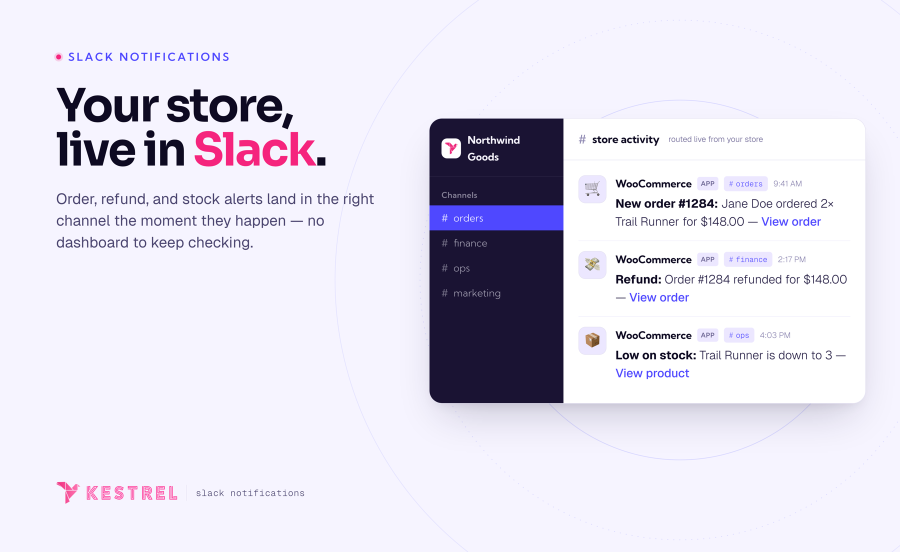
Con Slack de WooCommerce, tu tienda de WooCommerce será el centro de las conversaciones de tu canal de Slack, lo que te permitirá a ti y a tu equipo estar al tanto de lo que ocurre en tu tienda con el mínimo esfuerzo.
En este momento, puedes activar siete eventos de notificación diferentes. Puedes definir emojis y un canal específico para cada notificación, además de personalizar el texto como más te guste.
Algunos tipos de notificaciones también incluyen «notificaciones ampliadas», que permiten enviar de manera opcional información detallada de los pedidos o el contenido de las reseñas, lo que evita tener que abrir el panel de administración para consultar los últimos pedidos.

También puedes personalizar cada mensaje de notificación a tu gusto. Aquí puedes ver un ejemplo de personalización de la notificación Nueva reseña y su apariencia en Slack:


Para consultar más información sobre Slack de WooCommerce, consulta la documentación disponible o abre una solicitud de soporte con tus preguntas sobre preventa.
Creado por 
Ten event types: new order, order status update, subscription renewal, refund, back order, low stock, out of stock, new review, new customer, and newly published post. Each one is an independent switch and can be routed to its own Slack channel.
Yes. Every event has its own channel selector, and you can choose more than one channel per event. Send orders to #sales, stock alerts to #ops, and refunds to #finance — or fan a single event out to several channels at once. Anything you leave unset uses your default channel.
Yes. Each event has a message template built from tokens like {order_number} and {order_total}, plus Slack markup for clickable links. Turn on extended notifications to add rich attachments with line items, product thumbnails, and timestamps. Developers can customize further through the extension's filters.
Yes. When a subscriptions extension is active, renewal orders trigger their own Slack notification, so recurring revenue shows up alongside new orders. WooCommerce Subscriptions, Constellation by Kestrel, and YITH WooCommerce Subscription are all supported.
Orders created through standard WooCommerce order hooks — including POS plugins that use them — will trigger notifications. Some POS tools create orders through non-standard flows; if yours is one of them, the order-status event is a reliable fallback for catching those orders.
Yes. WooCommerce Slack declares compatibility with High-Performance Order Storage (custom order tables) and the Cart and Checkout blocks, so it fits both classic and modern WooCommerce stores.
Yes, it’s extensible and translation-ready, so developers can tailor it further if needed.
Not currently. WooCommerce Slack sends notifications one way — from your store into Slack — to keep your team informed at a glance. Managing orders still happens in WooCommerce. If you would like to see more management features crossing to your store from Slack, please contact our team and we'll be happy to help!
Información de la extensión
Comprobaciones de calidad
Compatibilidad
Países







