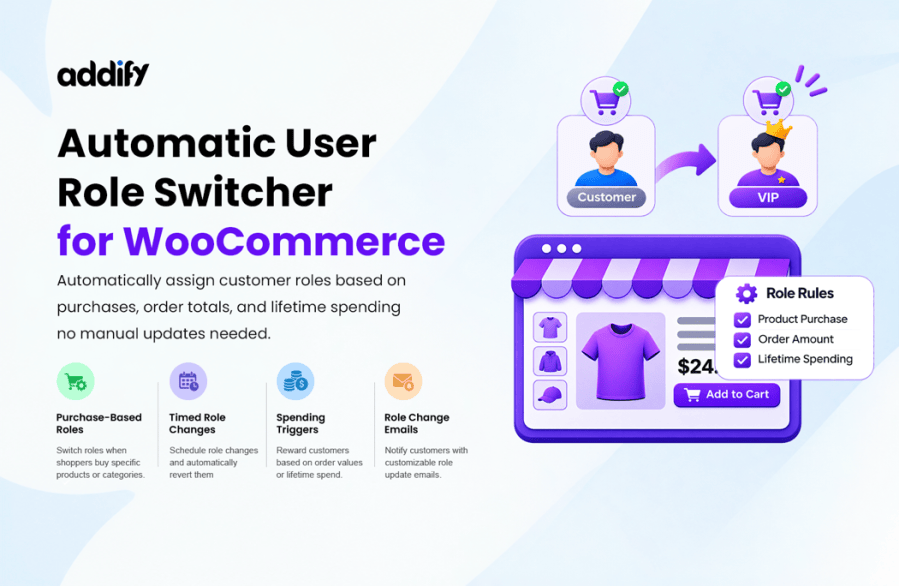
Highlights
- Automatically assign or switch user roles
- Create rules based on purchases, orders, and spending
- Set role duration with automatic reversion
- Send role-change emails and display role history
- See complete feature List
WooCommerce Automatic User Role Switcher enables you to automatically switch user roles based on various conditions like a specific product purchase, the total order amount, the customer’s total lifetime amount spent, and more.
Managing users across different roles enable merchants to offer different pricing, promotions, products, and personalized choices to improve the user experience and conversion rate. However, managing users across different roles manually is time-consuming. Our extension can help in automatically switching user roles based on various conditions.
| Use Cases of Automatic User Role Switcher |
 Loyalty & Spend Tiers |
Automatically upgrade customers to higher loyalty tiers once their lifetime spending or order count reaches a set threshold, unlocking exclusive discounts and perks. |
 Wholesale Accounts |
Transition retail buyers into wholesale roles when they place large bulk orders, meet minimum order subtotals, or register using an approved company email domain. |
 VIP Memberships |
Reward repeat shoppers with VIP status based on monthly spending or frequent orders, giving them early access to new releases and special member-only pricing. |
 Product-Based Switching |
Grant specialized roles immediately when customers buy specific products, categories, tags, or brands, ideal for unlocking courses, digital content, or gated catalogs. |
 Temporary & Timed Roles |
Assign time-limited roles for seasonal promotions, trial memberships, or limited-time passes, with automatic reversion back to the user’s previous role after a set number of days. |
Automatic User Role Switching
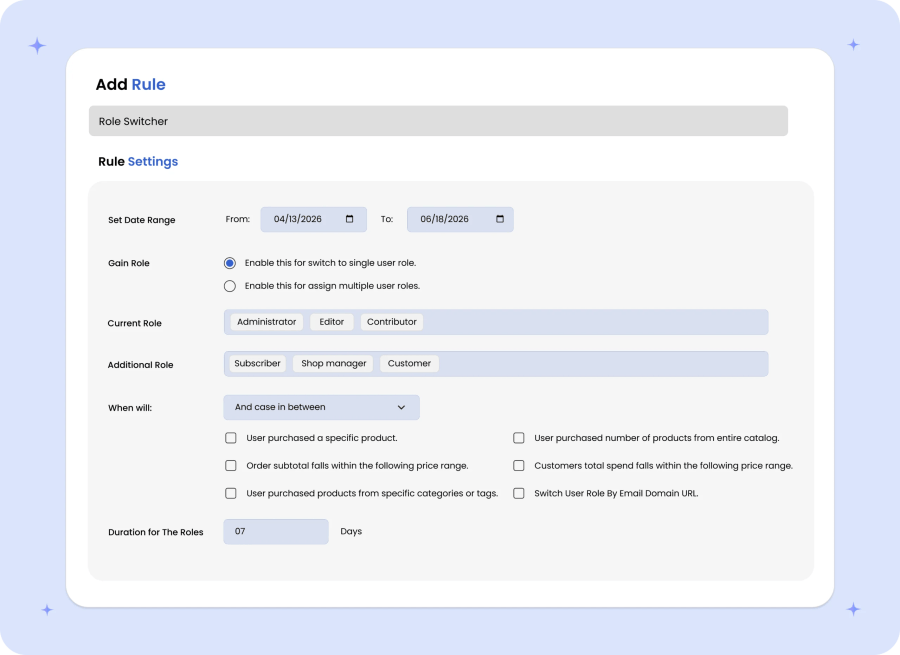
You can create multiple rules to automatically assign new user roles or replace existing roles based on different conditions. When creating a new rule, you can customize the following options:
- Choose whether to assign a new user role or replace existing user roles.
- Select the current user role(s) to replace.
- Specify the new user role.
- Exclude specific user roles from the rule.
- Choose whether all conditions or any one condition must be met.
- Set the starting and ending dates for the rule.
- Enter the number of days the new role should remain active. Leave this field empty to assign the role permanently.
Role Switching Conditions
You can automatically assign or switch customer roles based on the following conditions:
- Purchasing from Selected Products
You can select specific products and assign a new user role when a customer purchases any of those products.
- Number of Purchased Products
Set a required number of purchased products from the entire catalog to trigger the user role switch.
- Current Order Amount
Specify a minimum and maximum order subtotal to switch user roles when the order amount falls within the defined range.
- Customer’s Lifetime Spending
Automatically switch user roles based on the total amount a customer has spent on your website.
- Purchases from Specific Categories or Tags
Switch user roles when a customer purchases any product from the selected categories or tags.
- Customer’s Email Domain
Automatically assign or switch user roles based on the domain of a customer’s email address. For example, customers using email addresses from abc.com or xyz.com can receive a specific user role.
- Total Number of Orders
Switch user roles when a customer reaches a specified minimum number of orders on your store.
- Amount Spent Last Month
Automatically switch user roles when a customer’s spending during the previous month exceeds the specified amount.
- Purchases from Specific Brands
Assign or switch user roles when a customer purchases products from selected brands.
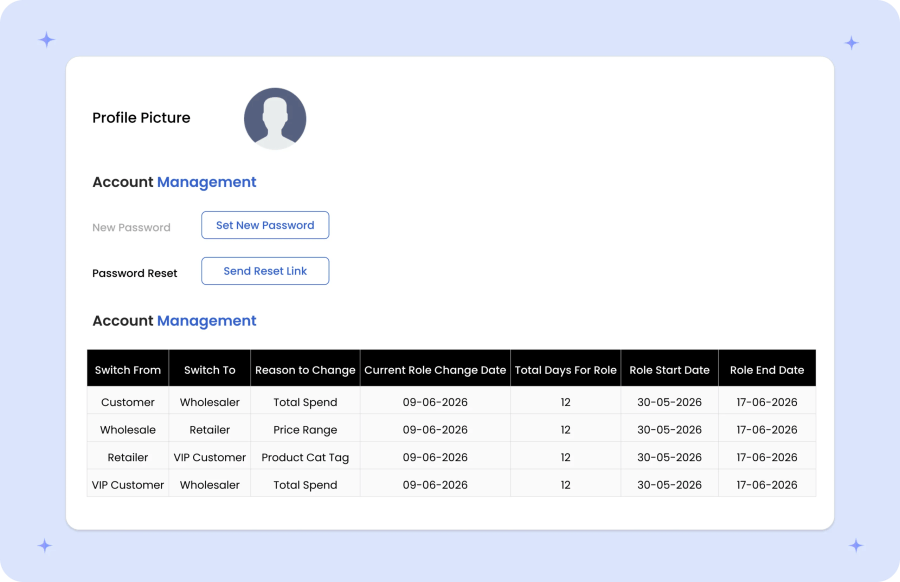
History of User Role Switching
The extension maintains a history of user role changes along with the reason for each change, such as product purchases, category or tag purchases, order amount, and customer lifetime spending. Enable the Role Change History option to let customers view their complete role change history on the My Account page.
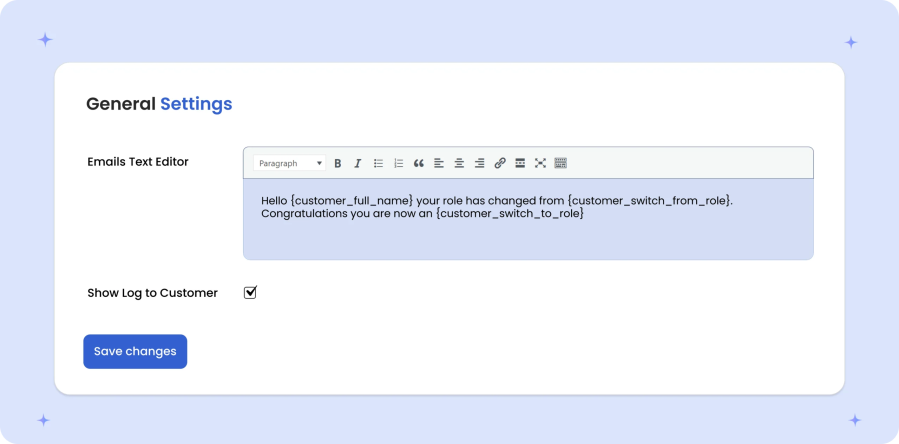
Email Notifications
You can customize the email notifications sent to customers when their user roles change. Use the available variables to personalize the email content with the customer’s name, previous role, new role, and currently assigned roles.
More Features
- Automatically switch or assign user roles based on different conditions.
- Create multiple rules to manage automatic user role switching.
- Set starting and ending dates for role-switching rules.
- Revert user roles after a specified number of days.
- Send customizable email notifications to customers about role changes.
- Add new user roles or replace existing user roles.
- Exclude specific user roles from switching rules.
- Match all or any conditions to trigger role changes.
- Display role change history on the My Account page.
- Switch or assign user roles based on:
- Purchase of specific products.
- Number of products purchased from the entire catalog.
- Order subtotal within a specified amount range.
- Customer’s total lifetime spending.
- Products purchased from specific categories or tags.
- Customer’s email domain.
- Total number of customer orders.
- Amount spent during the previous month.
- Purchases from specific brands.