Product Icon

Custom Product Tag Image for WooCommerce

Add images to product tags and display them on product and listing pages to provide a more visually informative shopping experience.
Choisissez une option de facturation
$29
Save 20%
$58 $46.40

L’abonnement comprend

  • Mises à jour et améliorations du produit
  • Assistance client
  • Remboursement garanti sous 30 jours

Highlights

  • Add visually appealing tag images to enhance customer experience
  • Convey key product information, such as brand, size, or features, using recognizable images
  • Improve navigation by helping customers identify products faster through visual cues
  • Boost engagement and conversions with attractive, professional-looking product displays
  • Simplify product discovery by associating specific tags with clear, intuitive visuals

When making purchase decisions, customers often bypass lengthy product descriptions in favor of quick details. Product tags play a crucial role in conveying key product characteristics — such as material, purpose, style, size, brand, and more.

The Custom Product Tag Image for Woocommerce extension allows merchants to incorporate images into product tags. These images can be added to both existing and new product tags and displayed on product and listing pages.

Using engaging tag images in place of extensive paragraphs can significantly impact customers. For instance, if you offer a money-back guarantee on your products, including a corresponding tag image alongside mentioning it in the content can increase visibility. Visual information is processed more easily than written content, making tag images a powerful tool for conveying important product information to customers.

Features

  • Customize images on existing or new tags of your products
  • Turn the visibility of tags on and off for product and listing pages
  • Choose from six different tag image display positions on the product and listing page:
    • After the product description
    • Before the product description
    • After the product price
    • Before the product price
    • After the add-to-cart button
    • Before the add-to-cart button
  • Show tags in multiple display formats:
    • Text
    • Icon
    • Both (text and icon)
  • Add shapes to your tag images:
    • Square
    • Round
  • Select the font size and family customize product tags
  • Display all tags anywhere by pasting the shortcode: [ka_tag_display]

Uses by industry

This product tag image extension is versatile enough to be used for various industries. Here are some of the common uses:
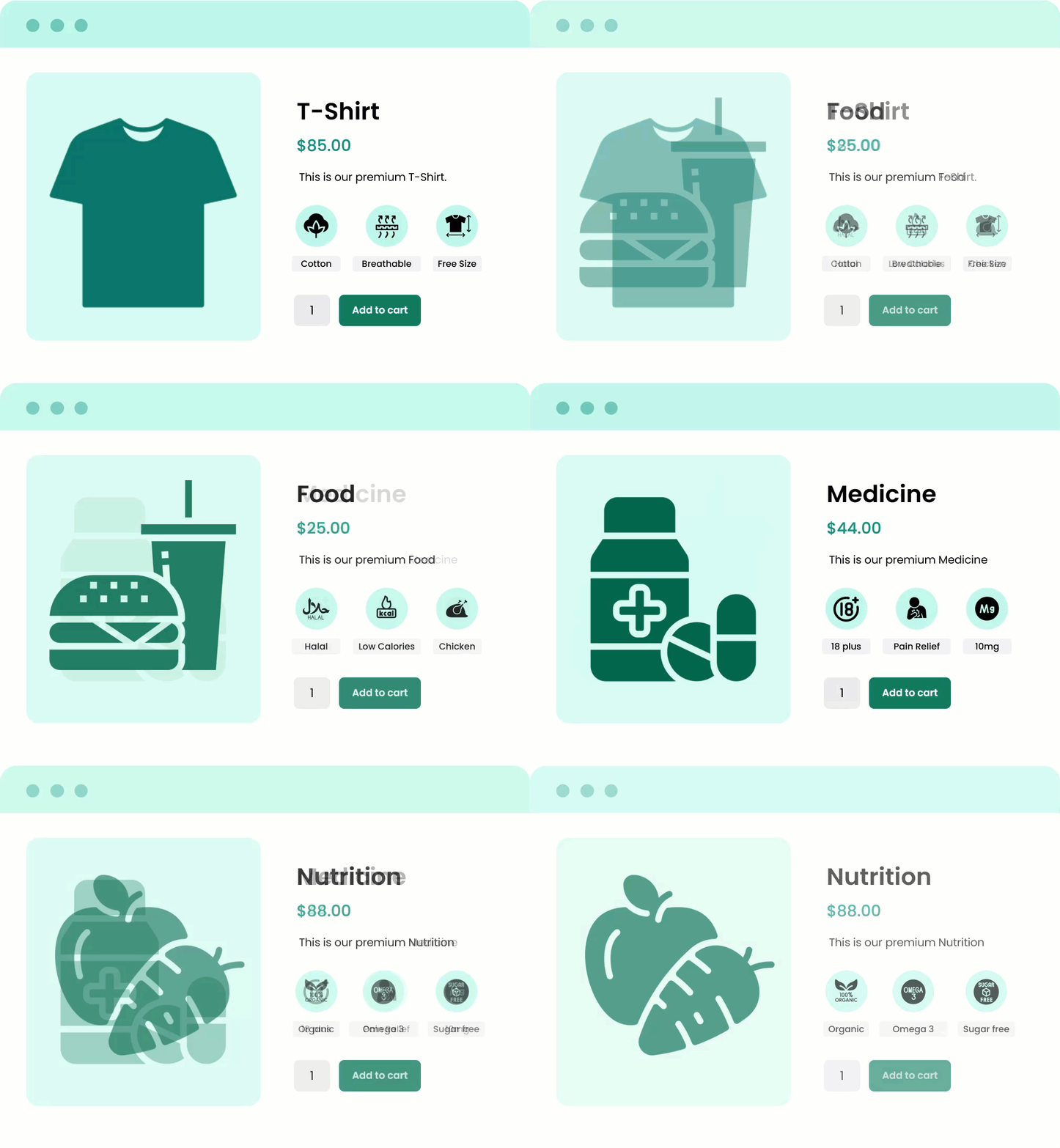
  • Fashion stores commonly tag such as best sellers, on sale, new arrivals,100% cotton, free size, and custom design.
  • Food stores often use tags such as certified halal, beef, chicken, low calories, spice levels, sauces, veggies, or any other key detail.
  • Medicinal products often use tags such as prescription required, mg dosage, 18+, pain relief, and other medical formulas.
  • Nutritional products commonly use tags like 100% organic, high protein, sugar-free, whole grain, low carb, rich in Omega-3, and more.

Display custom tag images on product and listing pages

Elevate your product and listing pages’ look by adding custom product tag images. This highly customizable extension enables merchants to tailor the look and feel of the tag section in whichever way they see fit. From font to icon shape, every option is customizable in this extension.

custom product tag image for woocommerce

Make your products stand out — add custom product tag images today.

Buy now

Multiple placement options to choose from

Choose between multiple placement options on product and listing pages to find the best position to display product tag images. For example, users can choose to place tag images before or after the product description, before or after the product price, and many more. These options help customers make an informed decision, as the product’s key information will be displayed in the most relevant places.

Display tags as text, an icon, or both

Using this extension, merchants can decide to display product tag images as text, icons, or a combination of both. For example, if the admin wants to convey a quick message, adding bold text like “best-seller” can fulfill the need. Alternatively, if the goal is to provide information like “limited-time offer,” then using a clock icon along with the text can persuade customers to act quickly before the deal expires.

Customize the look and feel of tags

The Custom Product Tag Image extension for WooCommerce allows users to customize product tags with images, text, and shapes. After adding an image, you can customize the title text, color and shape for the particular product tag.

For example, if you want to create a fear of missing out (FOMO) situation for customers about a sale, you can highlight the sale title with red color, increase its font, and change its shape (round, square, etc.) to attract attention. In this way, you can customize the look of product image tags freely and quickly.

c

Documentation

For more information on how to add tag images and how to customize their layout and display, review the documentation.

PHP version requirement

The minimum PHP version required to run this extension is 7.4.


Avis Clients

Moyenne des notes 5.0
10 avis
5 étoiles, 100 % des avis
4 étoiles, 0 % des avis
3 étoiles, 0 % des avis
2 étoiles, 0 % des avis
1 étoile, 0 % des avis
10 avis
  • insign
    Noté 5 sur 5
    Assistance
    Mai 28, 2025
    Assistance
    Outstanding assistance from the support team.
    • KoalaApps
      Mai 29, 2025
      Thank you for your kind feedback. We're delighted to hear you had a pleasant experience. It's always our pleasure to assist you. — Team Koala
  • biosupplies
    Noté 5 sur 5
    Fonctionnalité
    Nov 14, 2024
    Fonctionnalité
  • Culm Valley Kitchen
    Noté 5 sur 5
    Assistance
    Sep 26, 2024
    Assistance
    My website is brochure style and needed image tags to show in the product info but also I am using Divi. At first it didn't seem to work but when I reached out to Koala support they told me it was because I didn't have the item prices showing. I didn't want my products to have prices so the support logged in to the backend of my website and amended the code. It all works perfectly now! Great support, thank you!
  • designstackuk
    Noté 5 sur 5
    Fonctionnalité
    Août 27, 2024
    Fonctionnalité
    Great plugin, amazing support. This is a really great plugin for conversion optimisation.
  • drlellouchecom
    Noté 5 sur 5
    Mar 5, 2024
    Very good plugin and support as well!!
    I contacted the support team and they replied almost instantly. Very good support! I will recommend it for sure :)

Extension information

  • Version de WordPress requise: 4.6
  • Version de WooCommerce requise: 3.1.0
  • PHP version required: 7.4
  • Tested with WooCommerce: 10.*.*
  • Requires at least WooCommerce: 4.0.0

Pays

  • Mondial

Langues

English (United States)

Related Products

Prix $79 par an
Noté 3.4 sur 5 étoiles
Prix $59 par an
Noté 3.1 sur 5 étoiles
Prix $279 par an
Noté 3.2 sur 5 étoiles
Prix $49 par an
Noté 4.1 sur 5 étoiles
Prix $109 par an
Noté 2.8 sur 5 étoiles
Prix $109 par an
Noté 2 sur 5 étoiles
Prix $109 par an
Noté 2.3 sur 5 étoiles
Prix $59 par an
Noté 4.1 sur 5 étoiles
Prix $109 par an
Noté 2.6 sur 5 étoiles
Utilisation de vos données personnelles
Nous et nos partenaires traitons vos données personnelles (telles que les données de navigation, adresses IP, informations sur les cookies et autres identifiants uniques) sur la base de votre consentement et/ou de notre intérêt légitime afin d’optimiser notre site web, nos activités marketing et votre expérience utilisateur.




