
Icône du produit

Product Expiration and Batch Inventory pour WooCommerce

Track inventory by batches, manage expiry dates, automate stock synchronization, receive expiry notifications, and control product stock from a centralized dashboard for complete inventory control.
Choisissez une option de facturation
$39
Économisez 20 %
$78 $62.40

L’abonnement comprend

  • Mises à jour et améliorations du produit
  • Assistance client
  • Remboursement garanti sous 30 jours

Advanced Batch Tracking & Expiry Management for WooCommerce

Manage product batches, track expiry dates, and automate inventory workflows from a single centralized dashboard. Keep WooCommerce stock synchronized with batch quantities, receive automated expiry alerts, and gain complete visibility into your inventory across products and variations.

• Manage product and variation batches from one centralized interface.
• Track batch quantities, expiry dates, vendor information, and stock status.
• Automatically synchronize WooCommerce stock with active batch quantities.
• Search, filter, edit, and manage batches quickly using advanced inventory controls.
• Receive automated expiry notifications for administrators and vendors.
• Automatically organize expiring inventory into selected product categories.
• Import and export batch data using CSV for fast inventory management.

How It Works

Batch Inventory Manager works in three simple steps — create batches, manage inventory, and automate expiry control.

  1. Create & Manage Product Batches
    Add batches for products and variations directly from the Batch Manager dashboard. Store batch-specific information such as quantity, expiry date, vendor details, and inventory data in a centralized location without managing products individually
  2. Automatic Stock Synchronization
    When batch stock management is enabled, WooCommerce stock levels are automatically calculated from active batch quantities. As inventory changes, stock remains synchronized without manual updates, helping prevent stock discrepancies and overselling.
  3. Automated Expiry Monitoring
    The plugin continuously monitors batch expiry dates and automatically performs configured actions. Receive expiry notifications, exclude near-expiry batches from orders, notify vendors, and automatically assign products to clearance or expiring-soon categories when required.

Features

  1. Centralized Batch Management
    Manage all product and variation batches from a single dashboard. Add, edit, delete, and review inventory data without navigating multiple product pages.
  2. Batch-Based Stock Control
    Use batch quantities as the source of truth for inventory. WooCommerce stock updates automatically based on active batch quantities, ensuring accurate inventory levels at all times.
  3. Expiry Date Tracking
    Monitor expiry dates for every batch and maintain complete visibility over expiring inventory. Easily identify products that require action before they expire.
  4. Advanced Search & Filtering
    Quickly locate batches using filters for products, categories, product types, dates, batch status, and other inventory criteria.
  5. Inventory Dashboard & Analytics
    View key inventory metrics including total batches, available batches, expired batches, stock distribution by vendor, and high- or low-stock inventory insights.
  6. Automatic Expiry Alerts
    Send automated email notifications to administrators when batches are approaching expiry, helping reduce waste and improve inventory planning.
  7. Vendor Expiry Notifications
    Automatically notify assigned vendors when batches expire, streamlining returns, replacements, and inventory coordination processes.
  8. Near-Expiry Batch Protection
    Prevent batches that are approaching expiry from being allocated to new orders by defining a configurable expiry threshold.
  9. Automatic Inventory Cleanup
    Automatically remove fully sold and expired batches after a defined period, helping keep inventory records organized and efficient.
  10. Expiring Product Category Assignment
    Automatically add products with soon-to-expire batches to a selected category such as Clearance, Expiring Soon, or Promotional Stock.
  11. Frontend Expiry Date Display
    Display product expiry information on single product pages with customizable date formats and custom messaging.
  12. CSV Import & Export
    Import batch inventory from CSV files or export existing inventory data for reporting, migration, and bulk management purposes.

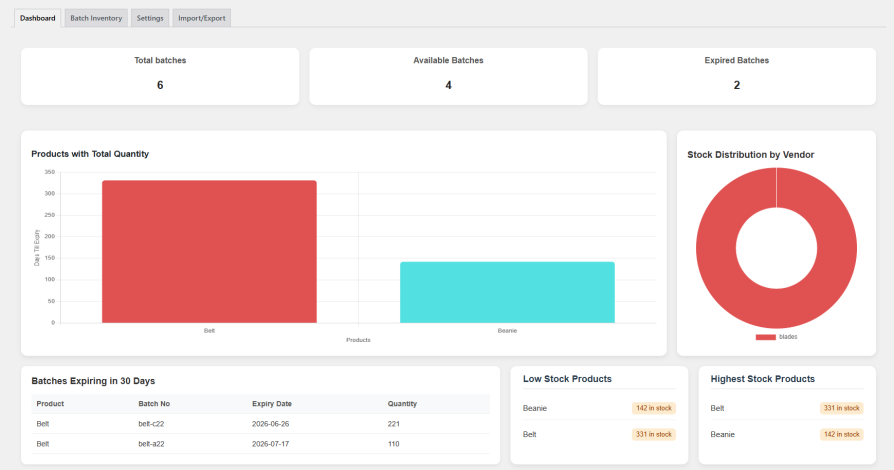
Inventory Dashboard

Get a complete overview of your batch inventory from a single dashboard. Instantly view total batches, available stock, expired batches, vendor stock distribution, and high or low inventory levels. Monitor inventory health at a glance and make faster stock management decisions.
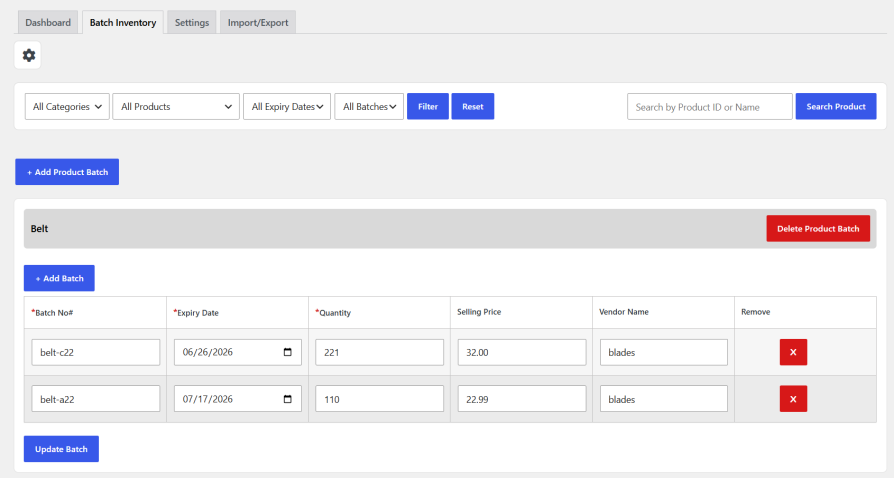
Batch Inventory Management

Manage all product and variation batches from a centralized inventory table. Easily add new batches, update quantities, track expiry dates, edit batch information, and remove inventory records when needed. Advanced filtering, search tools, and customizable columns help you quickly locate and manage batches across your entire store.
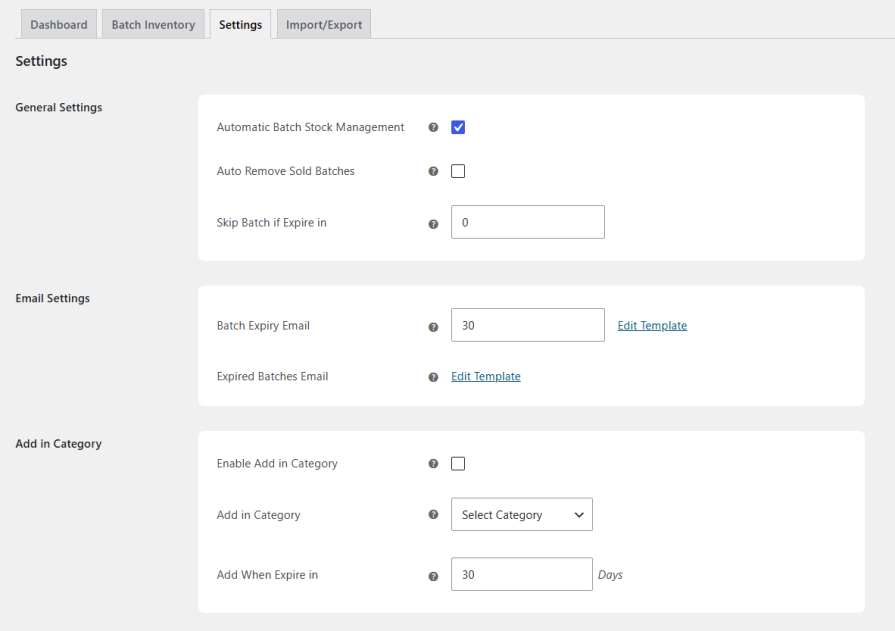
Settings & Automation

Configure how batch inventory is managed throughout your store using flexible automation settings. Control stock synchronization, expiry handling, automated cleanup of sold batches, email notifications, category assignment for expiring products, and frontend expiry date display. These settings help automate inventory workflows, improve stock accuracy, and reduce manual management.
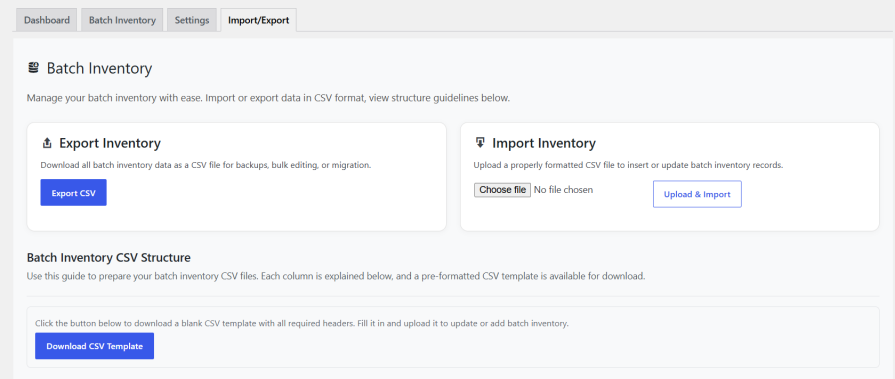
Import & Export

Easily import and export batch inventory data using CSV files. Export existing batch records for reporting, backups, or bulk editing, then import updated data back into the system in just a few clicks. This makes it simple to manage large inventories, migrate data, and perform bulk inventory updates efficiently
Front-End Expiry Display

Display batch expiry information directly on the single product page to keep customers informed before purchase. When enabled, the expiry date is shown using your preferred date format along with an optional custom message. This helps improve transparency, build customer confidence, and provide important product freshness information.


Foire aux questions

Can I manage batches for simple and variable products?

Yes. You can easily manage batches for both simple and variable products. Each product and variation can have its own batch with quantity, expiry date, and full inventory control.

Will my stock update automatically from batches?

Absolutely. Stock is calculated directly from active batches, so your inventory always stays accurate without manual updates or errors.

Can I prevent selling near-expiry products?

You can set rules to restrict near-expiry batches from new orders, ensuring only fresh and valid stock is sold.

Will I get alerts before batches expire?

Yes. You’ll receive automated expiry notifications before batches expire, so you can take action in time and reduce waste or loss.

Can I bulk manage or migrate my batch data easily?

Bulk management is fully supported through CSV import and export, making it easy to migrate, update, or back up batch data in minutes.

Avis Clients

Nous acceptons des avis pour ce produit et les afficherons dès que nous en aurons quelques-uns de plus.
Utilisation de vos données personnelles
Nous et nos partenaires traitons vos données personnelles (telles que les données de navigation, adresses IP, informations sur les cookies et autres identifiants uniques) sur la base de votre consentement et/ou de notre intérêt légitime afin d’optimiser notre site web, nos activités marketing et votre expérience utilisateur.




