

Installations actives
900+
L’abonnement comprend
Assistance
Les frais d’expédition de colis forfaitaires vous permettent de définir les coûts des colis vers différentes destinations. Les articles sont emballés dans des colis en fonction de leur taille et de leur volume. Les frais fixes que vous avez définis sont ensuite appliqués en fonction de la destination.
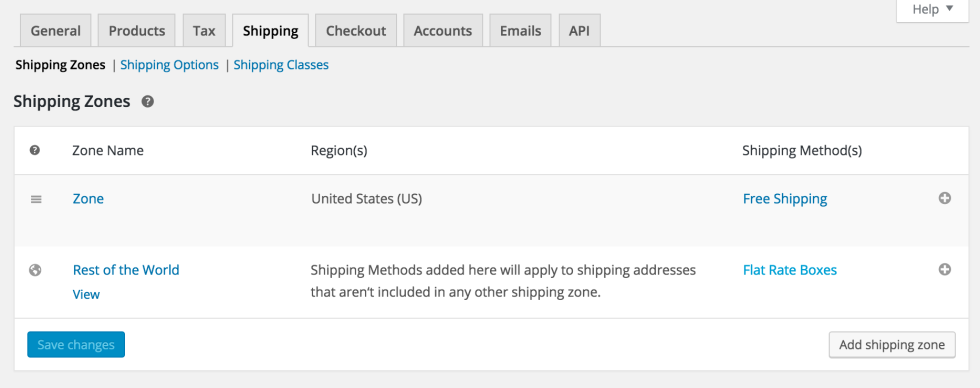
Lorsqu’un client valide sa commande avec des articles dans son panier, l’extension examine la destination des articles, la fait correspondre à une zone et applique ensuite les tarifs de cette zone pour le calcul. Pour chaque destination et tarif, il est possible d’appliquer des tailles de boîtes et plusieurs ensembles de tailles de boîtes distincts, en fonction de vos besoins en matière d’expédition. Les articles sont emballés dans des boîtes pour obtenir un tarif.
 |
DocumentationBesoin d’aide ? Consultez la documentation détaillée pour en savoir plus sur l’extension Flat Rate Box Shipping. Voir la documentation |
 |
Questions et assistanceSi vous avez des questions sur la prévente ou si vous avez besoin d’aide, contactez nos sympathiques Happiness Engineers. Obtenir de l’aide
|
Flat Rate Box Shipping for WooCommerce calculates rates by packing a customer's items into the boxes you define, then applying the fixed costs you set for that box and destination. When a shopper checks out, the extension reviews the destination, matches it to a shipping zone, and uses the box sizes and rates for that zone to work out the cost. This gives you box-based pricing instead of a single flat charge for the whole cart.
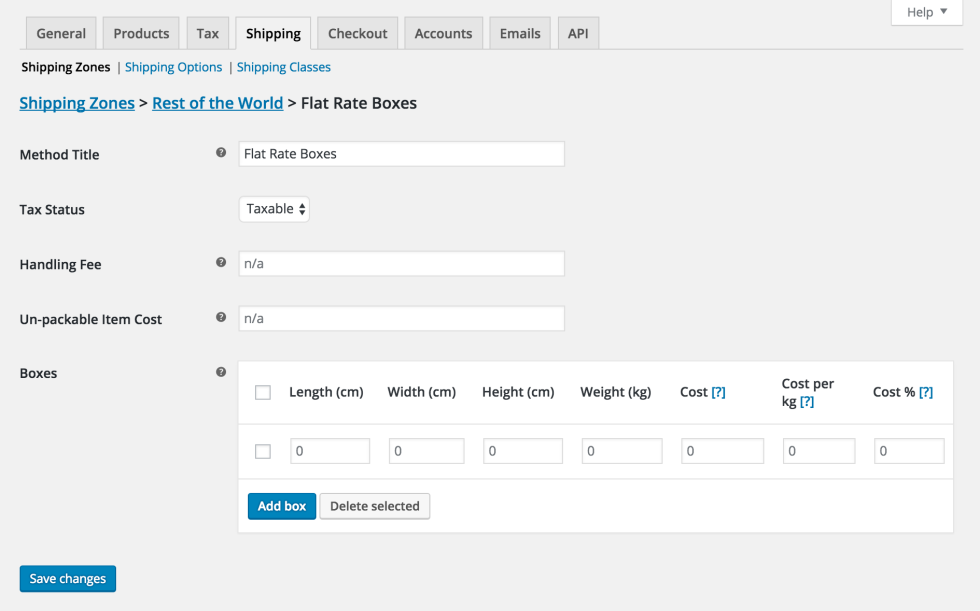
Box packing groups a customer's items into the boxes you configure, using each box's length, width, height, and weight limit. The packer is mainly volume based but also considers item sizes, so it looks for the most suitable box for the order. Because packing is volumetric, results are designed to be as accurate as possible rather than identical to a person physically packing a box.
Yes. Flat Rate Box Shipping lets you add multiple box sizes to each shipping zone, and each zone can have its own boxes and rates. This is useful if your packaging or pricing changes between regions, for example, charging different costs for domestic and international orders. You set the boxes and costs per zone, and the extension picks the most relevant box at checkout.
Each box supports three cost types that can be combined: a flat cost per box, a cost per weight unit that is multiplied by the box weight, and a percentage cost based on the value of the items packed inside. For example, you could charge a set amount per box plus a small percentage of the order value. You can also add a handling fee, as a fixed amount or a percentage, to the shipping method.
You can set an "un-packable item cost" that is charged when an item won't fit into any of your defined boxes. If you prefer, you can leave that cost blank so the shipping method is hidden when an item cannot be packed. This gives you control over how oversized or awkward items are handled at checkout.
Yes. Because Flat Rate Box Shipping packs items into boxes based on size, volume, and weight, your products need dimensions and weights configured for the packing to work correctly. Products without measurements can't be packed accurately, which affects the rates shoppers see. Setting accurate product dimensions is an important first step before configuring your boxes.
It can help. By pricing shipping around the boxes you actually use and the items packed inside them, Flat Rate Box Shipping gives you rates that reflect real packaging rather than a single flat fee for every order. Charging per box, per weight, and as a percentage of item value lets you align shipping prices more closely with your true costs, which can protect your margins on larger orders while keeping smaller orders reasonable.
Flat Rate Box Shipping is added as a shipping method inside a WooCommerce shipping zone. After adding it to a zone, you define your boxes with their dimensions, weight limits, and costs, and the extension handles the packing and rate calculation at checkout. You set up your shipping zones first, decide on the box sizes you offer, and make sure your products have dimensions set.
Flat Rate Box Shipping is a good fit for WooCommerce stores that ship physical products in a defined set of box sizes and want rates based on how those products pack together. It suits merchants who need box and weight-based pricing per destination, and who want to charge extra for oversized items. Stores that have accurate product dimensions in place will get the most reliable results.
If you want shipping rules based on factors like cart total, item count, or shipping class rather than box packing, another WooCommerce extension may suit you better. For flexible rules across location, price, weight, class, or item count, look at Table Rate Shipping. If your products don't have dimensions set or you don't ship in standardized boxes, box-based packing may not give you the accuracy you need.
Flat Rate Box Shipping prices are calculated around the boxes your items are packed into, using box cost, weight, and item value per destination. Table Rate Shipping takes a rules-based approach, letting you define rates based on location, price, weight, shipping class, or item count. Choose Flat Rate Box Shipping when your pricing follows your packaging and box sizes, and consider Table Rate Shipping when you need broader conditional rules that aren't tied to box packing.
Flat Rate Box Shipping is designed to calculate box-based shipping rates that customers see at checkout, not to create labels. If you need to print carrier labels for orders, WooCommerce Shipping handles label creation and fulfillment from your store dashboard. The two focus on different parts of the shipping process, so many stores use rate calculation and label printing tools alongside each other.
Yes. You can add as many boxes as you need within a zone, and the extension calculates the most relevant box for each order automatically. This is helpful if you use a range of package sizes, since the packer will select the box that best fits the items in the cart. You define the boxes once, and the calculation runs for every checkout in that zone.
The box packer is mainly volume-based and also considers item sizes, so it aims to find a suitable box for each order. It is designed to be as accurate as possible, but volume-based packing will never match a person physically arranging items in a box. Setting correct product dimensions helps keep results consistent, and small anomalies in packing can be expected.
Catégories
Informations sur l'extension
Vérifications qualité
Pays







