

L’abonnement comprend
Assistance
Fraud Shield for WooCommerce protects your store by blocking spam orders and fake user registrations. It validates user registration, billing, and shipping details, as well as technical fields such as IP address, device type, OS, domain, and subdomain.
Fraud Shield for WooCommerce is your smart defence against fake signups and spam orders. It uses intelligent validation across registration, billing, shipping, and technical fields (such as IP, OS, and device type) to block suspicious activity, keeping your store secure and clean.
Fraud Shield for WooCommerce is essential for safeguarding your store against the risks of fake sign-ups, spam orders, and fraudulent activities.
By validating user registration details, billing and shipping addresses, and technical parameters such as IP address, device type, operating system, and domain, it prevents suspicious transactions before they impact your business.
Adding Fraud Shield is not just about security — it’s about building trust, maintaining smooth operations, and focusing on growing your business without worrying about threats.
Add an extra layer of fraud protection to your store with AI-powered order risk analysis. The AI Detection module uses LLM-based intelligence to review checkout data and detect potentially fraudulent orders before they affect your business.
Instead of relying only on fixed fraud rules, AI Detection helps identify suspicious patterns based on customer, billing, shipping, and order details.
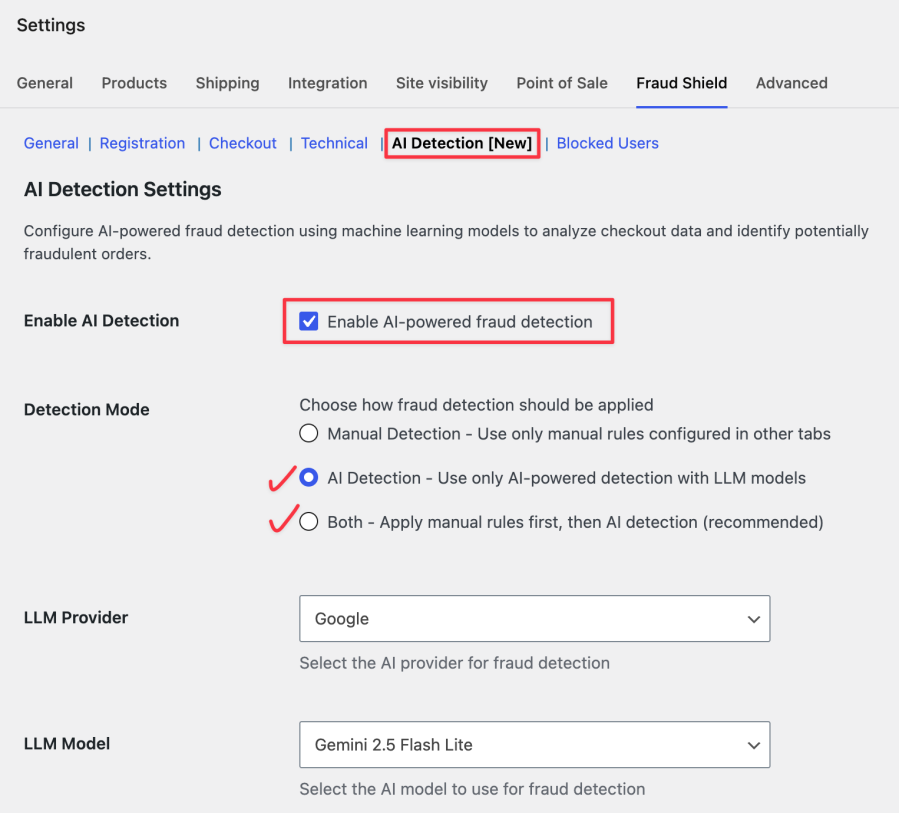
Choose how fraud checks should work for your store:
Manual Detection
Use only the fraud rules configured in the plugin.
AI Detection
Use only AI-powered detection to analyze checkout data.
Both
Apply manual rules first, then run AI Detection for deeper fraud analysis. This is the recommended option for better protection.
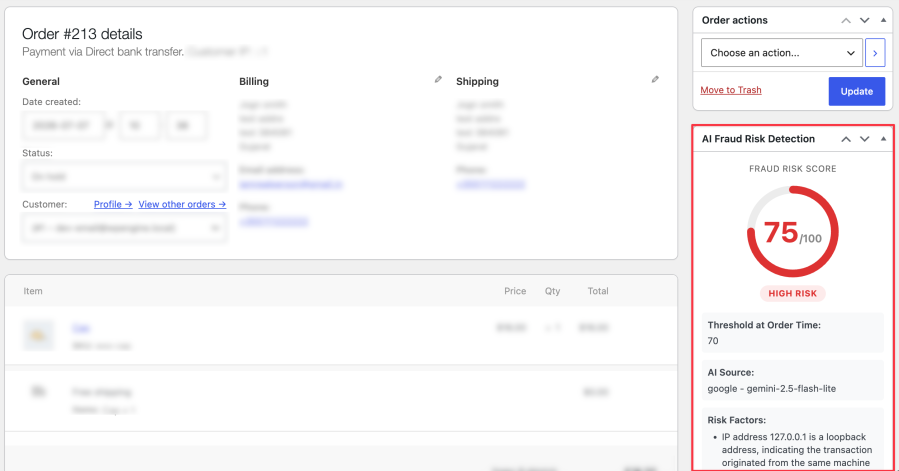
Set an AI Threshold Value from 0 to 100. Orders with an AI fraud score equal to or higher than your selected threshold will be blocked.
For example, if the threshold is set to 70, any order with an AI score of 70 or above will be treated as high risk.
You should add Fraud Shield as soon as you notice or want to prevent suspicious activity in your store. This includes:
Installing Fraud Shield early helps you stay ahead of threats, avoid revenue loss, and protect your store’s reputation before problems escalate.
Fraud Shield for WooCommerce offers four main types of validation rules to protect your store from spam, fake accounts, and fraudulent orders:
Registration Rules:Safeguard your store from fake or spam user signups by validating critical fields during the registration process.Available settings include username validation to block generic or numeric-only usernames, email username validation to block emails with suspicious local parts, and email domain validation to restrict sign-ups from known spam, disposable, or fake email domains.

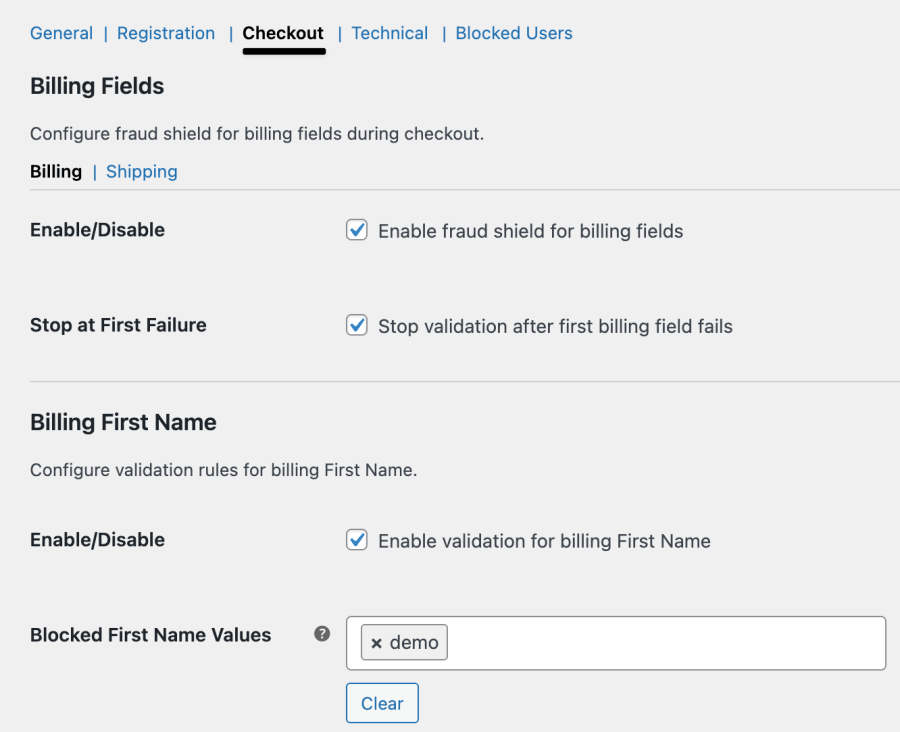
Checkout Billing Address Rules:
Validate billing details during checkout to prevent fake orders and suspicious transactions. These rules identify incomplete, invalid, or mismatched billing data, stopping fraud before it reaches payment processing.
Available settings cover validation for billing details, including name, address, city, state, country, postal code, email, phone number, and company. This helps block fake, invalid, or disposable information to maintain data accuracy and prevent fraudulent or low-quality orders.
Checkout Shipping Address Rules:
Ensure shipping details are accurate and legitimate. By blocking fake or bot-generated addresses, these rules reduce delivery issues, save fulfilment costs, and maintain a smooth order experience for genuine customers.
Available settings cover validation for shipping details, including first and last names, address, city, state, country, postal code, phone number, and company. This ensures the blocking of fake, invalid, or suspicious entries to maintain accurate and trustworthy order information.
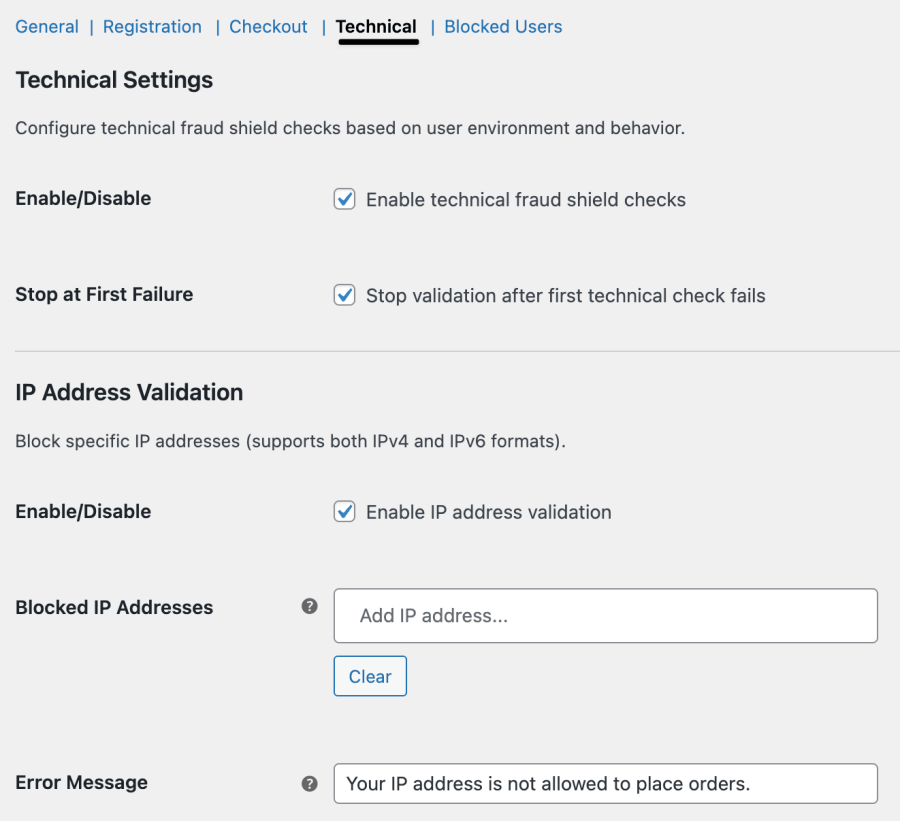
Technical Rules:
Go beyond basic form validation with system-level checks. Technical rules verify IP addresses, browsers, device types, and other metadata to detect patterns linked to fraudulent behavior. This adds a powerful, invisible layer of protection that works in real time.
Available settings include validation for IP address, device, browser, operating system, email domain, user role, and user ID, allowing you to block traffic from suspicious sources, outdated systems, disposable email domains, restricted user roles, or known spam accounts.
With these four layers of configurable rules, Fraud Shield provides precise, proactive control over fraud prevention, helping you block bad actors without disrupting genuine customers.
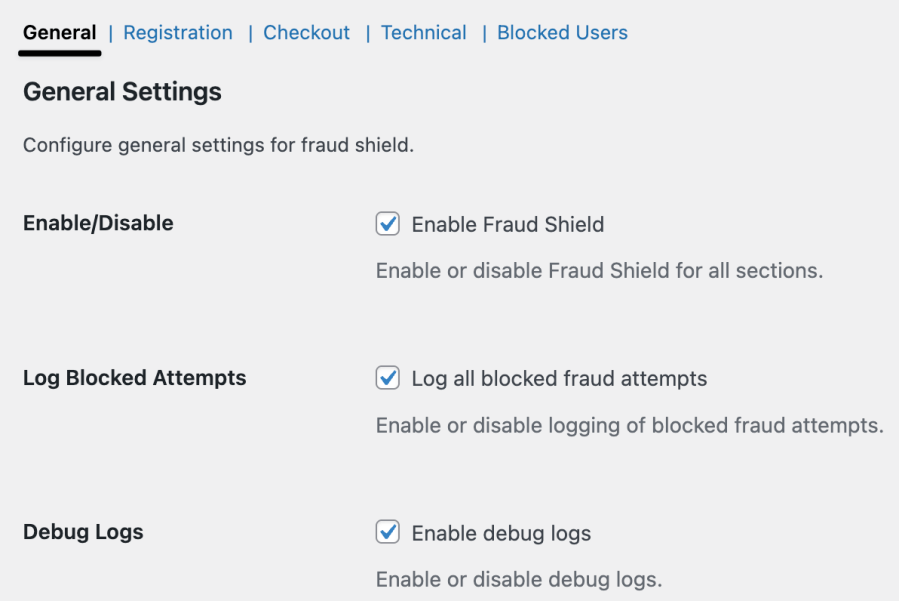
The General Settings section allows store owners to manage the core functionality of the Fraud Shield for WooCommerce extension.
It provides global controls to enable or disable the extension, configure how fraud detection rules behave, and manage logging for security insights and debugging.
These settings help ensure that validation rules are applied efficiently while offering visibility into all blocked attempts.
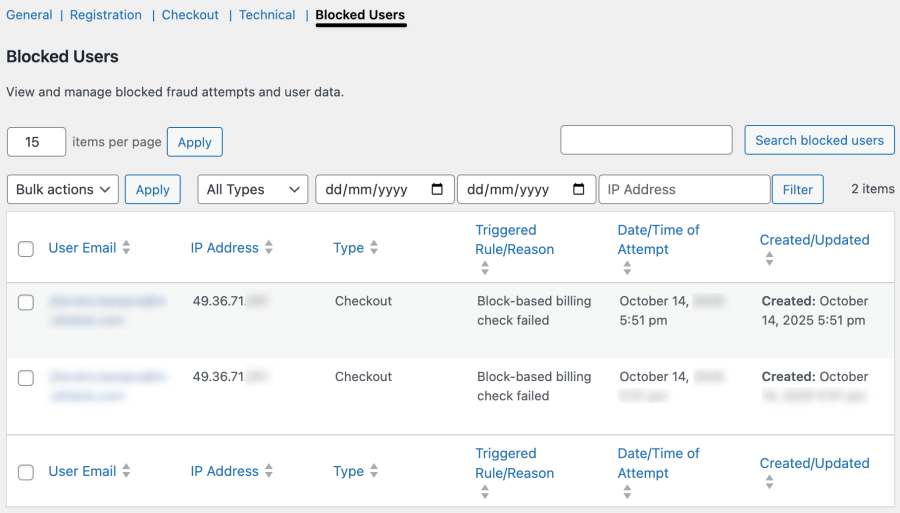
The « Blocked User » section of this extension offers a comprehensive dashboard that lists all users who were blocked due to failing fraud detection rules during registration or checkout.
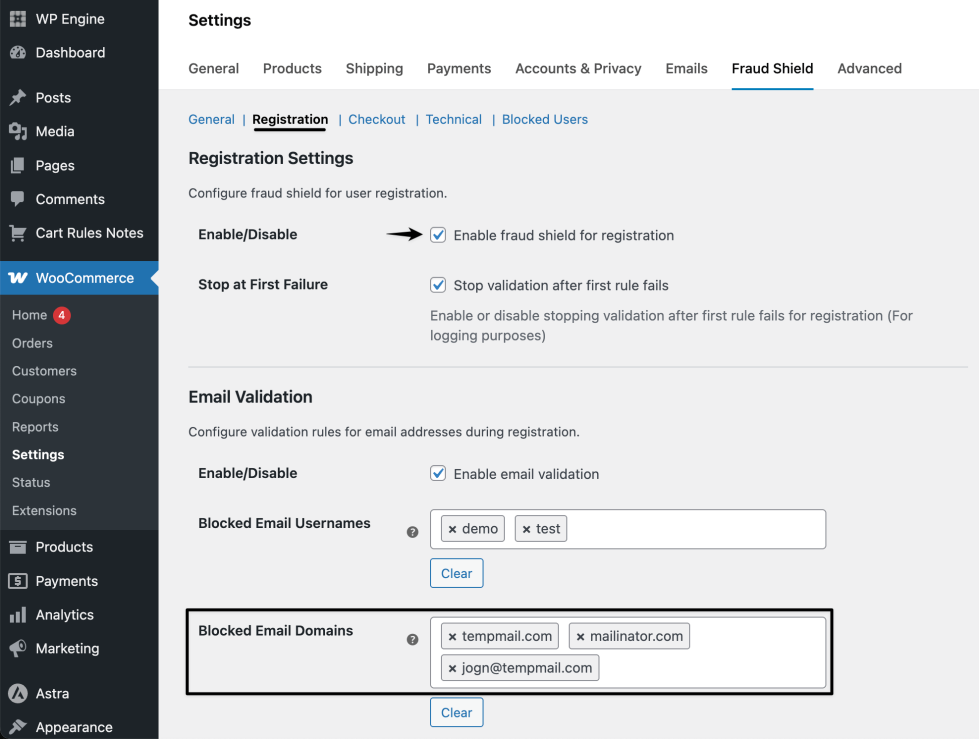
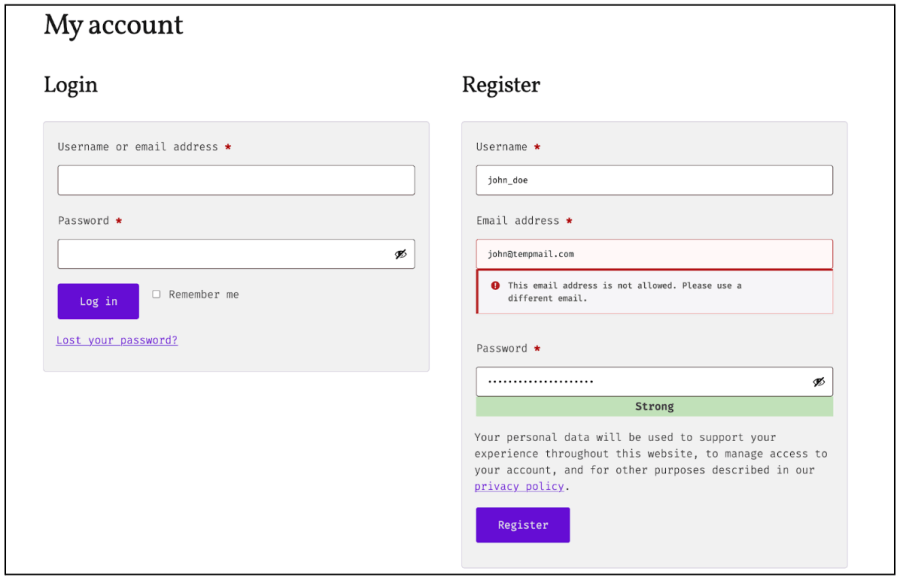
Scenario: You want to prevent fake account creation using disposable emails and suspicious addresses, commonly used for testing or fraudulent purposes.
Steps to create the validation rule:
Configure to protect your WooCommerce store by blocking fraudulent orders automatically. Use smart filters like user email, name, and other identifiers to stop scammers before checkout.
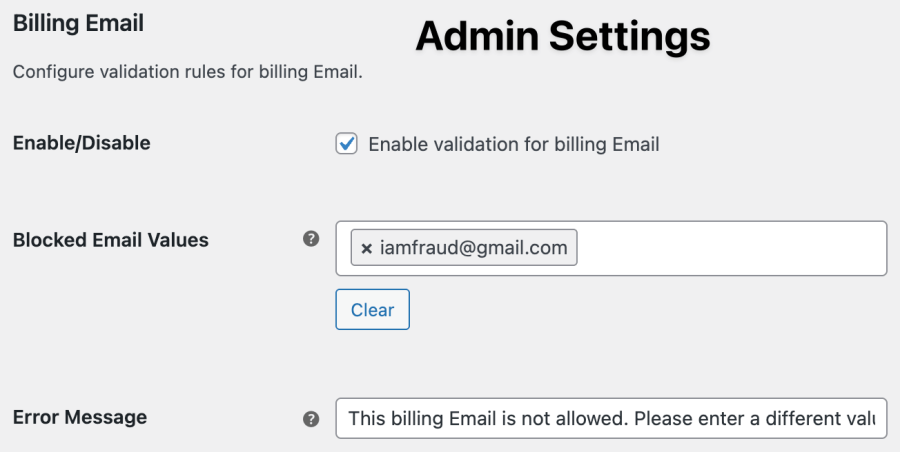
Admin Setting Screen
Checkout Page Screen
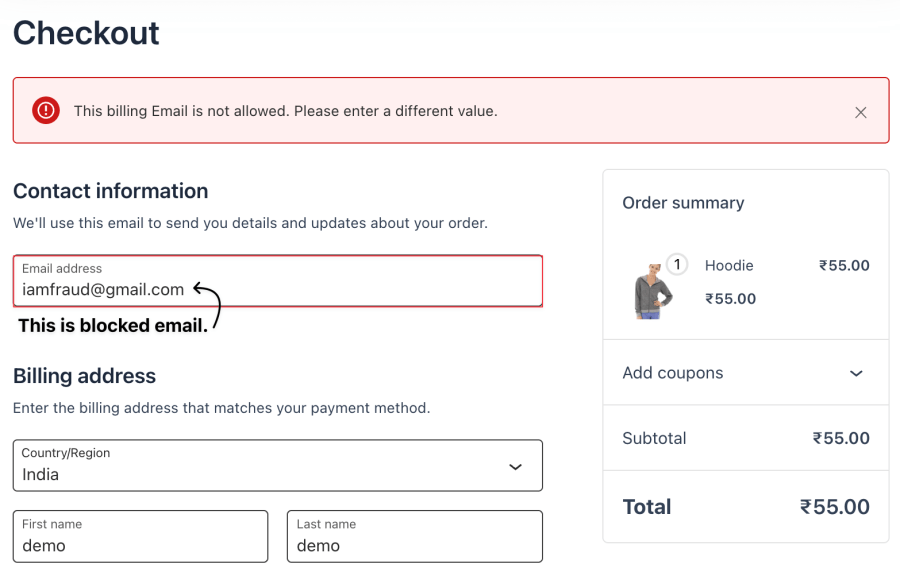
Fraud Shield works by validating user registration, order billing and shipping details, and technical data like IP, device type, and operating system. If any input matches a blocked value, the extension prevents the action and shows a customizable error message.
Yes, you can define rules to block specific emails’ usernames, email patterns (like fake email domains), or suspicious usernames. This helps reduce fake signups and spam accounts.
Absolutely. You can block specific shipping countries, states, cities, zip codes, or even company names to prevent orders from known fraud-prone regions.
When a user tries to register or place an order with blocked values, the extension logs the attempt in the "Blocked Users" log. This includes IP address, browser, and form data for admin review.
Yes. There’s a global setting called “Stop validation after first rule fails” which, when enabled, improves performance and user feedback by halting further validation once a match is found.
Yes. You can enable debug logs to monitor all validation attempts (successful or failed), helping you analyse patterns and improve rule accuracy.
Review blocked logs monthly; update high-risk country lists quarterly.
AI Detection is a fraud protection feature that uses an AI model to analyze checkout data and identify potentially fraudulent orders.
Yes. You need to add an API key from your selected LLM provider to use AI Detection.
The recommended option is Both. It applies manual fraud rules first and then uses AI Detection for deeper analysis.
Yes. After adding your API key, click Test API to confirm that the connection is working.
Informations sur l'extension
Vérifications qualité
Pays







