

Icône du produit

Quote Request pour WooCommerce

Quote Request for WooCommerce gives the ability for your users to request a quote for which you can follow up within the WooCommerce site.
Choisissez une option de facturation
$49
Économisez 20 %
$98 $78.40

L’abonnement comprend

  • Mises à jour et améliorations du produit
  • Assistance client
  • Remboursement garanti sous 30 jours

Quote Request for WooCommerce adds a way for your users to request a quote for which you can provide one after which your users can make the purchase.

Benefits of Having a Quote Request System in Your WooCommerce Shop

1. Converts Potential Prospects to Customers

Having an efficient Quote Request system in place can help in converting potential prospects to customers.

2. Increases Customer Loyalty

Offering products to your customers at their preferred price will increase their loyalty which can guarantee future purchases.

3. Attract New Customers

Loyal customers are more likely to refer new users to your site.

Features Offered

1. Multiple Quote Request Modes

The following Quote Request Modes are supported,

a. Approximate Quote Mode

In this mode, only the product’s price will be visible to the user while submitting the Quote Request. The additional costs like Tax(Based on Setup), Shipping Costs, Additional Fee, etc will not be known to the user until they proceed to make the payment.
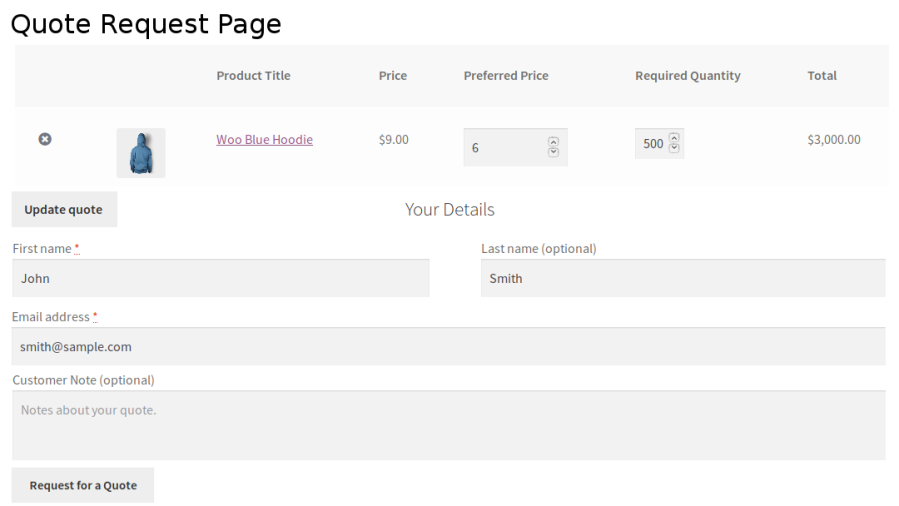
Approximate mode quote from

b. Accurate Price Mode

In this mode, the product’s price along with the additional costs like Tax(Based on Setup), Shipping Costs, Additional Fee, etc will be visible to the user while submitting the Quote Request. So, the user can get an idea on what is the final amount which they will have to pay before accepting the offer.
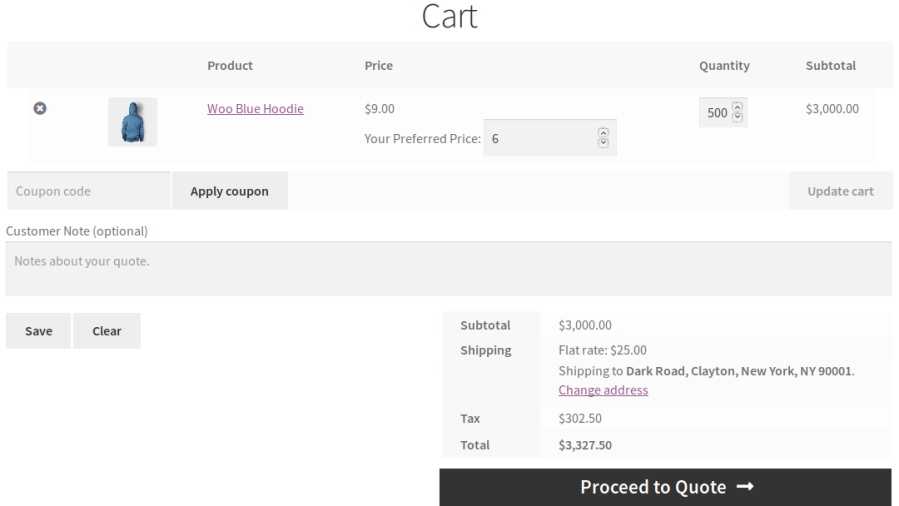
Accurate mode quote form

c. Let the User Decide Mode

In this mode, the option of choosing the mode will be displayed to the user. They can choose whether they want to go with the “Approximate Quote” mode or the “Accurate Price” mode.
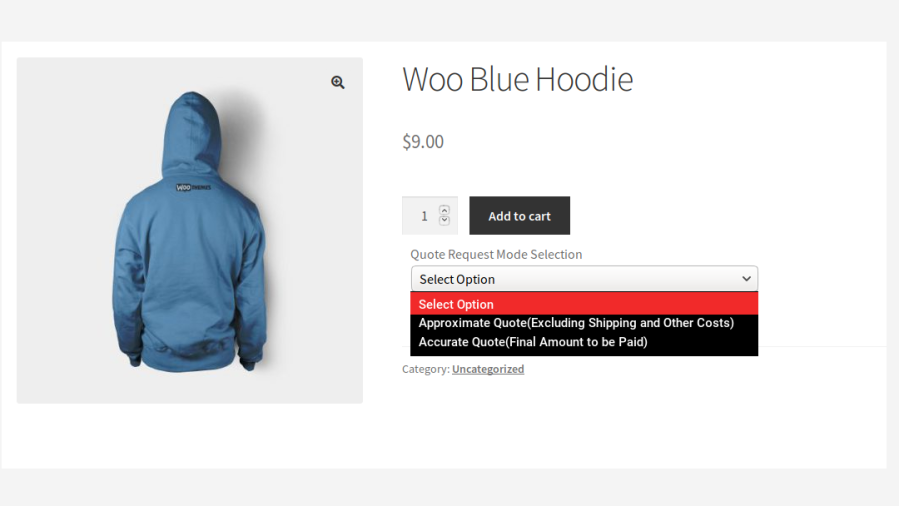
User chooses the quote type

2. Convert the current Cart to Quote Request

In this mode, the customer can able to convert the current purchasable cart items into quote request. The configured quote request mode will be applied when trying to convert the current purchasable cart items.
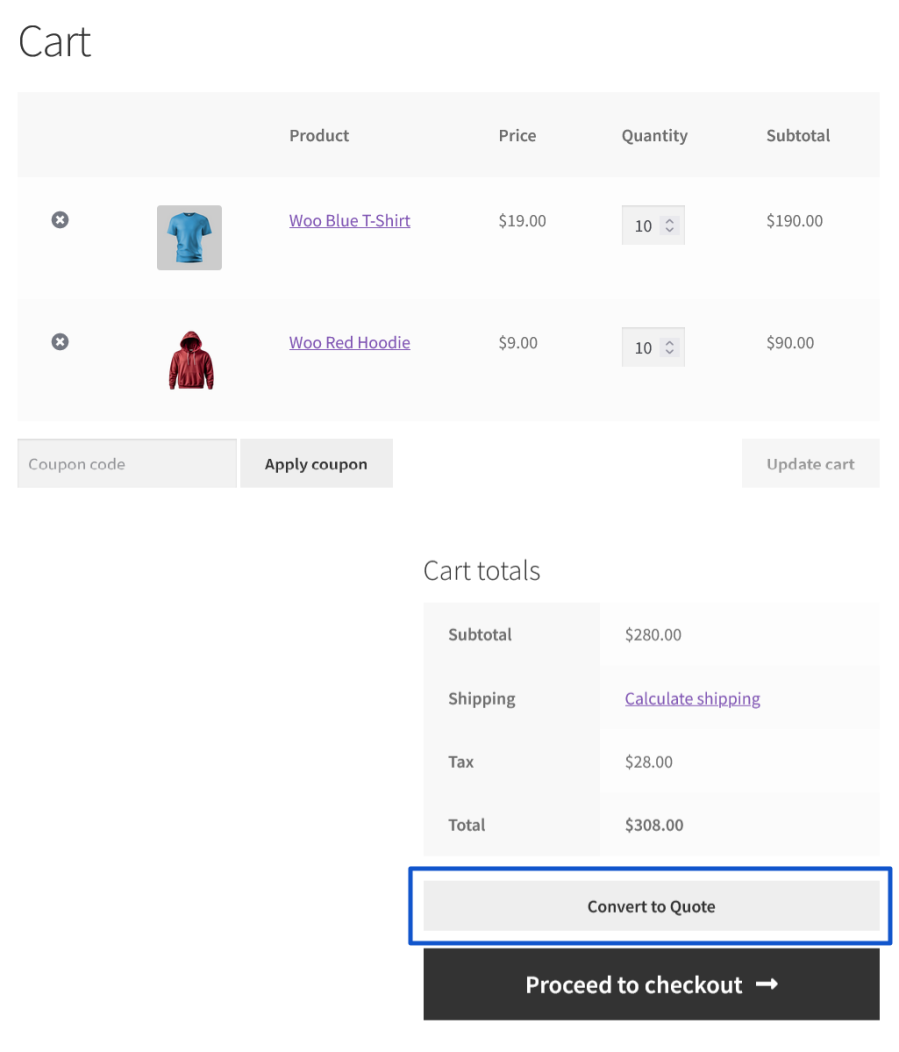
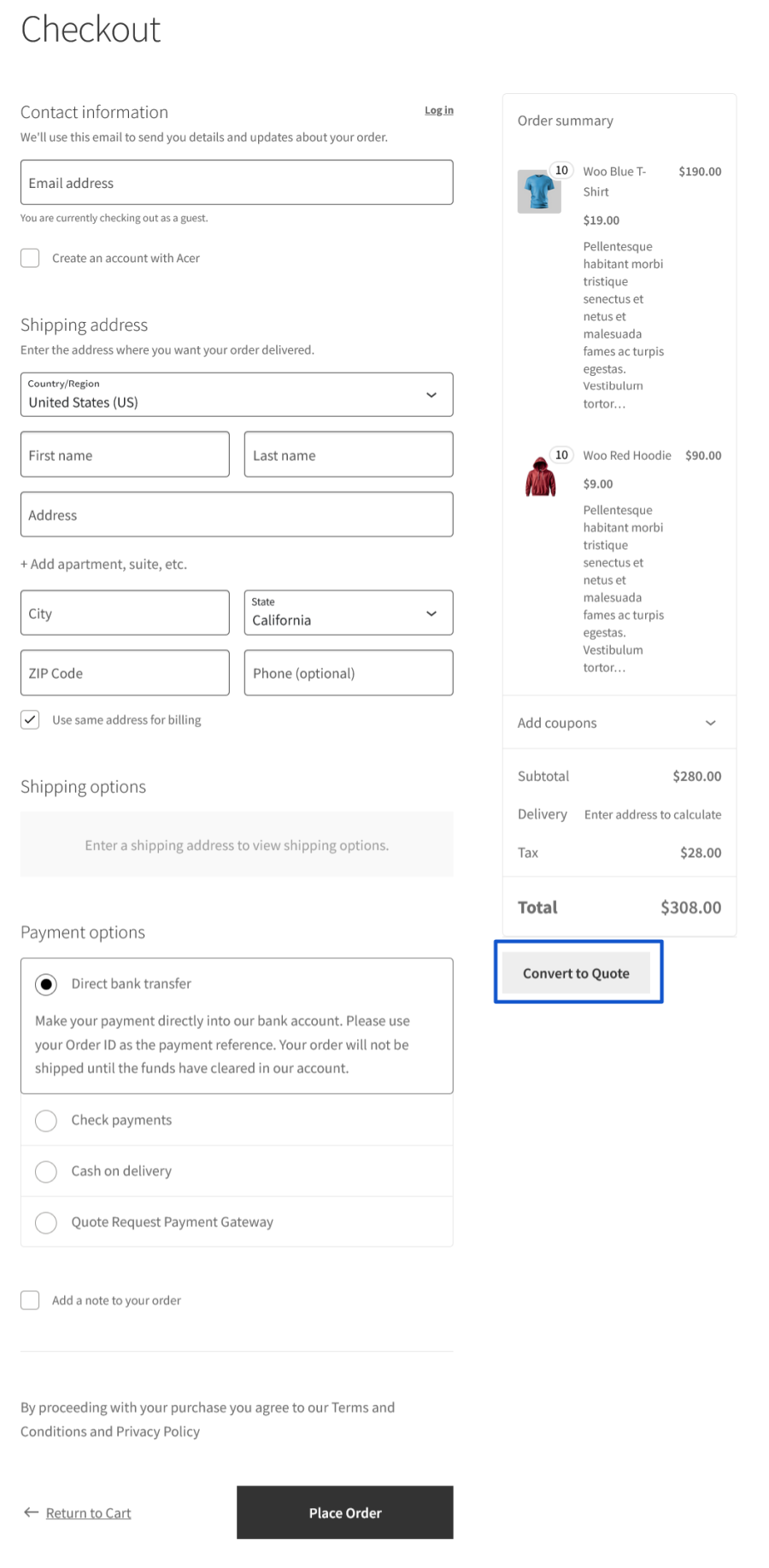
Convert to Quote on Cart Page
Convert to Quote on Checkout Page

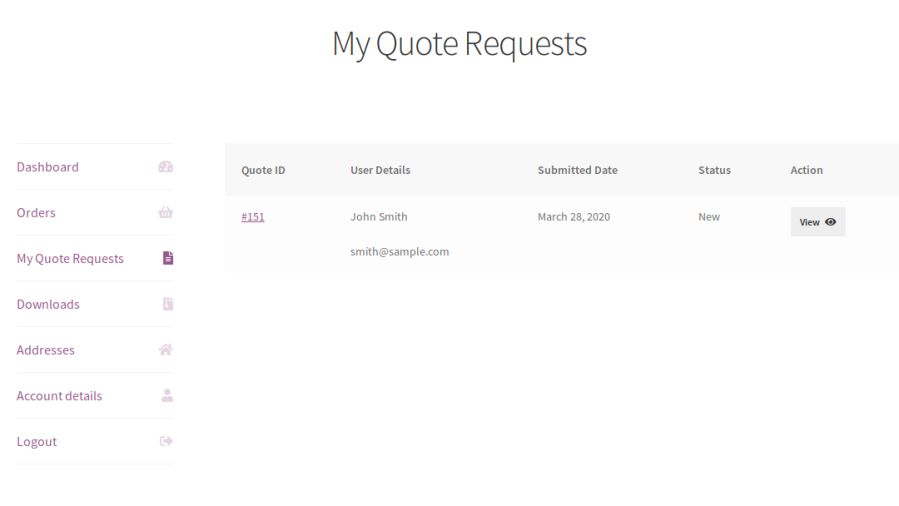
3. Dashboard for Both Admin and Customer

Separate dashboard for both admin and customers from where they can manage the submitted Quote Requests.
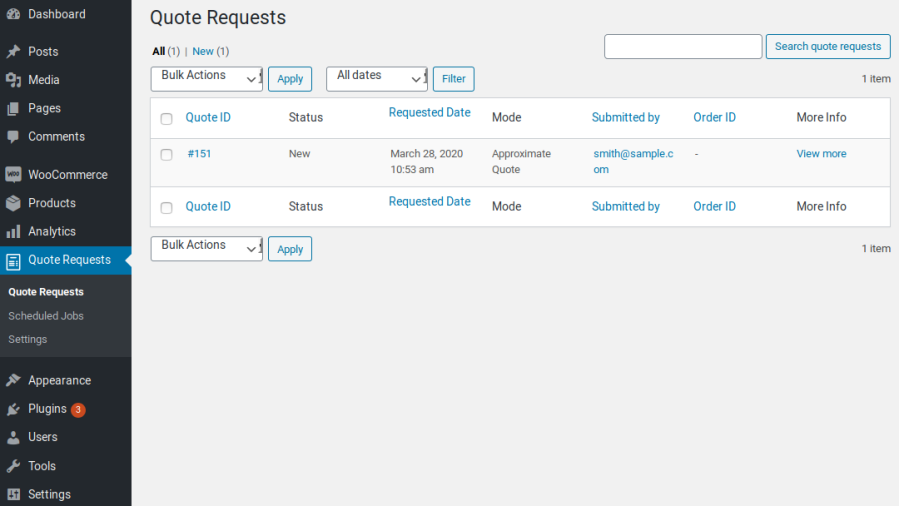
Quote request admin dashboard
Quote request customer dashboard

4. Conversation Support

Both admin can customers can negotiate the Quote Request using the conversation section available for each submitted Quote Request without having to leave the site.
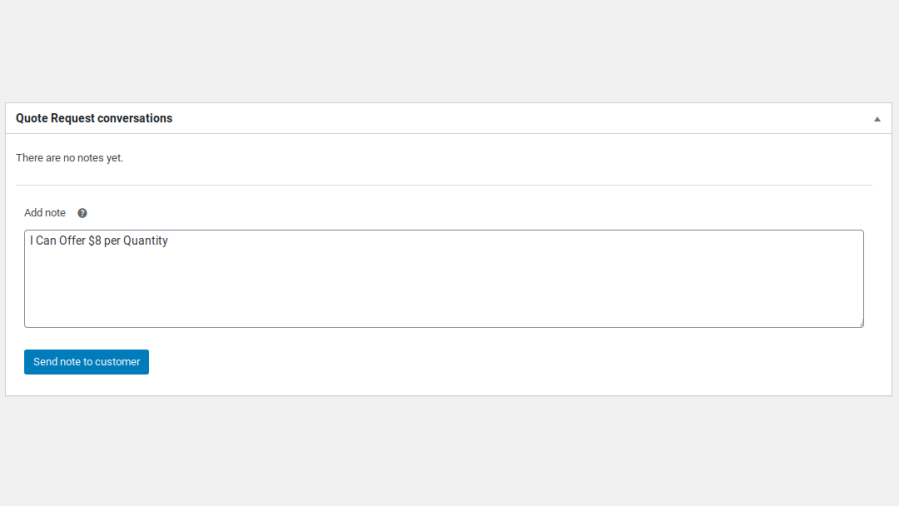
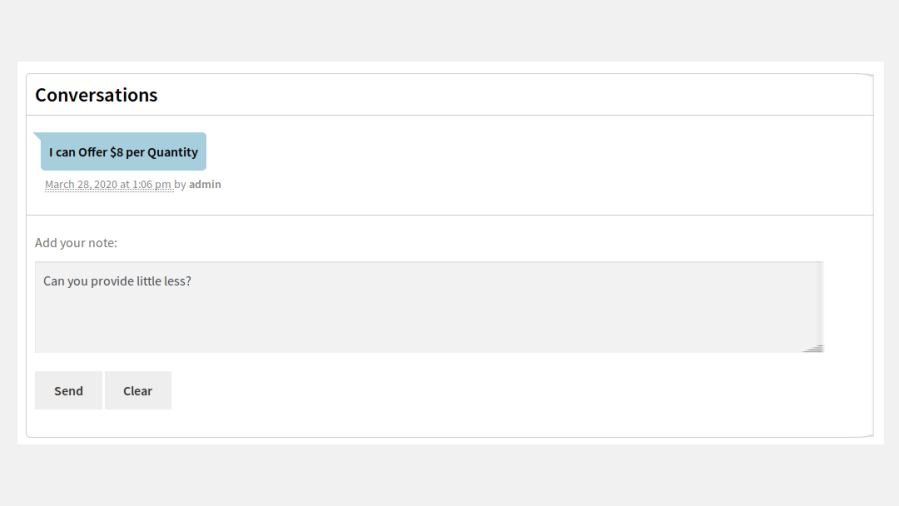
Admin conversation section
Customer conversation section

5. Stock Management

You can optionally allow your customers to request stock more than the available inventory for the products while submitting a Quote Request.

6. Quote Request for Out of Stock Products

You can allow your users to submit Quote Requests for Out of Stock products. You can also optionally restrict Quote Requests only to Out of Stock products.

7. Custom Form Fields

Option for the site admin to collect additional information from users through Custom Fields when they submit a Quote Request.
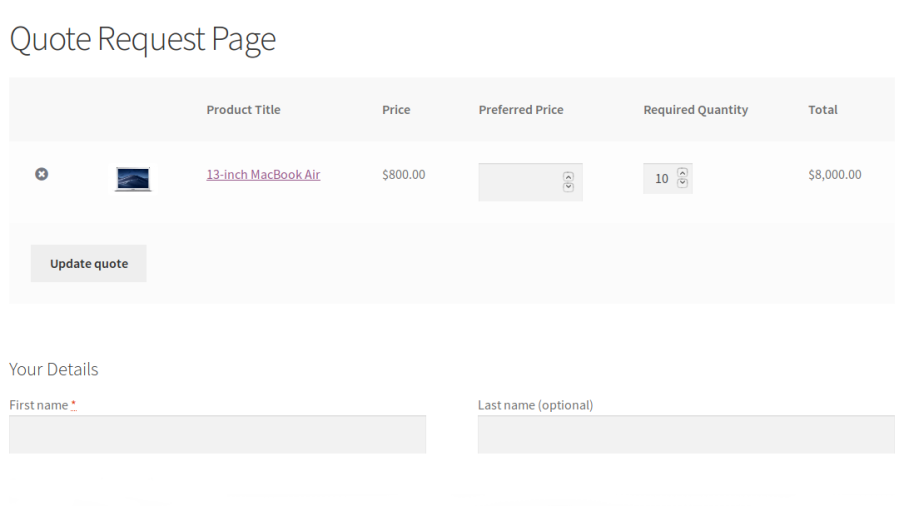
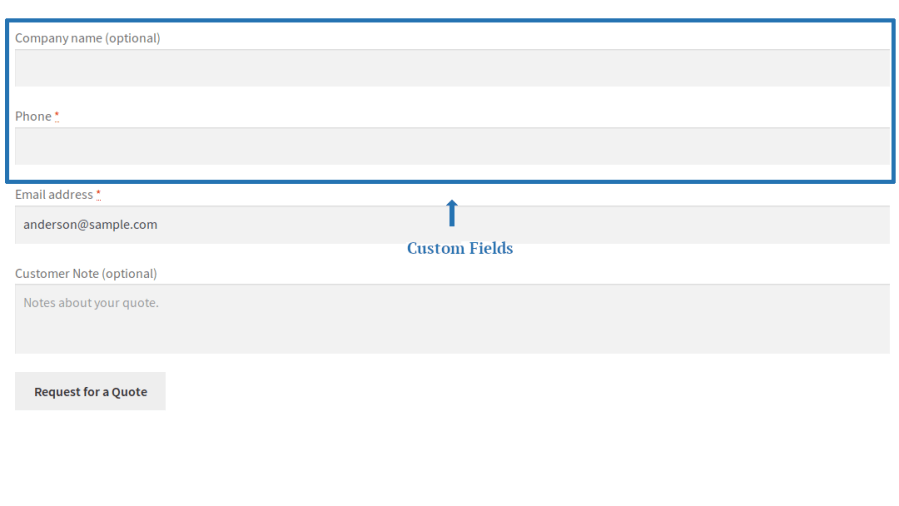
Custom form fields on quote request page

8. Shipping Method can be modified/added in Accurate Quote Mode

In Accurate Quote mode, the site admin can assign a shipping method for placing an order or modify the shipping method chosen by the user.
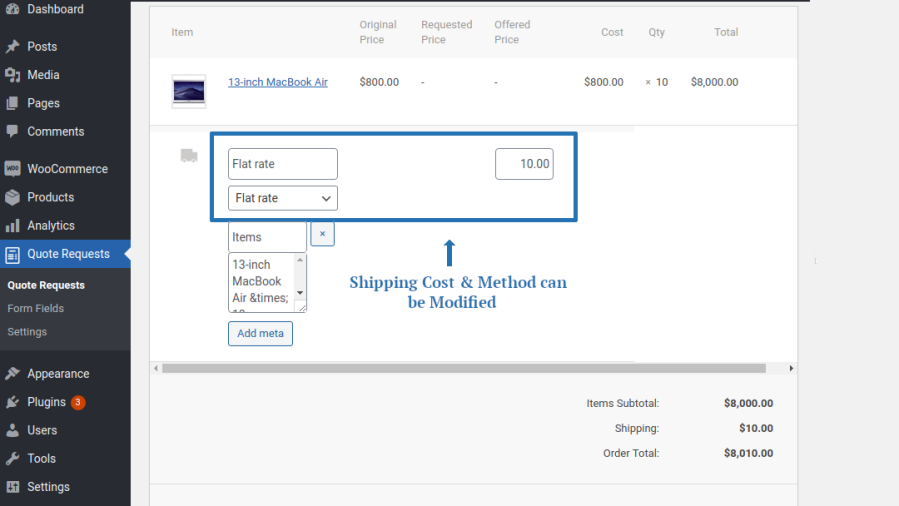
Shipping method modification on accurate quote mode

9. Request Product Price in Percentage

Option for the site admin to allow the users to negotiate product price in percentage.
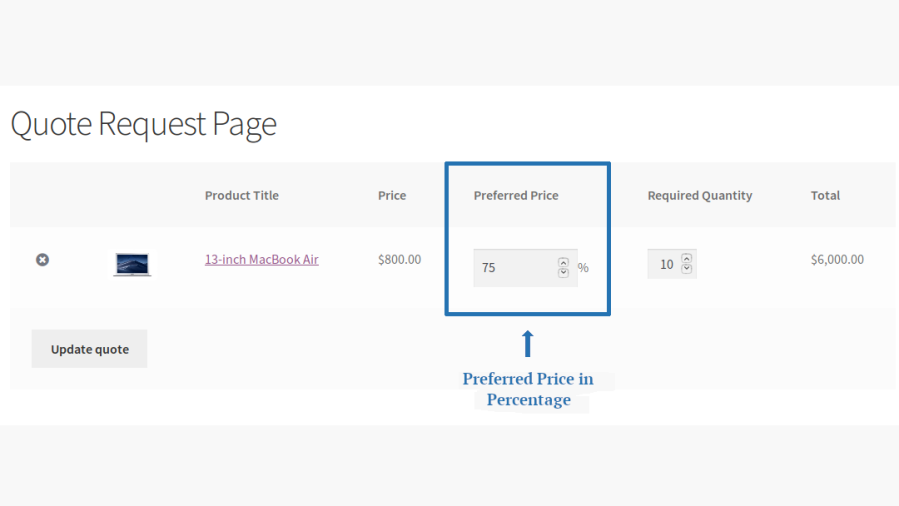
Price negotiation in percentage

10. Request Product Discount in Percentage

Option for the site admin to allow the users to negotiate product discount in percentage.
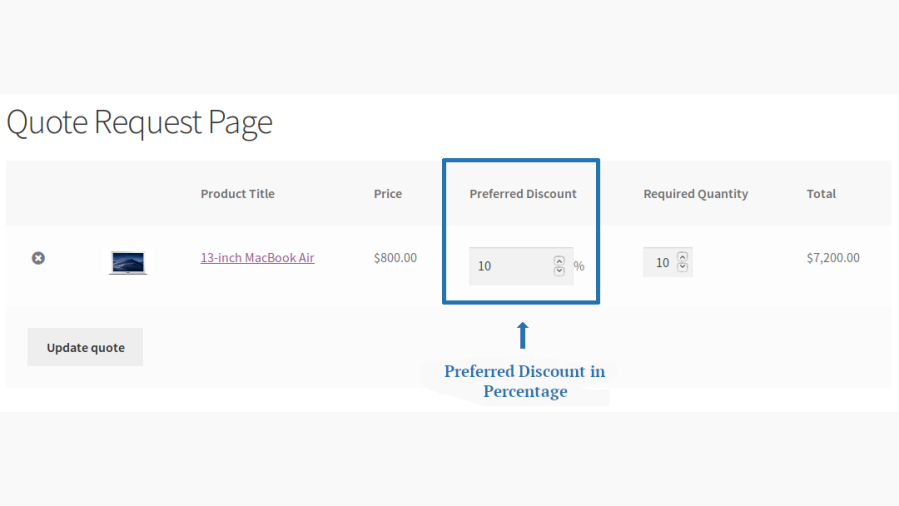
Discount negotiation in percentage

11. Time Limit for Customer to Respond

By default, when customers receive a response from the site admin, they will have to respond to it within 7 days from the date of receiving the response. The time limit for customer response is customizable.

12. Time Limit for Making Payments

By default, when a user accepts the admin’s offer, they will have to complete the payment  within 7 days from the date of accepting the offer. The time limit for making the payment is customizable.

13. Multiple Payment Reminders

From the time of accepting the admin’s offer, the user will be reminded in regular intervals to make the payment. You can customize when these emails have to be sent.

14. Payment Gateway Restriction to make Payment

By default, all the payment gateways will be visible to the user when they try to make payment for their approved Quote Requests. You can optionally restrict the approved Quote Request payment to specific payment gateways.

15. Payment for the Low in Stock/Out of Stock of Products

By default, payment for the Product which is low in stock/out of stock is restricted when they try to make payment for the approved Quote Request. It can be allowed optionally based on your needs and preferences.

Popular Features

1. Add to Quote & Custom Price Requests

Let customers request custom pricing on any product instead of buying at the listed price. Shoppers can submit a preferred price as a fixed amount, a percentage of the listed price, or a percentage discount right from the product page.

Key Capabilities:

  • Three pricing modes: Fixed, Percentage, and Percentage Discount requests.
  • Minimum quote request price percentage control to prevent lowball offers.
  • Option to allow quote quantities beyond available inventory.
  • « Add to Quote » displayed as a Button or Link, on single product pages, other pages, or both.
  • AJAX-enabled Add to Quote buttons supported on shop and archive pages.

2. Flexible Quote Working Modes

Choose how quotes are priced and finalized: Approximate Quote excludes shipping and other costs for a fast estimate, Accurate Quote calculates the final payable amount, or let the customer decide which they’d prefer.

Key Capabilities:

  • Approximate Quote mode for quick, cost-excluded estimates.
  • Accurate Quote mode for a final, checkout-ready total.
  • « Let the User Decide » mode to offer both options to customers.
  • Dedicated, shortcode-based Quote Request page.
  • Built-in « Quote Request » payment gateway to support Accurate Quote checkouts.

3. Product & Customer Targeting

Control exactly who can request quotes and on which products, with granular include/exclude rules by product, category, tag, brand, user, or user role.

Key Capabilities:

  • Include or exclude specific products, categories, tags, or brands.
  • Target specific users or user roles via include/exclude lists.
  • Guest quote submissions, with the option to force login/signup.
  • Automatic account creation when a guest submits a quote request.
  • Global enable/disable switch for the entire quote request feature.

4. Custom Quote Form Fields

Build a tailored quote request form using WooCommerce’s checkout field system, adding, editing, or removing fields to capture exactly the information you need.

Key Capabilities:

  • Add, edit, and remove custom form fields on the quote request form.
  • Fields inherit WooCommerce checkout field behavior for consistent validation.
  • Automatic prefill of billing details for logged-in customers.
  • Optional customer note and account password fields.
  • Submitted field data displayed directly on the quote request admin screen.

5. Convert Cart & Checkout to a Quote

Give shoppers the option to turn their existing cart into a quote request instead of buying immediately. Useful for bulk orders or price negotiation before checkout.

Key Capabilities:

  • « Convert to Quote » button on both the Cart and Checkout pages.
  • Configurable button placement (before cart totals, before the checkout form, order review, and more).
  • Full support for both classic and block-based Cart/Checkout pages.
  • « Back to Cart » option available from the generated quote page.
  • Works alongside standard purchasing without disrupting regular checkout.

6. Quote Negotiation & Status Workflow

Every quote request moves through a clear lifecycle. From submission to admin response, customer acceptance, and payment — with built-in negotiation and a running conversation thread.

Key Capabilities:

  • Complete status workflow: New, response awaited, accepted, approved, rejected, expired, and completed.
  • Two-way price negotiation between admin and customer.
  • Threaded conversation notes attached to each quote request.
  • My Account « Quote Requests » tab for customers to track and manage their quotes.
  • Admin quote request meta boxes for actions, notes, and conversation history.

7. Validity Windows & Automated Reminders

Keep quotes moving with configurable response deadlines, payment windows, and scheduled reminder emails sent automatically to customers.

Key Capabilities:

  • Configurable customer response time (in days) before a quote expires.
  • Configurable payment due period after a quote is accepted.
  • Scheduled reminder emails for both responding to and paying for a quote.
  • Automatic quote expiry handling once deadlines pass.
  • Background processing delivers reminders without slowing down the site.

8. Payment Gateway Control for Quotes

Decide exactly which payment methods are available when customers pay for an accepted quote, separate from your store’s normal checkout gateways.

Key Capabilities:

  • Enable or disable specific payment gateways for quote payments.
  • Dedicated « Quote Request » gateway to support Accurate Quote checkouts.
  • Compatible with the WooCommerce Blocks checkout.

9. Complete Email Notification System

A full set of transactional emails keeps both store admins and customers informed at every stage of the quote lifecycle.

Key Capabilities:

  • Admin emails for new requests, accepted/rejected quotes, and awaited responses.
  • Customer emails for acknowledgement, approval, rejection, expiry, and payment reminders.
  • Compatible with WooCommerce’s Email Preview feature.

10. Display & Storefront Customization

Fine-tune how quoting appears on the storefront — from hiding prices and Add to Cart buttons to showing a Mini-Quote basket in your site menu.

Key Capabilities:

  • Hide « Add to Cart » and/or product price for quote-enabled products.
  • Mini-Quote basket widget can be added to any WordPress navigation menu.
  • Show/hide « Add to Quote » for out-of-stock products, or restrict it to only them.
  • Custom CSS field for styling quote elements to match your theme.

Extensive Features List

  • Allow customers to request custom price quotations instead of purchasing products directly.
  • Support Flexible Quote Modes:
    • Approximate Quote Mode: excludes shipping costs.
    • Accurate Quote Mode: includes the final payable amount.
    • Let the User Decide Mode: allows customers to choose their preferred quote type.
  • Enable quote requests for all products or selected products only.
  • Restrict quote requests by product categories, tags, or brands.
  • Control quote access for specific customers, user roles, or individual users.
  • Allow guest users to submit quote requests without logging in.
  • Optionally automatically create customer accounts when quote requests are submitted.
  • Replace or complement the Add to Cart button with an Add to Quote option.
  • Display quote requests as either a button or text link.
  • Show quote functionality on product pages, shop pages, and product archives.
  • Add products to quotes using AJAX, without requiring page reloads.
  • Automatically redirect customers to the quote page after products are added to a quote.
  • Allow quote requests for out-of-stock products.
  • Optionally hide product prices when quote requests are enabled.
  • Allow customers to submit their target price or discount using:
    • Fixed Amount
    • Percentage
    • Percentage Discount
    • Minimum Quote Price Threshold to help protect profit margins.
  • Optionally display preferred subtotal fields when required.
  • Allow customers to convert existing cart items into a quote request without rebuilding their order:
    • Convert from Cart Page
    • Convert from Checkout Page
  • Provide a Back to Cart option to easily restore quote items to the shopping cart.
  • Build fully customized quote request forms using Custom Quote Form Fields.
  • Allow customers to enter their expected or preferred price during quote submission.
  • Manage the complete quote lifecycle with 9 Quote Statuses from a dedicated admin screen:
    • New
    • On Hold
    • Approved
    • Accepted
    • Rejected
    • Expired
    • Completed
    • Response Awaited
    • Have to Respond
  • Review and manage all quotes from a centralized admin dashboard.
  • Enable direct communication between customers and administrators within quote requests.
  • Convert approved quotes into payable WooCommerce orders.
  • Send automated email notifications throughout the quote lifecycle:
    • New Quote Request
    • Quote Approved
    • Quote Rejected
    • Accepted Quote to Pay
    • Payment Reminder
    • Quote Expired
    • Response Awaited
    • Response Reminder
    • Quote Completed
  • Restrict or disable specific payment gateways during quote checkout to ensure customers use only approved payment methods.
  • Allow customers to view, accept, or reject quotes directly from their My Account page, with access to complete quote history and status tracking.

Requirements

Minimum WooCommerce version: 3.5.0
Minimum WordPress version: 4.6
Minimum PHP version: 5.6

Never loose a sale because your site couldn’t handle quote requests from your users. Quote Request for WooCommerce adds just that.


Avis Clients

Nous acceptons des avis pour ce produit et les afficherons dès que nous en aurons quelques-uns de plus.

Informations sur l'extension

  • Version PHP requise: 7.4.0
  • Testé avec WordPress: 7.0
  • Testé avec WooCommerce: 10.8.1
  • Nécessite au minimum WordPress: 6.2
  • Nécessite au minimum WooCommerce: 8.2.0

Compatibilité

  • High performance order storage (HPOS)

Pays

  • Mondial

Related Products

Prix $79 par an
Noté 3.4 sur 5 étoiles
Prix $279 par an
Noté 3.2 sur 5 étoiles
Prix $59 par an
Noté 3.1 sur 5 étoiles
Prix $109 par an
Noté 2.7 sur 5 étoiles
Prix $49 par an
Noté 4.1 sur 5 étoiles
Prix $109 par an
Noté 2 sur 5 étoiles
Prix $109 par an
Noté 2.3 sur 5 étoiles
Prix $39 par an
Noté 2.8 sur 5 étoiles
Prix $109 par an
Noté 2.6 sur 5 étoiles
Utilisation de vos données personnelles
Nous et nos partenaires traitons vos données personnelles (telles que les données de navigation, adresses IP, informations sur les cookies et autres identifiants uniques) sur la base de votre consentement et/ou de notre intérêt légitime afin d’optimiser notre site web, nos activités marketing et votre expérience utilisateur.




