
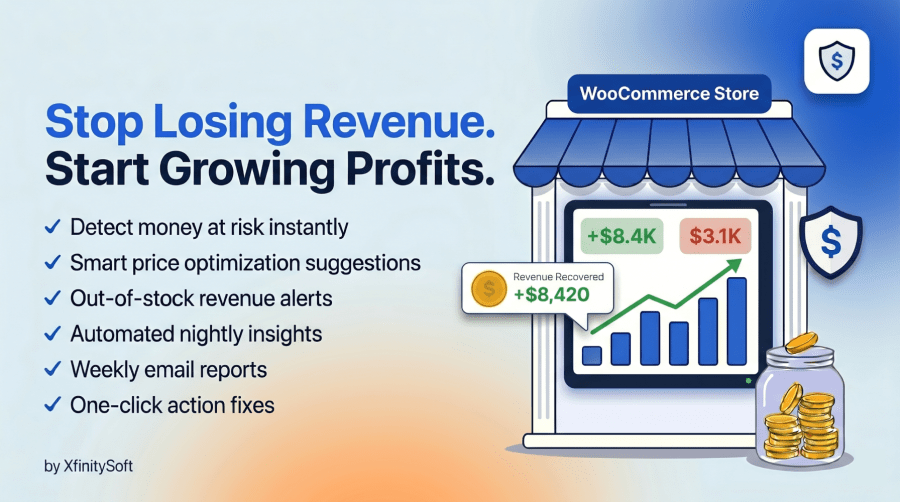
Icône du produit

Revenue Guard pour WooCommerce

Automated revenue optimization for WooCommerce. Recover lost revenue (money at risk) and unlock new profit (easy wins) opportunities without increasing traffic.
Choisissez une option de facturation
$49
Économisez 20 %
$98 $78.40

L’abonnement comprend

  • Mises à jour et améliorations du produit
  • Assistance client
  • Remboursement garanti sous 30 jours

Stop Losing Revenue. Start Growing Profits. Automatically.  

Revenue Guard for WooCommerce is your intelligent revenue optimization assistant that works 24/7 to protect your income and uncover hidden profit opportunities. Unlike traditional analytics plugins that just show you data, Revenue Guard for WooCommerce takes action to identify exactly where you’re losing money and what to do about it.

Key Features of Revenue Guard for WooCommerce

  • Automated WooCommerce Revenue Optimization – Automatically analyzes your WooCommerce store data to protect lost revenue and uncover new profit opportunities without increasing traffic.
  • Money at Risk Detection – Identifies revenue leaks in your WooCommerce store, including stockouts, refunds, discount dependency, and payment failures.
  • Out-of-Stock Revenue Alerts – Calculates estimated lost sales from out-of-stock products and notifies you when it is time to restock.
  • WooCommerce Refund Rate Monitoring – Detects products with unusually high refund rates so you can fix quality or description issues before profits drop.
  • Discount Dependency Analysis – Finds products that rely heavily on coupons, helping you reduce margin erosion and improve profitability.
  • Payment Gateway Failure Tracking – Monitors WooCommerce payment methods to identify high cancellation or checkout failure rates.
  • Smart Price Optimization Suggestions – Recommends safe 3–5% price increases for high-demand products with low refunds and low coupon usage.
  • Product Bundle Recommendations – Identifies frequently bought together products to help you increase the average order value in WooCommerce.
  • Free Shipping Threshold Optimization – Suggests data-driven free shipping limits to encourage larger cart sizes and higher revenue.
  • Centralized Revenue Dashboard – Provides a real-time WooCommerce revenue health check with possible revenue gain and money at risk metrics.
  • Actionable Insights with One-Click Fixes – Every alert includes clear explanations and direct links to restock products or adjust pricing instantly.
  • Automated Nightly WooCommerce Analysis – Runs daily at off-peak hours to compute insights without slowing down your store.
  • Weekly Revenue Email Reports – Sends automated WooCommerce revenue summaries to store owners, managers, or agencies.
  • Customizable Alert Thresholds – Lets you control refund limits, stockout duration, coupon usage rates, bundle strength, and price suggestion rules.
  • WooCommerce Profit Recovery System – Focuses on increasing revenue from existing traffic instead of relying on more ads or new visitors.
  • Lightweight & Performance Friendly – Pre-computes insights to ensure your WooCommerce store remains fast and responsive.
  • Data Privacy & GDPR Friendly – All revenue analysis runs on your server with no external data sharing.
  • Agency-Ready WooCommerce Optimization Tool – Ideal for agencies managing multiple WooCommerce stores that need automated revenue monitoring.

What Revenue Guard for WooCommerce Does

Revenue Guard features two intelligent modules:

1. Money at Risk (Revenue Protection)

Stop the revenue leaks draining your profits:
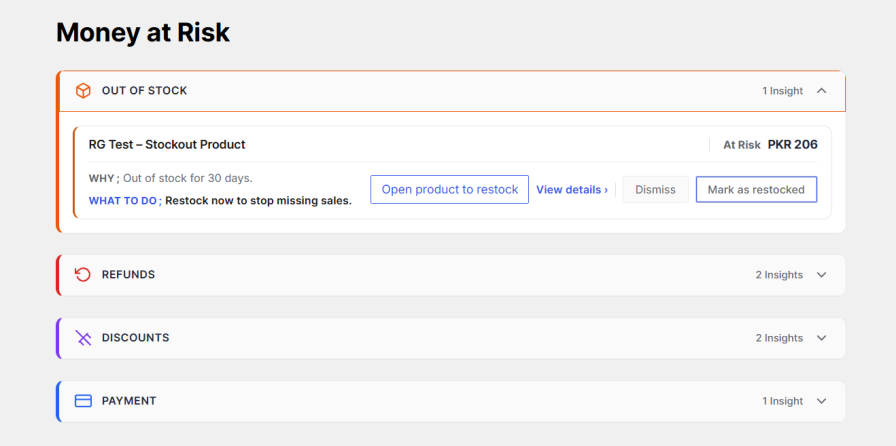
  • Out-of-Stock Alerts – Get notified when popular products run out of stock. Revenue Guard calculates exactly how much money you’re losing daily and tells you when to restock.
  • Refund Monitoring – Identify products with unusually high refund rates compared to your store’s average. Fix quality or description issues before they escalate.
  • Discount Dependency Detection – Find products that only sell when heavily discounted. Learn which items can be sold at full price to improve margins.
  • Payment Failure Analysis – Detects payment gateways with high rates of cancellations or failures. Fix checkout issues to recover lost orders.

Money at risk

2. Easy Wins (Revenue Growth)

Discover low-effort, high-impact opportunities to grow revenue:
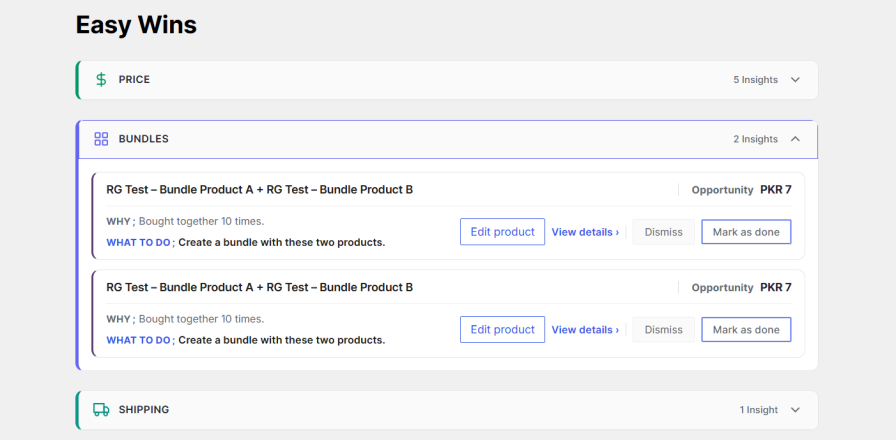
  • Smart Price Optimization – Get data-backed suggestions to raise prices 3-5% on products with strong sales and low refunds. Capture more revenue without losing customers.
  • Bundle Recommendations – Identify products frequently bought together. Create bundles to increase average order value and customer satisfaction.
  • Shipping Threshold Suggestions – Discover the optimal free-shipping threshold based on your actual order data. Encourage bigger carts and smoother checkout.

Easy wins

Centralized Revenue Dashboard

The Overview dashboard gives you a real-time store health check:

  • Possible Revenue Gain
  • Money at Risk
  • Easy Wins Count
  • Direct action buttons to edit products

Each alert explains:

Why it matters
What to do next

You can click directly to restock products or edit pricing.
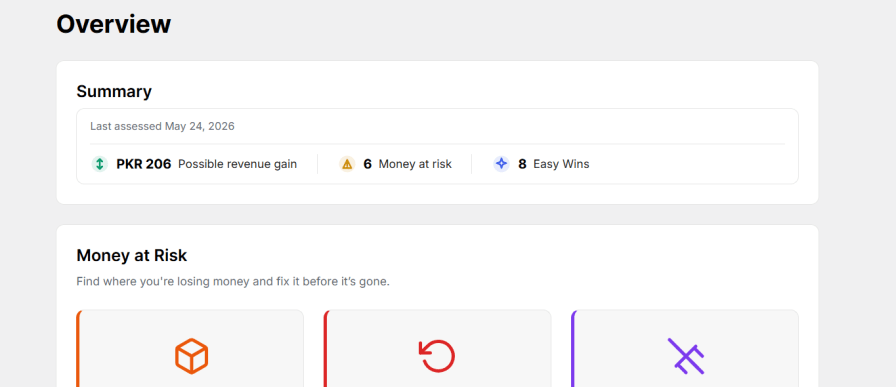
Centralized Revenue Dashboard

Automated Weekly Email Reports

Get summarized insights delivered automatically.

This email report is useful for:

  • Store owners
  • E-commerce managers
  • Marketing teams
  • Agencies

Stay informed without logging in daily.

Why Woocommerce Store Owners Choose Revenue Guard

Running a successful WooCommerce store means constantly balancing inventory, pricing, discounts, and customer satisfaction. But what if you had an automated system watching your back?

Revenue Guard analyzes your store data every night and delivers actionable insights that help you:

  • Recover Lost Revenue – Identify products costing you sales
  • Increase Profits – Find safe opportunities to raise prices
  • Optimize Inventory – Never miss sales from stockouts again
  • Reduce Refunds – Spot products with higher refunds before they hurt you
  • Boost Average Order Value – Discover bundling opportunities

How Revenue Guard for WooCommerce Works

  • Automated Nightly Analysis – Every night at 2:00 AM (your store time), Revenue Guard for WooCommerce analyzes your WooCommerce data without slowing down your site.
  • Intelligent Insights – Advanced algorithms identify patterns, risks, and opportunities specific to YOUR store.
  • Clear Action Steps – Each insight includes « WHY » this matters and « WHAT TO DO » with direct links to fix issues instantly.
  • Weekly Email Reports – Get comprehensive summaries delivered to your inbox every Monday morning.

Fully Customizable Thresholds

Every store is different. Revenue Guard for WooCommerce lets you fine-tune when alerts trigger:

  • Set minimum sales thresholds before showing stockout alerts
  • Define refund rate thresholds for your industry
  • Configure minimum order requirements for price suggestions
  • Adjust bundle strength calculations
  • Customize discount dependency thresholds

Default settings work great for most stores, but advanced users can optimize for their specific business model.

Real Results, Real Simple

The beautiful dashboard shows at a glance:

  • Possible Revenue Gain – Total potential from Easy Wins
  • Money at Risk Count – Active revenue threats
  • Easy Wins Count – Growth opportunities waiting

Color-coded cards make it impossible to miss critical issues. One-click actions let you fix problems without leaving the dashboard.

Privacy & Performance First

  • All data stays on YOUR server – no external APIs or cloud processing
  • Lightweight analysis runs during off-peak hours
  • Option to remove all data on uninstall
  • GDPR compliant – no tracking or data collection

Perfect For:

  • WooCommerce store owners are tired of guessing
  • E-commerce managers handling multiple products
  • Agencies managing client stores
  • Dropshippers optimizing margins
  • Subscription box services
  • Digital product sellers

Physical product retailers

The Advantage of Revenue Guard for WooCommerce

While other plugins just show you charts and graphs, Revenue Guard for WooCommerce tells you what to do. No data science degree required. No hours spent analyzing spreadsheets. Just clear, actionable insights that protect and grow your revenue.

Join successful store owners who never miss an opportunity or lose revenue to preventable problems.

Get Started In Minutes

  1. Install Revenue Guard for WooCommerce
  2. Click « Seed WooCommerce data » to analyze your store
  3. Review your first insights immediately
  4. Take action with one-click fixes
  5. Watch your revenue grow

No credit card required. No complex setup. Just better revenue decisions.

Requirements

  • WordPress 5.8 or higher
  • WooCommerce 6.0 or higher
  • PHP 7.4 or higher
  • MySQL 5.6 or higher

Recommended Settings

  • At least 30 days of order history for best insights
  • Minimum 10 orders for meaningful analysis
  • WP Cron is enabled for automated nightly insights

Support & Updates

XfinitySoft actively maintains Revenue Guard for WooCommerce with regular updates, security patches, and feature improvements.

Feel free to contact us 24/7 Contact support. Our support team is ready to help you maximize your store’s revenue potential.

Ready to stop leaving money on the table? Install Revenue Guard for WooCommerce today and start making data-driven decisions that boost your bottom line.


Foire aux questions

How Does the Revenue Guard for WooCommerce Find Money At Risk?

Revenue Guard for WooCommerce analyzes your WooCommerce order data, product performance, refund rates, stock levels, and payment gateway performance. It compares metrics against your store averages and industry thresholds to identify products or processes that are costing you revenue. Each insight includes the specific amount at risk and clear action steps.

Will This Plugin Slow Down My Store?

No. Revenue Guard for WooCommerce runs automated analysis nightly at 2:00 AM (your store time) during off-peak hours. The dashboard loads instantly because all calculations are pre-computed. Your customers won't notice any performance impact.

How Accurate Are The Price Increase Suggestions?

Revenue Guard for WooCommerce only suggests price increases for products with strong sales velocity, low refund rates (below 3% by default), and minimal coupon dependency. These are products with proven demand that can likely support a 3-5% price increase without losing customers. However, you should always test price changes gradually.

Can I Customize When Alerts Appear?

Yes! The Settings page lets you adjust all thresholds. For example, you can set minimum days out of stock before alerting, minimum refund rates to flag, or minimum orders before suggesting price increases. Default settings work for most stores, but you can fine-tune them for your specific business.

Does This Plugin Work With All WooCommerce Products?

Yes, Revenue Guard for WooCommerce analyzes simple products, variable products, virtual products, and downloadable products. It works with any product type that generates WooCommerce orders.

What Happens If I Uninstall The Plugin?

You can choose to keep or remove all Revenue Guard for WooCommerce data on uninstall. Go to Settings > Data and check "Remove data on uninstall" if you want a clean removal. Your WooCommerce data remains untouched either way.

How Often Are Insights Updated?

Insights are computed nightly at 2:00 AM store time. You can also manually trigger an analysis anytime by clicking "Run insights now" at the top of the dashboard.

Can I Receive Insights Via Email?

Yes! Enable weekly email reports in Settings > Weekly email. Reports are sent every Monday at 9:00 AM with a summary of Money at Risk and Easy Wins. You can add multiple recipients (comma-separated email addresses).

Is My Data Secure?

Absolutely. All analysis happens on your server. Revenue Guard for WooCommerce doesn't send data to external servers or third parties. Your customer data, order information, and product details stay 100% private on your WooCommerce installation.

How Much Revenue Can I Expect To Recover?

Results vary by store size and current optimization level. Typical stores find:

  • 5-15% revenue recovery from stockout prevention
  • 3-5% profit increase from strategic price optimization
  • 10-20% reduction in refund rates by identifying problem products
  • 15-25% increase in average order value from bundling suggestions

The Overview dashboard shows your specific potential revenue gain based on current data.

Does This Plugin Work With Multi-Currency Stores?

Yes, the Revenue Guard for WooCommerce displays all amounts in your WooCommerce store's base currency. If you use a multi-currency plugin, insights are calculated using the base currency for consistency.

Can I Use This Plugin with Page Builders or Custom Themes?

Yes! Revenue Guard for WooCommerce is a backend analytics tool that works independently of your frontend theme or page builder. It integrates directly with WooCommerce data.

What If I Need Help?

Revenue Guard for WooCommerce includes contextual help icons throughout the settings to explain each option. For additional support, visit our support forum or contact XfinitySoft directly through the plugin page.

Avis Clients

Nous acceptons des avis pour ce produit et les afficherons dès que nous en aurons quelques-uns de plus.

Related Products

Prix $79 par an
Noté 3.4 sur 5 étoiles
Prix $279 par an
Noté 3.2 sur 5 étoiles
Prix $59 par an
Noté 3.1 sur 5 étoiles
Prix $109 par an
Noté 2.8 sur 5 étoiles
Prix $49 par an
Noté 4.1 sur 5 étoiles
Prix $109 par an
Noté 2 sur 5 étoiles
Prix $109 par an
Noté 2.3 sur 5 étoiles
Prix $109 par an
Noté 2.6 sur 5 étoiles
Prix $109 par an
Noté 2.3 sur 5 étoiles
Utilisation de vos données personnelles
Nous et nos partenaires traitons vos données personnelles (telles que les données de navigation, adresses IP, informations sur les cookies et autres identifiants uniques) sur la base de votre consentement et/ou de notre intérêt légitime afin d’optimiser notre site web, nos activités marketing et votre expérience utilisateur.




