Icône du produit

Sales Triggers pour WooCommerce

Sales Triggers for WooCommerce can help increase conversions in your Shop using Psychological Sales Triggers.
Choisissez une option de facturation
$49
Économisez 20 %
$98 $78.40

L’abonnement comprend

  • Mises à jour et améliorations du produit
  • Assistance client
  • Remboursement garanti sous 30 jours

Display psychological sales triggers to increase sales and conversions

Use marketing science to increase your sales and conversions with the Sales Triggers for WooCommerce extension.

Sales Triggers for WooCommerce comes with five known psychological sales triggers.

These revenue-increasing triggers are:

1. The deal expiration-date trigger

2. The low-stock trigger

3. The savings-info trigger

4. The guarantee trigger

5. The best reviews trigger

Benefits

Increase conversions 

Seeing sales triggers encourages buyers to make purchases at that moment—no delays or items left abandoned in carts.

Increases trust and brand value

Displaying a savings trigger gives customers a sense of satisfaction. They know they will receive a financial benefit when they purchase from your shop.

Attracts new customers

Customers who respond to sales triggers and purchase merchandise are more likely to refer new users to your site.
How do sales triggers work?

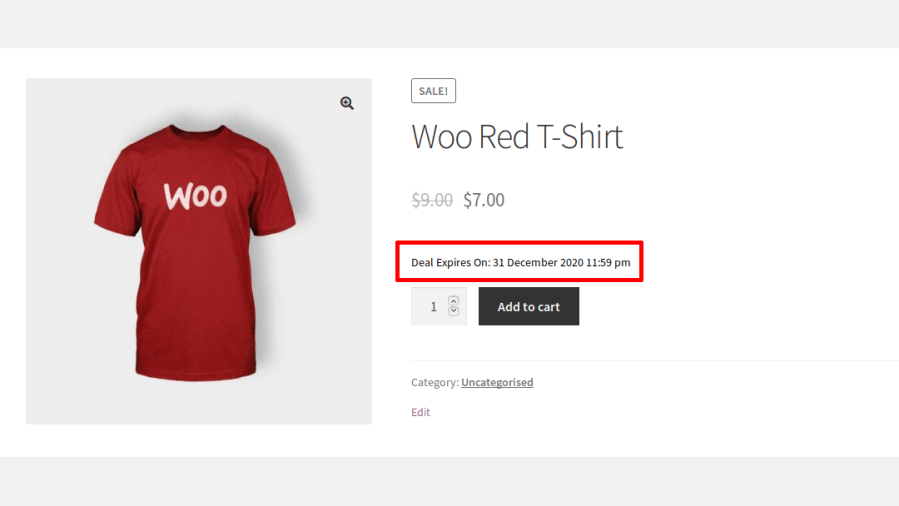
1. Deal-expiration date trigger

  • The deal-expiration date trigger displays the time left for a sale price to end on a product page in the following formats:
    • Day(s) left
    • Date
    • Countdown timer
  • Deal-expiration date triggers create an urge to take advantage of a discount before it disappears.
Deal Expiration Date Trigger

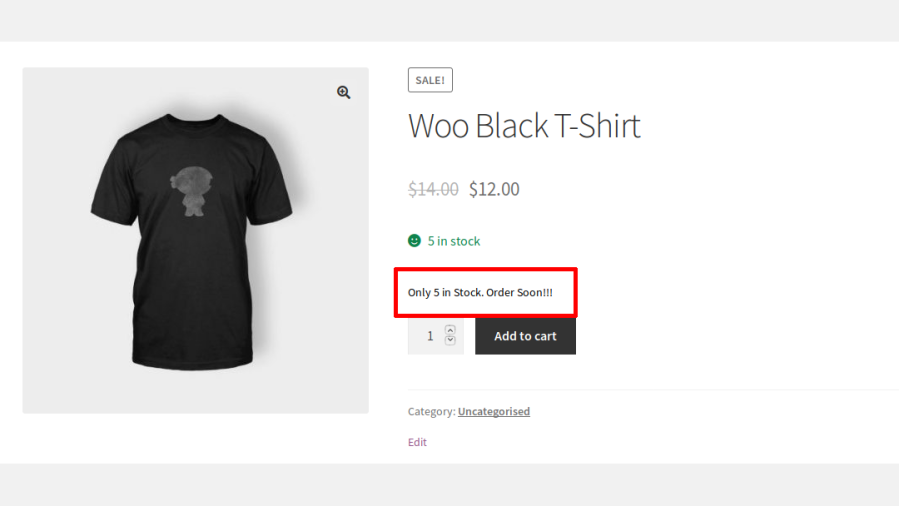
2. Low-stock triggers

  • Low-stock triggers display a low in-stock notice on product pages.
  • Displaying a low-in-stock notice creates a sense of urgency to complete purchases before items are sold out.
Low-stock Trigger

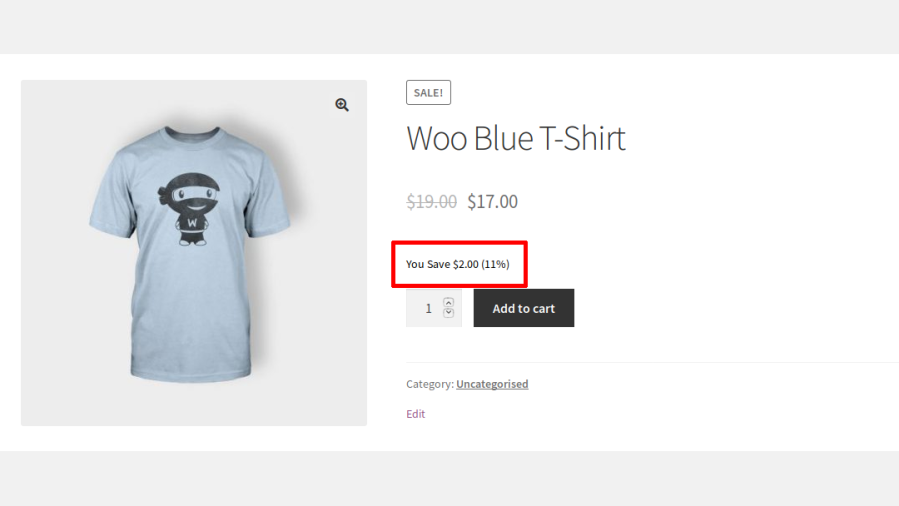
3. Savings trigger

  • Savings triggers display the amount the user can save with current sale conditions.
  • Displaying savings triggers give customers a sense of satisfaction. They know they’ll receive a financial benefit when they purchase from your shop.
Savings Trigger

4. Guarantee trigger

  • Guarantee triggers display positive, reassuring information on product pages such as:
    • Free shipping
    • Return policies
    • Brand assurances
  • Displaying guarantee triggers on product pages can transform hesitant shoppers into confident buyers.
Guarantee Trigger

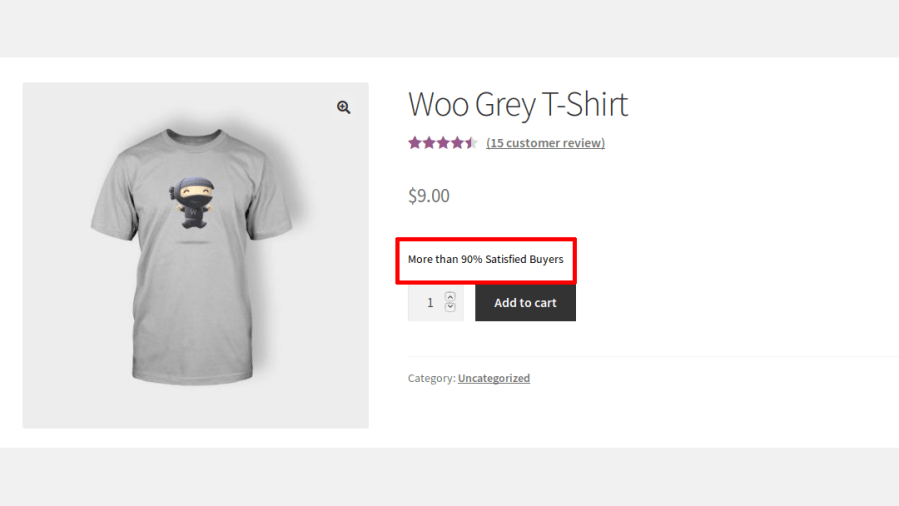
5. Best reviews trigger

  • The best reviews trigger displays satisfaction rates on product pages.
  • Displaying the satisfaction rate on product pages helps your new buyers analyze how your existing customers feel about your products. Customers convinced of your positive satisfaction rates are more likely to purchase from your shop.
Best Reviews Trigger

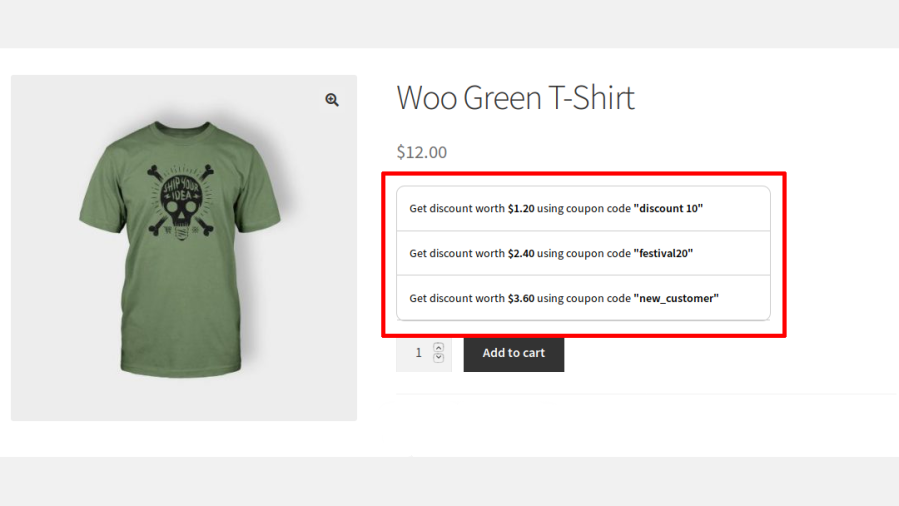
6. Coupons trigger

  • The Coupons trigger displays coupon codes to users on the product pages.
  • Displaying coupon codes to users on the product pages encourages them to complete the purchase immediately by using the coupon offered.
Coupons Trigger

Popular Features

1. Six Ready-Made Trigger Types

Choose from six proven persuasion triggers Deal Expiry, Low Stock, Savings, Guarantee, Best Reviews, and Coupons each designed to nudge a hesitant shopper closer to checkout without you writing a single line of copy from scratch.

2. Smart Countdown Timers Tied to Real Sale Dates

Deal Expiry triggers automatically read the WooCommerce sale end date on each product, so countdowns stay accurate without manual updating and you can set a countdown to only appear once the sale is within a specific number of hours remaining, keeping urgency messaging meaningful rather than constant.

3. Low Stock Scarcity Messaging

Automatically show an « only X left » message once a product’s stock drops below a threshold you define, with a separate friendly « in stock » message above that threshold turning real inventory data into a genuine urgency cue.

4. Automatic Savings Calculator

Display exactly how much a customer saves both in percentage and currency calculated live from the regular and sale price, including a smart price range for variable products with multiple sale prices.

5. Star-Rating-Powered Trust Trigger

Automatically calculate a customer satisfaction percentage from a product’s existing star ratings and display it as a trust signal, with the option to hide it entirely if the rating falls below a quality threshold you set.

6. Coupon Promotion Trigger

Automatically surface specific WooCommerce coupons directly on the product page, encouraging shoppers to apply a discount instead of abandoning their cart to hunt for one elsewhere.

7. Custom Trust & Guarantee Badges

Build your own set of guarantee icons like money-back guarantees or secure checkout badges each with its own title, description, and uploaded image, displayed together to reassure hesitant buyers.

8. Powerful AND/OR Rule Engine

Control exactly who sees each trigger using a multi-condition rule builder that supports both AND and OR logic, letting you combine product, customer, and scheduling conditions with real precision.

9. Product & Category Targeting

Show or hide triggers based on specific products or entire categories, so promotional messaging only appears where it’s actually relevant to the shopper.

10. Customer & User Role Targeting

Display different triggers to specific customers, user roles, guests, or logged-in shoppers, enabling personalized messaging for VIPs, wholesale buyers, or first-time visitors.

11. Day & Date-Range Scheduling

Set triggers to appear only on specific weekdays or within a defined start and end date, with automatic activation and deactivation perfect for weekend flash sales or planned promotions.

12. Flexible Placement Across Your Store

Insert triggers into multiple WooCommerce hook positions on the product page before/after the Add to Cart button, product meta, and more plus dedicated positions for shop and category listing pages.

13. Deep Visual Customization

Adjust colors, font sizes, and typography independently for each trigger type, so every message matches your store’s branding rather than looking like a generic plugin add-on.

14. Custom CSS at Global & Individual Levels

Fine-tune the look of a single trigger with its own custom CSS panel, or apply site-wide custom CSS from the general settings giving you both granular and global styling control.

Extensive Features List

Display Sales Triggers on Shop and Category Pages

  • Option for the site admin to display sales triggers on shop and category pages.
Triggers on Shop and Category Page

Conversion Optimization & Sales Growth

  • Dedicated Coupons trigger
  • Select specific WooCommerce coupons for display
  • Show countdown timer only when a sale reaches a specific remaining-hour threshold
  • Countdowns automatically read WooCommerce sale dates
  • Customer satisfaction percentage is calculated dynamically
  • Hide review trigger below the configured satisfaction percentage
  • Custom stock quantity threshold
  • Unique messages per trigger type

Advanced Targeting & Personalization

  • Multi-condition criteria engine with AND/OR rule groups
  • Display triggers only for selected products
  • Exclude specific products from trigger display
  • Show or hide triggers for selected categories
  • Show or hide triggers for selected customers
  • Display triggers based on user roles
  • Show or hide triggers for guests

Scheduling & Automation

  • Display triggers only on selected weekdays
  • Run triggers only during specific start and end dates
  • Triggers automatically activate and deactivate according to configured schedules

Variable Product Support

  • Dedicated support for WooCommerce variable products
  • Show sales triggers before customers select a variation
  • Separate display logic for variable products
  • Display variable-product triggers on category and shop listings

Store Management & Administration

  • Centralized trigger management dashboard

Design & Branding Controls

  • Independent color settings
  • Adjust typography independently
  • Background color customization for guarantee sections
  • Custom CSS for individual triggers
  • Site-wide custom CSS settings panel

Technical & Integration Features

  • Support for multiple WooCommerce hook positions
  • Dedicated troubleshooting controls for frontend loading behavior

Sales Growth & Social Proof

  • Best Sellers by Revenue
  • Time-Limited Revenue Rankings
  • Category-Wise Ranking Engine
  • Automatic Rank Suppression for Hidden Categories

Product Discovery & Merchandising

  • Dedicated Category Bestseller Pages
  • Products automatically display links to category-specific bestseller pages
  • Cross-linking between product pages and bestseller lists
  • Includes a widget specifically for bestseller category navigation
  • Choose any page as a bestseller page

Bestseller Rankings & Visibility

  • Rank indicators can appear directly on category pages
  • Rank placement can be customized
  • Separate rank alignment settings for category archive layouts
  • Several display position options are available for ranks and seals
  • Rank badges can be positioned differently on bestseller pages
  • Custom bestseller rank title

Premium Badges & Trust Signals

  • Independent badge display controls
  • Multiple badge presentation styles are available
  • Admin can upload their own badge image
  • Separate from badges, a dedicated seal can be displayed
  • Seal is reserved for #1 ranked products
  • Store owners can use their own seal artwork

Store Control & Configuration

  • Store owners can exclude selected categories from bestseller calculations and visibility

Customization & Flexibility

  • Admins can inject custom CSS without editing theme files


Increase conversions in your shop using marketing science and Sales Triggers for WooCommerce.

Requirements

Minimum PHP version: 5.6

Get started

  • Download and install the extension.
  • Find the installation guide here.
  • Read our detailed documentation to set up the extension.

Avis Clients

Nous acceptons des avis pour ce produit et les afficherons dès que nous en aurons quelques-uns de plus.

Informations sur l'extension

  • Version PHP requise: 7.4.0
  • Testé avec WordPress: 6.9.4
  • Testé avec WooCommerce: 10.7.0
  • Nécessite au minimum WordPress: 6.2
  • Nécessite au minimum WooCommerce: 8.2.0

Compatibilité

  • High performance order storage (HPOS)

Pays

  • Mondial

Langues

English (United States)

Related Products

Prix $279 par an
Noté 3.2 sur 5 étoiles
Prix $79 par an
Noté 3.4 sur 5 étoiles
Prix $59 par an
Noté 3.1 sur 5 étoiles
Prix $109 par an
Noté 2.7 sur 5 étoiles
Prix $109 par an
Noté 2 sur 5 étoiles
Prix $49 par an
Noté 4.1 sur 5 étoiles
Prix $109 par an
Noté 2.3 sur 5 étoiles
Prix $39 par an
Noté 2.8 sur 5 étoiles
Prix $109 par an
Noté 2.6 sur 5 étoiles
Utilisation de vos données personnelles
Nous et nos partenaires traitons vos données personnelles (telles que les données de navigation, adresses IP, informations sur les cookies et autres identifiants uniques) sur la base de votre consentement et/ou de notre intérêt légitime afin d’optimiser notre site web, nos activités marketing et votre expérience utilisateur.