


Installations actives
4K+
L’abonnement comprend
Assistance
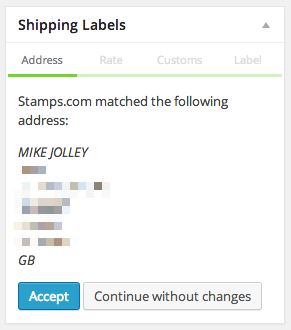
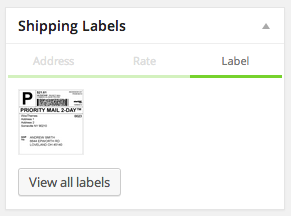
Avec l’intégration Stamps.com, vous pouvez créer automatiquement des étiquettes d’expédition prêtes à imprimer pour USPS, en fonction des articles d’une commande. Stamps.com accède de manière transparente aux derniers tarifs USPS lors de la création de vos étiquettes, ce qui vous offre une fiabilité, une facilité et une rapidité sans précédent.
Cette extension n’affiche pas les tarifs d’expédition pour vos clients lors du processus de validation de la commande. Si vous souhaitez que les tarifs USPS soient affichés sur les pages de panier/de validation de la commande de votre site, vous devez également acheter l’extension USPS Shipping Method. En utilisant ces deux extensions ensemble, vos clients voient les meilleurs tarifs lors de la validation de la commande et vous profitez de ces mêmes tarifs lors de la création d’étiquettes d’expédition via l’administrateur de commande backend.
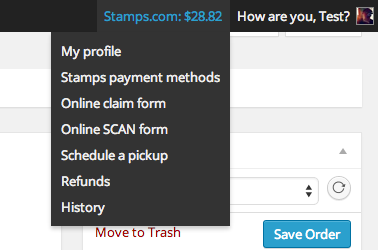
Vous pouvez également traiter les remboursements d’étiquettes d’expédition Stamps.com, supprimer des étiquettes et recharger votre compte Stamps.com.
Avec près de 500 000 clients, Stamps.com est devenu le premier fournisseur d’affranchissement USPS des États-Unis en simplifiant l’accès aux tarifs d’expédition USPS les plus bas et aux services USPS les plus populaires. Que vous expédiiez un colis par jour ou 1 000, depuis votre garage ou un entrepôt géant, Stamps.com a les outils pour rendre votre processus d’expédition USPS® plus rapide, plus abordable et plus efficace.
De plus, les clients de WooCommerce bénéficient de réductions d’expédition USPS exclusives sans exigences de volume minimum pour contribuer à réduire les coûts d’expédition. Vos tarifs Priority Mail moyens sont 3 % inférieurs au tarif de base commercial standard et 17,3 % inférieurs pour Priority Mail Express.
Créez votre compte WooCommerce-Stamps.com aujourd’hui et économisez !
Créez un compte Stamps.com aujourd’hui ! Chaque compte Stamps.com comprend :
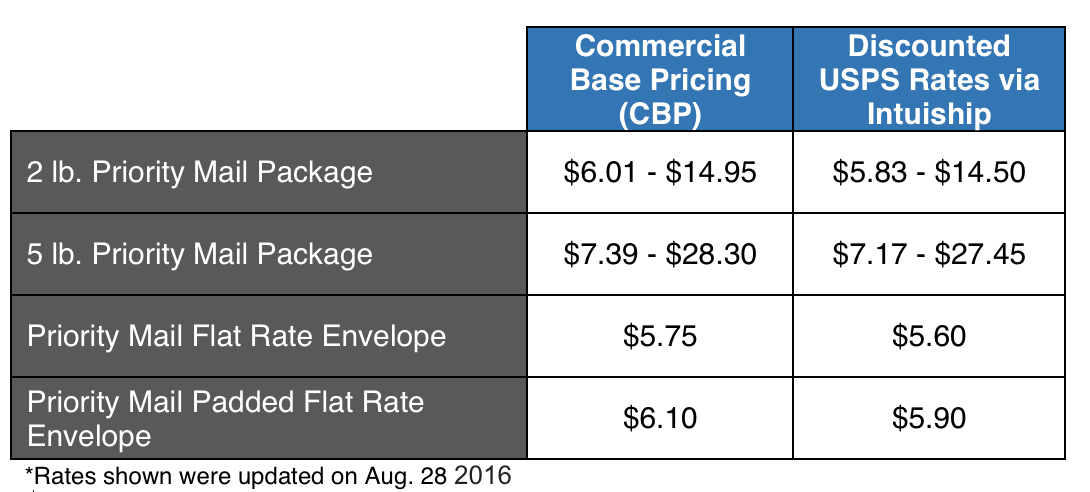
Chez WooCommerce, nous comprenons que vous cherchez des moyens d’économiser de l’argent. C’est pourquoi nous nous sommes associés à IntuiShip, un partenaire d’affranchissement de volume d’USPS, pour vous offrir des réductions d’expédition importantes afin de réduire les coûts d’expédition. Les économies sont remises directement via votre compte WooCommerce-Stamps.com. Aucun compte supplémentaire n’est nécessaire.
Voici des exemples de tarifs réduits que vous obtenez :
Yes. WooCommerce Stamps.com API is a label printing and fulfillment extension that lets you generate ready-to-print USPS shipping labels straight from the order screen in your WooCommerce dashboard. It pulls the items in an order and connects to your Stamps.com account, so you can create labels without copying order details into a separate shipping tool.
WooCommerce Stamps.com API brings label creation into the order admin, so you can review an order, verify the shipping address, and print a USPS label from the same screen. It also lets you monitor your Stamps.com account balance, add funds, and manage postage from within WooCommerce, which streamlines day-to-day fulfillment for stores shipping within the United States.
No. WooCommerce Stamps.com API is built for creating labels in the order admin, not for displaying live rates during checkout. If you want customers to see USPS rates on the cart and checkout pages, pair it with the USPS Shipping Methods extension. Using both together, shoppers see USPS rates at checkout and you print labels using those same rates from the backend.
They solve two different parts of shipping. WooCommerce Stamps.com API creates and prints USPS labels from your order admin after a purchase. USPS Shipping Methods calculates and displays USPS rates to customers during checkout. Many stores run both: one quotes rates to shoppers, and the other handles label printing and fulfillment.
It can help. Through your Stamps.com account, the extension gives you access to discounted USPS rates on domestic and international shipments, including Priority Mail and Priority Mail Express. It also offers discounted Stamps.com package insurance compared with standard USPS insurance rates. Actual savings depend on your services and volume, so review current rate details on the product page.
Yes. WooCommerce Stamps.com API includes an Automatic Funding option that purchases postage on your behalf when your balance drops below a threshold you set. This is useful if staff handle shipping and you do not want them to buy postage manually, or if you prefer to keep a low balance and top up as you go.
Yes. The extension supports international USPS shipments, and it prompts you for the customs information required before an international label can be generated. You add your customs details and line items for the package contents, then create the label from the order screen.
Yes. From the WooCommerce admin, you can process refunds for Stamps.com labels and delete labels when an order changes or a mistake happens. You can also top up your Stamps.com balance from the same area, which keeps postage management inside your store dashboard.
Yes. The extension includes Stamps.com address verification in the order meta box, so you can confirm a customer's shipping address before creating a label. Verifying addresses up front can help reduce failed deliveries and reprints.
Yes. WooCommerce Stamps.com API connects your store to Stamps.com, so you need a Stamps.com account, which carries a monthly fee. Your Stamps.com credentials let the extension request labels and manage postage on your behalf.
You need a Stamps.com account with its monthly fee, and your hosting environment needs SOAP support in place before installation. After activating the extension, you enter your Stamps.com username and password and set your shipping preferences under WooCommerce settings. If you are unsure about the SOAP requirement, your hosting provider can confirm it.
It is best for United States based WooCommerce stores that ship with USPS and want to print labels and manage postage from within their store dashboard. It suits merchants who already use, or plan to use, a Stamps.com account and want discounted USPS rates plus a straightforward, order-by-order label printing workflow.
It may not be the right fit if your main goal is to show shipping rates to customers at checkout, since this extension focuses on label printing in the order admin. For checkout rates, add USPS Shipping Methods. It is also not suitable if you rely on the Ship to Multiple Addresses plugin, because the two are not compatible. And if you ship primarily with carriers outside USPS, another shipping solution may serve you better.
If you run a WooCommerce store on WordPress and ship with USPS, WooCommerce Stamps.com API is a label printing extension designed for exactly that. It connects to Stamps.com and lets you generate USPS labels from each order, verify addresses, manage postage funding, and process label refunds, all inside your WooCommerce dashboard.
Yes, if you prefer to work in the Stamps.com client rather than printing from WooCommerce. The Stamps.com XML File Export extension lets you select orders and export them into an XML format you can import into Stamps.com. This gives you access to the full set of features on the Stamps.com website, including sending Stamps.com tracking emails to customers.
Catégories
Informations sur l'extension
Vérifications qualité
Pays
Conditions





