
Installazioni attive
10K+
Confronto prodotti
L'abbonamento include
Supporto
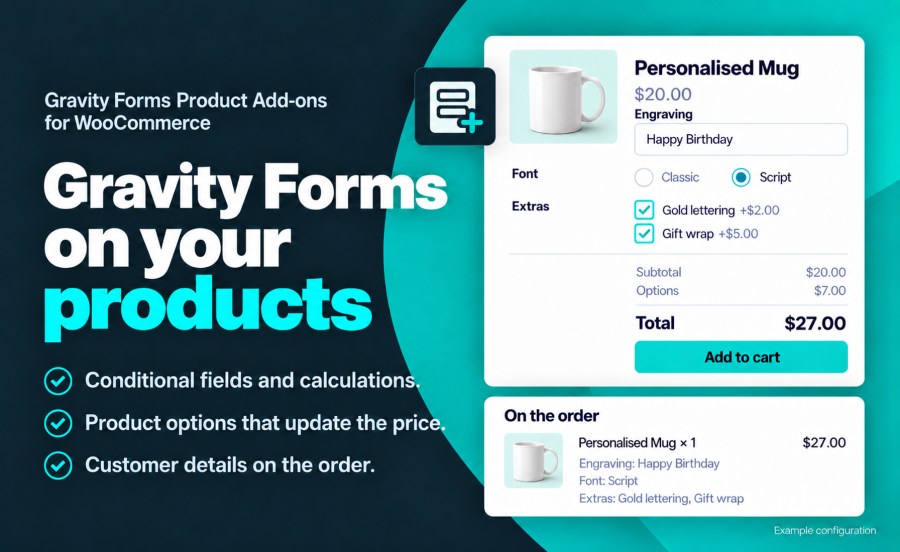
Gravity Forms Product Add-ons is a WooCommerce product configurator built on Gravity Forms. Attach a form to any WooCommerce product and the form becomes part of the product page: customers complete it, pricing updates in real time, and the details stay with the cart item, the order, the order emails and a linked Gravity Forms entry.
It suits any product that needs information from the customer before checkout: engraving and personalization, made-to-order and configure-to-order products, custom-priced products, deposits and donations.

When customers select options that affect cost, the product price updates dynamically on the page. Use Gravity Forms pricing fields — products, options, quantities, and shipping — and the extension calculates the total in real time. Customers see exactly what they are paying for before they add anything to the cart.
You have full control over how pricing appears. Display the base price with a label like “Starting at $50”, hide the default WooCommerce price entirely for products the form prices in full, or customize the subtotal, options, and grand total labels individually.
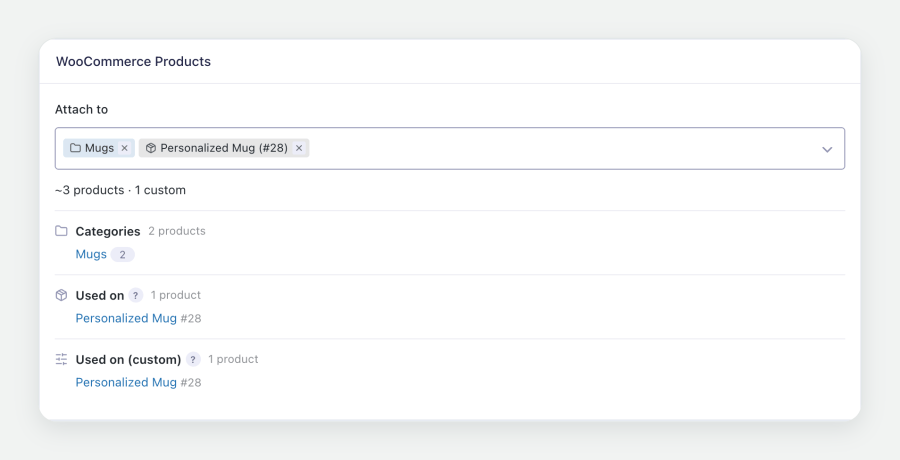
Assign a form to product categories and tags, and every product in them uses it. WooCommerce settings live on the form, so a change made there applies to every product using it, while any product can override individual sections with its own settings. The Products list shows the form assigned to each product and filters by form.
Gravity Forms Product Add-ons integrates with every stage of the WooCommerce purchase flow:
Map Gravity Forms Number fields to the cart item’s weight, length, width and height. Each mapped value replaces the product’s own value or adds to it, so shipping rates and labels match what the customer ordered. A calculated Number field works too, for a weight worked out from length or area. Map a field to quantity to set the cart quantity, or to reduce stock by the field’s value when the order is placed.
Each product’s form is published through the WooCommerce Store API, and items can be added to the cart with their form values. Submissions are validated and priced exactly as they are on the product page, which supports headless storefronts and AI shopping agents.
Gravity Forms Product Add-ons also registers four read-only abilities with the WordPress Abilities API: read a product’s form, price a configuration, list the products that have forms, and read an order’s entries.
When a product’s price depends on its form, override the price in its structured data with a flat price or a price range, either added to the product price or replacing it, so search engines show accurate pricing.
Filters and actions cover cart item data, order item meta, pricing, field visibility, notifications and cart editing, and Gravity Forms logging records each step for debugging. The documentation lists the most common hooks.
Requirement: This extension requires Gravity Forms 2.9 or later (any license level). Gravity Forms is sold separately.
Gravity Forms Product Add-ons has been sold on WooCommerce.com since 2011. Support tickets are answered by its developer.
Yes. Gravity Forms Product Add-ons requires Gravity Forms 2.9 or later, at any license level. Gravity Forms is sold separately.
The cart price is the WooCommerce product price plus the total of the form's Product and Option fields. A $20 mug with $7 of options is added to the cart at $27. Set the Regular Price to $0 when the form sets the whole price.
Yes. Assign a form to product categories and tags from the form's WooCommerce settings, and every product in them uses it. Settings made on the form apply to every product that uses it, and any product can override them section by section. See the documentation for both setups.
Yes. With cart editing enabled, an Edit link on the cart item reopens the product with the customer's selections filled in, and saving updates the item in the cart.
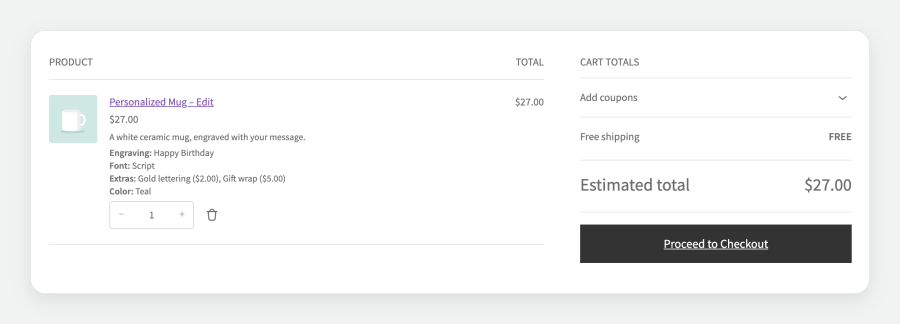
Yes. Form details show one per line in the Cart, Mini-Cart and Checkout blocks, and in the classic cart and checkout.
On the cart item, at checkout, on the order, in the customer's account, in order emails and in a Gravity Forms entry linked to the order. You choose whether the item shows every field, a selected set of fields, or a custom summary built from merge tags.
Yes. Map form fields to the cart item's weight, length, width, height and quantity, and shipping rates and labels use those values.
Gravity Forms Product Add-ons works with simple and variable products, WooCommerce Subscriptions, WooCommerce Bookings, Dynamic Pricing, Bulk Variation Forms, Quick View Pro, High-Performance Order Storage, and Gravity Perks such as Populate Anything, Conditional Pricing, Limit Choices and Nested Forms.
No. Hidden fields are saved with the order and the entry, and stay off the cart, the order and the order emails. Choose every other field, a set of fields, or a merge-tag summary for what the customer sees.
Each ordered item creates one entry with the customer's answers, linked to its order. With Entry payment updates enabled, the entry also records the line total, less any refund, the transaction ID and the payment date, and its payment status follows the order.
Yes. A Gravity Forms Product field with the Calculation type sets a price from the customer's other answers, such as width times height. The cart price is the product price plus the form's Product and Option fields.
Yes, with Gravity Forms 3.2 or later. Each row's Product and Option fields add to the price, the cart and order show one line per row, and cart editing restores every row.
Yes. On a variable product the form appears once a variation is selected. On a subscription product, renewal orders get their own entries.
Yes. Choose the order statuses that send them, such as Processing and Completed. Each entry sends its notifications once, when the order first reaches one of those statuses.
Yes. The [gravityforms_product_addons id="123"] shortcode places the product, its form and its add to cart button on any page or post.
Yes. Choose a File Upload field as the Thumbnail, and the customer's image replaces the product image in the cart, at checkout, on the order and in order emails that show product images.
Questions before you buy go through the pre-sales form. After purchase, open a ticket from your WooCommerce.com account. Support tickets are answered by the Gravity Forms Product Add-ons developer.
Informazioni sull'estensione
Controlli di qualità
Paesi
Requisiti