
Product Icon

Archiva for WooCommerce

Keep Your WooCommerce Admin Fast & Organized — Even as You Scale Automatically archive old orders so your store stays clean, manageable, and future-ready — without manual cleanup.
Scegli un'opzione di fatturazione
$49
Risparmia 20%
$98 $78.40

Subscription includes

  • Product updates and improvements
  • Servizio clienti
  • 30-day money-back guarantee

  • Automatically archive old WooCommerce orders
  • Advanced retention and cleanup rules
  • Restore archived orders anytime
  • Export archived orders (CSV & XML)
  • Show archived orders in the customer’s My Account page
  • Fully compatible with HPOS & legacy order storage system
  • Archive via WP-CLI

Designed to keep large WooCommerce stores manageable as order volume grows.

Archiva for WooCommerce automatically archives older orders based on age and status, helping reduce unnecessary load on the active order list and keeping your WooCommerce admin easier to work with over time.

As your WooCommerce store grows, managing thousands of past orders inside the main Orders screen can become increasingly cumbersome and harder to work with. Archiva works quietly in the background to support long-term admin usability and store scalability.

Order Archiving & Retention

  • Automatically archive old WooCommerce orders based on age.
  • Archive orders by status, including completed, cancelled, failed, or custom statuses.
  • Apply different retention rules before permanently deleting archived data.
  • Manually archive orders using bulk actions or individual order screens.

Access, Restore & Export

  • View archived orders directly in the WooCommerce dashboard.
  • Restore archived orders anytime from the admin or via WP-CLI.
  • Export archived orders as CSV or XML for records, audits, or compliance.

Customer Visibility

  • Optionally display archived orders in My Account > Archived Orders for customers.

Advanced & Compatibility

  • WP-CLI support for bulk and automated workflows.
  • Fully compatible with HPOS and legacy (posts-based) order storage.

What store owners say about Archiva

⭐⭐⭐⭐⭐
“I modified the plugin to process more orders per run, and it’s helping a lot with performance. The flexibility Archiva provides makes it easy to adapt to real-world store needs.”

⭐⭐⭐⭐⭐
“The implementation was seamless. We ran into an issue, and their customer service was very fast and helpful — the problem was fixed in just a few days.”

⭐⭐⭐⭐⭐
“Very interesting plugin. Based on the feature set and code quality, this is the best order archiving solution I’ve come across.”

Rated 4.7/5 by store owners


How it works

  • Set Retention Rules — Choose which orders to archive based on age and order status, then enable automated archiving.
  • Archiva Runs Silently — Once configured, Archiva automatically archives eligible orders at your chosen interval, no manual action required.
  • Manage Archives — View, export, restore, or permanently delete archived orders from WooCommerce > Archived Orders whenever you need.
  • Smoother Day-to-Day Store Operations — By reducing the size of core WooCommerce order tables, Archiva helps maintain a responsive Orders page as your store scales.

Archive orders based on order status

Easily archive WooCommerce orders based on their status. Whether it’s completed, canceled, or custom statuses, Archiva lets you automate the process and keep your order list clutter-free.
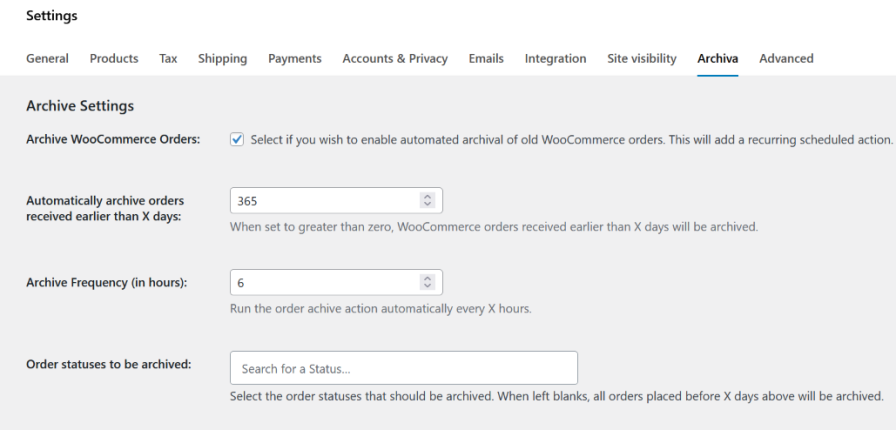
archiva settings

Archive Frequency

Choose an archive frequency that is perfect for you store. Archiva runs the automated archive schedule once every 12 hours by default. But you can set it to run as frequently as every 30 minutes. archive frequency

Archive failed/canceled orders quickly

If you wish to archived failed/canceled orders quickly (within a few days) while continuing to retain the normal orders for a year, we have you covered. Set a shorter retention period for such orders.

failed/canceled orders archive settings

Auto delete old archives after a secondary retention period

Delete older archived orders automatically after retaining them for a secondary retention window. The plugin creates a lean CSV backup of the orders on the site before permanently deleting them.
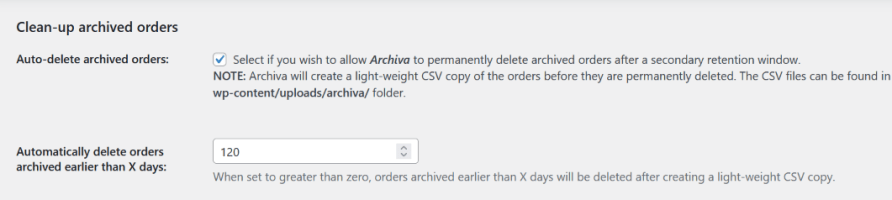
secondary retention period settings

Archive in bulk via WP-CLI

More comfortable working via WP-CLI? Archive orders in bulk using the WP-CLI tool. List, view, archive, unarchive and delete archived orders via the command line at your convenience.
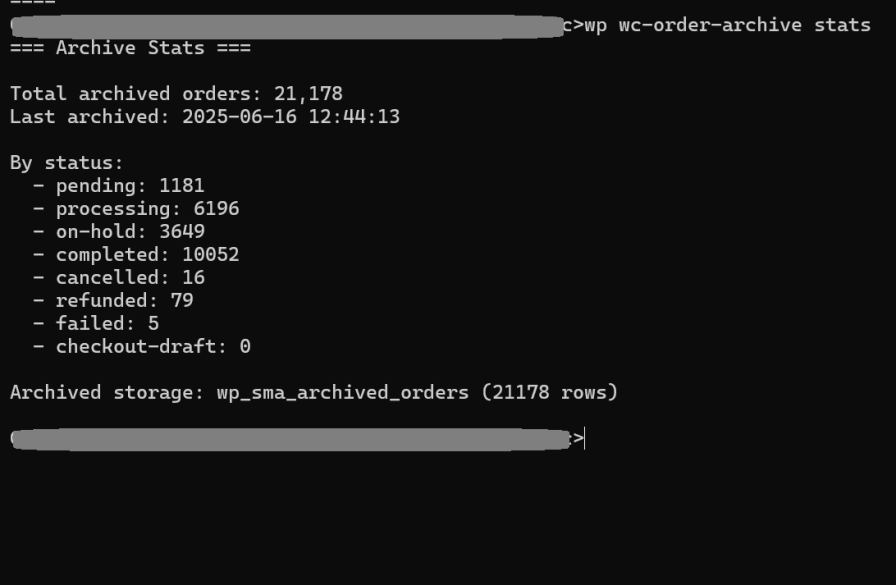
wp-cli-archiva-stats

WooCommerce > Archived Orders page

Easily manage your archived orders from the WooCommerce Archived Orders page. View, unarchive, export, or delete orders as needed, all in one place.
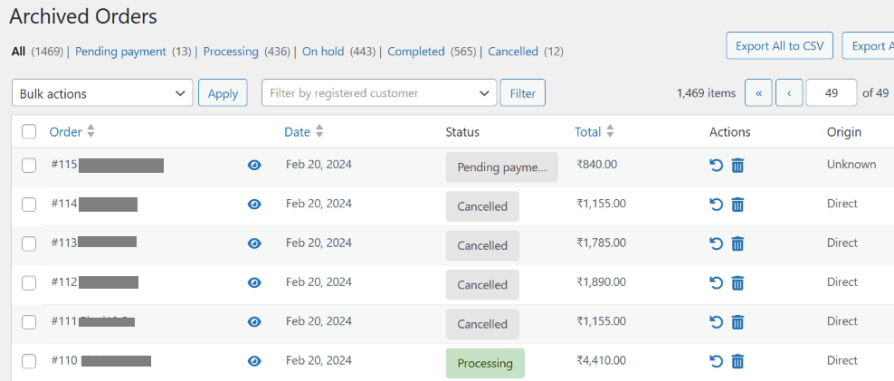
archived-orders-page

Orders are segregated based on status and can be filtered by customer.
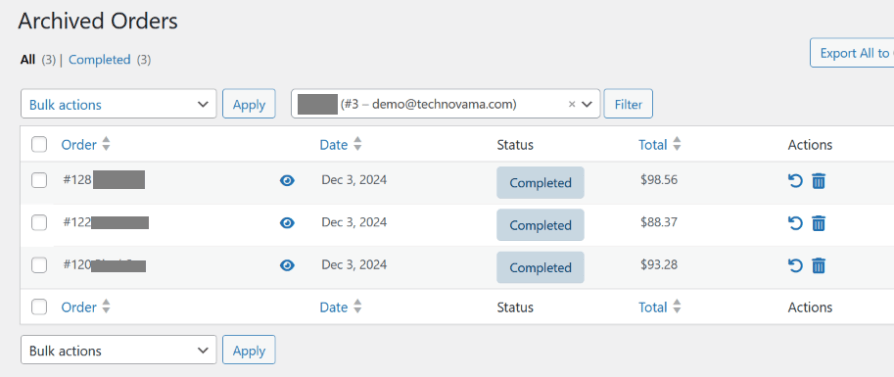
filter-archived-orders-by-customer

View archived order details with just a click.
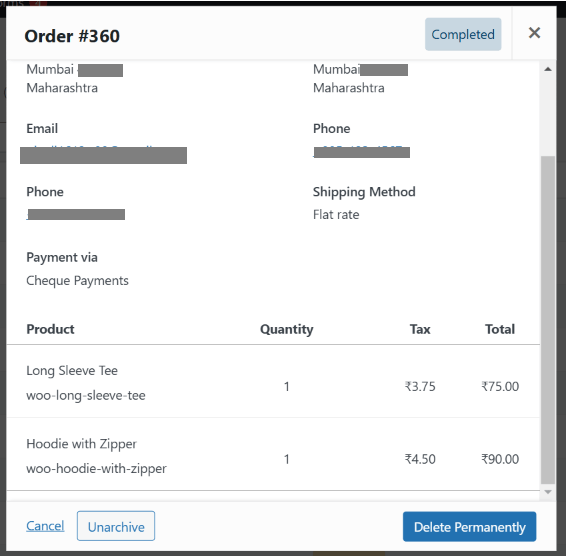
view-archived-order-details

Unarchive an order

Need to restore an archived order? Unarchive it with a single click. You can also unarchive multiple orders at once using Bulk Actions for faster management.
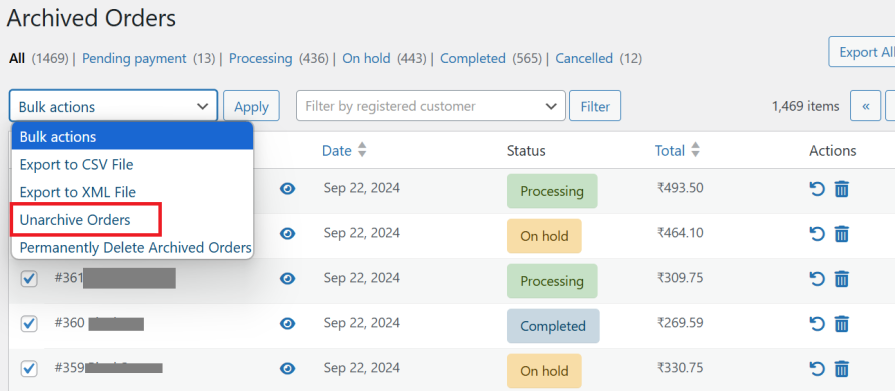
unarchive-orders-bulk-action

Export order data to CSV/XML files

Export order data to a CSV or XML file for safekeeping and easy record-keeping. Filter orders by status, customer, and more before exporting and downloading the files in just a few clicks.
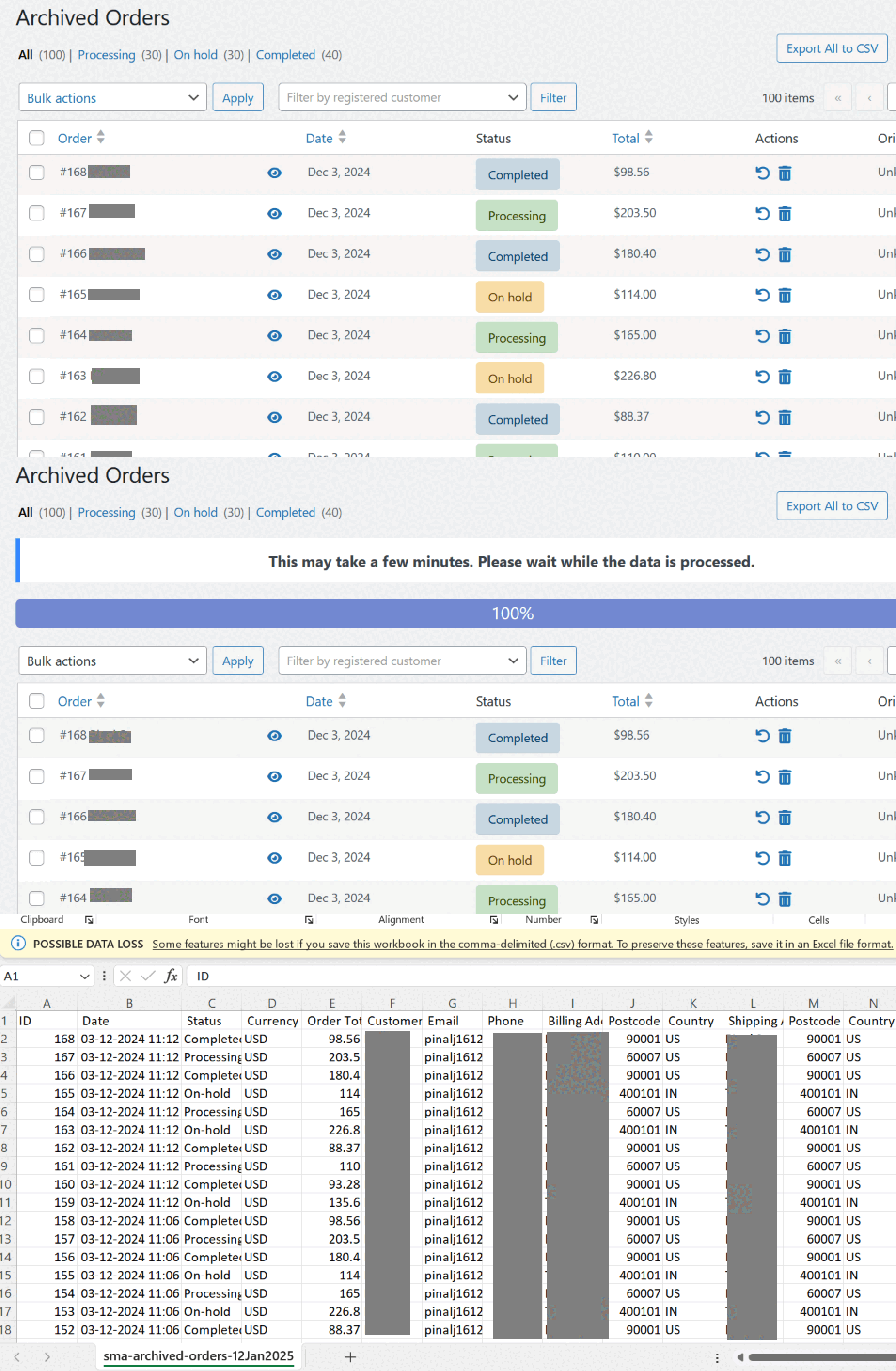
export-csv

Manually archive orders

Manually archive orders whenever needed with just a click. Select individual orders or use Bulk Actions to archive multiple orders at once for better order management.
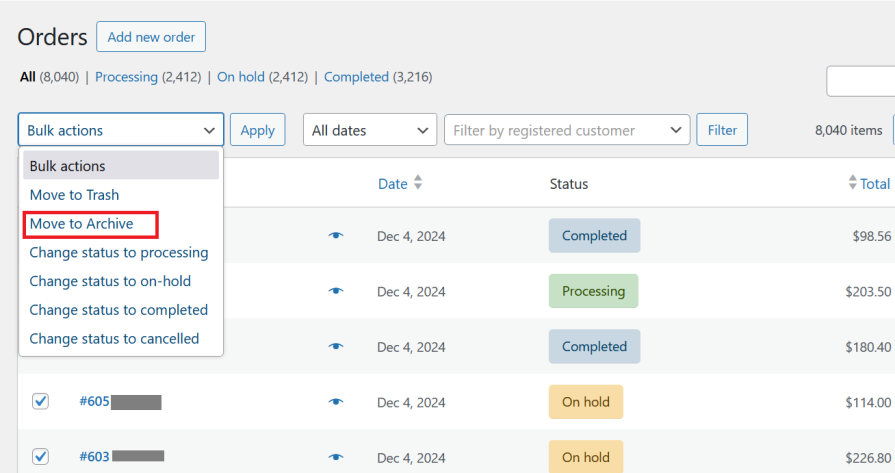
manual-archive-bulk-action

edit-order-page-unarchive

Manually delete archived order

Manually delete archived orders when they’re no longer needed. Delete a single order using row actions or remove multiple orders at once with Bulk Actions for efficient cleanup.

delete-archived-orders

My Account > Archived Orders

Let customers access their archived orders easily from My Account > Archived Orders. This dedicated page displays all archived orders for convenient viewing.
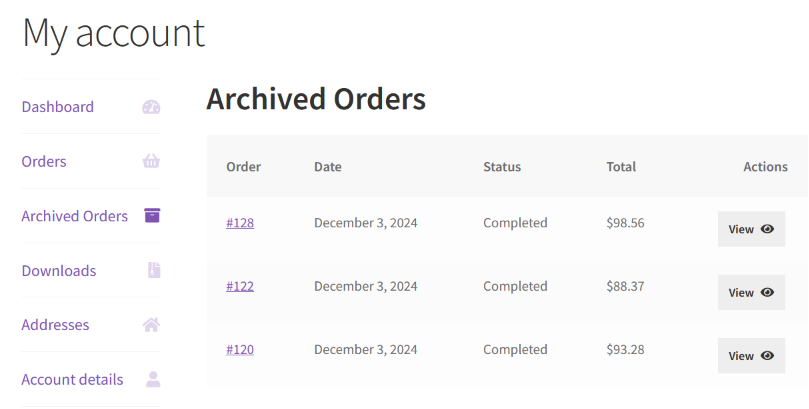
myaccount-archived-orders-page

myaccount-archived-order-details

Benefits

  • Streamline your order management process by archiving old WooCommerce orders
  • Export old order data as CSV and XML for records and compliance
  • Restore archived orders if needed with just a click
  • Display archived orders in My Account > Archived Orders
  • Securely store archived orders in your WordPress database, maintaining full data ownership, privacy, and compliance

Archiva is built to support growing WooCommerce stores without changing existing workflows.

Upcoming features

  • More file formats for export.
  • Add order notes for archival and unarchival.
  • Add API endpoints for external access to archived order data.

Join our family of 4000+ delighted TechnoVama users and experience the difference!”

  • Enjoy unparalleled support
  • Streamline your order management process
  • Archiva works silently in the background without affecting your day-to-day tasks

Have a feature request?  Submit one here.


Domande più comuni

How frequently can I run the automated archival cycle?

By default, the automated archival action runs once every 12 hours. You can choose to run it once every 30 minutes. 50 orders are archived in each cycle.

How can I archive more than 50 orders at one go?

You can choose to archive orders via WP-CLI. Detailed documentation is available here

Can I archived failed/canceled orders faster?

Yes, you can modify the Automatically archive failed/cancelled orders received earlier than X days setting to a smaller value (such as 7, 14 or more) based on your requirements.

Can the plugin delete archived orders after a secondary retention window?

Yes. For example, if you want to archive orders 2 years (730 days) after they are received and then delete them after another year (365 days), here’s how:

  1. Set "Automatically archive orders received earlier than X days" to 730.

  2. Enable "Auto-delete archived orders" and set "Automatically delete orders archived earlier than X days" to 365.
    Before deleting, the plugin will create a lightweight CSV backup of the archived orders on your site for safekeeping.

Recensioni dei clienti

Extension information

  • PHP version required: 7.4
  • Tested with WordPress: 6.8.3
  • Tested with WooCommerce: 10.3.5
  • Requires at least WordPress: 4.5
  • Requires at least WooCommerce: 5.0

Countries

  • Worldwide

Related Products

Price $279 Annualmente
Rated 3.2 out of 5 stars
Price $79 Annualmente
Rated 3.4 out of 5 stars
Price $59 Annualmente
Rated 3.1 out of 5 stars
Price $109 Annualmente
Rated 2.9 out of 5 stars
Price $49 Annualmente
Rated 4.1 out of 5 stars
Price $109 Annualmente
Rated 2 out of 5 stars
Price $109 Annualmente
Rated 2.3 out of 5 stars
Price $109 Annualmente
Rated 2.6 out of 5 stars
Price $109 Annualmente
Rated 2 out of 5 stars




