
Manage WooCommerce Archived Orders via CLI
Archiva supports WP-CLI, enabling store owners and developers to archive, unarchive, inspect, list, and delete WooCommerce orders directly from the command line. This is ideal for automating cleanup tasks, maintaining lean order tables, and efficiently managing large order volumes.
Archive orders
↑ Back to topwp wc-order-archive archive --limit=50 --dry-run --before=365 --status=wc-failed --include-analyticsMoves eligible WooCommerce orders from WooCommerce > Orders to WooCommerce > Archived Orders. By default, up to 100 orders are processed per cycle.
Parameters
- limit – optional (integer)
- Number of orders to archive in one cycle. Default is 100. Max allowed: 500.
- dry-run – optional
- Simulates the process without actually archiving any orders. Useful for previewing which orders will be archived.
- before – optional (integer)
- Archive orders older than the specified number of days. If omitted, the plugin uses the setting from WooCommerce > Settings > Archiva > Automatically archive orders received earlier than X days.
- status – optional (string)
- Comma-separated list of order statuses to archive (e.g.,
wc-completed,wc-failed). No spaces allowed. If not included, uses the value in WooCommerce > Settings > Archiva > Order statuses to be archived.
- Comma-separated list of order statuses to archive (e.g.,
- override-meta-keys – optional (string)
- Comma-seperated list of meta keys to override.
- sma_unarchive – to archive orders which were previously unarchived
- subscription-orders – optional (string)
- Define how to handle WooCommerce Subscription related orders
- none – Do not archive any subscription related orders
- parents – Archive only parent subscription orders
- renewals – Archive only renewal subscription orders
- all – Archive all subscription related orders
- include-analytics – optional
- When added, the plugin will archive the analytics data from WooCommerce analytics tables for the orders being archived.
NOTE: The plugin has always archived analytics data along with orders on HPOS-enabled sites. This behavior will continue in version 1.8, even if the --include-analytics flag is not specified.
Starting with version 1.9, you must specify the --include-analytics flag in the CLI command if you want analytics data to be archived along with an order.
Unarchive orders
↑ Back to topwp wc-order-archive unarchive --order-id=1234Moves orders from Archived Orders back to WooCommerce > Orders. Either the order-id OR the order-number should be provided. The plugin will display basic order information and ask for confirmation before proceeding.
Parameters
- order-id – optional (integer)
- Accepts one or more order IDs (comma-separated). Max: 100.
- order-number – optional (integer)
- Accepts one or more order numbers (comma-separated). Max: 100.
- start-date – optional (string) – Format – YYYY-MM-DD
- end-date – optional (string) – Format – YYYY-MM-DD
- email – optional (string)
- Filter archived orders based on billing email address
- dry-run – optional
- Simulates the process without actually unarchiving any orders. Useful for previewing which orders will be unarchived.
Delete archived orders
↑ Back to topwp wc-order-archive delete --order-id=1234Permanently deletes an archived order. Up to 2000 archived orders can be deleted in a single run. The plugin displays basic order information and asks for confirmation before proceeding. Deleted orders cannot be recovered.
- order-id – optional (integer)
- order-number – optional (integer)
- start-date – optional (string) – Format YYYY-MM-DD
- end-date – optional (string) – Format – YYYY-MM-DD
- email – optional (string)
- Filter archived orders based on billing email address
- no-backup
- By default, the plugin creates a CSV backup of the archived orders being deleted. Add this parameter if you wish to skip the backup.
- dry-run – optional
- Simulates the process without actually deleting any orders. Useful for previewing which orders will be deleted.
Archive analytics data
↑ Back to topwp wc-order-archive analytics archive --before=730 --limit=500 --dry-runMoves analytics data for eligible archived orders from core WooCommerce tables into Archiva’s tables. By default, up to 100 orders are processed per cycle.
Parameters
- order-id – optional (integer)
- order-number – optional (integer)
- limit – optional (integer)
- Number of orders to check analytics data for archival in one cycle. Default is 100. Max allowed: 500.
- dry-run – optional
- Simulates the process without actually archiving any analytics data. Useful for previewing the analytics data for which orders will be archived.
- before – optional (integer)
- Archive analytics data for orders older than the specified number of days. If omitted, the plugin uses the setting from WooCommerce > Settings > Archiva > WooCommerce Analytics > Archive analytics data for orders received earlier than X days.
- status – optional (string)
- Comma-separated list of analytics statuses to archive (e.g.,
retained,unarchived). No spaces allowed. If not included, archives only retained status.
- Comma-separated list of analytics statuses to archive (e.g.,
Rebuild analytics data
↑ Back to topwp wc-order-archive analytics rebuild --start-date=2024-01-01 --end-date=2024-01-31Moves/unarchives analytics data for archived orders that were placed in a specific date range. Analytics data is moved from Archiva’s tables back into WooCommerce core tables.
Parameters
- order-id – optional (integer)
- order-number – optional (integer)
- start-date – optional (string) – Format – YYYY-MM-DD
- end-date – optional (string) – Format – YYYY-MM-DD
- dry-run
- Simulates the process without actually unarchiving any analytics data. Useful for previewing the analytics data for which orders will be unarchived.
Delete analytics data
↑ Back to topwp wc-order-archive analytics delete --order-id=1234Permanently deletes the analytics data for an archived order. The analytics data for up to 2000 archived orders can be deleted in a single run. The plugin displays basic order information and asks for confirmation before proceeding. Deleted analytics data cannot be recovered.
Parameters
- order-id – optional (integer)
- order-number – optional (integer)
- start-date – optional (string) – Format YYYY-MM-DD
- end-date – optional (string) – Format – YYYY-MM-DD
- dry-run – optional
- Simulates the process without actually deleting the analytics data for any orders. Useful for previewing the analytics data for which orders will be deleted.
Archiva stats
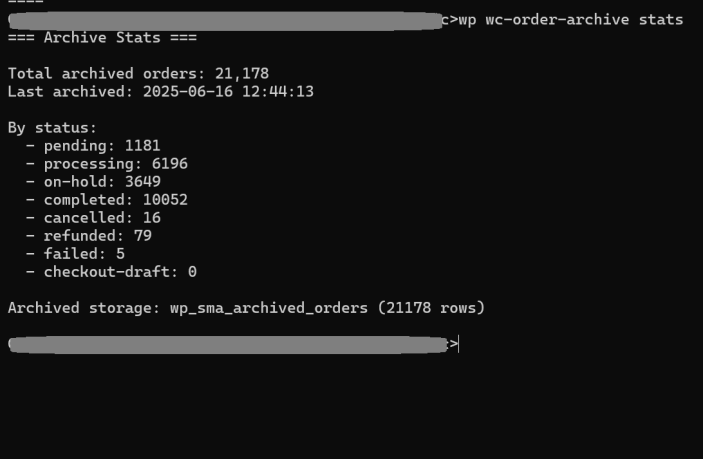
↑ Back to topwp wc-order-archive stats --before=730 --status=unarchived --limit=500 --dry-runDisplays basic stats like number of orders archived, the last time the archival cycle ran. It also displays archived order count by order status.
List archived orders
↑ Back to topwp wc-order-archive list --limit=30 --page=4Parameters
- limit – optional (integer)
- Number of orders to display. Default: 30. Max: 50.
- page – Optional (integer)
- Pagination index. Default: 1.
View archived order details
↑ Back to topwp wc-order-archive inspect --order-id=1234wp wc-order-archive inspect 1234View order details for an archived order. Either the order-id OR the order-number should be provided. The order-id or order-number can be passed along with the parameter name or as the first argument.
Parameters
- order-id – optional (integer)
- order-number – optional (integer)
Please feel free to reach out to us for any further queries.