Icona del prodotto

Google Address Autocomplete per WooCommerce

WooCommerce address autocomplete with Google Maps: one tap fills street, city, state and postcode at checkout, in each country's format.
Scegli un'opzione di fatturazione
$49
Risparmia 20%
$98 $78.40

L'abbonamento include

  • Aggiornamenti e miglioramenti del prodotto
  • Servizio clienti
  • Garanzia di rimborso entro 30 giorni

WooCommerce address autocomplete that gets it right the first time

A missing house number or a postcode in the wrong field means a parcel that comes back, a support email and an unhappy customer. Address Autocomplete for Google Maps suggests real addresses from Google Maps Platform as customers type. One tap fills the street, house number, city, state or province, postcode and country in WooCommerce’s own fields, in the right format for each country, so checkout is faster and orders ship to the right door.
  • Fewer typing errors. Customers choose a suggested address instead of typing four fields by hand.
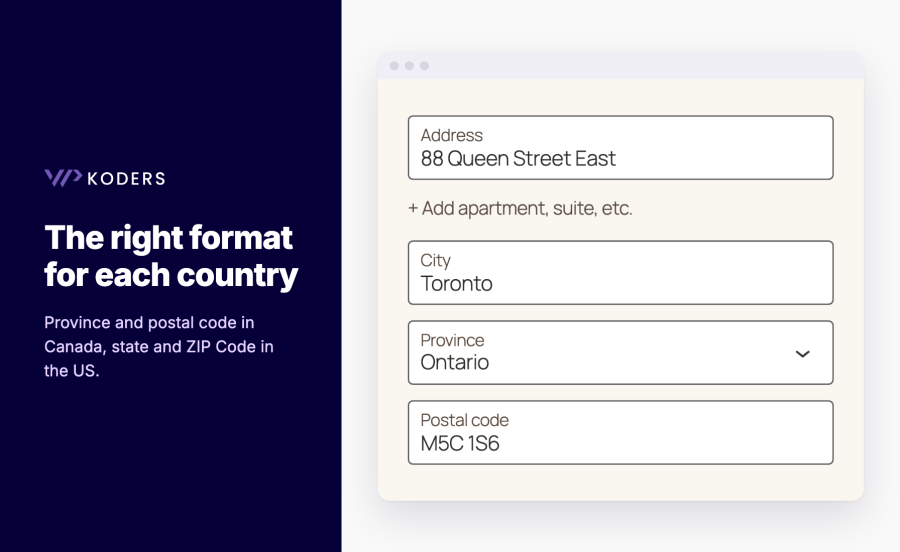
  • The right format everywhere. House number first or street first per country, and states and provinces matched to WooCommerce’s own lists, including Italy and Spain.
  • Block and classic checkout. Suggestions appear in the Address field of the Checkout block and the classic checkout, and in My Account.
  • Privacy and cost under control. Load Google only when the customer starts typing, or only after cookie consent.
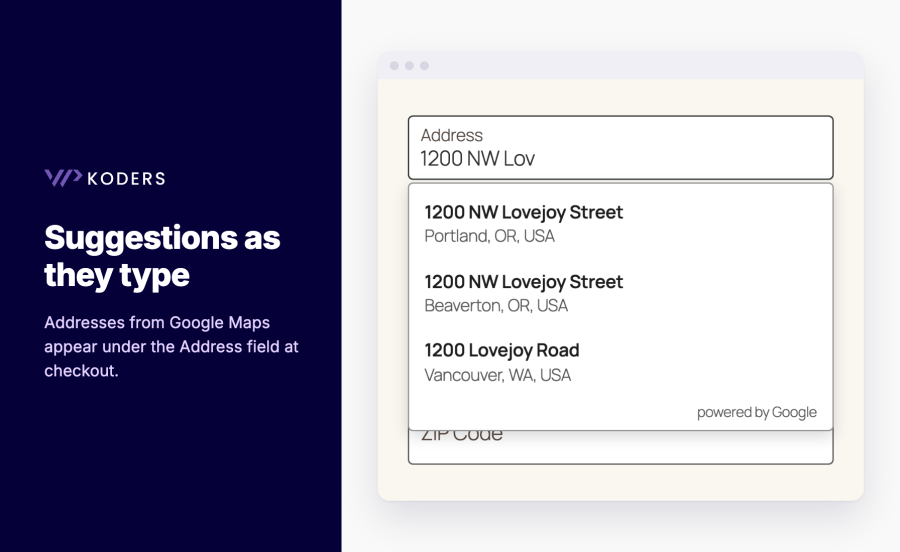
Google address autocomplete suggestions under the checkout Address field

Who it’s for

  • Stores that ship physical products and want fewer returned or delayed parcels.
  • Shops selling to several countries where address formats differ.
  • Mobile-heavy stores where typing a full address is the slowest part of checkout.
  • Local delivery businesses that need the exact delivery spot saved on the order.
Canadian address filled with province and postal code in the right format

Google address autocomplete for checkout and My Account

Checkout address autocomplete

  • Suggestions as they type. Addresses from Google Maps appear under the Address field, with a keyboard- and screen-reader-friendly list.
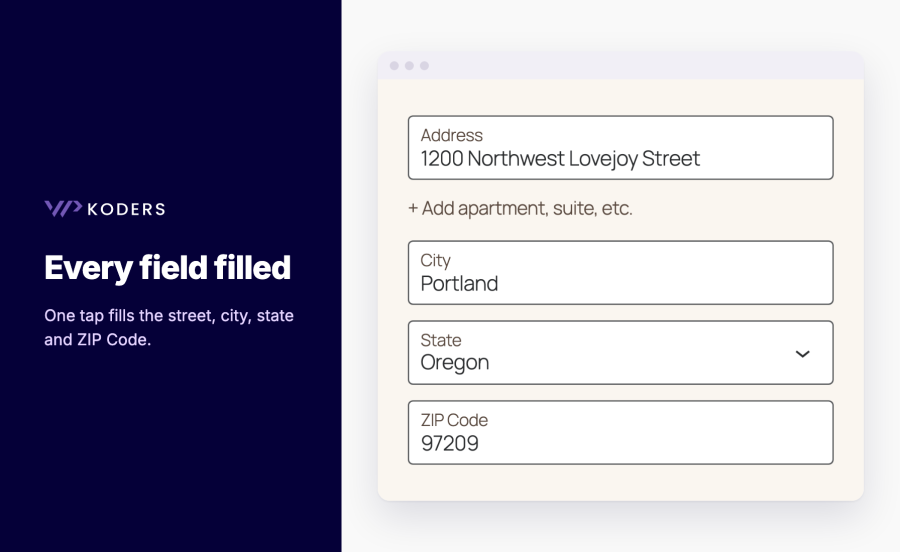
  • Every field filled. Street, house number, city, postcode, country and state or province go into WooCommerce’s own fields.
  • Billing and shipping, checkout and My Account. Switch each one on or off.
  • Limit suggestions to your countries. Up to 15 countries (5 with the legacy Places API), or worldwide.
  • House number hint. Optionally ask the customer to add a house number when the chosen address has none.
Checkout address, city, state and ZIP Code filled with one tap

Maps and delivery location

  • Optional map with a draggable pin. Customers can fine-tune the delivery spot.
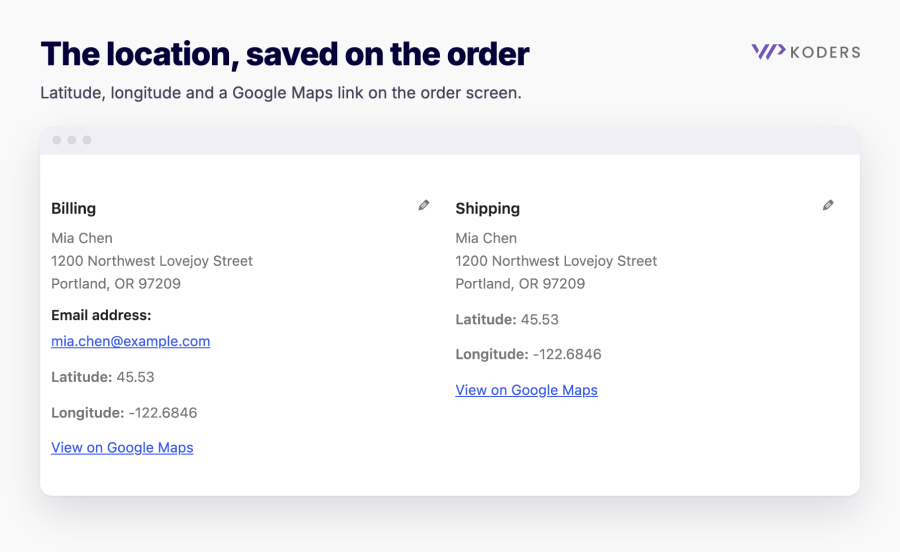
  • Location saved on the order. Latitude, longitude and a Google Maps link on the order screen. For older orders, “Locate on map” finds it.
Order screen showing the delivery latitude, longitude and a View on Google Maps link

Setup, privacy and cost

  • Places API (New), with automatic fallback to the legacy Places API for older keys, or force either one.
  • Separate browser and server keys with setup guidance and a “Test keys” button.
  • Advanced field mapping with tokens and a live preview, and apartment or unit into Address 2 or Address 1.
  • Privacy tools. Load Google on first use or after consent (WP Consent API), suggested privacy-policy text and personal data export.
  • Ready for real stores. HPOS compatible and translation-ready.

How it works

  1. Create a Google Cloud project with billing and enable the Maps JavaScript API, Places API (New) and Geocoding API.
  2. Go to WooCommerce > Settings > Address Autocomplete, paste your browser API key and click “Test keys”.
  3. Choose where suggestions appear (checkout, My Account, billing, shipping) and which countries to suggest.
  4. Type an address on your checkout and pick a suggestion.

Works great with


Domande più comuni

How do I add Google address autocomplete to WooCommerce checkout?

Install the plugin, paste a Google browser API key under WooCommerce > Settings > Address Autocomplete and click "Test keys". Suggestions then appear in the Address field of the Checkout block or the classic checkout.

Which Google APIs do I need?

Maps JavaScript API, Places API (New) and Geocoding API, on a Google Cloud project with billing enabled. Keys that only have the legacy "Places API" keep working: the plugin detects this and uses the legacy API.

How much does Google charge for address autocomplete?

Google bills autocomplete per session (typing plus one address selection) and maps per load, and has a monthly free usage tier. To reduce requests, load Google only when the customer starts typing and limit suggestions to the countries you ship to. Check Google Maps Platform pricing for current rates.

Does it work with the WooCommerce Checkout block?

Yes. Suggestions appear in the Address field itself, also after "Edit address" or switching countries. The map and the house-number hint are shown under the address form.

Does it fill addresses correctly outside the US?

It fills WooCommerce's fields for every country WooCommerce has states for, including provinces in Italy and Spain. You choose house number first ("350 5th Avenue") or street first ("Via Roma 12"), for all countries or only the ones you pick.

Can I keep Google off the page until the visitor consents?

Yes. Turn on "Wait for consent" (works with consent plugins that support the WP Consent API), or load Google only when the customer starts typing an address.

Where do I find the delivery location of an order?

On the order screen, under the billing and shipping address: latitude, longitude and a "View on Google Maps" link. For orders placed without choosing a suggestion, click "Locate on map".

Can I limit suggestions to certain countries?

Yes, up to 15 countries (5 with the legacy Places API), under Address fields > Limit suggestions to countries. Leave it empty to suggest addresses worldwide.

Related Products

Prezzo $279 Annualmente
Valutato 3.9 su 5 stelle
Prezzo $79 Annualmente
Valutato 3.4 su 5 stelle
Prezzo $59 Annualmente
Valutato 3.1 su 5 stelle
Prezzo $49 Annualmente
Valutato 4.1 su 5 stelle
Prezzo $109 Annualmente
Valutato 2 su 5 stelle
Prezzo $109 Annualmente
Valutato 2.8 su 5 stelle
Prezzo $109 Annualmente
Valutato 2.5 su 5 stelle
Prezzo $199 Annualmente
Valutato 4 su 5 stelle
Prezzo $39 Annualmente
Valutato 2.8 su 5 stelle
Uso dei tuoi dati personali
Noi e i nostri partner trattiamo i tuoi dati personali (come dati di navigazione, indirizzi IP, informazioni sui cookie e altri identificatori univoci) sulla base del tuo consenso e/o del nostro legittimo interesse per ottimizzare il nostro sito web, le attività di marketing e la tua esperienza utente.