Icona del prodotto

Migrate & Import Shopify to WooCommerce

Migrate Shopify to WooCommerce in one run. Import products, orders, customers, coupons, pages, and blogs, then keep them in sync.
Scegli un'opzione di fatturazione
$79
Risparmia 20%
$158 $126.40

L'abbonamento include

  • Aggiornamenti e miglioramenti del prodotto
  • Servizio clienti
  • Garanzia di rimborso entro 30 giorni

Move Your Shopify Store to WooCommerce Without Losing Data

Migrate & Import Shopify to WooCommerce is a Shopify to WooCommerce migration plugin that moves your store data from Shopify straight into WooCommerce through the Shopify API. It imports your products, customers, orders, coupons, pages, and blog posts, so you do not have to rebuild your catalog by hand, clean up CSV files, or pay for a migration service.

Import everything at once, or use filters to bring over only the data you need. After the move, real-time sync keeps WooCommerce updated with changes made in Shopify, so you can keep selling while you switch platforms.

Migrate & Import Shopify to WooCommerce Features List

  • Import 6 data types: products, customers, orders, coupons, pages, and blogs
  • Connect directly to Shopify through its API, with no CSV files
  • Import variable products with their variations, images, stock, and SKUs
  • Filter products by title, type, vendor, product ID, and published date
  • Save imported products as Active, Draft, or Archived
  • Filter orders by created date, financial status, and fulfillment status
  • Map Shopify order statuses to WooCommerce order statuses
  • Filter customers by ID, name, country, and city
  • Import coupons by start or end date
  • Import pages and blog posts by status, ID, name, or author
  • Run a full import in one click or import each data type separately
  • Track imports with a progress bar and status for each data type
  • Get an email notification when the import is complete
  • Keep WooCommerce in sync with Shopify in real time for products, stock, orders, and customers
Note: This plugin requires substantial server resources due to intensive data processing operations. Ensure your hosting environment has adequate CPU, memory, and processing capacity to handle the migration workload effectively.

Import Shopify to WooCommerce Directly Through the API

The plugin connects to your Shopify store with the store URL, API key, and API secret key from a Shopify custom app. It works with apps created in the Shopify Dev Dashboard as well as legacy custom apps, and a built-in connection check confirms your store is linked before you start. Because data moves directly from Shopify to WooCommerce, you don’t need to reformat exported files or rely on a third-party service to handle your store data.
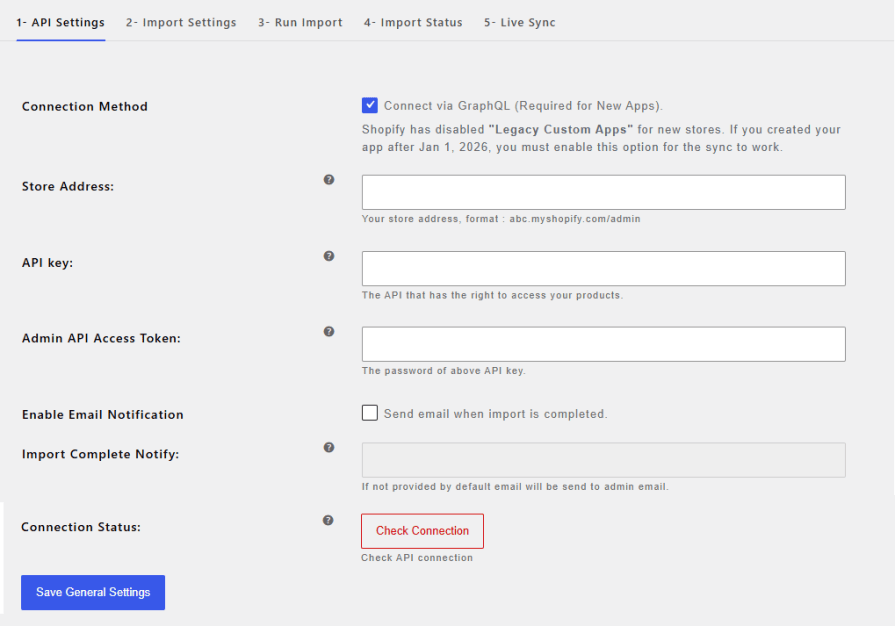
Note: For details on how to create a Custom App in Shopify (In the Dev Dashboard or Legacy Custom App). Click Here

Migrate All Your Shopify Store Data

A complete Shopify to WooCommerce migration covers more than products. The plugin transfers six types of data:
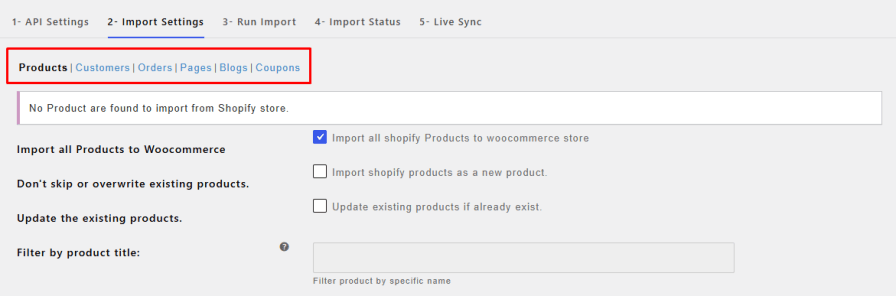
  • Products: titles, descriptions, prices, images, variations, stock, and SKUs
  • Customers: first and last name, phone, address, city, province, postcode, and country
  • Orders: order history with financial and fulfillment status
  • Coupons: discount codes with their start and end dates
  • Pages: page titles and content
  • Blogs: post titles, content, tags, and featured images

Import Products from Shopify to WooCommerce with Filters

Import your full catalog with one checkbox, or choose exactly which products to move. Filter Shopify products by title, product type, vendor, product ID, or published date to import only what you need.

Every Shopify to WooCommerce product import keeps variable products intact, with their variations, images, stock, and SKUs. You can also choose whether imported products are saved as Active, Draft, or Archived, so you can review them before they go live.
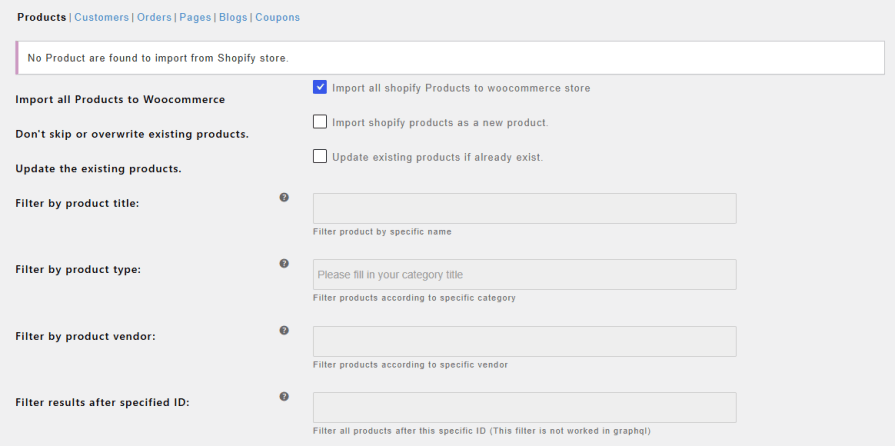
Import Orders with Filters and Status Mapping

Bring over your complete order history or only the orders you need. Filter orders by created date (before or after a specific date), financial status (authorized, pending, paid, refunded, voided), and fulfillment status (shipped, unshipped, partial, unfulfilled).

Map each Shopify order status to the WooCommerce status of your choice, and skip customer addresses during the order import if you do not need them.
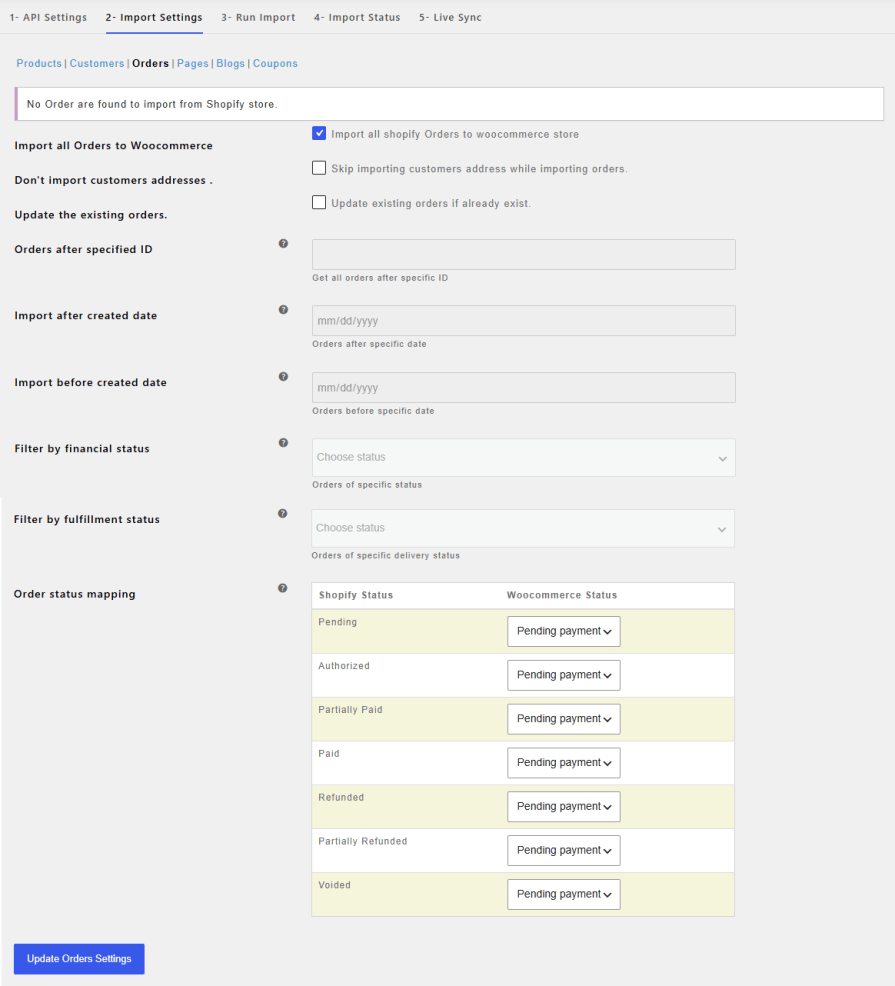
Import Customers by Name, Country, or City

Move your customer list with names, phone numbers, and full address details. Import all customers at once, or filter them by customer ID, name, country, or city. You can also skip updating customers that already exist in WooCommerce.
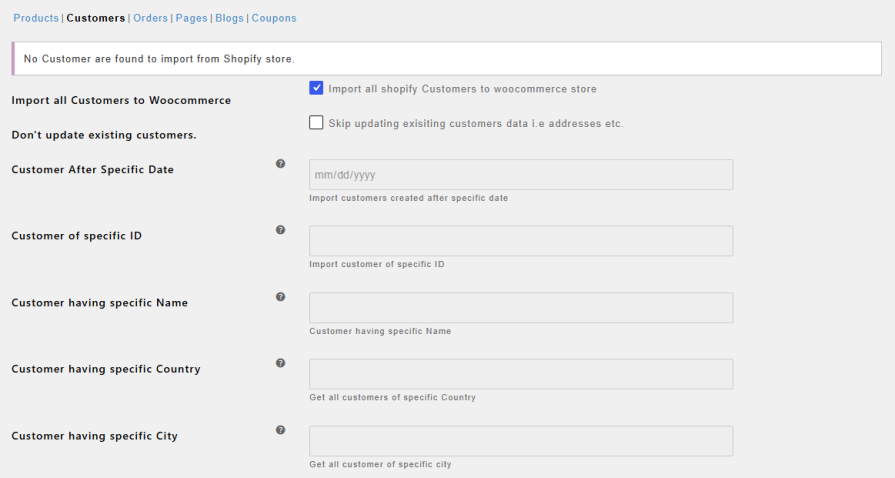
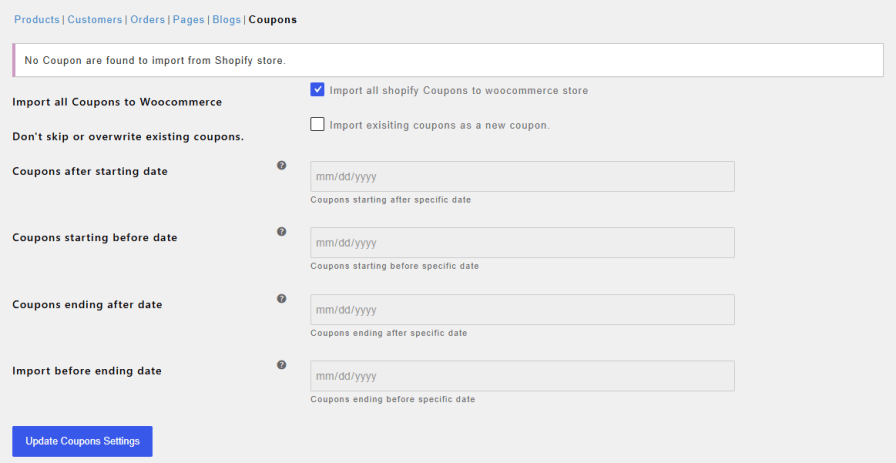
Import All or Specific Coupons

Keep your discount codes running after the move. Import all Shopify coupons, or only the ones that start or end before or after a specific date.
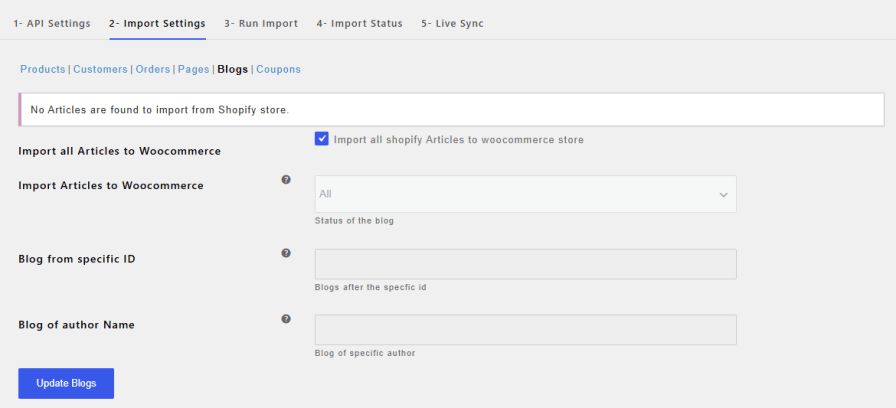
Import Pages and Blog Posts

Move your content along with your store. Import CMS pages with their titles and content, and blog posts with their titles, content, tags, and featured images. Filter pages by status, ID, or name, and blog posts by status, ID, or author.
Run Full or Selective Imports and Track Progress

Import all your data in one run, or import products, customers, orders, pages, blogs, and coupons separately. A progress bar shows the import as it runs, the Import Status tab shows results for each data type, and you can get an email as soon as the import finishes.

This slideshow requires JavaScript.

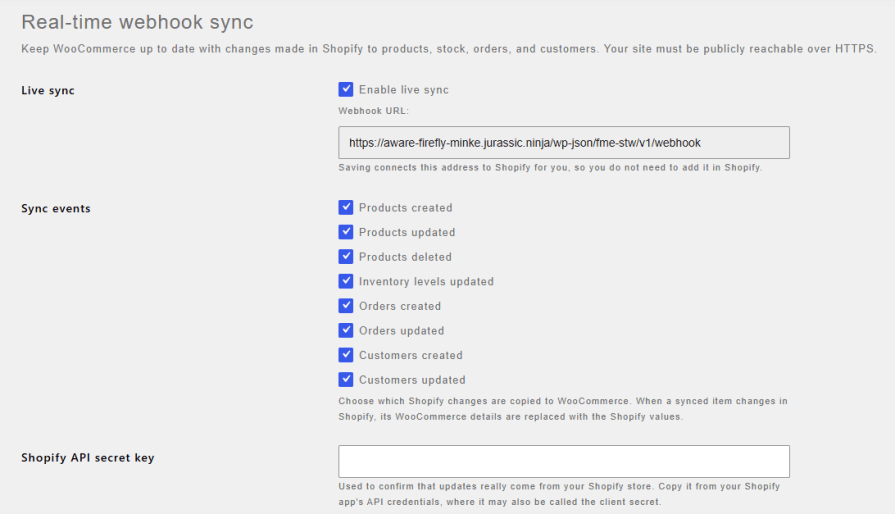
Keep Your Store Updated with Real-time Shopify Sync

Keep selling on Shopify while you move to WooCommerce, with no data falling behind. Live sync copies new and updated products, stock levels, orders, and customers from Shopify to WooCommerce automatically. Choose which changes to sync, and the plugin connects to Shopify for you on save, so there is nothing to set up in Shopify manually.
Compatibility

Our plugins are designed to be highly versatile and also compatible with the most commonly used themes, browsers, builders, and mobile views. We understand the importance of flexibility and integration when it comes to enhancing your website’s functionality. Our plugins can effortlessly integrate with the following:

Themes Compatibility

  • Store Front
  • Avada
  • Flatsome
  • Porto
  • Woodmart
  • WooCommerce default theme
  • Divi

Builders

  • Elementor
  • Bakery
  • Divi

Also Compatible with

  • Multi-Site
  • PHP 8
  • Mobile Layouts

How to Get Started

  • Purchase Migrate & Import Shopify to WooCommerce from WooCommerce.com
  • Download and install the extension
  • Activate the extension
  • Go to the WooCommerce > Settings> Shopify to WooCommerce tab to enable and configure the settings
  • Read the full installation guide here
WooCommerce Migrate Shopify to WooCommerce - documentation

Documentation

Looking for assistance? Check out the extensive documentation for a complete understanding of the WooCommerce Migrate Shopify to WooCommerce plugin.

View documentation

woocommerce FmeAddons Support

Questions and Support

For Questions and Support: If you have inquiries before making a purchase or require assistance, don’t hesitate to contact our support team.

Send email


Domande più comuni

How do I migrate Shopify to WooCommerce with this plugin?

Create a custom app in Shopify to get your API key and secret key, then enter them with your store URL in the plugin settings. Choose what to import in the Import Settings tab and start the import from the Run Import tab.

What data can I import from Shopify to WooCommerce?

You can import products, customers, orders, coupons, pages, and blog posts.

Can I import only specific products or orders?

Yes. Products can be filtered by title, type, vendor, ID, and published date. Orders can be filtered by created date, financial status, and fulfillment status.

Can I import Shopify products to WooCommerce without importing orders?

Yes. The Run Import tab has a separate button for each data type, so you can import products on their own and move other data later.

Does the plugin import variable products?

Yes. It imports variable products with their variations, images, title, stock, and SKU.

Are customer passwords imported?

No. Shopify does not share customer passwords through its API, so customers will need to set a new password on your WooCommerce store.

Can I keep selling on Shopify during the migration?

Yes. Turn on live sync and new or updated products, stock, orders, and customers in Shopify are copied to WooCommerce automatically.

Do I need to use CSV files for migration?

No. The plugin imports data directly through the Shopify API, so there are no files to export, reformat, or upload.

Informazioni sull'estensione

  • Versione di WordPress richiesta: 4.6
  • Versione di WooCommerce richiesta: 2.6.0
  • Versione PHP richiesta: 7.4.0
  • Testato con WordPress: 7.1.3
  • Testato con WooCommerce: 11.2.1
  • Richiede almeno WordPress: 5.0
  • Richiede almeno WooCommerce: 4.0.0

Paesi

  • Mondiale

Lingue

English (United States)

Recensioni dei clienti

Valutazione media 4.2

28 reviews from verified users

5 stelle, 79% delle recensioni
4 stelle, 0% delle recensioni
3 stelle, 0% delle recensioni
2 stelle, 4% delle recensioni
1 stella, 18% delle recensioni

Click to rate

  • Valutato 5 su 5
    liftaccountsCanadaJun 30, 2026
    Bilal provied great support when we had trouble installing the app
  • Valutato 5 su 5
    natasadd97b647faSerbiaJun 26, 2026
    Excellent plugin and outstanding support. We used it to import a large set of data and ran into a few questions along the way. Bilal Ahmed from the support team helped us through the whole process, he was incredibly fast, responsive, and patient. Every reply came quickly and actually solved the problem. Highly recommend both the plugin and the team behind it. Thank you, Bilal!
  • Valutato 5 su 5
    modulardigitalbristolRegno Unito (UK)May 12, 2026
    Fantastic support, helped us migrate two complex Shopify stores, rapid response to queries, really helpful happy to recommend this plugin.
  • Valutato 5 su 5
    techniknaissSvizzeraMay 4, 2026
    Really Profesionall. Thanks :D
  • Valutato 5 su 5
    Unity OnlineRegno Unito (UK)Apr 17, 2026
    This plugin is great, and migrates everything from shopify, we ran to a small issue and the support was great.

Related Products

Prezzo $279 Annualmente
Valutato 3.9 su 5 stelle
Prezzo $79 Annualmente
Valutato 3.4 su 5 stelle
Prezzo $59 Annualmente
Valutato 3.1 su 5 stelle
Prezzo $109 Annualmente
Valutato 2.8 su 5 stelle
Prezzo $49 Annualmente
Valutato 4.1 su 5 stelle
Prezzo $109 Annualmente
Valutato 2 su 5 stelle
Prezzo $109 Annualmente
Valutato 2.5 su 5 stelle
Prezzo $39 Annualmente
Valutato 2.8 su 5 stelle
Prezzo $199 Annualmente
Valutato 4 su 5 stelle
Uso dei tuoi dati personali
Noi e i nostri partner trattiamo i tuoi dati personali (come dati di navigazione, indirizzi IP, informazioni sui cookie e altri identificatori univoci) sulla base del tuo consenso e/o del nostro legittimo interesse per ottimizzare il nostro sito web, le attività di marketing e la tua esperienza utente.