The Payment Gateway Based Fees extension enables you to add a fee to an order, depending on the chosen payment gateway.
The fee can be automatically assessed on the price of certain products in the cart or the cart total, in addition to being changed on an order by the shop administrator at any time. A fee may also be applied manually, i.e., if the customer wants to switch payment methods after checkout is completed.
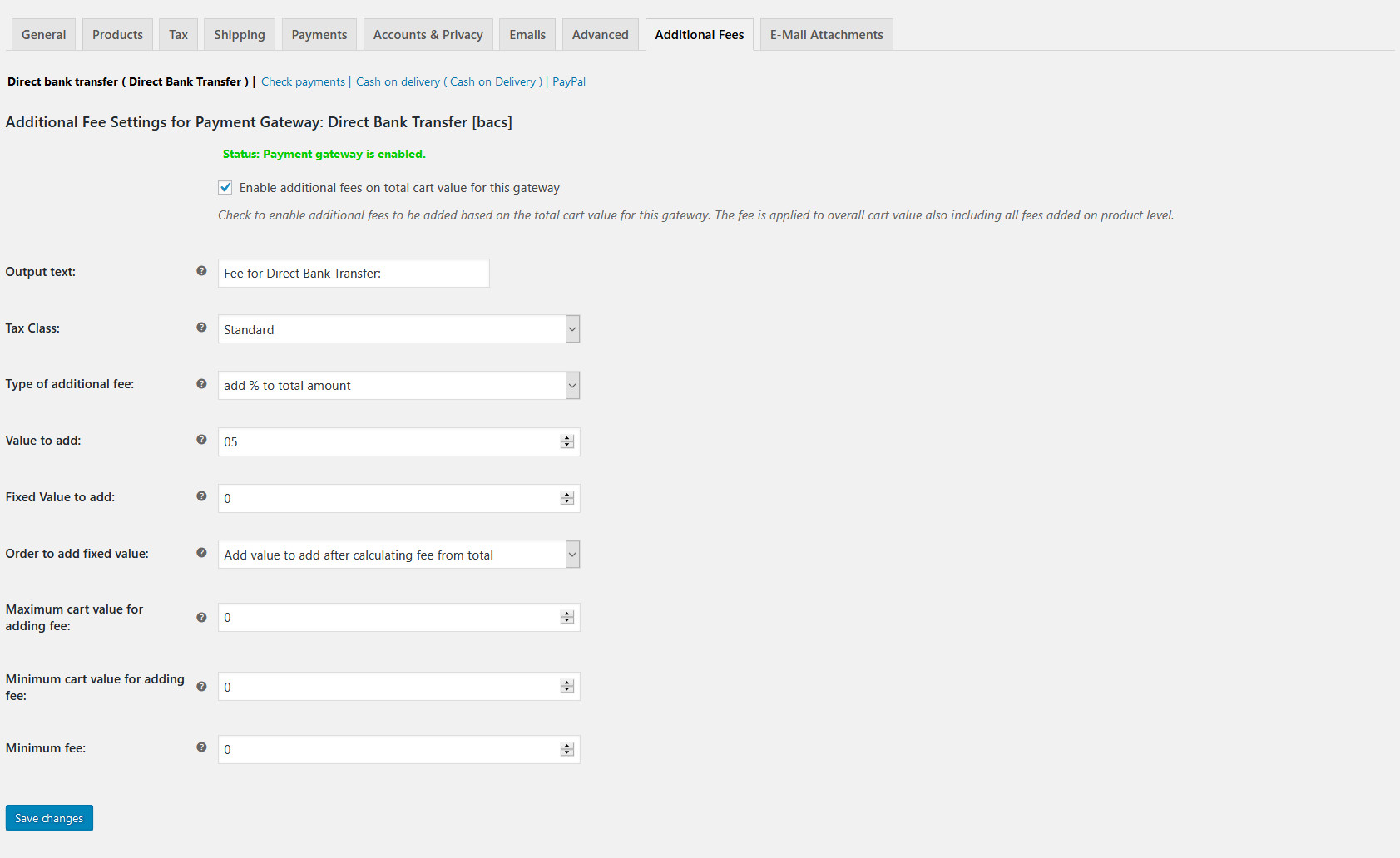
Screenshot of the Payment Gateway Based Fees admin/settings page
General options overview:
Enable/Disable additional fees for entire website without removing data
Enable additional fees for a single gateway or a single product
Automatic calculation of fees for each gateway or each product
Change the automatically calculated fee on the order page
Option to manually add a fee to an order, after the user completes checkout
Option to manually add a fee to orders you create on the admin page
Define a maximum and/or minimum limit to which a fee is added at the cart level
Define a maximum and/or minimum fee value to add
Exclude fees for defined customer E-Mails
Define a maximum limit to which a fee is added for a product
Tax calculation for additional fees is also supported
Three calculation methods:
“Fixed amount”: Adds a fixed amount
“add % to total amount”: Adds a percentage depending on the total amount of the product price or order total
“include % in total amount”: The fee is calculated as a commission rate (you will be payed the total amount of the order)
WPML compatible – fee caption/title can be translated (requires WPML 4.2.8 or later)
Since version 5.0 WooCommerce Block Checkout is supported
The Payment Gateway Based Fees extension is currently not compatible with the automated taxes service of the Jetpack plugin (except when using version 5.2 or higher with WooCommerce Tax plugin 2.8.8 or higher). Please select “Disable automated taxes” (Tax tab) on the WooCommerce settings page. We will support this feature as soon as 3rd party plugins can hook into the automated tax calculation.
This plugin does not work and conflicts with Stripe API calls. I really don’t understand why WooCommerce does not provide its own solution, fully compatible with WooCommerce Core and payment gateways such as Stripe.
Valutato 2 su 5
Jason Absolom·Australia·Mar 5, 2026
So I have had this plugin installed for over a year and while it works for the most part, I have noted a lot of failing PayPal orders with this notice:
"Payer action required, possibly overcharge. Payer needs to perform the following action before proceeding with payment. Order status changed from Pending payment to Failed."
Some users receive an email asking to confirm the difference in the order total, others are not and it's losing me orders or I have to manually generate orders without the additional fee for them to work.
I have disabled it now but would like to know if there is a solution to this issue or a reason this would be occurring.
Valutato 1 su 5
kathryn1fdcc9e25b·Canada·Feb 26, 2026
Was easy to set up and worked well until someone places an order with GooglePay and it didn't work. (Settings are for the Stripe Gateway which includes Google Pay)
Support tells me that it's not compatible with Google/Apple Pay, however there was nothing in the documention to indicate this when I was making the purchasing decision and now I am out $96 in fees from this order plus the cost of the plugin.
Valutato 5 su 5
Brett Rodgers·Stati Uniti (US)·Jan 27, 2026
I used to pay all the cc fees. NOT ANYMORE. This plugin does the job. It allows you to add the fee % that you want and it allows you to add a separate additional per transaction fee. Perfect. Love it. Saves me thousands.
Valutato 5 su 5
Juergen Berkessel·Stati Uniti (US)·Dec 18, 2024
I have totally relied on this tool for almost a decade for passing on processing fees to our clients in an unobtrusive way because frankly, I cannot afford to have the 3% charge subtracted from the low subscription prices I ask for in the first place, so this has been a lifesaver for me
Noi e i nostri partner trattiamo i tuoi dati personali (come dati di navigazione, indirizzi IP, informazioni sui cookie e altri identificatori univoci) sulla base del tuo consenso e/o del nostro legittimo interesse per ottimizzare il nostro sito web, le attività di marketing e la tua esperienza utente.