
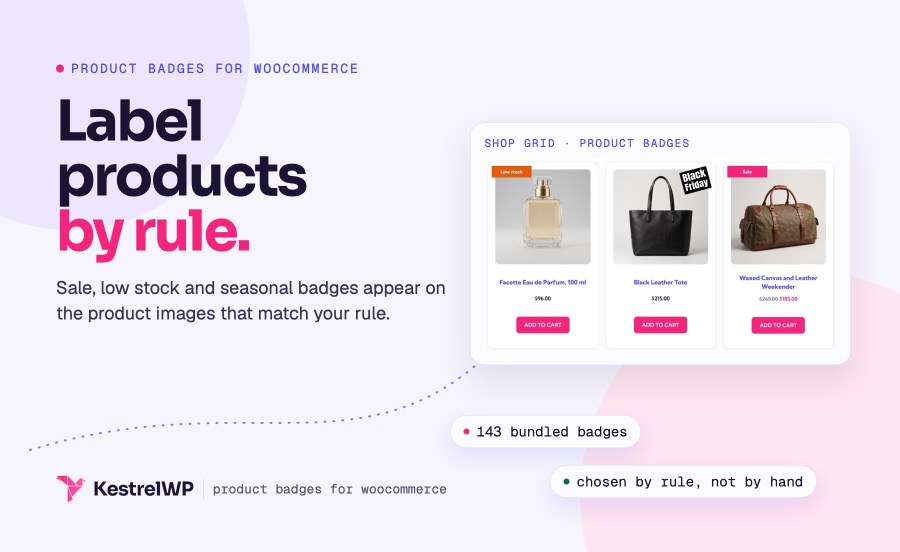
Icona del prodotto

Product Badges per WooCommerce

WooCommerce product badges and labels: add sale badges, low stock labels, seasonal artwork and countdown timers to product images, by rule.
Scegli un'opzione di fatturazione
$89
Risparmia 20%
$178 $142.40

Confronto prodotti

L'abbonamento include

  • Aggiornamenti e miglioramenti del prodotto
  • Servizio clienti
  • Garanzia di rimborso entro 30 giorni

WooCommerce product badges that show the right label on the right products

Product Badges for WooCommerce puts a sale flash, a low stock label, a seasonal seal or a countdown on the right product images, chosen by rule, with no image editing. Other badges show a brand logo, the price or the discount as text, or your own HTML. You manage them as a list under Products » Badges, and each badge chooses which products it appears on and where. Built by Kestrel, a long-time WooCommerce extension developer.

Pick one of 143 bundled badges (or upload your own), choose a rule such as On sale or Low stock, and the badge appears on every matching product. It declares support for the Cart and Checkout blocks and High-Performance Order Storage.

Jack, an ecommerce store owner said:

“I was previously wasting lots of time editing product images and adding badges, now I can easily create badges and assign them to specific products.”

What you get

  • Pick from 143 bundled SVG badges or upload your own artwork
  • Add countdown timers, text badges with price and discount placeholders, or custom HTML
  • Show badges by rule: sale, low stock, out of stock, backorder, featured or specific products
  • Choose a position, size and one of nine animations
  • Show one badge per product or stack several

Start from 143 ready-made badges, or upload your own

The bundled library has 143 SVG badges that stay sharp at any size. Filter them by theme (Availability, Black Friday, Christmas, Cyber Monday, Easter, Father’s day, Halloween, Mother’s day, Valentine’s and more) and by color, then set the width in pixels and let the height follow. If you have artwork of your own, such as a brand logo, a warranty seal or a “Made in” mark, upload it in the Badge image custom box and it works like any other badge, with the same positions, rules and animations.
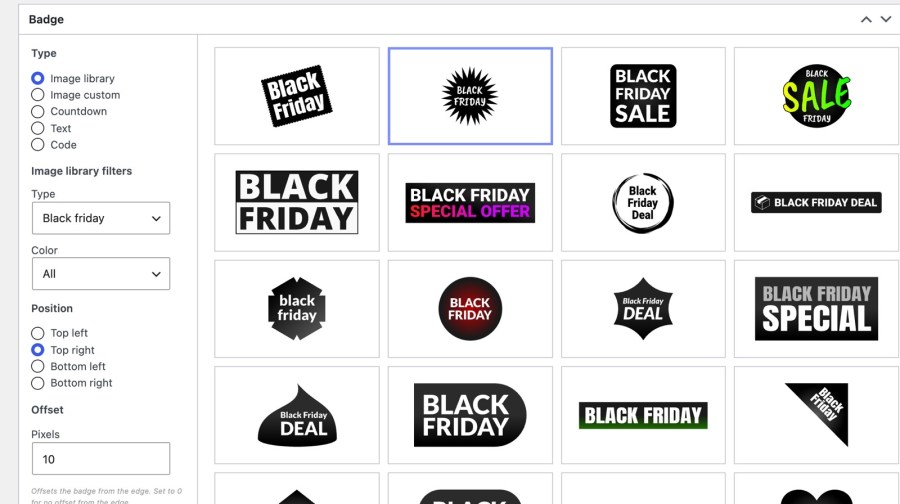
  • Filter the 143 bundled badges by theme and by color
  • Use seasonal artwork for Black Friday, Christmas, Halloween and more
  • Upload your own image in the Badge image custom box
  • Set the width in pixels and let the height follow

Badge library filtered by theme with a Black Friday badge selected
Pick a seasonal badge from the library, filtered by theme

Add a countdown, a text badge or custom HTML

A countdown badge shows a live timer to a date and time you choose, with text before and after, such as “Ends in” and “left”. The date is read in your store’s time zone, so it ends at the same moment for every visitor. A text badge takes the same styling (alignment, colors, font size, style and weight, padding and corner radius) and accepts the placeholders [price], [regular_price], [sale_price], [stock] and [discount_percentage]. A code badge takes custom HTML: inline styles stay, while style and script tags are removed.
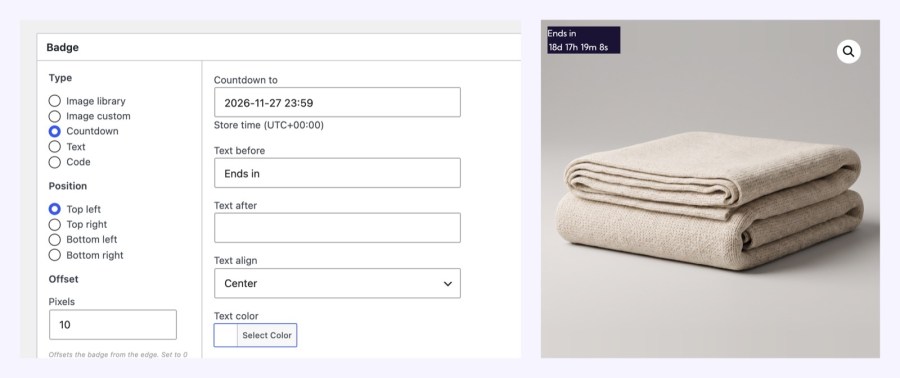
  • Count down to a sale end date in your store’s time zone
  • Show the discount percentage or stock count in a text badge
  • Style countdown and text badges without writing CSS

Countdown badge settings beside a product showing the live timer
Set a countdown date and see the live timer on the product image

Show the right badge on the right products

Each badge has one Products option: Specific, All, Sale, Non-sale, Out of stock, Low stock, On backorder, Featured or Custom rules. Specific badges can target products by product, category, tag or shipping class. Low stock uses the product’s own low stock threshold and falls back to WooCommerce’s store-wide setting, so a badge appears as stock runs low without anyone updating it by hand, and you can set a different threshold on any product that needs one. Custom rules is for developers: the badge shows when the wcpb_product_badges_custom_rules_display filter returns true.
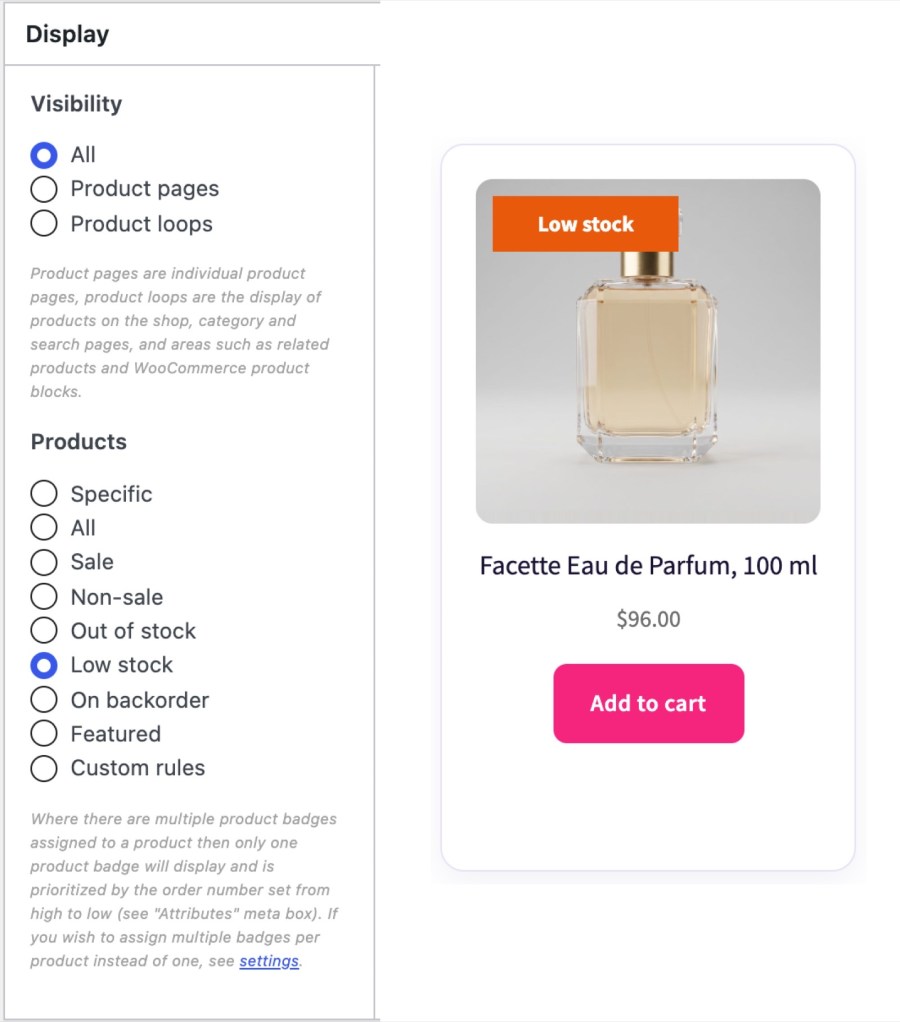
  • Match sale, non-sale, out of stock, low stock, backorder or featured products
  • Target products by category, tag, shipping class or one by one
  • Add a developer rule when the built-in ones don’t fit

Display box with the Products rule set to Low stock, beside the shop product that shows the Low stock badge
Choose Low stock and the badge appears on matching products in the shop

Show one badge per product, or stack several

When several badges match a product, the one with the highest Order number shows. Turn on Multiple badges per product to show all of them, stacked by Order, with lower numbers on top where badges overlap. A matching badge with nothing to show, such as one with no image, empty text or an ended countdown, is skipped and the next one shows, so an expired countdown never leaves a gap or hides the badge behind it. The Badges list shows each badge’s type, position, visibility, products and order at a glance.
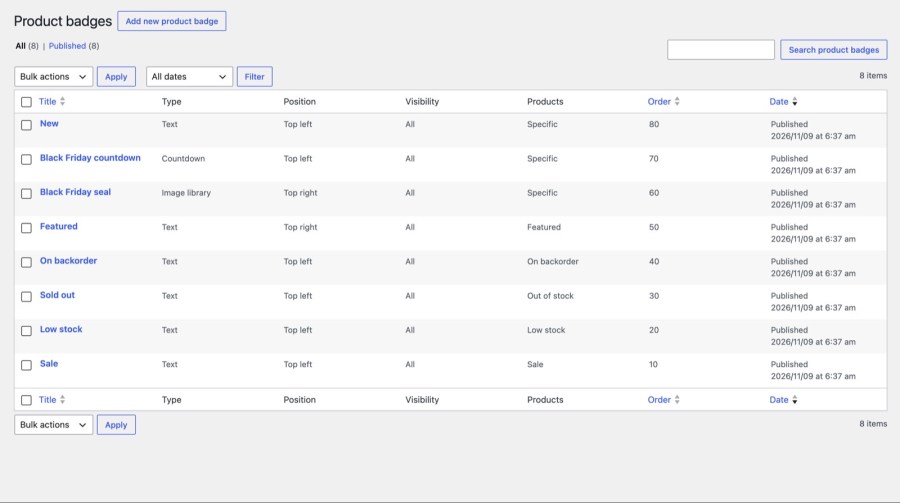
  • Pick the highest Order number to win when badges compete
  • Turn on multiple badges to stack every match
  • Skip empty or ended badges so the next one shows

Badges list showing type, position, visibility, products and order
Manage every badge in one list with its position, rule and order

Place, size and animate every badge

Place a badge at the top left, top right (the default), bottom left or bottom right of the product image, with an offset in pixels from the edge. Choose one of nine animations (bounce, breathing, jiggle, rotate, shadow pulse, shake, sway, tilt or wave) and set its duration. Show badges on product pages, in product loops (shop, category and search pages, and areas such as related products) or both. On a product page, the badge shows on the product image. Every badge has its own CSS class, wcpb-product-badges-badge-<badge ID>, if you want to restyle it.
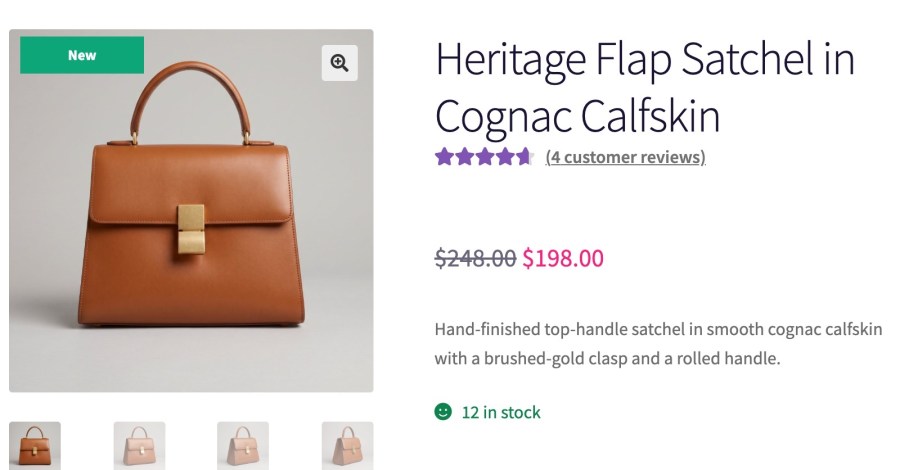
  • Choose one of four corners and an offset in pixels
  • Add one of nine animations with a duration you set
  • Show badges on product pages, product loops or both

product page with a New badge on the product image, above the gallery thumbnails
Badges show right on the product image, here a New label

Keep badges working with your theme and caches

Under WooCommerce » Settings » Products » Product badges, compatibility settings reposition badges in product loops or on product pages, and add badges to images that appear after the page loads, such as tabs, accordions, carousels and lazy loaded images. Saving a published badge clears the WP Rocket, W3 Total Cache, WP Super Cache and LiteSpeed Cache page caches, so a new badge doesn’t wait for a cache to expire. Clear other caches by hand. Themes and builders that skip WooCommerce’s standard product hooks may need a compatibility mode.

On block themes, the Product Collection block draws its own Sale badge, and Product Badges doesn’t hide it, so a sale badge from this plugin can show beside it. Bottom positions also land on the card edge there, so top positions are the safer choice on a block theme.
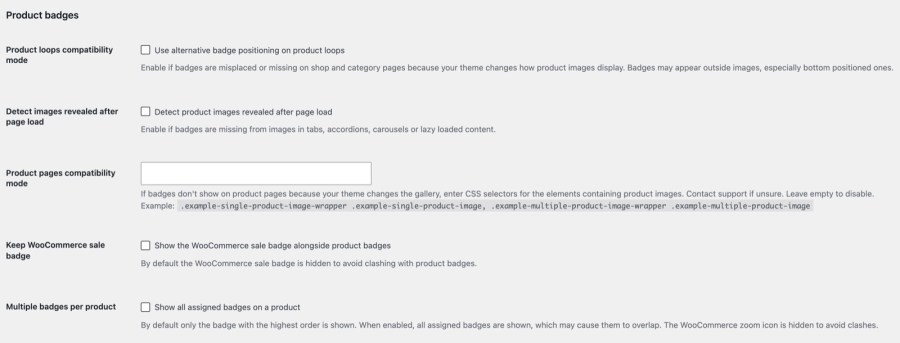
  • Reposition badges for themes that place images differently
  • Add badges to images revealed after the page loads
  • Clear four popular page caches when a badge changes

Product badges store-wide settings: the five options with their descriptions
Fix badge placement for your theme and choose how many badges show

Works well with

Product Badges or Sale Flash Pro? The two overlap on sale badges but do different jobs. Product Badges adds designed badges shown by any rule. Sale Flash Pro changes the wording of WooCommerce’s own Sale! badge so it says how much is off, such as 25% off!, in your theme’s style. Product Badges covers sale badges with the discount shown, through a text badge with [discount_percentage]; Sale Flash Pro suits stores that only want the theme’s own Sale! badge to say how much is off. If you run both, turn on Keep WooCommerce sale badge.

Find out which products shoppers love. Badges tell shoppers what you want them to notice; Product Likes shows you what they care about. It adds a like button and count to product lists and a dashboard of the most liked products, so you can decide which products deserve a sale or seasonal badge. The two plugins don’t depend on each other, and either one works without the other.

Pair it with Products Compare. Products Compare for WooCommerce adds a Compare tick to the same product lists, so a shop can label products with badges and let shoppers weigh several side by side. Badges mark what’s special about a product; Compare shows how products differ. Each works without the other, so you can add Compare whenever your catalog has products worth weighing against each other.

Get help

Every badge field and setting is explained in the Get started with Product Badges guide. Kestrel support is there if you need it.

Get started

  1. Download, install and activate Product Badges for WooCommerce
  2. Open Products » Badges and add a badge
  3. Choose a type, a position and where it shows
  4. Set Products to a rule, or pick specific products, then publish
  5. Check your shop page and a product page

Built and supported by Kestrel, a long-time WooCommerce extension developer.

KestrelWP

Domande più comuni

How do I add a sale badge to WooCommerce products?

Add a badge, set Products to Sale and publish. It shows on every product that is on sale. To show the discount itself, such as 25% off, use a text badge with the [discount_percentage] placeholder, which renders only while the product is on sale.

Can I add a countdown timer badge to WooCommerce products?

Yes. A countdown badge shows a live timer to a date and time you choose, with text before and after, in your store's time zone. After the date passes the badge has nothing to show, so it is skipped and the next matching badge shows.

Can I add more than one badge to a product?

Yes, with Multiple badges per product turned on. Every matching badge shows, stacked by Order number. With it off, only the matching badge with the highest Order number shows, and a badge with nothing to show is skipped.

Can I show Low stock or Out of stock badges?

Yes. Set a badge's Products option to Low stock or Out of stock. Low stock uses the product's own low stock threshold and falls back to WooCommerce's store-wide setting, so stock management must be on for that product. There is also an On backorder option.

Can I use Product Badges for trust badges like Secure Checkout?

No. Badges show on product images, not at checkout or in the cart, so payment and security icons belong elsewhere. CheckoutWC has trust badges for checkout. Product Badges is for labels on products, such as sale, stock, seasonal and custom badges.

Will badges show on shop and category pages?

Yes. Under each badge's Visibility, choose Product pages, Product loops or both. Product loops covers shop, category and search pages and areas such as related products, so one badge can appear wherever the product image does.

Informazioni sull'estensione

  • Versione di WordPress richiesta: 6.3
  • Versione di WooCommerce richiesta: 8.5.0
  • Versione PHP richiesta: 7.4
  • Testato con WordPress: 7.1.3
  • Testato con WooCommerce: 11.2.0
  • Richiede almeno WordPress: 6.3
  • Richiede almeno WooCommerce: 8.5

Paesi

  •  Mondiale

Lingue

English (United States)

Recensioni dei clienti

Valutazione media 4.6

5 reviews from verified users

5 stelle, 80% delle recensioni
4 stelle, 0% delle recensioni
3 stelle, 20% delle recensioni
2 stelle, 0% delle recensioni
1 stella, 0% delle recensioni

Click to rate

  • Valutato 5 su 5
    mvf59AustraliaJun 9, 2022
    Easiest Plugin to use and best support team! We installed this plugin mainly to show products 'out of stock' or 'on sale'. The plugin is super easy to use and took me only 2 minutes to work out an set up. Unfortunately there was a coding conflict with one of our existing plugins, so I contacted support and they were super helpful in diagnosing the issue for me. The support for this plugin is unmatched by any other support teams I have been in contact with, they were able to explain the issue to me in words that I understand and try to help me fix it. Great plugin!!
  • Valutato 5 su 5
    centerfirereserveStati Uniti (US)May 11, 2022
    Product Badges = awesome We've been using the Product Badges plugin for 2+ years. It is a powerful plugin that does nearly everything you ask of it out of the box. Lots of features to really customize product badges down to the minute details. We use it extensively on our site. Plugin tech support is also top notch. Early on we requested an out of stock badge feature which was promptly added into the next version of the plugin release. They are now working on adding capability to display badges for products with certain specified Product Tags. Now that's awesome support from the dev team behind this plugin!
  • Valutato 5 su 5
    Heine Lund ThunboDanimarcaDec 20, 2021
    Great support I got an idea for minor improvements/adjustments and the support were fast to implement it 👍 Plugin works fine with Kalium theme.
  • Valutato 5 su 5
    thriftstorecowboyvintagecomStati Uniti (US)Dec 8, 2020
    Lightning fast, friendly support. Active development - a new release with more great features came out the week we purchased! Suits our needs to clearly flag new inventory/sale items. Stock image badges are rendered nicely and display options offer a wide ranges of conditions in which to display the badges. Very happy!!
  • Valutato 3 su 5
    kfcboy132Stati Uniti (US)Dec 3, 2020
    The plugin works very well. Does exactly what you need it to do on the product page. However, it does have an option to apply badges to products that are out of stock or on backorder.

Related Products

Prezzo $119 Annualmente
Valutato 3.5 su 5 stelle
Prezzo $199 Annualmente
Valutato 4 su 5 stelle
Prezzo $29 Annualmente
Valutato 3.7 su 5 stelle
Prezzo $109 Annualmente
Valutato 4.6 su 5 stelle
Prezzo $49 Annualmente
Valutato 2.7 su 5 stelle
Prezzo $149 Annualmente
Valutato 4.8 su 5 stelle
Prezzo $279 Annualmente
Valutato 3.9 su 5 stelle
Prezzo $79 Annualmente
Valutato 3.4 su 5 stelle
Prezzo $59 Annualmente
Valutato 3.1 su 5 stelle
Uso dei tuoi dati personali
Noi e i nostri partner trattiamo i tuoi dati personali (come dati di navigazione, indirizzi IP, informazioni sui cookie e altri identificatori univoci) sulla base del tuo consenso e/o del nostro legittimo interesse per ottimizzare il nostro sito web, le attività di marketing e la tua esperienza utente.