Active installs
100+
Product comparison
Subscription includes
Support
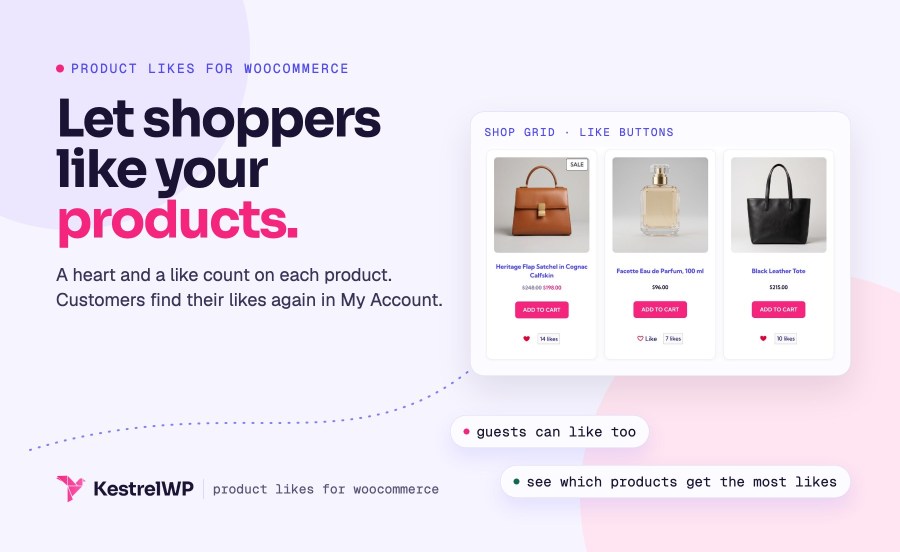
Product Likes for WooCommerce adds a like button to your products, the way people like things on social networks. Customers like a product with one click and find it again in a Likes tab in My Account, and you get a dashboard of which products and which customers collect the most likes. Guests can like products too. Built by Kestrel, a long-time WooCommerce extension developer.
Likes are one-way favorites. This isn’t a wishlist: there’s no sharing, no price or stock alerts and no emails about liked products. The plugin declares support for the Cart and Checkout blocks and High-Performance Order Storage.
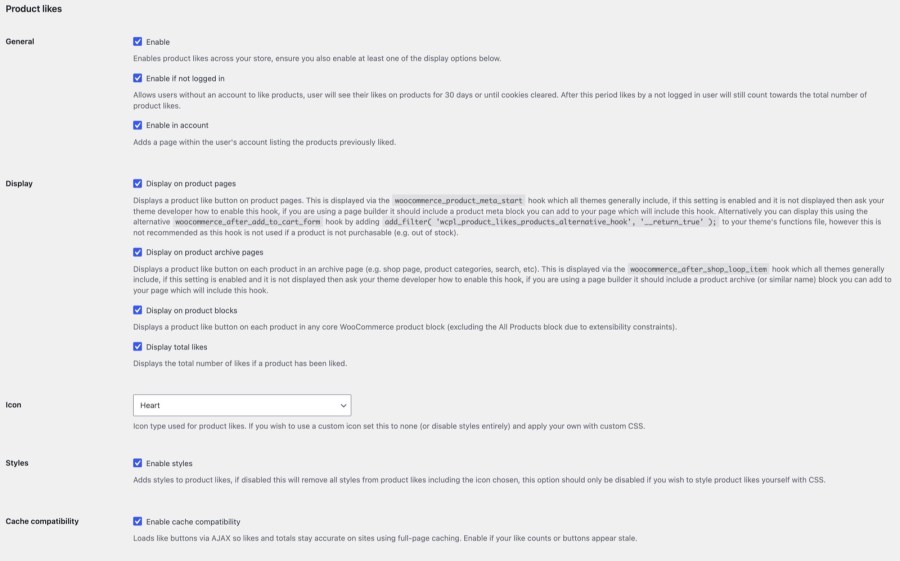
Turn the button on for single product pages, for product archive pages (shop, category and search) and for WooCommerce’s product grid blocks: Products by Category, Hand-picked, Newest, On Sale, Top Rated and Best Selling. The All Products block and Product Collection blocks placed on a page don’t show it. Choose a heart, star or thumbs up icon, or none, and show the total number of likes beside the button, so shoppers can see which products other people liked. Likes work for logged-in customers and, if you allow it, for guests.
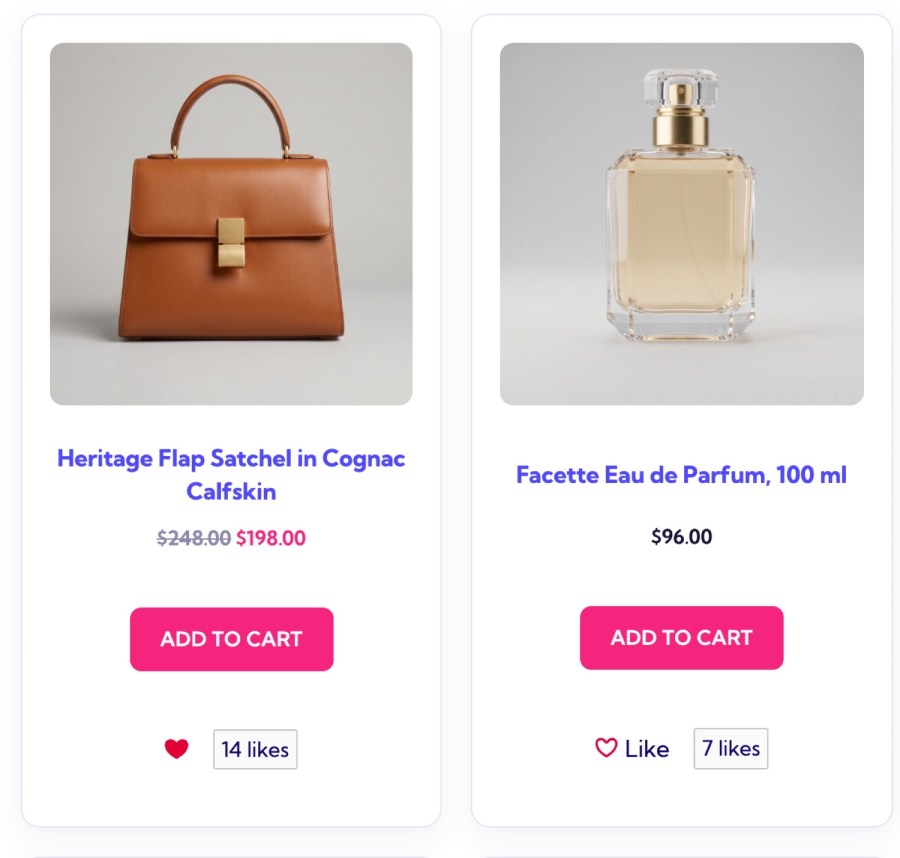
Turn on Enable if not logged in and visitors without an account can like products. A 30 day cookie remembers their likes, and the cookie is set only when a guest actually likes a product. Their likes keep counting toward each product’s total afterward. Guest likes aren’t carried into an account when the guest signs up, so a guest who registers starts with an empty Likes tab. Leave the setting off and only logged-in customers can like products. That choice is one setting, so you can change it at any time.
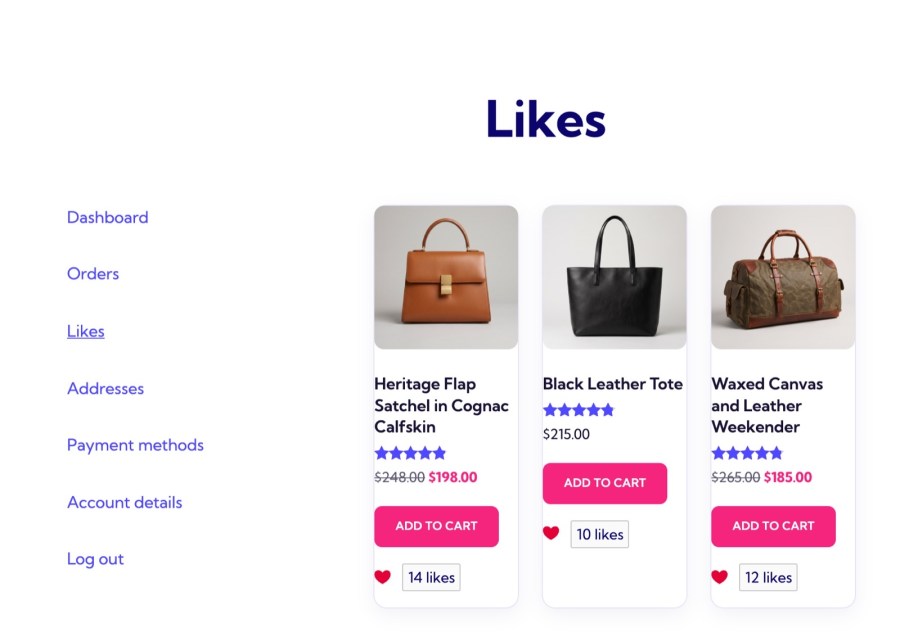
With Enable in account on, logged-in customers get a Likes tab in My Account that lists the products they liked, 20 to a page. It only lists liked products that are still visible in your store, and an empty list shows a notice instead of a blank page. The tab sits in the account menu, after Orders or Downloads. The tab is a lightweight way for customers to come back to products they were interested in, without a wishlist to manage and without any extra step when they sign in.
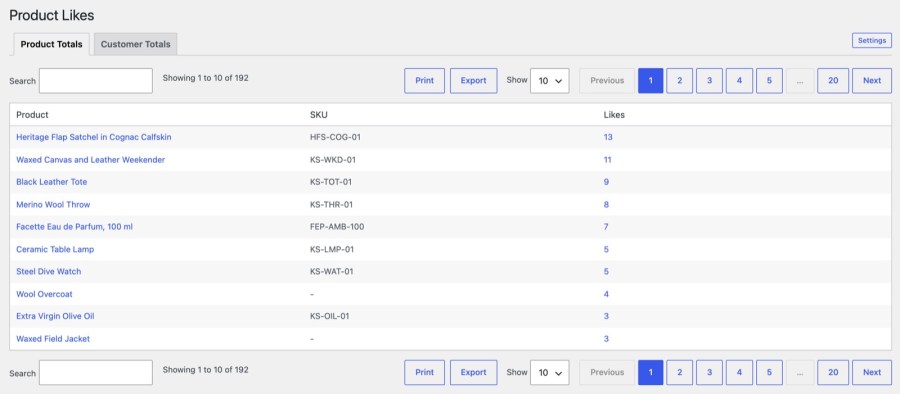
Products » Likes has a Product Totals tab and a Customer Totals tab. Click a product’s total to see which customers liked it and how many guests did. Click a customer’s total to see which products that customer liked. Both tabs can be searched and sorted, and the data can be exported to CSV or printed, so you can see which products your customers keep coming back to and take the list into a spreadsheet. Customer Totals lists Customer, Administrator and Shop manager accounts.
Use the standard WooCommerce [products] shortcode with the class wcpl-product-likes-products-shortcode-most-liked and cache="false", as in [products class="wcpl-product-likes-products-shortcode-most-liked" cache="false"], to list products that have at least one like, most liked first. Put it on a landing page, a homepage section or a sale page to show shoppers what other people like, with no extra code to write. Ordering attributes on the shortcode don’t apply, because the plugin sets the order itself. The WooCommerce shortcode’s other attributes, such as the number of columns, work as usual, in any page or post that renders WooCommerce shortcodes.
Cache compatibility loads each button’s state, the counts and a fresh nonce with one AJAX request after the page loads, so full-page caching doesn’t serve stale likes. It’s on for new installs, and stores upgrading from earlier versions turn it on themselves under WooCommerce » Settings » Products » Product likes. Turn on Enable styles to use the plugin’s icon styling, or turn it off to style the button yourself, and use the text filters, such as wcpl_product_likes_like_text, to change the wording.
Customers’ likes are included in WordPress’s personal data exports and erasures, so a request through the standard WordPress privacy tools covers their likes too. The plugin adds suggested privacy policy text about likes and the guest cookie, and it removes a like when its customer or product is deleted. When WooCommerce is set to remove all data on uninstall, deleting the plugin also deletes its likes data, so a store that closes the plugin doesn’t leave customer likes behind. That keeps your store ready for the privacy requests customers send you.
Pair it with Product Badges. Product Badges for WooCommerce labels what’s special about a product, such as a sale, low stock or a seasonal badge, on the product image, while Product Likes lets shoppers mark the ones they love. They add different things to your store, so a shop can mark what’s special about a product and learn which products shoppers love, and each works without the other.
Pair it with Quick View. Quick View for WooCommerce opens a pop-up preview with a product’s photos, price and add to cart from the shop grid, so a shopper can check a product from the shop grid before liking it. It is a separate plugin that does a separate job, and neither needs the other to run.
Settings and the dashboard are covered in the Get started with Product Likes guide. Kestrel support is there if you need it.
Built and supported by Kestrel, a long-time WooCommerce extension developer.

Install and activate Product Likes for WooCommerce, then open WooCommerce » Settings » Products » Product likes. Tick Enable and at least one Display option: product pages, product archive pages or product blocks. The button, and a like count if you turn it on, then show on those products.
Customers can save favorites, but Product Likes isn't a wishlist. Likes are one-way favorites with a Likes tab in My Account. There's no wishlist sharing, no price drop or back in stock alerts, and no emails about liked products. If you need those, you need a wishlist plugin. Product Likes is for showing and counting what customers like.
No. With Enable if not logged in on, guests can like products too, tracked by a 30 day cookie, and their likes count toward each product's total. Logged-in customers also get a Likes tab in My Account. Guest likes aren't carried into an account later.
Yes. Products » Likes shows each product's total and who liked it, and each customer's total and what they liked, with search, sort, CSV export and print. The products shortcode with the most liked class also lists top products on any page, most liked first.
Yes. Cache compatibility loads the buttons and counts after the page, so cached pages don't show stale likes. It's on for new installs; if you upgraded from an earlier version, turn it on under the Product likes settings.
Yes. Customers' likes are included in WordPress's personal data export and erasure tools, and the plugin suggests privacy policy text about likes and the guest cookie. The guest cookie is set only when a guest likes a product, and likes are removed when a customer is deleted.
Categories
Extension information
Quality Checks
Countries
Languages