Product Icon

Registration Form Fields per WooCommerce

Quickly add custom registration form fields to the WooCommerce registration form with Registration Form Fields for WooCommerce.
Scegli un'opzione di fatturazione
$49
Risparmia 20%
$98 $78.40

L'abbonamento include

  • Aggiornamenti e miglioramenti del prodotto
  • Servizio clienti
  • 30-day money-back guarantee

  • Add custom fields like radio, checkbox, text area, number, select, and many more to the default WooCommerce registration Form.
  • Create an entirely new WooCommerce registration form. Also, create multiple registration forms.
  • Supports WooCommerce shipping and billing fields in the registration form.
  • Supports Google reCAPTCHA to prevent spam registration.
  • Supports auto approval, manual approval, and email confirmation for approval of registered users.
  • Redirect to custom URL after a successful registration.
  • Assign any role to registered users.
  • Supports read-only fields (disallows user to change details).

Customize the WooCommerce Registration Form

WooCommerce’s default registration form is simple and contains only basic fields. It is limited and inconvenient for store owners who want to collect more information from new customers.

Registration Form Fields for WooCommerce customizes the registration form with additional fields. You can easily add new custom fields like billing, shipping, radio, text-area, input, checkbox, time-picker, phone, multi-select, and many more. You can extend the default registration form or create a new registration form using the Gutenberg form builder.

Registration Form Fields for WooCommerce collects additional information about customers during registration. The additional information is useful to enhance the shopping flow and increase your marketing reach. You can ask for shipping and billing details at the time of registration so during checkout the billing and shipping fields are auto filled.
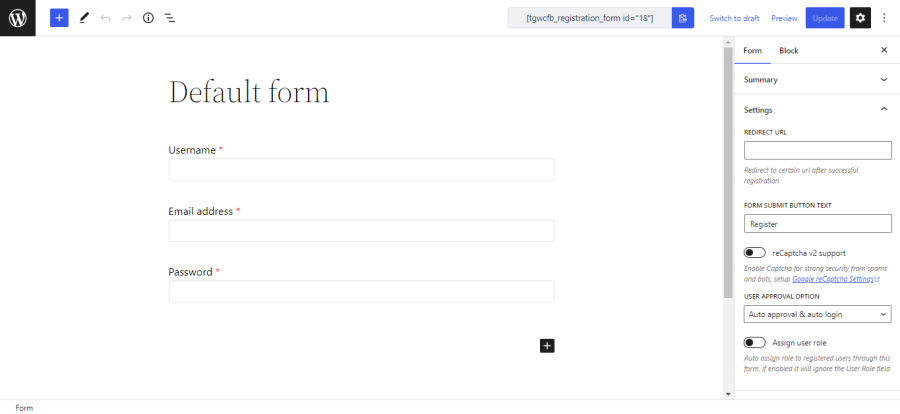
Easily add fields to the WooCommerce Registration Form
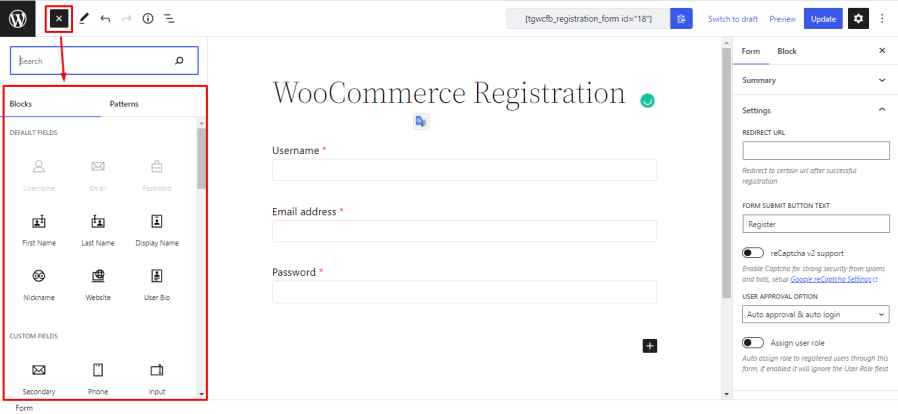
Adding fields to the registration form is easy. Just click on the field or drag and drop the field from the list and click on the Update button. You can then change the settings of the field.

Sync fields across registration and checkout forms
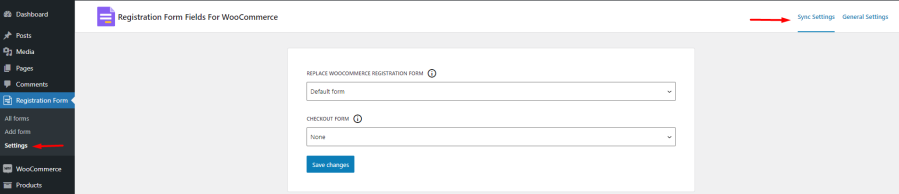
 

Synchronizing fields across registration and checkout is also easy. Just select your desired form from the Available Form options list and click on Save Changes.
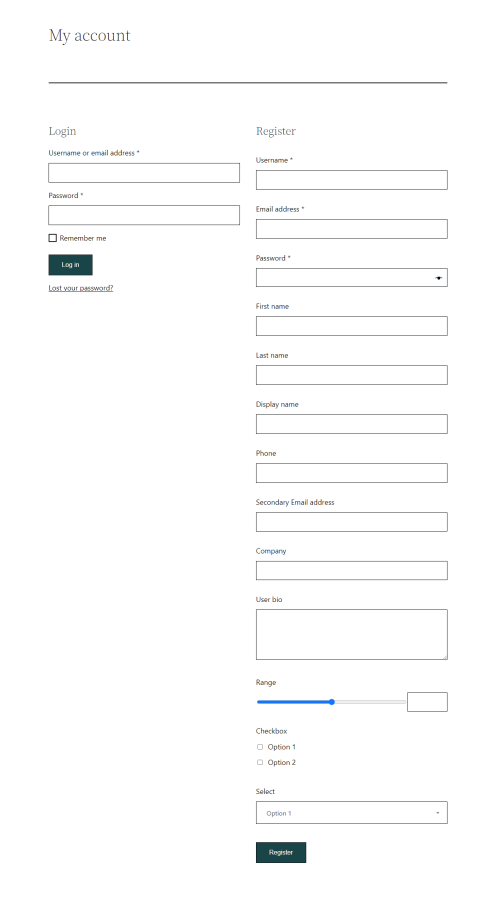
     My Account page with custom fields

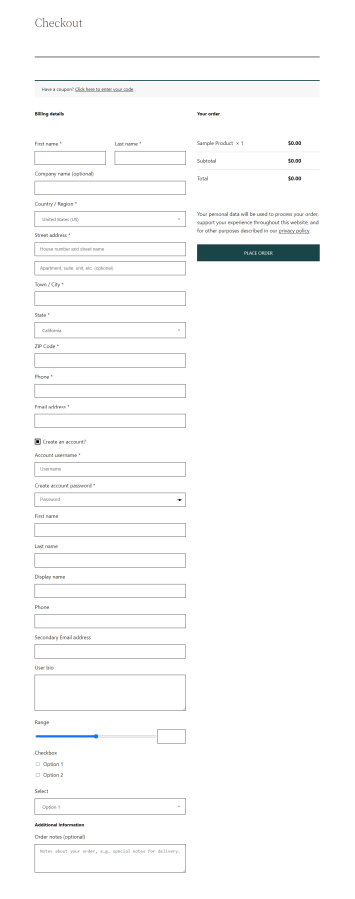
Checkout page with custom fields


Custom registration form inserted via shortcode in page


For more detail please follow our documentation.


Recensioni dei clienti

Stiamo accettando recensioni per questo prodotto e le mostreremo quando ne avremo ricevute alcune in più.

Informazioni sull'estensione

  • WordPress version required: 5.0
  • WooCommerce version required: 3.5.0
  • Versione PHP richiesta: 7.4
  • Testato con WordPress: 6.9
  • Testato con WooCommerce: 9.8.5
  • Richiede almeno WordPress: 5.3
  • Richiede almeno WooCommerce: 4.0.0

Countries

  • Worldwide

Languages

English (United States)

Related Products

Prezzo $79 Annualmente
Valutato 3.4 su 5 stelle
Prezzo $279 Annualmente
Valutato 3.2 su 5 stelle
Prezzo $59 Annualmente
Valutato 3.1 su 5 stelle
Prezzo $109 Annualmente
Valutato 2.8 su 5 stelle
Prezzo $49 Annualmente
Valutato 4.1 su 5 stelle
Prezzo $109 Annualmente
Valutato 2 su 5 stelle
Prezzo $109 Annualmente
Valutato 2.3 su 5 stelle
Prezzo $109 Annualmente
Valutato 2.6 su 5 stelle
Prezzo $109 Annualmente
Valutato 2.3 su 5 stelle
Uso dei tuoi dati personali
Noi e i nostri partner trattiamo i tuoi dati personali (come dati di navigazione, indirizzi IP, informazioni sui cookie e altri identificatori univoci) sulla base del tuo consenso e/o del nostro legittimo interesse per ottimizzare il nostro sito web, le attività di marketing e la tua esperienza utente.




