Product Icon

Role Based Tax per WooCommerce

Personalize your tax rates, classes and prices display settings based on user roles.
Scegli un'opzione di fatturazione
$79
Risparmia 20%
$158 $126.40

L'abbonamento include

  • Aggiornamenti e miglioramenti del prodotto
  • Servizio clienti
  • 30-day money-back guarantee

  • Customize tax rates based on user roles
  • Customize tax-display settings based on user roles
  • Customize taxes or tax exemptions on a product-by-product basis for specific user roles 
  • Hide or display tax rates to comply with location-based requirements

Role Based Tax enables you to customize tax policies for locations, assign unique tax rates to specific customer groups, and customize taxes, price displays, suffix and more.

Why you need Role Based Tax

Set up tax rates based on roles: If you sell products to different customer types, such as retail or wholesale, you may need to adjust your tax rates based on the tax laws of a location.

Meet tax display requirements: The tax laws in some areas require you to display prices with or without taxes shown based on customer roles (retail, wholesale, etc.). Role Based Tax allows you to easily configure tax-display settings based on user roles.

Tax exemptions or special tax rates: You can assign tax exemptions or set reduced tax rates based on user roles with Role Based Tax.

Features Detail:

Tax rates by user roles

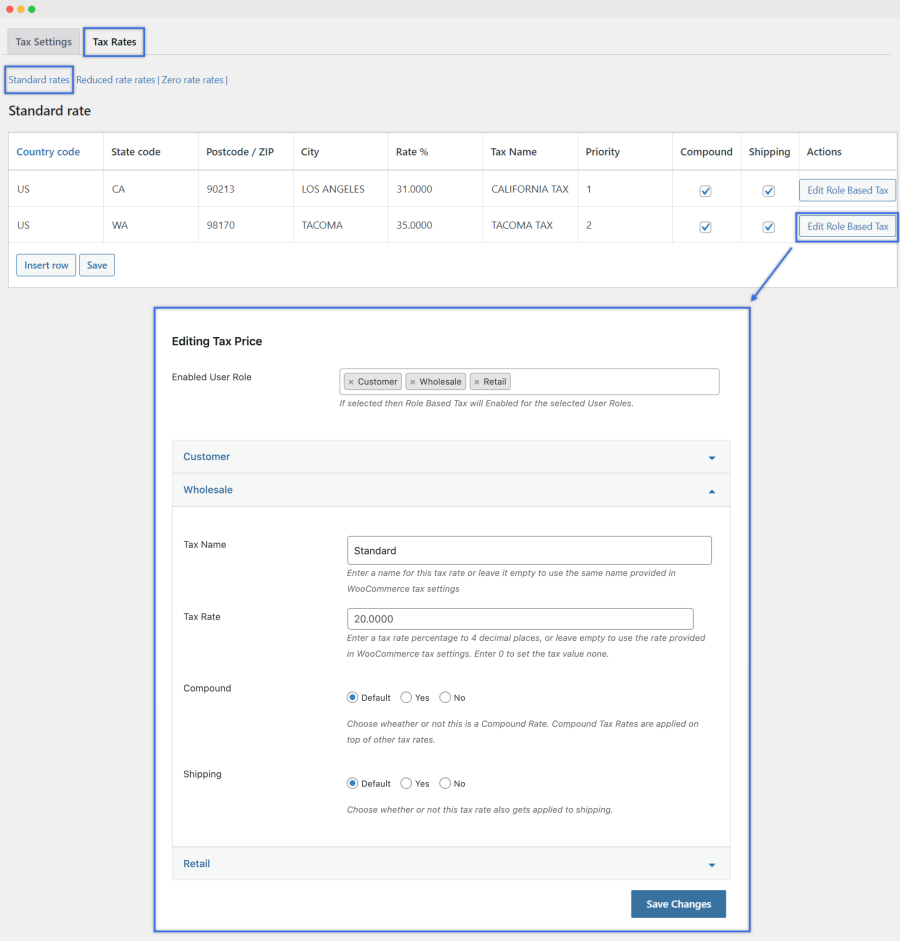
With Role Based Tax, you can adjust tax rates based on user roles, including standard, reduced, and tax-exempt. In addition, you can choose to assign or exempt coupons and shipping from taxes.
Tax display settings

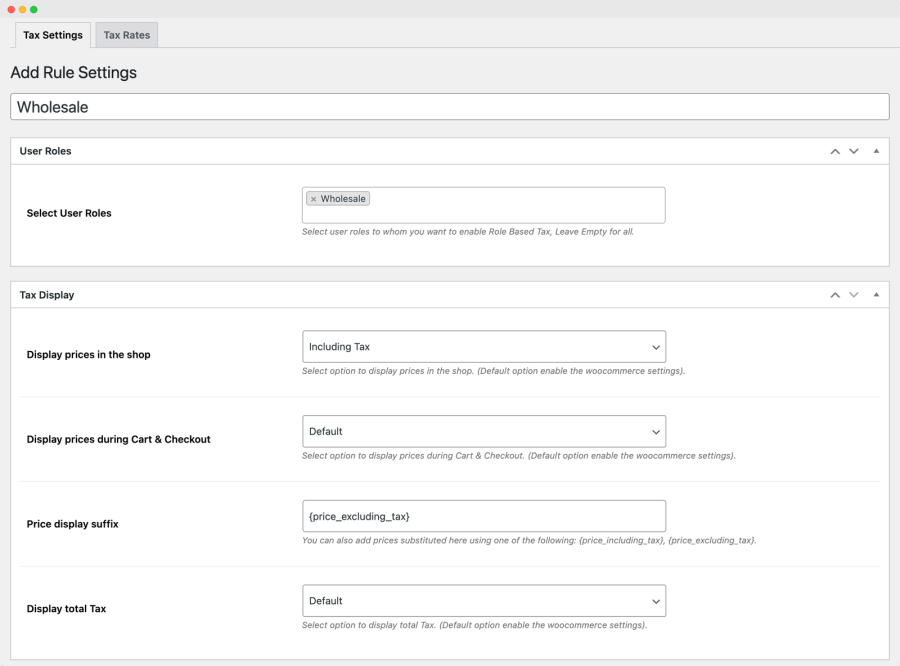
Along with tax rates, you can customize the following tax display settings based on user roles.

Show prices inclusive or exclusive of taxes Role Based Tax gives you control over how you display prices in your shop, Cart, and on the Checkout page. You can tailor the visibility of prices based on user roles.

Customize price suffixes Display personalized pricing information to your customers by adding different price suffixes for specific user roles.

Customize tax information on the Cart page Display taxes as a single summary total or per-item list on the Cart page.
Set tax class based on user roles

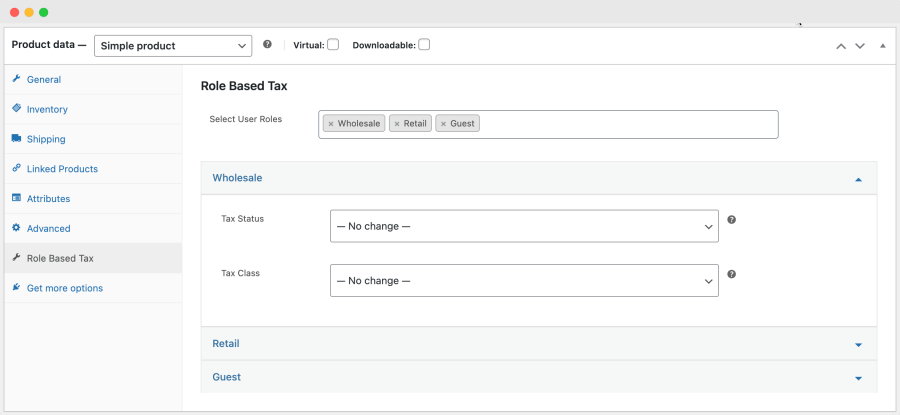
Using product-level settings, you can customize your product’s tax status and class based on user roles.

Tax statuses include:

  • Taxable: applies regular taxes to the selected user role
  • Shipping only: only applies tax on shipping costs for the selected user role
  • None: excludes a product from taxes for the selected user role

You can select a tax rate after you mark a product as taxable. Tax rates include:
  • Standard: Applies the standard tax rate for the location
  • Reduced rate: Apply a reduced tax rate based on the selected user role
  • Zero rate: Applies a 0% tax rate to the selected user role

Recensioni dei clienti

Stiamo accettando recensioni per questo prodotto e le mostreremo quando ne avremo ricevute alcune in più.

Informazioni sull'estensione

  • Versione PHP richiesta: 7.4
  • Testato con WordPress: 6.*.*
  • Testato con WooCommerce: 10.*.*
  • Richiede almeno WordPress: 6.5
  • Richiede almeno WooCommerce: 4.0

Countries

  • Worldwide

Related Products

Prezzo $79 Annualmente
Valutato 3.4 su 5 stelle
Prezzo $59 Annualmente
Valutato 3.1 su 5 stelle
Prezzo $279 Annualmente
Valutato 3.2 su 5 stelle
Prezzo $109 Annualmente
Valutato 2.8 su 5 stelle
Prezzo $49 Annualmente
Valutato 4.1 su 5 stelle
Prezzo $109 Annualmente
Valutato 2 su 5 stelle
Prezzo $109 Annualmente
Valutato 2.3 su 5 stelle
Prezzo $109 Annualmente
Valutato 2.6 su 5 stelle
Prezzo $109 Annualmente
Valutato 2 su 5 stelle
Uso dei tuoi dati personali
Noi e i nostri partner trattiamo i tuoi dati personali (come dati di navigazione, indirizzi IP, informazioni sui cookie e altri identificatori univoci) sulla base del tuo consenso e/o del nostro legittimo interesse per ottimizzare il nostro sito web, le attività di marketing e la tua esperienza utente.




