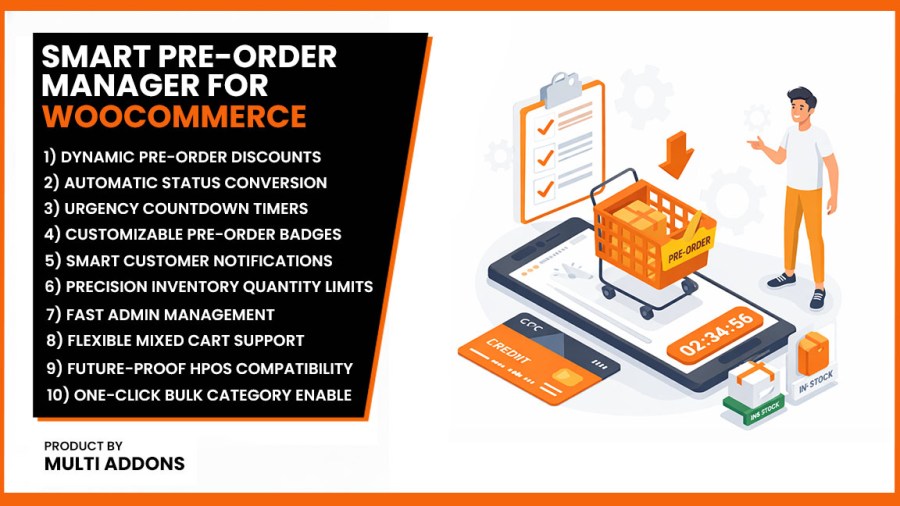
Icona del prodotto

Smart Pre-Order Manager per WooCommerce

Boost sales with Smart Pre-Order Manager. Automate WooCommerce pre-orders, backorders & inventory with discounts, countdown timers & notifications.
Scegli un'opzione di fatturazione
$49
Risparmia 20%
$98 $78.40

L'abbonamento include

  • Aggiornamenti e miglioramenti del prodotto
  • Servizio clienti
  • Garanzia di rimborso entro 30 giorni

Automate Pre-Orders & Secure Out-of-Stock Sales on WooCommerce

Running out of stock shouldn’t mean losing sales. Smart Pre-Order Manager is a lightweight, conversion-focused WooCommerce pre-order plugin that lets you seamlessly accept payments for upcoming product launches and out-of-stock inventory. By replacing standard “Add to Cart” buttons with customized “Pre-Order Now” buttons, you can capture customer buying intent the moment it’s highest and secure early revenue.

This plugin is designed to handle the entire pre-launch lifecycle on autopilot. From setting up dynamic countdown timers and exclusive early-bird discounts to triggering automated email updates and auto-converting products back to regular stock on release day, Smart Pre-Order Manager gives you complete, hands-free control over your inventory campaigns.

1. Centralized WooCommerce Pre-Order Dashboard & Filtering

Streamline your pre-launch campaigns with an integrated management dashboard. Instantly filter your product catalog by “Pre-Order Active” or “Inactive” status directly from your WooCommerce product list. Get a real-time overview of upcoming release dates, stock levels, and projected revenue streams in one clean, unified view.
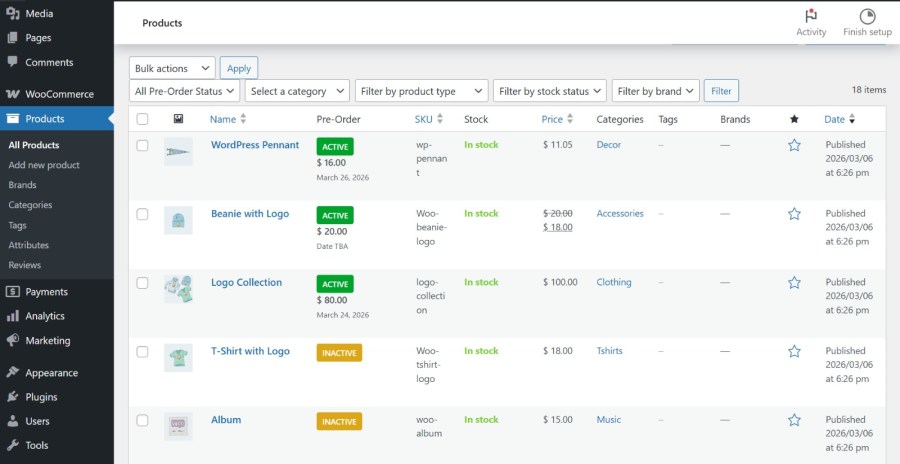
WooCommerce pre-order dashboard with product status filtering options

2. WooCommerce Pre-Order Discounts & Custom Savings Badges

Drive early sales by offering exclusive pre-launch discounts. Set automatic fixed or percentage-based pricing rules that apply solely during the pre-order phase. The dynamic “Savings Badge” automatically calculates and displays the exact discount value (e.g., “Save 20%” or “Save $15”) to the shopper, creating strong visual urgency and boosting conversion rates.
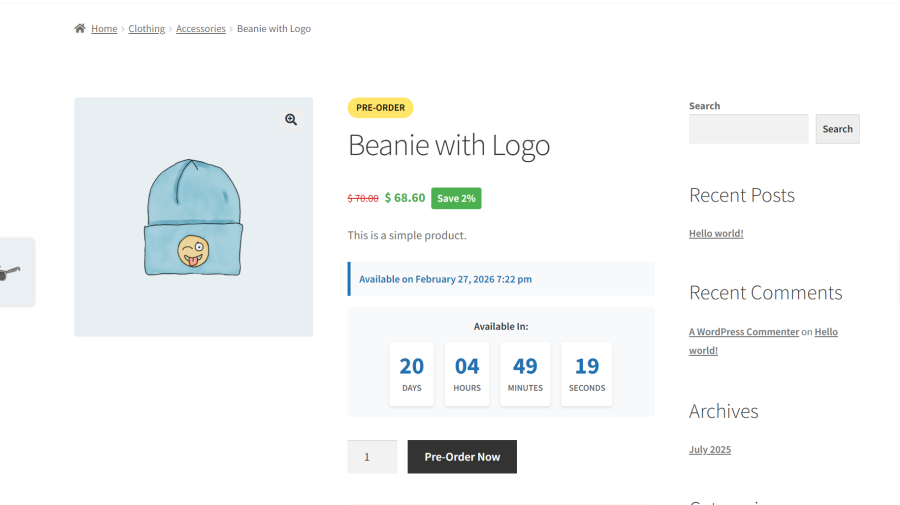
WooCommerce product page with pre-order discount price rules and savings badge

3. WooCommerce Pre-Order Countdown Timers (Boost FOMO)

Build maximum launch excitement by turning your product pages into highly anticipated events. These fully mobile-responsive countdown timers display a real-time deadline to leverage Fear of Missing Out (FOMO). Choose from three beautiful built-in templates—Minimalist Text, Boxed, or Circular Progress—to match your brand’s style perfectly.
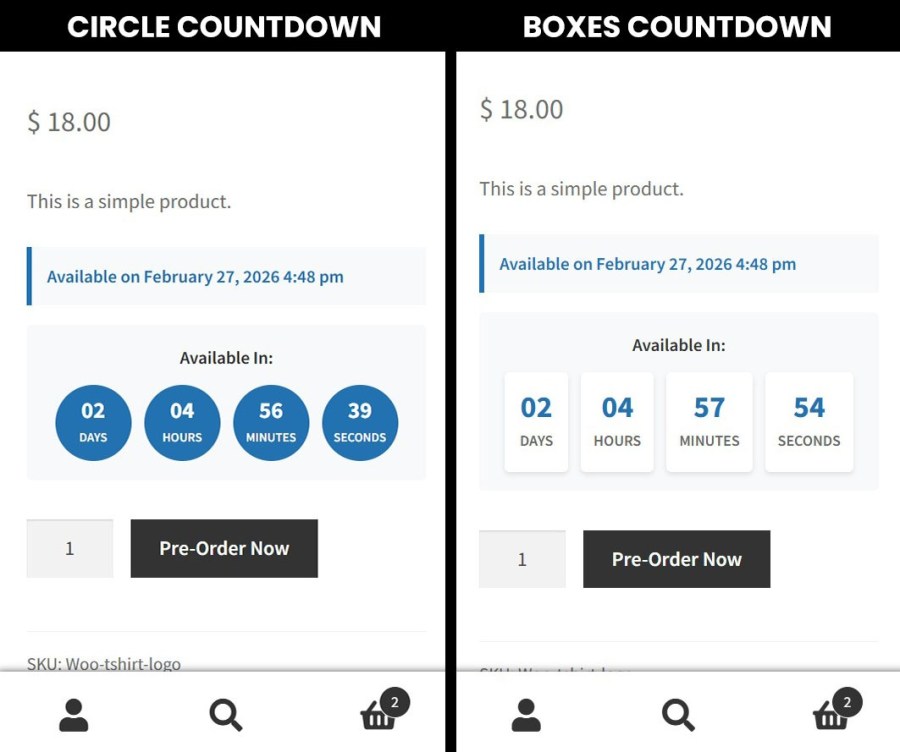
WooCommerce pre-order countdown timer templates showing boxed circular and simple text styles

4. Automated Pre-Order Release Schedules (Set & Forget)

Eliminate the need for manual midnight updates. Schedule the exact release date and time for your pre-order products. Once the countdown hits zero, the plugin automatically converts the product to standard “In-Stock” status, updates your purchase buttons, and handles the launch workflow for complete, hands-free management.
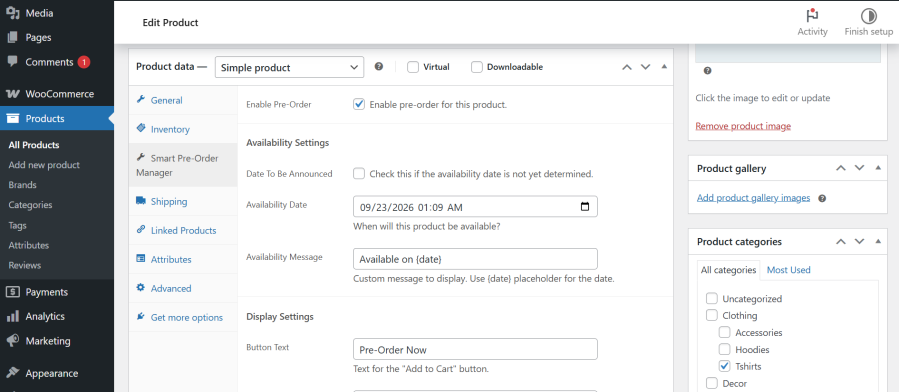
WooCommerce pre-order release date scheduler and automated launch settings

5. Pre-Order Stock Limits & Scarcity Marketing

Protect your supply chain and leverage urgency. Define the maximum quantity of pre-order sales allowed for each product. The plugin automatically tracks sales in real-time and can display a “Limited Availability” or “Only X Remaining” stock notice, encouraging shoppers to lock in their purchase before it sells out.
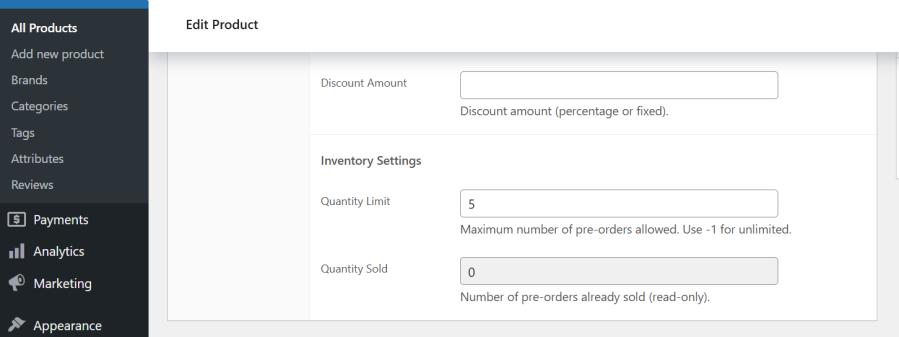
WooCommerce product edit settings page for pre-order stock limits and scarcity options

6. Smart WooCommerce Mixed-Cart & Checkout Validation

Take full control of complex shipments. Easily choose whether to allow customers to mix pre-order products with in-stock items in the same transaction, or enforce separate checkouts. Prevent customer service tickets with clear, automatic “Pre-Order Item” labels displayed across the cart page, checkout form, and order receipts.
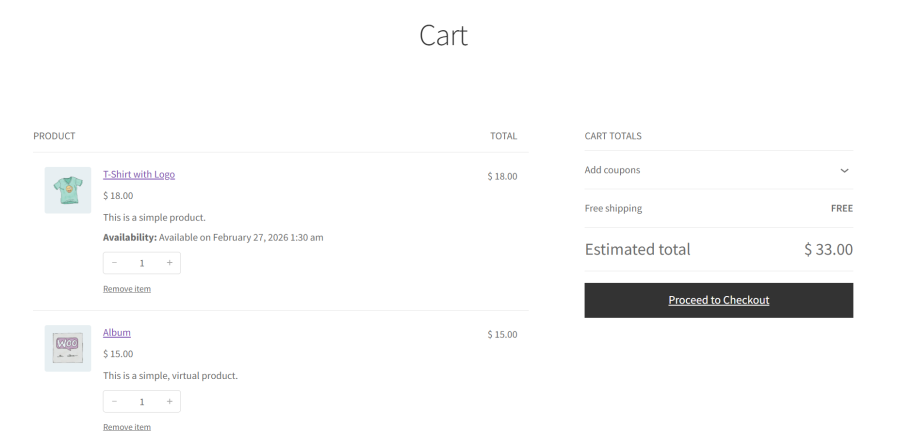
WooCommerce checkout and cart page displaying mixed cart pre-order warnings and labels

7. Flexible “Date TBA” (To Be Announced) Pre-Orders

Start accepting pre-orders before finalizing your supply chain schedule. The “Date To Be Announced” (TBA) feature allows you to build product hype and secure early sales for upcoming collections without displaying a strict release deadline. Update the actual release date globally when you are ready.

WooCommerce product backend showing Date To Be Announced option for pre-orders

8. Automated Pre-Order Email Notifications & Reminders

Build buyer trust and reduce customer support requests with automated updates. Smart Pre-Order Manager integrates with the WooCommerce mailer to trigger tailored notifications, including pre-order confirmations, countdown reminders, release delay alerts, and “Ready to Ship” announcements—completely hands-free.
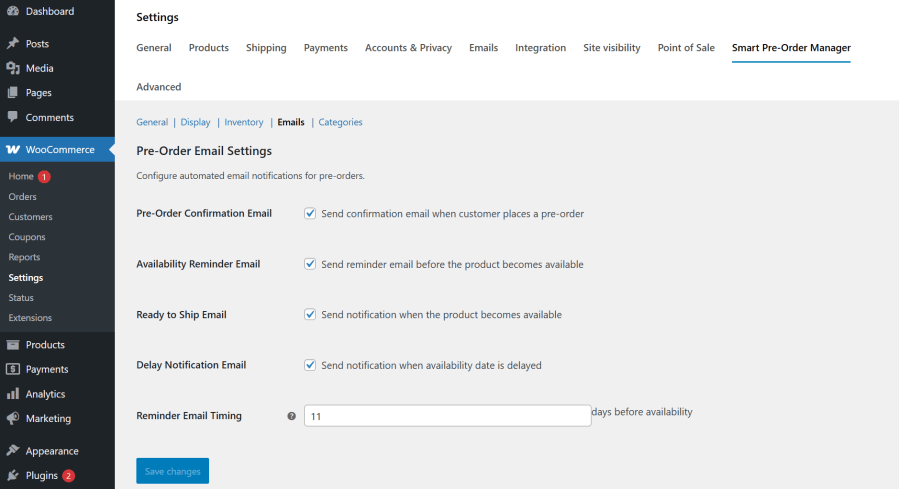
WooCommerce email notification templates for pre-order confirmations and updates

9. Bulk Enable Pre-Orders for Categories & Tags

Save hours of tedious manual configuration. Instantly activate pre-order status across entire product categories, tags, or specific attributes. This bulk management feature is perfect for launching seasonal collections, coordination drops, or handling large-scale store restocks in seconds.
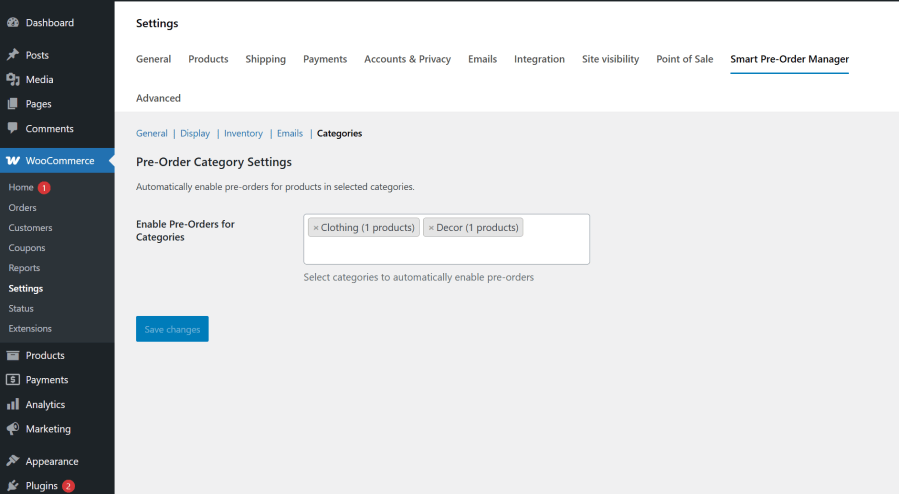
WooCommerce bulk edit screen for activating pre-orders across entire categories and tags

10. WooCommerce HPOS & Checkout Blocks Compatibility

Future-proof your store with speed-optimized code. Smart Pre-Order Manager is built to support WooCommerce’s latest performance standards, including full High-Performance Order Storage (HPOS) compatibility for ultra-fast database queries, and seamless integration with modern WooCommerce Checkout Blocks to ensure a smooth, high-converting checkout experience.
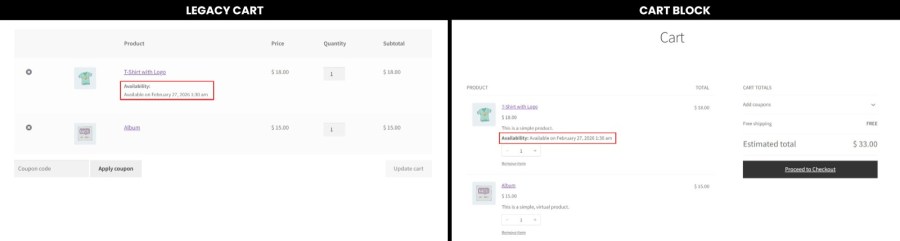
WooCommerce system settings showing HPOS compatibility enabled for Smart Pre-Order Manager

11. Custom Pre-Order Availability Messages & Labels

Take complete control of your store’s pre-launch messaging. Easily override default purchase buttons and stock text globally or on a per-product basis. Display exact release dates, relative timeframes, or write custom availability notices that fit your brand’s voice and set clear expectations for your buyers.
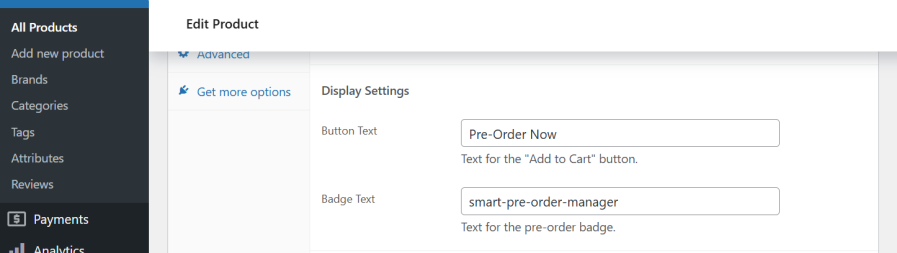
WooCommerce frontend product page showing custom pre-order availability message and customized button label

Why Choose Smart Pre-Order Manager for WooCommerce?

Selecting the right pre-order system is critical for keeping your store running smoothly and maintaining customer trust. Here is why Smart Pre-Order Manager is the best choice for your WooCommerce store:

  • Prevent Lost Sales & Secure Revenue Early: Instead of showing an unhelpful “Out of Stock” message, keep your checkout open. Capture customer intent and secure payments the exact moment interest is highest.
  • 100% Automated Workflow (Set-and-Forget): Save hours of manual admin work. The plugin automatically tracks release dates, switches products from “pre-order” to “in-stock,” and updates inventory settings in the background without you having to lift a finger.
  • Leverage Launch Hype and FOMO: Boost your conversion rates using built-in marketing tools. Combine custom pre-order discounts with visual countdown timers to create a sense of urgency (FOMO) that encourages customers to buy immediately rather than waiting.
  • Transparent Customer Communication: Reduce customer support tickets. With automatic email notifications for order confirmations, delays, and launch reminders, your customers always know exactly when to expect their shipment.
  • Lightweight and Performance Optimized: Many plugins bloat your database and slow down your site. Smart Pre-Order Manager is built with clean, modern code and is fully compatible with WooCommerce High-Performance Order Storage (HPOS) to ensure ultra-fast load times.
  • Seamless Compatibility: Designed to fit perfectly with standard WooCommerce cart templates, checkout blocks, page builders (Elementor, Divi, Gutenberg), and standard WordPress translation plugins.

Domande più comuni

How do I enable pre-orders for WooCommerce products?

With Smart Pre-Order Manager, enabling WooCommerce pre-orders takes just a few steps:

  1. Go to your WordPress admin dashboard and open any product.
  2. In the Product Data settings panel, check the Enable Pre-Order option.
  3. Set a release date (or check "Date TBA") and save your changes.

The plugin will automatically change your "Add to Cart" button to "Pre-Order Now" on your shop front. You can also use the bulk settings tab to enable pre-orders for entire categories, tags, or attribute ranges in one click.

Can I offer discounts on pre-order products in WooCommerce?

Yes! Smart Pre-Order Manager makes it easy to set promotional pricing to encourage early orders. You can configure:

  • Percentage Discounts: Automatically reduce the product price by a set percentage (e.g., 15% off).
  • Fixed Discounts: Reduce the price by a flat currency amount (e.g., $10 off).

The system calculates the savings automatically and displays a customizable "Savings Badge" on the product page to show buyers the exact benefit of ordering early.

Does the plugin support automated pre-order email notifications?

Yes. Smart Pre-Order Manager includes a fully automated customer email system that integrates directly with your native WooCommerce mailer settings. It sends:

  • Pre-Order Confirmations: Sent instantly when a buyer locks in their pre-order.
  • Release Reminders: Sent automatically a custom number of days before the launch date.
  • Ready to Ship Notifications: Alerts buyers as soon as the product becomes available.
  • Delay Updates: Automatically notifies customers if you adjust the launch date.

This keeps your customers informed and significantly reduces "Where is my order?" support requests.

Can customers mix pre-orders and regular items in the same WooCommerce cart?

Yes, the plugin offers complete control over mixed-cart transactions. In your admin settings, you can choose to:

  • Allow Mixed Carts: Let customers purchase pre-order products and standard in-stock items in a single checkout transaction.
  • Enforce Separate Checkouts: Restrict checkout so that customers must buy pre-order items separately, preventing split-shipping calculations and confusion.

Whichever option you choose, the plugin automatically adds clear "Pre-Order" labels to items in the cart, checkout, and invoices to keep buyers informed.

Is the plugin compatible with WooCommerce HPOS and Checkout Blocks?

Yes. Smart Pre-Order Manager is built according to the latest WordPress development standards and is 100% compatible with:

  • High-Performance Order Storage (HPOS): Ensures your order database queries remain lightning-fast and scale smoothly as your store grows.
  • WooCommerce Cart & Checkout Blocks: Integrates natively with WooCommerce's new default block-based templates for a clean, modern checkout flow.

This ensures your store remains future-proof, fast, and optimized for high conversion rates.

Recensioni dei clienti

Stiamo accettando recensioni per questo prodotto e le mostreremo quando ne avremo ricevute alcune in più.

Informazioni sull'estensione

  • Versione PHP richiesta: 7.4
  • Testato con WordPress: 6.9
  • Testato con WooCommerce: 10.7
  • Richiede almeno WordPress: 5.8
  • Richiede almeno WooCommerce: 6.0

Paesi

  • Mondiale

Related Products

Prezzo $79 Annualmente
Valutato 3.4 su 5 stelle
Prezzo $279 Annualmente
Valutato 3.2 su 5 stelle
Prezzo $59 Annualmente
Valutato 3.1 su 5 stelle
Prezzo $49 Annualmente
Valutato 4.1 su 5 stelle
Prezzo $109 Annualmente
Valutato 2.8 su 5 stelle
Prezzo $109 Annualmente
Valutato 2 su 5 stelle
Prezzo $109 Annualmente
Valutato 2.3 su 5 stelle
Prezzo $109 Annualmente
Valutato 2.6 su 5 stelle
Prezzo $109 Annualmente
Valutato 2.3 su 5 stelle
Uso dei tuoi dati personali
Noi e i nostri partner trattiamo i tuoi dati personali (come dati di navigazione, indirizzi IP, informazioni sui cookie e altri identificatori univoci) sulla base del tuo consenso e/o del nostro legittimo interesse per ottimizzare il nostro sito web, le attività di marketing e la tua esperienza utente.




