
Product Icon

Account Funds for WooCommerce

Give every customer a WooCommerce wallet: award cashback, take top-ups and let them pay with store credit at checkout.
Choose a billing option
$89
Save 20%
$178 $142.40

Subscription includes

  • Product updates and improvements
  • Customer support
  • 30-day money-back guarantee

Give every customer a WooCommerce wallet with cashback and top-ups

Account Funds for WooCommerce gives every customer a WooCommerce wallet with a balance in each currency you sell in. Customers earn credit through cashback and sign-up or review rewards, top it up themselves, or keep a refund in store, then spend it at checkout with a Store credit payment method, for all of an order or part of it, including on subscription renewals. Every credit and debit is a transaction you can browse and adjust, and you choose what earns credit, when it expires and what customers see it called.

Award cashback on orders and products

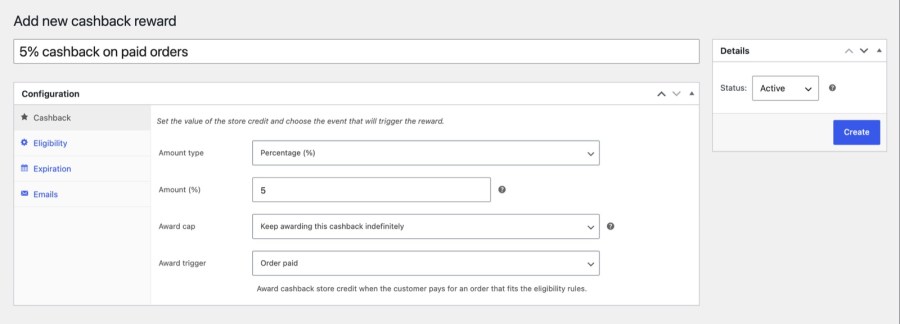
Set up cashback under Account funds » Cashback. Each reward is a fixed amount or a percentage, triggered when an order is paid or when a specific product is bought, and it credits the customer’s wallet with no coupon to send. Narrow a reward by product, product type or order value, skip orders with sale items or coupons, and limit awards to once per customer. Add a Maximum balance under Account funds » Settings » Limits to cap how much a customer can earn from rewards.
  • Filter by products, product types, and minimum or maximum order value
  • Exclude free items, sale items or orders that used a coupon
  • Limit awards to once per customer, or cap how many a reward gives
  • Cap how much credit a customer can earn from rewards in total
Adding a cashback reward under Account funds » Cashback
Set up a percentage cashback reward that credits the wallet when orders are paid

Thank customers for signing up and reviewing

Milestone rewards give a fixed amount when someone registers an account or reviews a product. Logged-in customers see an Earn message on product pages and the review form, and a Store credit awarded email tells them when credit lands. Registration rewards include accounts created at checkout, so a first order can start a customer’s balance, and every reward can make its credit never expire, expire after a period, or expire on a date. Review rewards can be limited to chosen products and set to once per product, once per customer or unlimited.

  • Reward account registration, including accounts made at checkout
  • Reward product reviews, with a verified purchase required by default
  • Send an expiring-soon email a set number of days before credit expires
Earn store credit notice on a WooCommerce product page
Product pages tell customers how much credit they will earn

Add a wallet payment method with partial payment

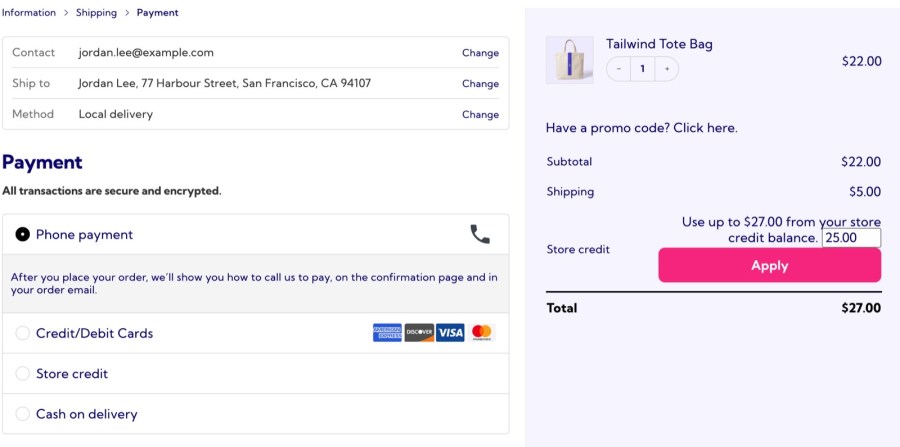
At checkout, the Store credit payment method appears when a customer’s balance covers the order. When it doesn’t, partial payment lets customers choose how much credit to apply from the cart or checkout and pay the rest with any other gateway. It works on the classic pages and the Cart and Checkout blocks, and with WooCommerce PayPal Payments and Square. You set the minimum and maximum amount customers can apply, and a payment that covers the whole order completes checkout without another gateway.
  • Cover a whole order, or part of it, with wallet credit
  • Set a minimum and maximum amount customers can apply
  • Show the customer’s balance in the payment method description
Checkout with a store credit amount entered to pay part of the order
Customers apply part of their wallet balance and pay the rest another way

Let customers top up their own wallet

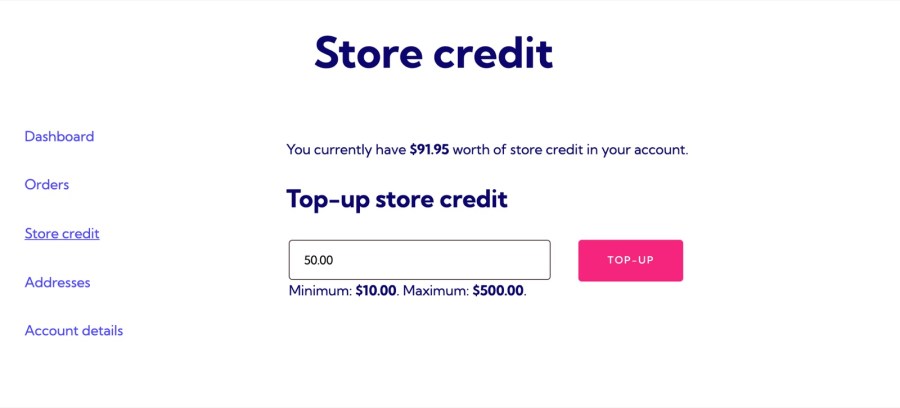
Turn on My Account top-up and customers add funds from a Store credit tab, within the minimum and maximum you set. You can also sell store credit products at a set price, or charge $80 for $100 of credit: a sale price is what the customer pays, and the full regular price lands in their wallet. The tab shows their balance and the top-up form, plus recent deposits once they have topped up. Top-ups earn no cashback unless you turn that on.
  • Show the balance, top-up form and recent deposits in My Account
  • Credit the full regular price when a sale price is paid
  • Choose whether top-ups earn cashback rewards for customers
My Account store credit tab with a wallet balance and top-up form
Customers top up their own wallet from My Account within your limits

See every credit and debit in a ledger

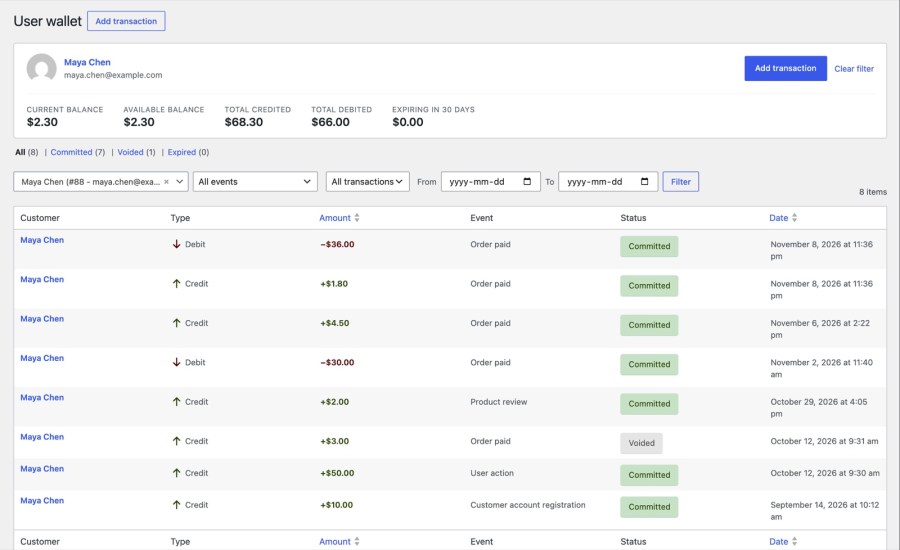
Account funds » Wallets lists every transaction across customers, with its event, type, status and date. Filter to one customer to see their current balance, available balance, total credited, total debited and what expires in the next 30 days. Balances also show on the Users list, and editing one from a profile records the difference as a manual transaction, so the ledger always explains how a balance got where it is. Each transaction opens to show its source, and its status reads Committed, Voided or Expired.
  • Add a credit or debit by hand, with a note and optional email
  • Void a transaction or change when its credit expires
  • Show a balance anywhere with the store_credit_balance shortcode or a widget
  • Read customer balances in the WooCommerce REST API
Wallets screen with balance cards and a transaction ledger for one customer
Review every credit and debit for a customer in one ledger

Refund to a wallet instead of the original payment method

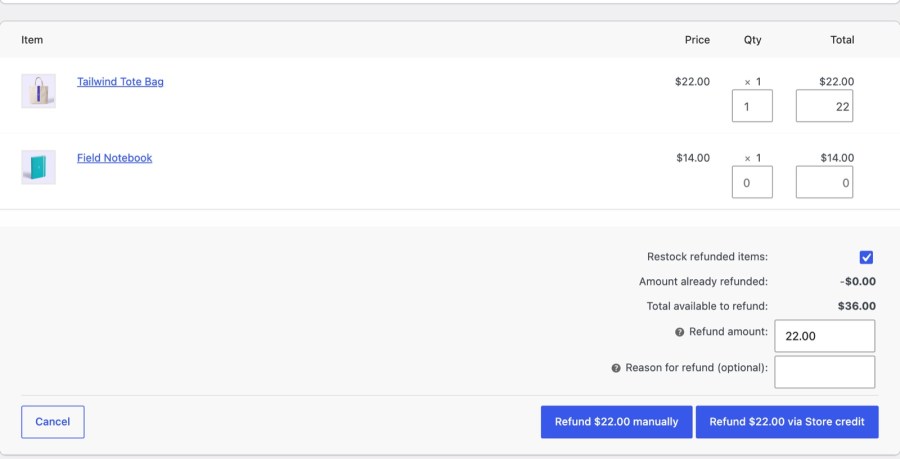
On an order that wasn’t paid with store credit, the refund screen adds a Refund via store credit button next to the usual refund to the original payment method. The customer gets the money in their wallet straight away, ready for their next order. Refunds on orders paid with store credit go back to the balance too, and cashback is voided when an order is cancelled or refunded with line items, so a reward never outlives a returned purchase. Deleting a refund to credit removes that credit again.
  • Refund to credit or to the original gateway, order by order
  • Return refunds on orders paid with store credit to the balance
  • Void cashback automatically when an order is cancelled or refunded
Order refund screen with the Refund via store credit button
Refund to the customer’s wallet with one button on the order

Account Funds or Store Credit?

Both give customers a balance to spend in your store. Account Funds keeps a wallet for every customer that pays at checkout like a payment method; Store Credit for WooCommerce hands out credit as coupons.

Account Funds (this extension)

  • Credit is a wallet balance on the customer’s account
  • Customers pay with a Store credit payment method, for all or part of an order
  • Automatic cashback, sign-up and review rewards credit the wallet
  • A Refund via store credit button sits on the order screen
  • Pays automatic subscription renewals from the wallet
  • Best for loyalty cashback, prepaid wallets and subscriptions

Store Credit

  • Credit is a coupon with a balance, tied to the customer’s email
  • Customers apply it like a coupon at cart and checkout, from a one-click list
  • Buyers send gift cards to another email address with a message
  • Guests can receive and spend credit sent to their email
  • You send credit instead of a cash refund, whenever you choose
  • Covers first orders and manual subscription renewals

Works well with

Selling gift cards that buyers send to someone else, or sending credit as a coupon? Store Credit for WooCommerce is the simpler tool for that job.

Running memberships? Constellation isn’t directly integrated, but a Product purchase cashback reward on the membership product credits members each time they pay. With WooCommerce Subscriptions, renewals are paid from the wallet when the balance covers them. Account Funds also works with PayPal Payments and Square, and supports the Cart and Checkout blocks and High-Performance Order Storage.

Get started

  1. Add Account Funds to your store, then install and activate it
  2. Check the Store credit payment method under WooCommerce » Settings » Payments
  3. Add a cashback reward under Account funds » Cashback
  4. Turn on My Account top-up under Account funds » Settings » Funding
  5. Check balances and transactions under Account funds » Wallets

Built and supported by Kestrel, a long-time WooCommerce extension developer.

KestrelWP

Frequently asked questions

Is Account Funds a WooCommerce wallet plugin?

Yes. Every customer gets a balance in each currency you sell in. They can top it up from My Account, earn cashback and rewards, receive refunds as credit, and spend it at checkout on all of an order or part of it. It doesn't let customers withdraw cash or send funds to other customers.

Do I need Account Funds, or are coupons enough?

If you only want gift cards or credit you send as a coupon, Store Credit for WooCommerce is simpler. Choose Account Funds when you want automatic cashback, a wallet customers top up, or a Store credit payment method. The comparison above sets them side by side.

Can guests spend their wallet balance?

No. Customers must be logged in to spend credit. Guests can still earn cashback by email, and it joins the account registered with that email, so the credit is waiting when they log in.

Can customers pay subscription renewals from their wallet?

Yes, with WooCommerce Subscriptions, as long as the balance covers the renewal. If it doesn't, the payment fails and the subscription switches to manual renewal. Credit applied as a partial payment on the first order isn't carried over to renewals.

Can I rename "Store credit" to "Wallet balance"?

Yes. Set the singular and plural labels under Account funds » Settings » Labels, to Wallet balance or any wording that fits your brand. The new name carries through to the payment method, the My Account tab and the emails.

Can customers see their transaction history?

Customers see their balance, the top-up form and recent deposits in My Account. The full ledger of credits and debits is for you, under Account funds » Wallets, and there is no customer-facing transaction history.

Extension information

  • WooCommerce version required: 4.0.0
  • PHP version required: 7.4
  • Tested with WordPress: 7.1.3
  • Tested with WooCommerce: 11.2.1
  • Requires at least WordPress: 6.3
  • Requires at least WooCommerce: 9.9

Countries

  •  Worldwide

Customer reviews

Average rating 4.2

6 reviews from verified users

5 stars, 80% of reviews
4 stars, 0% of reviews
3 stars, 0% of reviews
2 stars, 0% of reviews
1 star, 20% of reviews

Click to rate

  • Rated 5 out of 5
    marlenemagalhaesce9439a4aePortugalNov 13, 2026
  • Rated 5 out of 5
    Jose ManuelSpainApr 21, 2026
    We've contacted them for several reasons, sometimes because of issues they resolved within just a few hours, and other times to help us adapt our own custom developments related to their plugin. They always respond quickly, efficiently, and in a very friendly and approachable way. Great plugin and outstanding support. Highly recommended!
  • Rated 5 out of 5
    lespainsduvercorsFranceSep 13, 2025
    Recent updates open up many possibilities and better transparency of transactions made on Account funds. My use case was not initially planned, but after a quick exchange with the support team, an update was released within a few days and my need was understood and implemented quickly. I have been using Account_funds for many years now, and I was able to create new functionalities for my clients, based on the new features of the latest update (4.0.2 at the time of writing). Long live the plugin and the Kestrel team!
  • KestrelUnited States (US)Aug 28, 2025
    Hello, Sorry that you had a bad experience with the plugin. Mind reaching out our customer support elaborating about the problems you've encountered? We would be happy to help. Since you posted your review we deployed a new major version (v4.0.0) that contains several improvements and new features. The documentation has been updated accordingly. Perhaps you would like to give it another try? Don't hesitate to reach out to our support team if you still have issues with the plugin.
  • Rated 5 out of 5
    mariemalmrosSwedenNov 21, 2024

Related products

Price $279 annually
Rated 3.9 out of 5 stars
Price $199 annually
Rated 4 out of 5 stars
Price $109 annually
Rated 4.6 out of 5 stars
Price $79 annually
Rated 3.4 out of 5 stars
Price $59 annually
Rated 3.1 out of 5 stars
Price $109 annually
Rated 2.8 out of 5 stars
Price $109 annually
Rated 2 out of 5 stars
Price $49 annually
Rated 4.1 out of 5 stars
Price $109 annually
Rated 2.5 out of 5 stars
Use of your personal data
We and our partners process your personal data (such as browsing data, IP Addresses, cookie information, and other unique identifiers) based on your consent and/or our legitimate interest to optimize our website, marketing activities, and your user experience.



