
Subscription includes
Support
Every WooCommerce store has abandoned stores due to various reasons. These reasons can be missed milestones, indecisiveness, inactivity, or sending them irrelevant emails and promos like every other store.
As a complete WooCommerce customer retention plugin, it handles every trigger, every email, and every coupon rule automatically. Set it up once and let it grow your store revenue while you focus on what matters.
Now with the WooCommerce Coupon Email System, you can automatically create and send special coupons to your customers based on their data and behaviour.
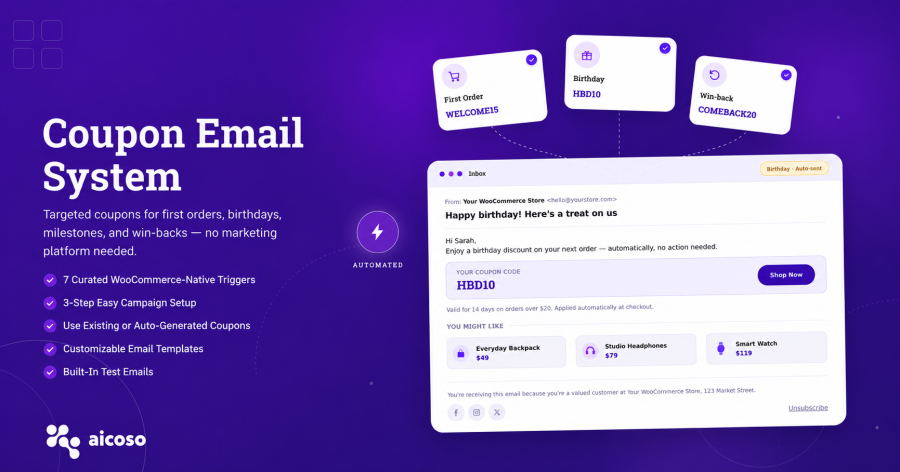
The AICOSO Coupon Email System is the one plugin every WooCommerce store owner needs, that fills the gap for reaching customers through email with special coupons based on events, such as first order, registration, birthday, spending milestones, total number of orders placed, purchasing product(s), and win-back campaigns.
Let it run all by itself on your store, and you will be providing the right discount at the right time for every potential buyer without having to manage a manual campaign. With $29/year, you can grab some conversions that were never going to happen.
This WooCommerce coupon plugin is built for stores focused on repeat purchase growth, not one-off promotions:
Most triggers will be set up in less than 15 minutes:
No need for a developer, no need for third party email service.
This WooCommerce coupon plugin is designed specifically for stores that want to encourage repeat purchases; they are not intended for stores simply looking to offer promotions for customers who may only shop with them once.
Whenever a new customer completes their first purchase, an automatic email coupon will be sent directly to them. The coupon can be an existing WooCommerce coupon or a new one generated by the plugin as per your set of rules defined, such as the discount type, value, minimum order value, free shipping option, and usage restrictions. You can also customise the subject and body of the email with dynamic placeholders such as the customer name, order date, and coupon code. \
With very little effort, you will be able to convert first-time customers into repeating customers.
Moreover, this system offers an automatic welcome coupon that will be sent immediately to a newly registered user. This encourages them to purchase as soon as possible.
The email content and subject line are fully customisable with dynamic placeholders, which makes it one of the easiest ways to turn a registered user into a paying customer.
An automatic email will be sent to a registered user on their special day to make them feel special. The plugin will create a specialised birthday coupon and send the email automatically to the user without any manual interaction.
However, you will be able to configure the discount type, value, and expiration date. Because of this, birthday emails can improve the ROI and build a stronger customer-client relationship.
Rewarding customers based on their lifetime spending can be very simple now. This system allows a defined amount that can be set, such as $50, $100, or more. So, whenever a user crosses the following thresholds, they get a milestone coupon.
You can also trigger an email coupon when a customer reaches a predefined order completion threshold of three, five, ten, or any other number you want. If you want to help build brand loyalty at various stages of loyalty, you can assign multiple thresholds to gift customers. Use a personalized subject line and email message to celebrate the milestone. A great way to create long-term purchase habits.
You can use purchase transactions of a specific product to send targeted email coupons. This is a great way to cross-sell and provide product-specific loyalty rewards and upsells after a purchase. You can generate instant coupons based on various options like a percentage off or fixed amount off, minimum and maximum spend amount for the store, free shipping, excluding items on sale, and individual use only. By providing customers with coupons based on best-selling and/or on-sale products, you can help create loyalty.
You can define a certain amount of time since the customer’s last purchase. When that limit has been reached, the plugin automatically sends a coupon email to the customer to re-engage with the customer that has not made a recent purchase. A nice way to define the type of coupon, amount of discount, and any restrictions is to define these parameters based on the margin of profit. This is the best WooCommerce automatic coupon tool for recovering customers that have become inactive and for this type of business you do not need to purchase a complete CRM or an email marketing platform to manage customers.
You’ll be able to fully customise every coupon email that the plugin sends, you can change the header, subject line and the body of your email for each trigger separately. You can use your existing WooCommerce coupons or have the plugin generate new ones automatically for each trigger. You can define the coupon rules in just the same way as you would within the standard WooCommerce interface, eg discount type (fixed or percentage), min/max spend conditions, plus free shipping & coupon usage limits for each customer and exclude sale items. You can also email yourself a test email to preview each message before making it live.
Step 1
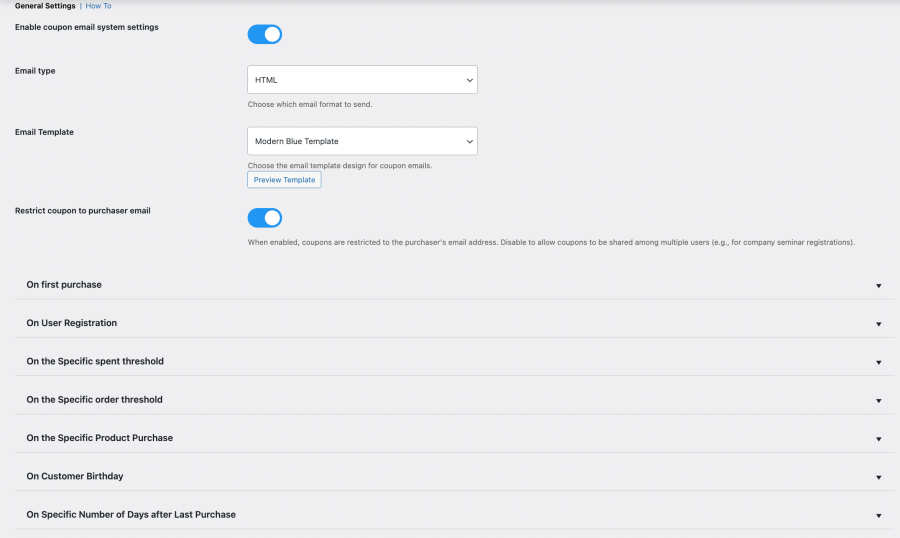
Enable the coupon email system and choose your email type and template from General Settings. Then select your trigger: first order, user registration, birthday, spending threshold, order count, specific product purchase, or inactivity.
Each trigger has its own settings panel where you configure the coupon, email subject, header, and body content independently.
Step 2
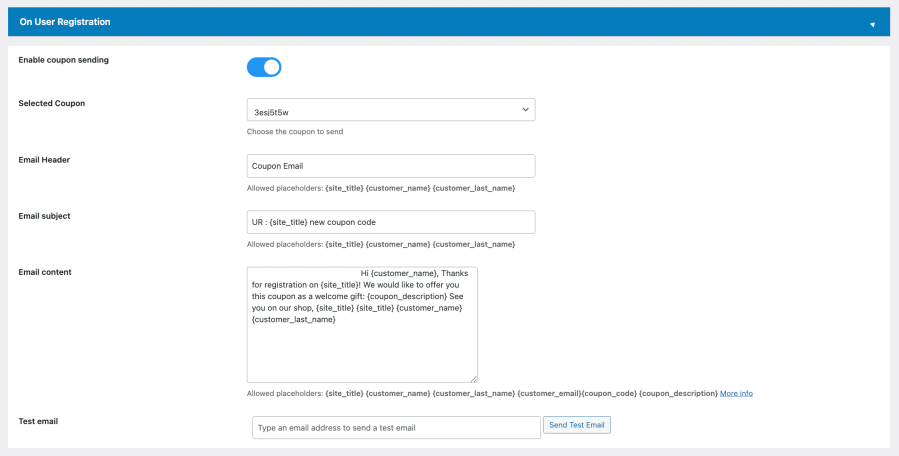
For each trigger, select an existing WooCommerce coupon or let the plugin auto-generate one. Then customize the email header, subject line, and body content using dynamic placeholders like {customer_name}, {coupon_code}, and {coupon_description}.
Use the built-in Send Test Email option to preview exactly what your customers will receive before going live.
Step 3
Customers Automatically Receive Branded Coupon Emails
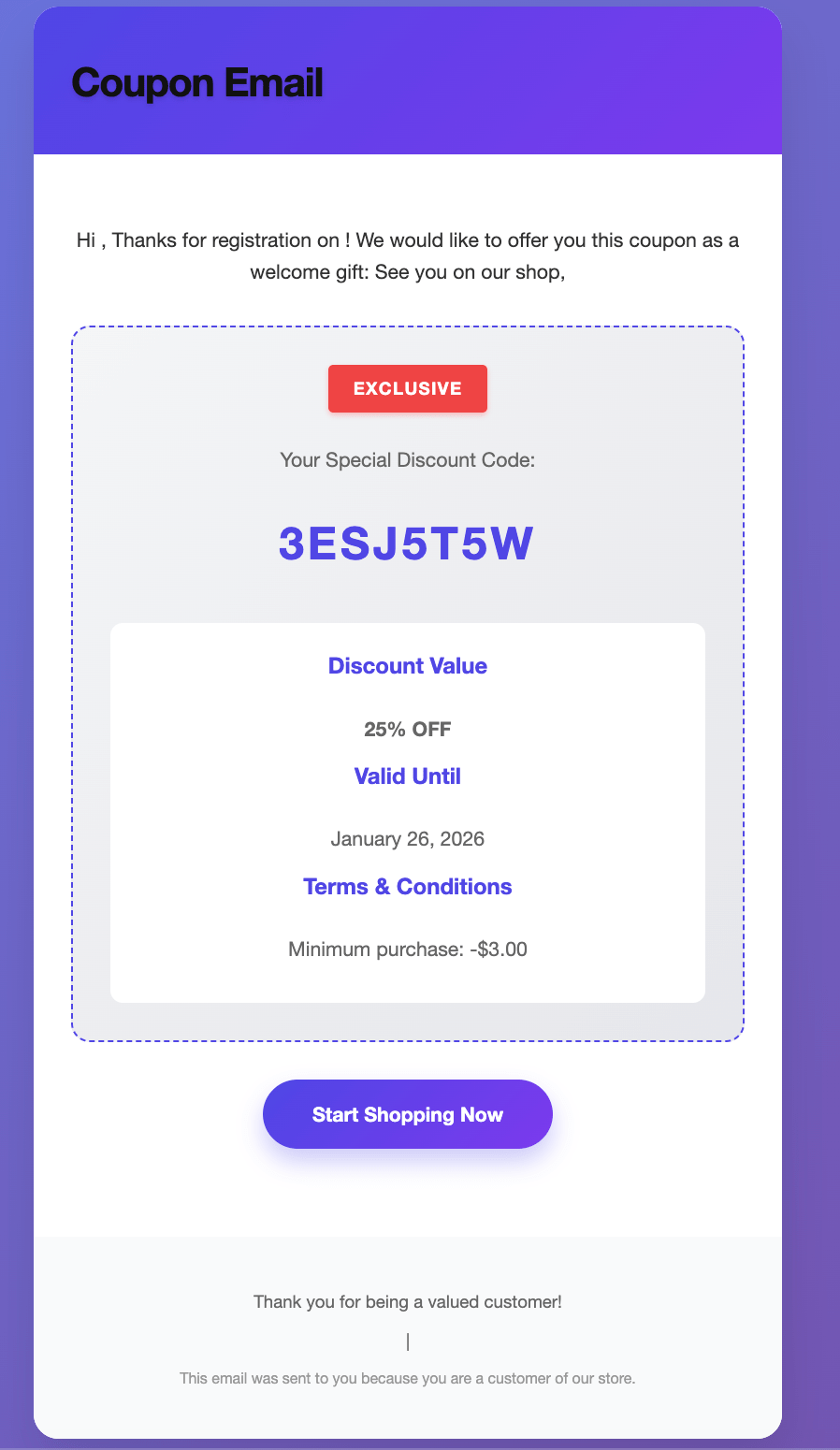
When a trigger fires, your customer automatically receives a beautifully formatted coupon email, showing their exclusive discount code, discount value, validity date, and terms. No manual sending. No missed moments.
Choose from multiple email templates including the Modern Blue Template to match your store’s branding perfectly.
Start Your WooCommerce Automatic Coupon Email System Today & Save Your Potential Conversions!
Set up birthday coupons, win-back campaigns, first order rewards, and spending milestone discounts in under 15 minutes today. No email platform. No manual work. No platform fees. Only at $29/yr.
It automatically sends personalised coupon emails to customers based on their behaviour. When a customer places their first order, reaches a spending milestone, hits an order count threshold, has a birthday, buys a specific product, or goes inactive for a defined period, the plugin detects the trigger and sends the relevant coupon email automatically. No manual work required after setup.
Not precisely. This is a focused WooCommerce coupon plugin for lifecycle-based coupon delivery. It does not do broadcast campaigns, segmented lists, or full email automation sequences. If you need those, pair this with an email platform. If your only need is automated coupon emails triggered by customer events, this plugin handles that without requiring an external platform.
Yes. You can assign existing WooCommerce coupons to any trigger, or let the plugin auto-generate new coupons with rules you configure, such as discount type, value, minimum spend, usage limits, and expiry.
Customers can enter their birthday in the My Account section or during checkout. Once entered, the plugin handles the rest automatically on the customer's birthday each year.
What is a win-back coupon, and how does it work?
A win-back coupon is a discount sent automatically to a customer who has not purchased for a defined number of days. You set the inactivity threshold — for example, 30, 60, or 90 days since last purchase — and the plugin sends the win-back email with a coupon when that threshold is reached. It is the most direct way to re-engage lapsed customers without manual list management.
Yes. Every trigger has its own customisable email subject line, header, and body. Use dynamic placeholders to personalise each message with the customer's name, order date, coupon code, total spend, and other details.
The plugin works with WooCommerce stores running standard order flows. For subscription-specific compatibility, verify on the WooCommerce Marketplace listing before purchase.
Extension information
Quality Checks
Countries
Languages







