Active installs
400+
Subscription includes
Support
Credit Line or Credits for WooCommerce allows you to offer a Line of Credit to your customers using which they can buy the products in your shop now and pay later.
When your customers browse products on your site, there’s always a chance that they will postpone purchasing because of insufficient funds. With credits, they won’t have to abandon their carts. They can purchase on the spot. What’s more, you can choose to charge interest on transactions made with credits. This can increase your site’s revenue.
Offering credits is a show of good faith and can help boost future sales from repeat customers.
Satisfied customers are more likely to refer new customers to your site.
Your customers won’t have to postpone purchases due to insufficient funds. Plus, they won’t have to keep their payment credentials on hand at all times—they can use credits instead.
If you choose not to charge interest, your customers will only be responsible for repaying the regular price of a product.
You decide how long customers have to repay. Set the due date as a fixed date that moves with each bill, or as any number of days (1 to 365) after the bill is generated.
This plugin comes up with 2 fund types.
Admin Funds
In this type, to offer a credit line to the customers, first you(admin) has to load funds to your admin account and from admin account it can be transferred to customers account. In this type, you will have a statistics on total funds approved to customers.
Virtual Funds
In this type Funds can be issued without any limitation from admin side.
This plugin supports three ways to offer Credit Line to customers,
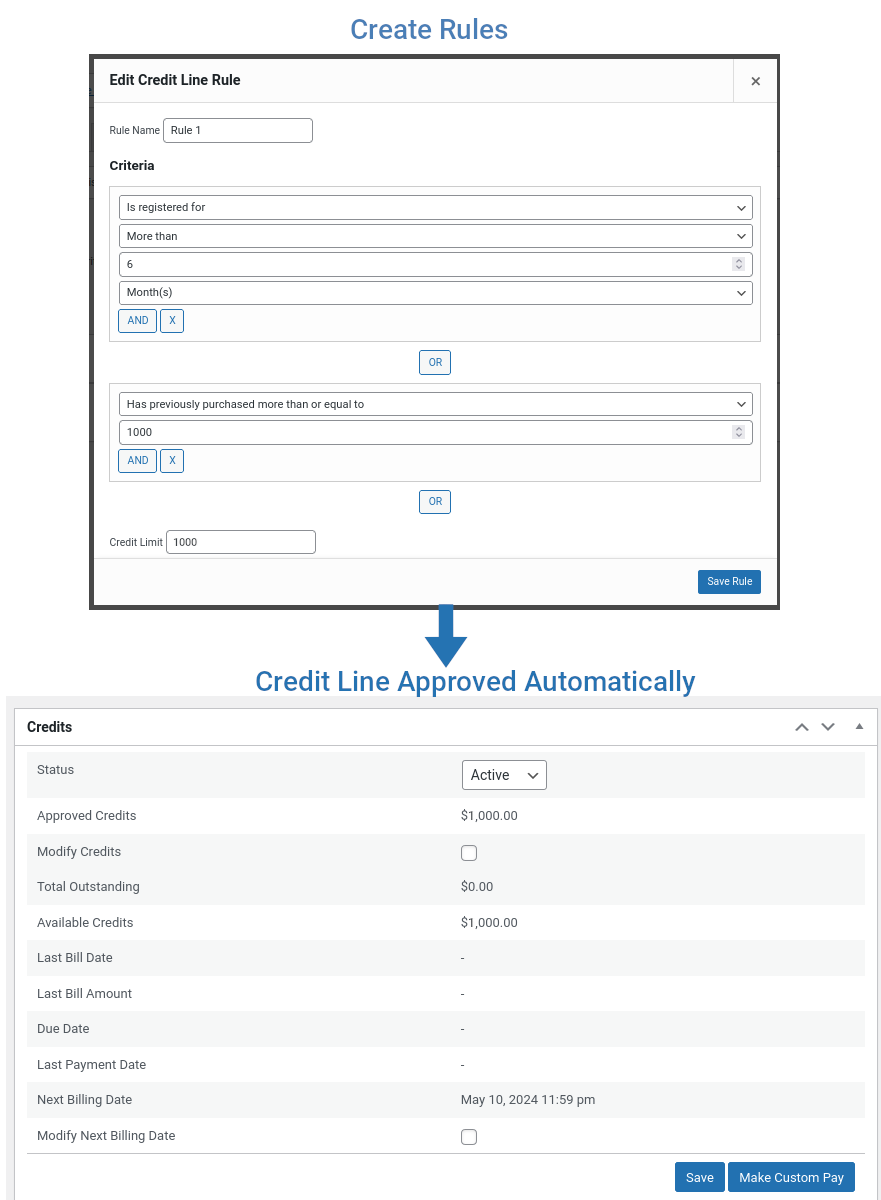
Auto Approval
Based on Criteria set by site admin, Credit Line can be approved for all the customers on the site automatically.
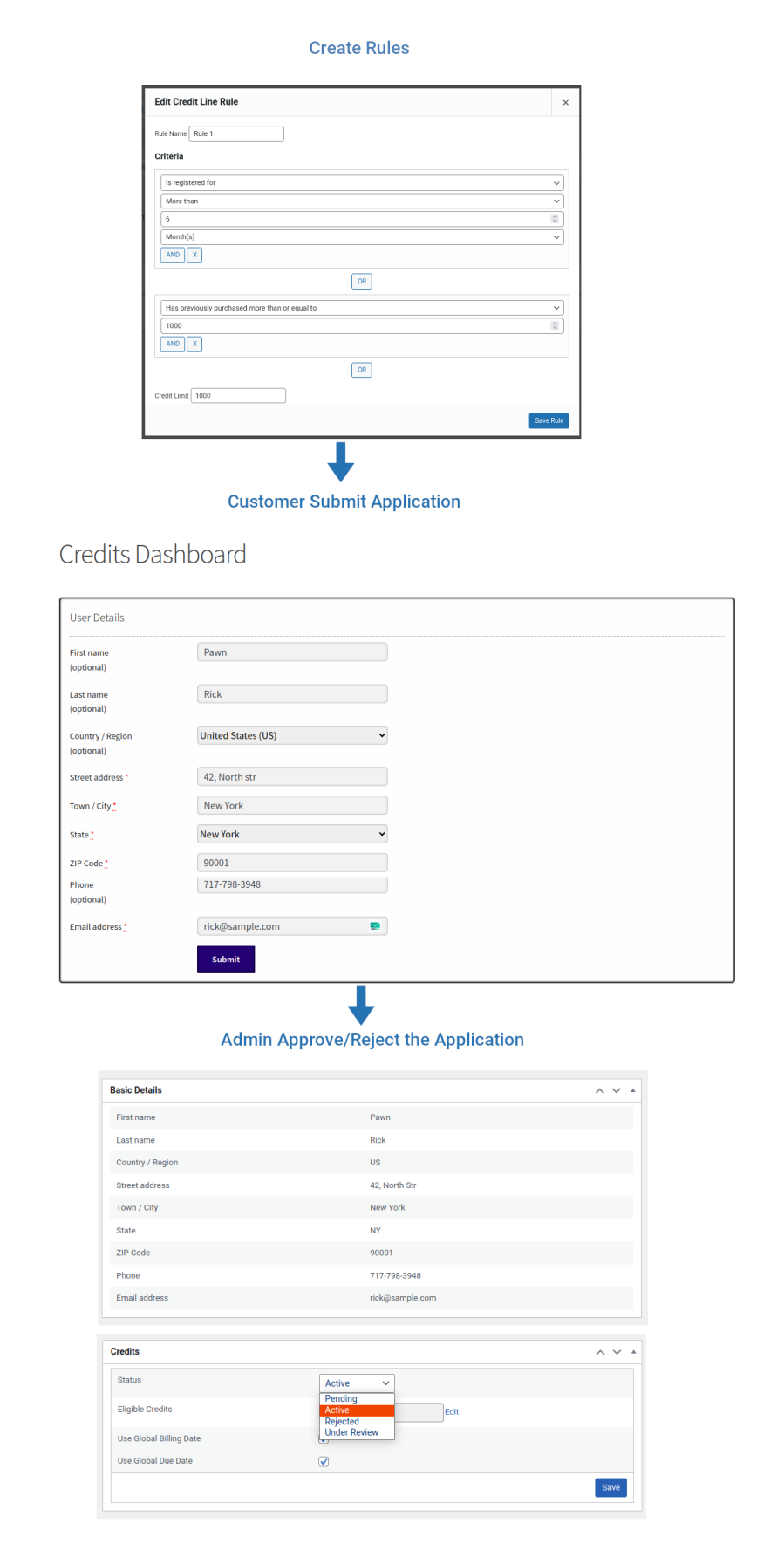
Application Based Approval – Manual Approval
Customers will have to submit the application and the site admin will have to review the application and approve or reject the customer’s application.
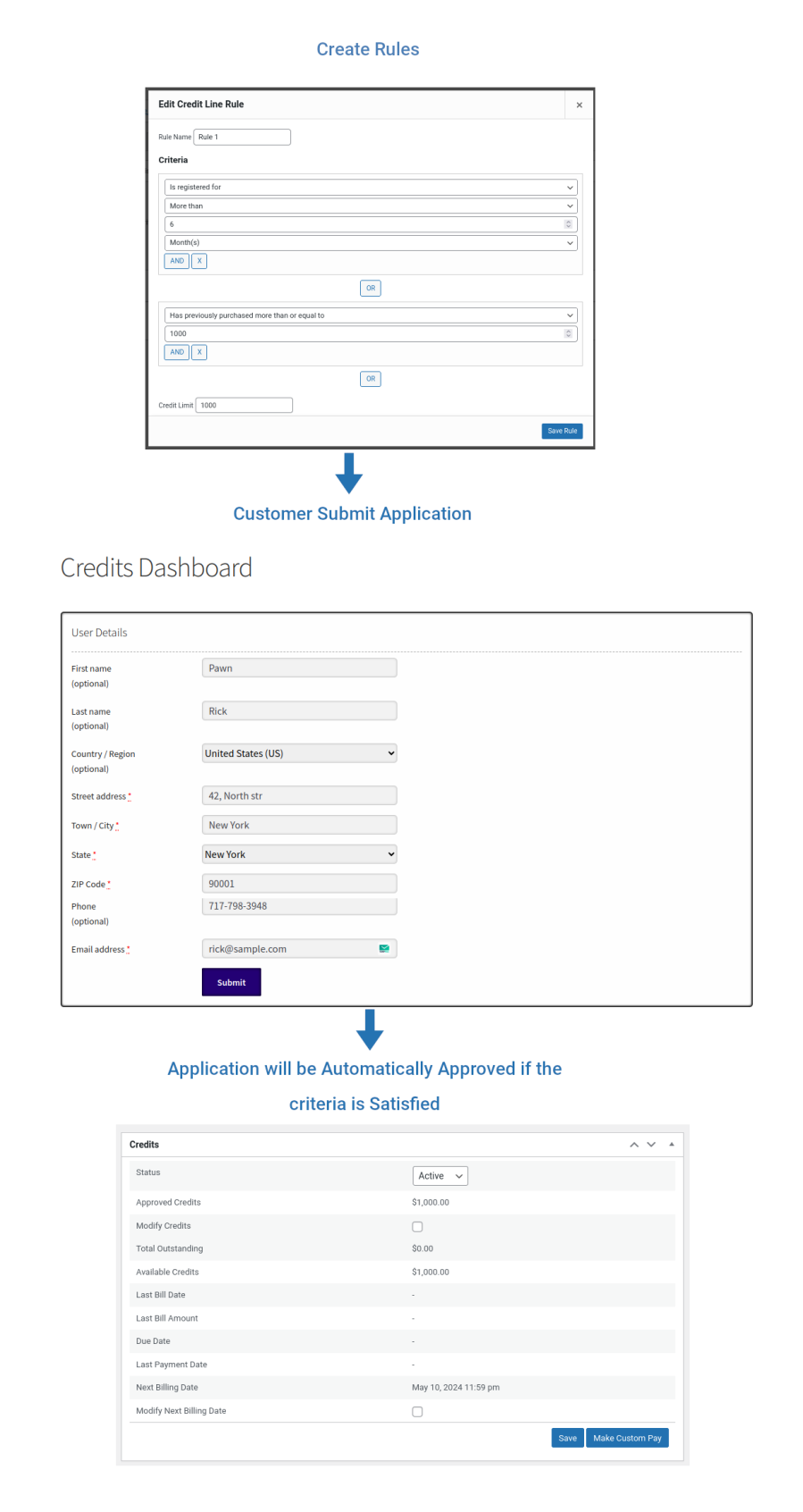
Application Based Approval – Auto Approval
Customers will have to submit the application and if the Criteria set by site admin matches, then the Credit Line will be automatically approved automatically.
Complete Manual
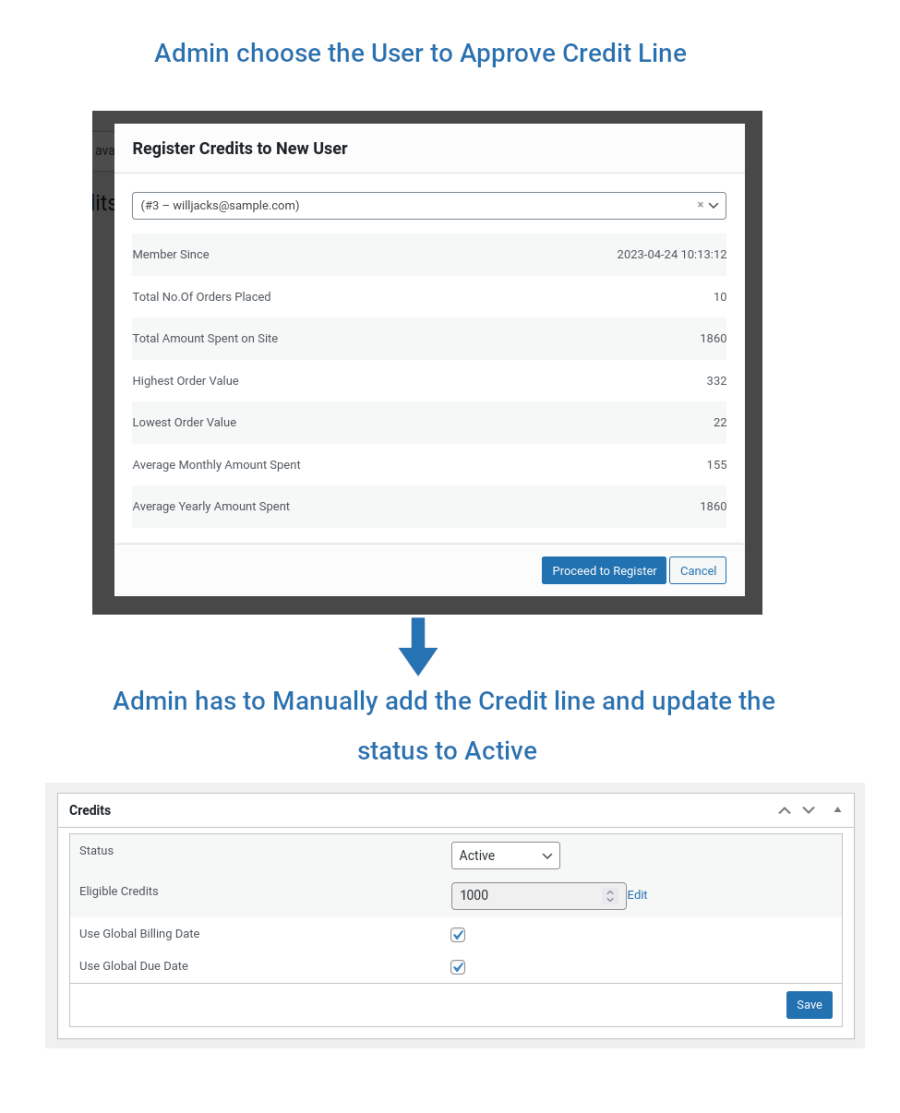
Admin can manually create a Credits account for any customer on the site and they can add Credit Line to the customer as per their wish.
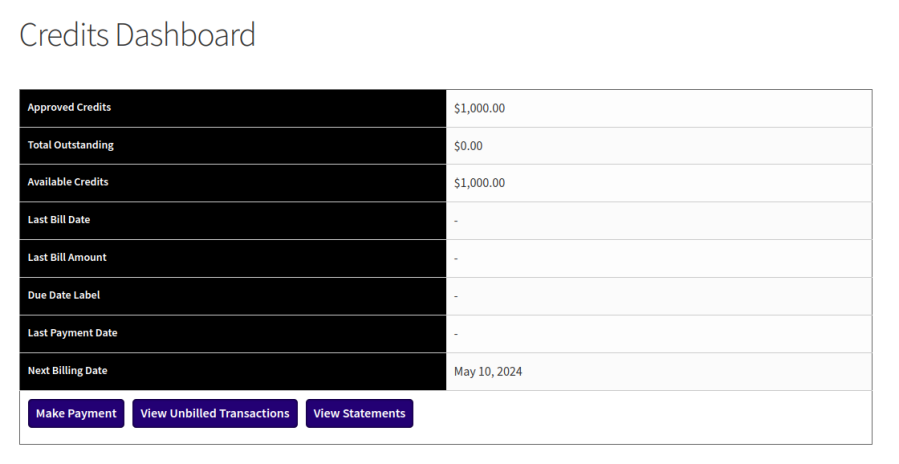
Once Credit Line is approved for the customer, they can view the details in their Credits Dashboard. In Credits Dashboard, customers will be able to Make Payment(Advance Payment, Custom Amount Bill Payment, Full Bill Payment), View Unbilled Transactions, View Statements.
The Credits Dashboard also shows the customer’s Next Payment Due and Outstanding Bills, and View Statements lists every statement with month and status filters.
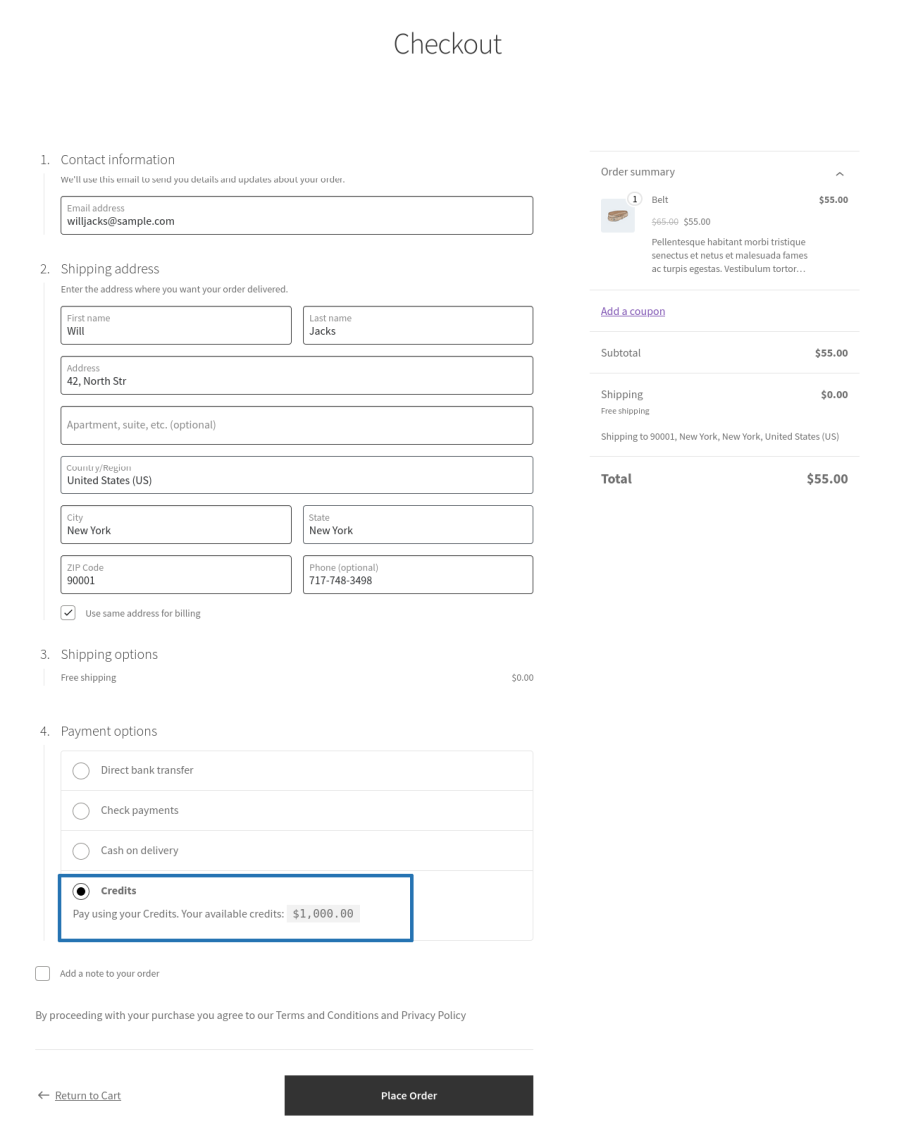
Customers can place orders using the “Credits” payment method which will be available in Checkout if they have enough Credits available in their account. In case if the order amount is more than their Available Credits, the payment method will be hidden for the customer.
Admin can globally set a Billing Interval (every N days, weeks or months) and a Cycle Start Date. Bills are generated for all customers on the Cycle Start Date plus whole intervals, so every customer is billed on the same dates. Admin can also move a customer’s next billing date as a one-off change.
Once the bill is generated, customers will be notified by email with a link to download their statement. At this point their due date also will be set as per the admin configuration, either a fixed date that moves with each bill or a number of days after the bill.

After reviewing the bill, customers will have to pay their bill amount on/before the due date. Customers can pay their bill amount from their Credits Dashboard. Customers can also make advance payment and custom amount payment as per their convenience from their Credits dashboard.
If a customer has more than one unpaid bill, they can choose which bills to pay on the Make a Repayment screen, and the cart shows which bills are being paid.
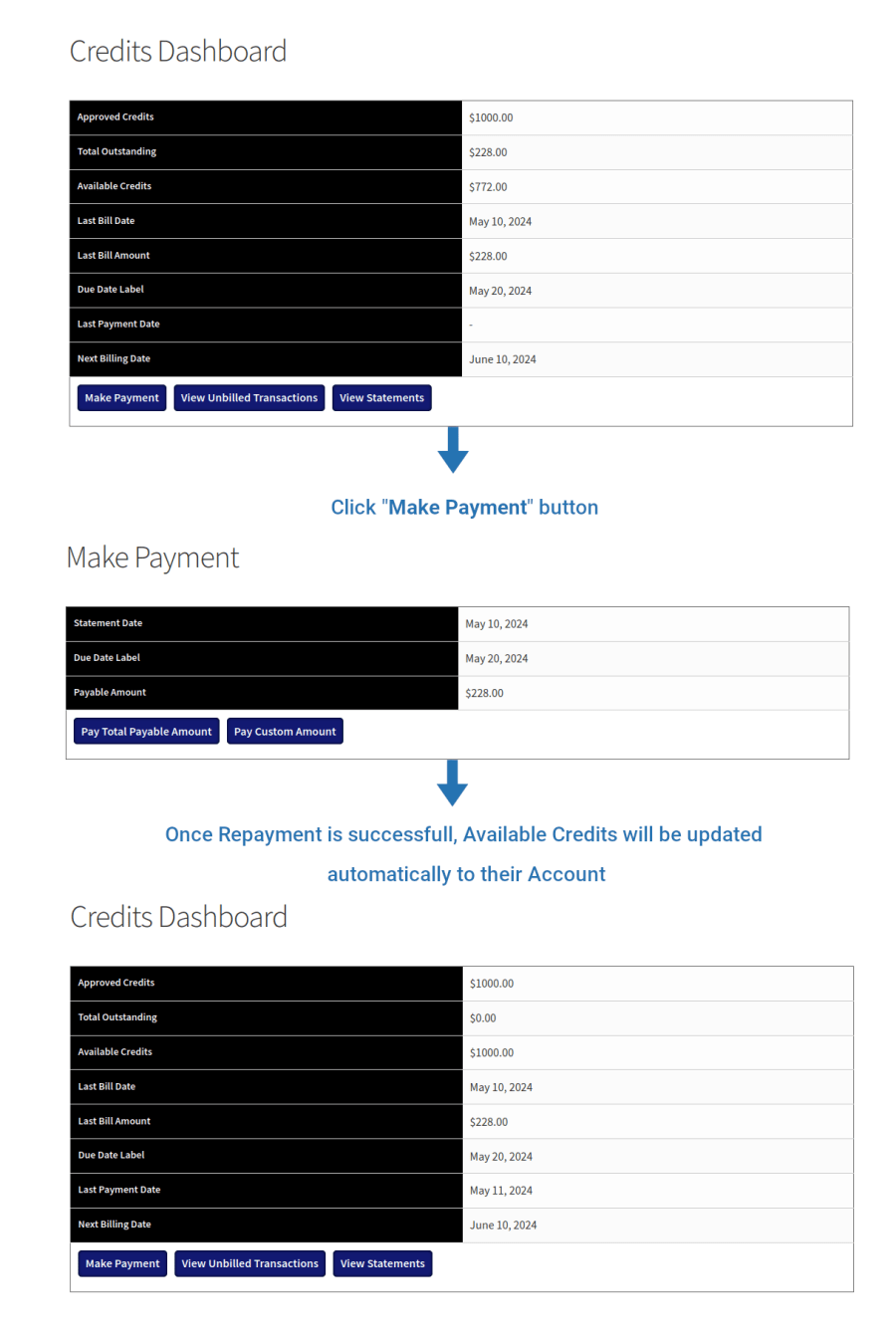
If admin have received the payment in offline mode(i.e. outside WooCommerce), then admin can make the payment on behalf of the customer.
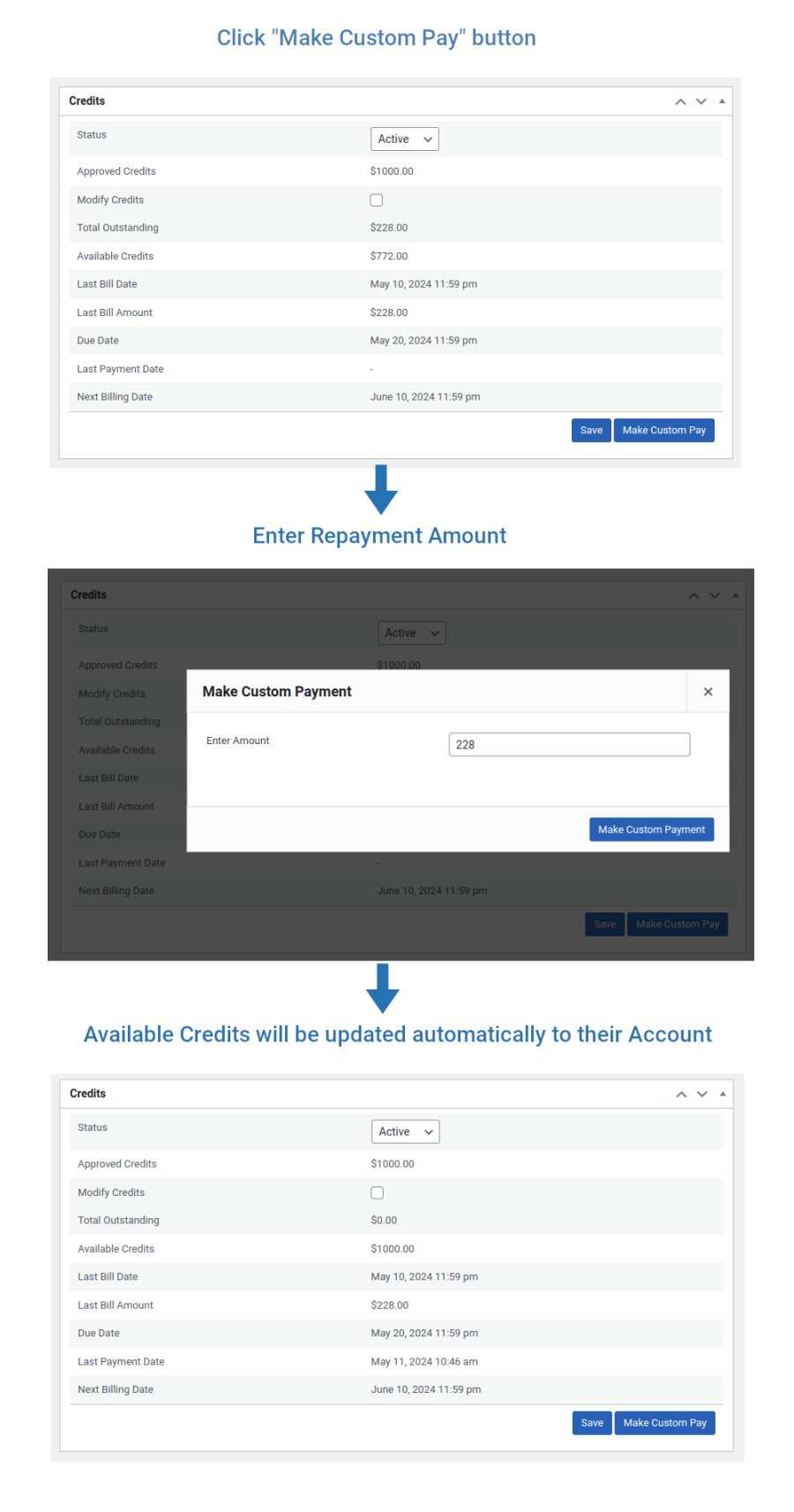
If the customers doesn’t make the repayment even after the due date, their Credits account status will be moved to “Overdue” and Late Payment(optional fee which has to be set by admin) will be debited from their account automatically. Admin can also block customers Credits usage if the status is Overdue.
This whole process will be repeated on every billing interval.
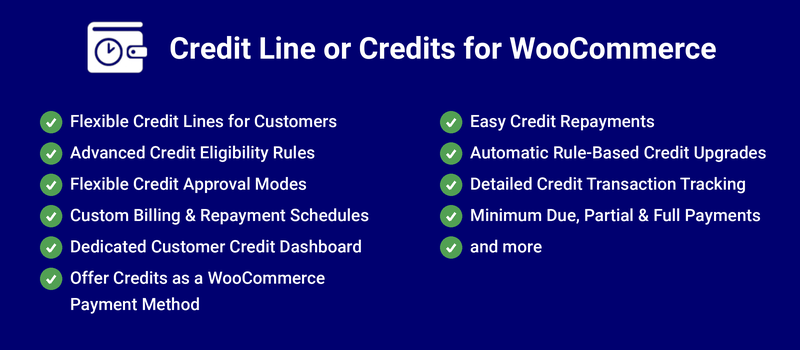
Offer your customers a pre-approved credit limit that can be used to purchase products instantly without making an upfront payment. The available credit balance is automatically tracked and updated after every purchase and repayment.
Bill customers every N days (7 to 365), weeks (1 to 52) or months (1 to 12) instead of only monthly. Bills are generated on a Cycle Start Date plus whole intervals, so every customer is billed on the same dates. A First Bill Buffer (0 to 30 days) makes sure a newly approved customer’s first bill comes at least that many days after approval.
Set the due date as a fixed date that moves with each bill, or as a number of days (1 to 365) after the bill. Help tips in the settings show the bill and due dates your saved settings will produce.
Create unlimited credit line rules based on user roles, specific users, or other business requirements. Automatically assign different credit limits to different customer groups and manage credit access with complete flexibility.
Allow customers to apply for credit and manage requests through flexible approval modes. Store owners can approve applications automatically, review them manually, or grant credit without an approval process. This helps businesses maintain control over credit allocation while providing a smooth customer experience.
Configure flexible billing cycles, due dates, and repayment schedules that suit your business model. Give customers a structured way to repay outstanding balances while maintaining predictable cash flow.
Provide customers with a comprehensive Credit Dashboard where they can view their available credit, outstanding balance, billing information, repayment history, and account activity in one place.
Credits are integrated directly into the WooCommerce checkout process, allowing customers to select Credits as a payment method and complete purchases without leaving the standard checkout experience.
Allow customers to make repayments through dedicated repayment products and repayment workflows. Payments are automatically applied to outstanding balances, reducing manual administration for store owners.
Several unpaid bills can be open at the same time, and each bill tracks its own amount, late fee, payments, reminders and overdue email. Customers can choose which bills to pay on the Make a Repayment screen. Pay Custom Amount and Pay Minimum Due settle the bills with the earliest due date first.
When customer eligibility changes, the plugin can automatically switch between credit rules and update the customer’s credit limit based on predefined priorities, ensuring customers always receive the appropriate credit line.
Maintain complete visibility over every credit transaction, including credit usage, repayments, balance adjustments, and account activities. This provides a clear audit trail for both administrators and customers.
Allow customers to repay their credit balances using multiple payment options. Customers can pay the Minimum Amount Due, make a Custom Partial Payment, or settle the Full Outstanding Balance whenever they choose. This creates a flexible repayment experience while helping store owners maintain consistent credit recovery.
In “Admin Funds”, the site admin has to load credits to their own account in order to give credit line to other customers. In case if there is no enough credits in your account, you won’t be able to give a credit line to the customers.
In “Virtual Funds”, site admin doesn’t need to load credits to their account. A Credit line can be given to customers.
It is not possible to style the bill statement.
Updating the status to “Refunded” won’t credit the refund amount to the customer account. Follow the below steps while processing the refund to credit the refund amount directly to the customer’s account.
Bill will be generated automatically using cron. Please cross check whether cron is running properly on your site. If the cron is not running, then that is the reason why the bill is not generating.
We are getting customer details using the Email address and hence it is not possible to disable the email address field and it is not possible to give the email address field as optional.
Weekly billing is possible. Set the Billing Interval to the number of weeks you want (1 to 52). Bills can also be generated every N days (7 to 365) or months (1 to 12).
A repayment date based on each purchase date is not possible, since purchases are billed together. However, the Due Date can be set as a number of days (1 to 365) after each bill, or as a fixed date that moves with each bill.
Yes. Several unpaid bills can be open at once, and each bill tracks its own amount, late fee, payments, reminders and overdue email. Customers can choose which bills to pay from the Make a Repayment screen.
Categories
Extension information
Quality Checks
Countries