Product Icon

Custom Permalinks for WooCommerce

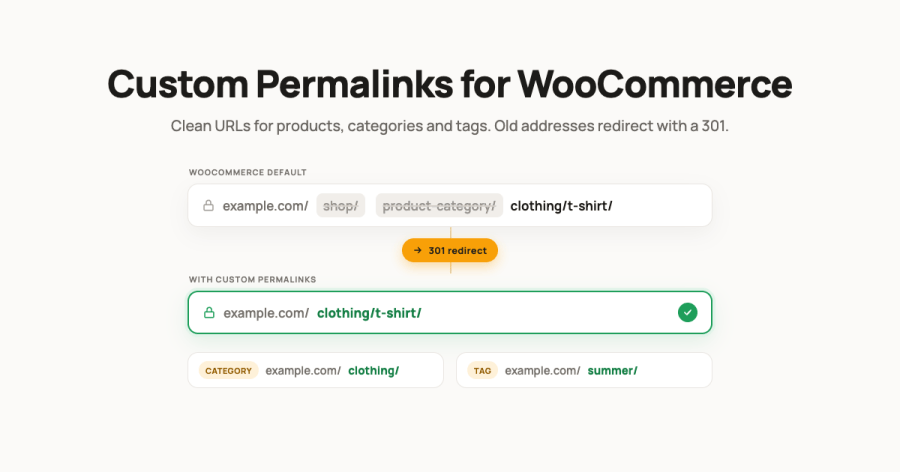
Clean /product/, /product-category/, tag and brand URLs for WooCommerce, with 301 redirects, canonicals, SKU slugs and custom endings.
Choose a billing option
$49
Save 20%
$98 $78.40

Subscription includes

  • Product updates and improvements
  • Customer support
  • 30-day money-back guarantee

  • Product URLs your way: keep the WooCommerce default, use the product slug alone, add its category, or the full category path.
  • Clean category, tag and brand URLs: drop /product-category/, /product-tag/ and the brand base, with or without the parent path.
  • 301 redirects and canonicals: old product, category and tag addresses redirect permanently, product and category pages get a rel=canonical tag.
  • URL endings: append .html, .htm, .php or any other ending, switched on per type.
  • SKU as the product slug: use the inventory SKU instead of the title-based slug.
  • Shop base: keep /shop/ in front of custom URLs and rename the segment.
  • Per-product structures: give a single product its own URL structure from the product editor.
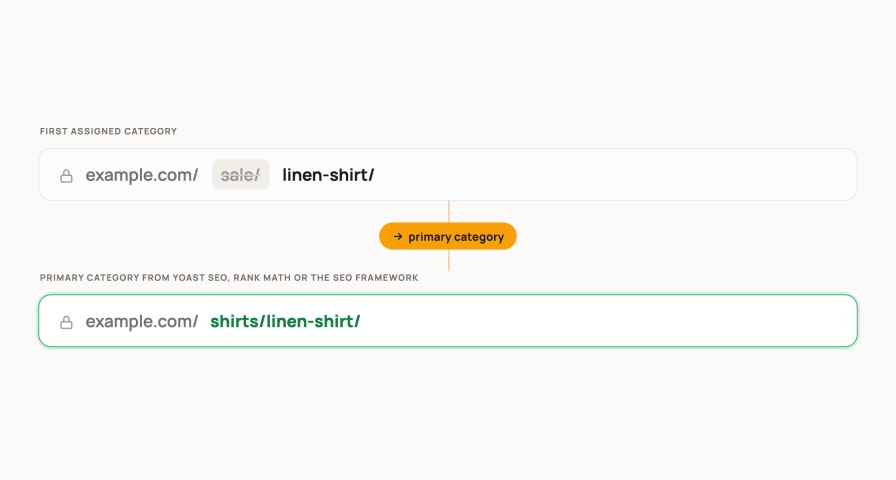
  • SEO primary category: build the URL from the primary category set in Yoast SEO, Rank Math or The SEO Framework.
  • Works with WooCommerce Brands and custom brand taxonomies, WPML and Polylang, classic and block themes, and High-Performance Order Storage.

Choose the Product URL Structure Once

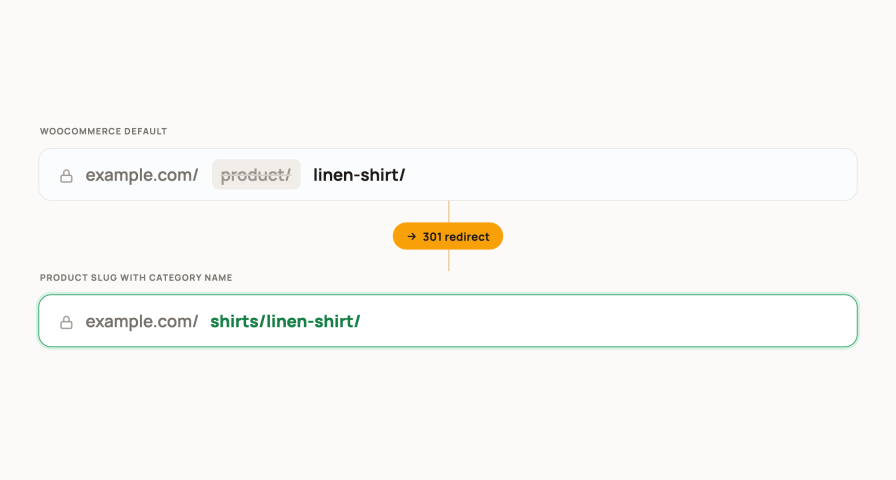
Pick one structure for the whole store in WooCommerce, Settings, Custom permalinks. The product slugs stay as they are, only the address around them changes.

  • Use WooCommerce defaults: example.com/product/linen-shirt/
  • Product slug alone: example.com/linen-shirt/
  • Product slug with category name: example.com/shirts/linen-shirt/
  • Full path: example.com/clothing/shirts/linen-shirt/

Categories, Tags and Brands Get Their Own Structure

Archive pages lose their base too. Categories can keep the parent category in the path, and brand archives from WooCommerce Brands or any custom brand taxonomy get the same treatment.
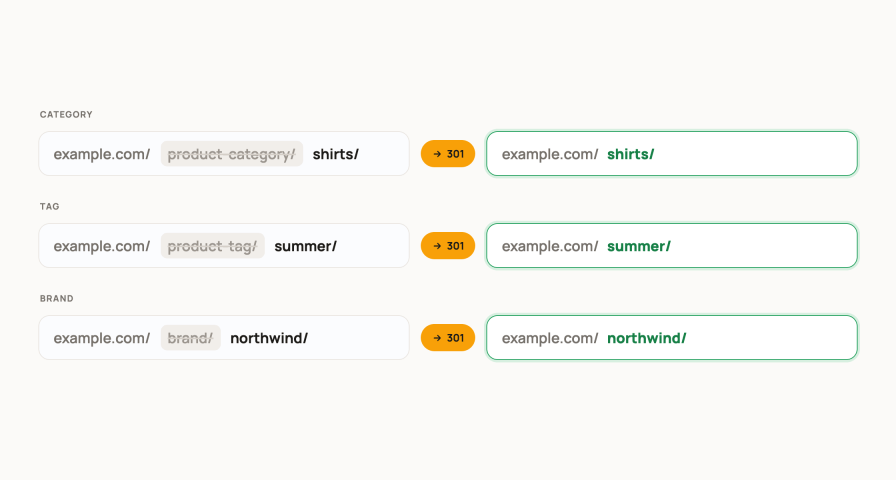
  • Category permalink: Use defaults, Category slug alone or Full path.
  • Tag permalink: Use defaults or Tag slug alone.
  • Brand permalink: Use defaults, Brand slug alone or Full path, for WooCommerce Brands or a custom taxonomy slug you enter.
  • Pagination, feeds and embeds keep working on the new addresses.

301 Redirects and Canonicals for Every Changed URL

Change the structure of a live store without losing a visitor. Old addresses in search results, emails and bookmarks answer with a permanent redirect to the new one.
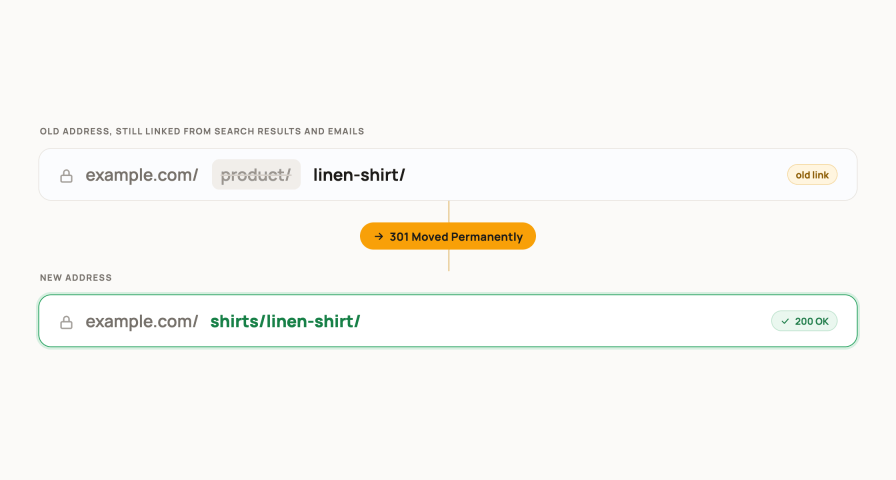
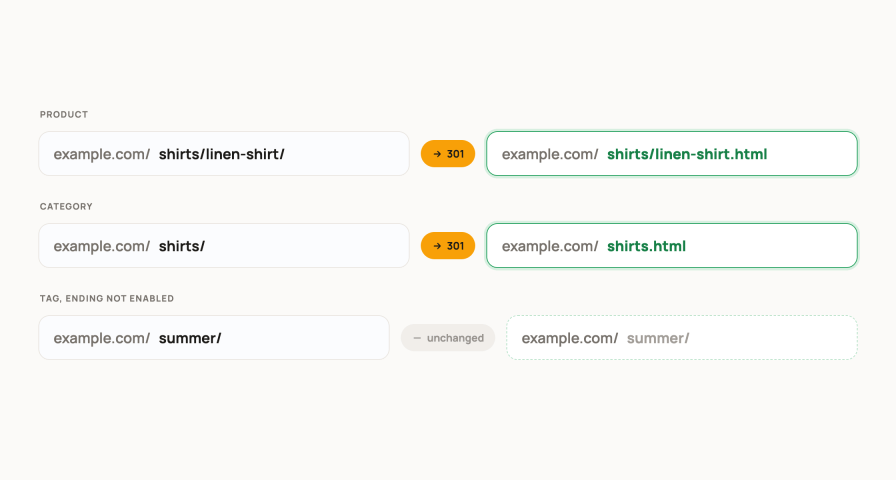
  • 301 redirects for old product, category and tag addresses, on by default.
  • Add canonicals prints a rel=canonical tag on product and category pages, so search engines index one address.
  • The canonical tag is left to Yoast SEO when it is active.
  • Nothing to configure per product: the redirects follow the structure you choose.

Add a URL Ending Such as .html

Keep the address style of the platform you migrated from, so old links and search listings keep their value.

  • One URL ending for the store: .html, .htm, .php or anything you type.
  • Switched on separately for products, categories, tags and brands.
  • Combines with every structure, the shop base and SKU slugs.

Use the SKU as the Product Slug

For catalogues where the SKU is the public reference, in price lists, in print or in a migrated shop, put it in the URL instead of the title-based slug.
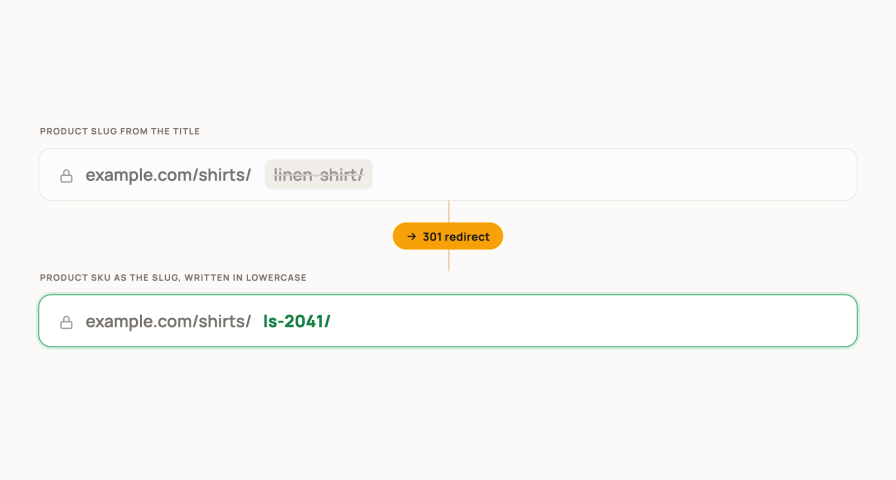
  • Product slug: Use defaults or Product SKU.
  • The SKU is written in lowercase in the address.
  • Products without a SKU keep their normal slug.

Keep the /shop/ Base or Rename It

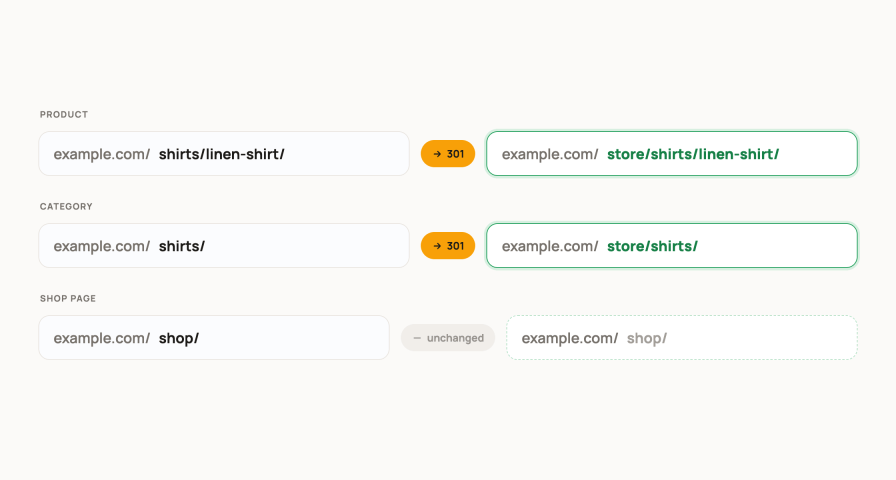
Some stores want a visible catalogue section in every address. Others want categories right after the domain. Both work.

  • Include /shop/ adds the base to custom product and category URLs.
  • The /shop/ segment field renames it, for example to store.
  • The slug of the shop page itself is not touched.
  • The segment is translatable with WPML String Translation.

A Different Structure for Single Products

A landing product, a campaign address you already advertise, or a legacy URL you need to keep: give that one product its own structure.
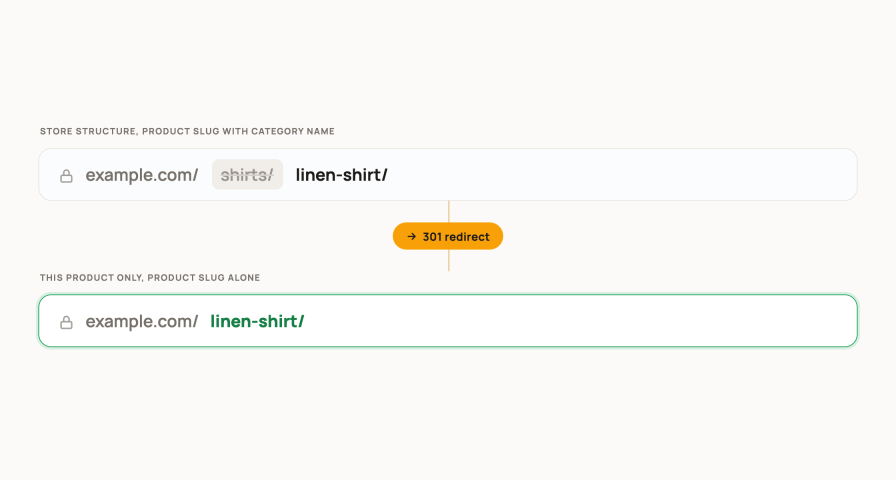
  • Switch on Product specific permalinks in the Advanced section.
  • A Custom permalinks box appears in the product editor with Use global settings and the four product structures.
  • Every other product keeps the store-wide setting.

Primary Category from Your SEO Plugin

A product in several categories gets one stable address, built from the category you mark as primary.

  • SEO plugins integration: None, Yoast SEO, SEO Framework or Rank Math.
  • With None, the first assigned category is used.
  • Sitemaps from your SEO plugin and from WordPress list the new addresses without extra steps.
  • A notice warns when the Yoast option Remove the categories prefix conflicts with your settings, with a one-click fix.

Works with WPML and Polylang

The rewrite rules are generated for the categories, tags and brands of every language, so the new addresses resolve inside each language directory.
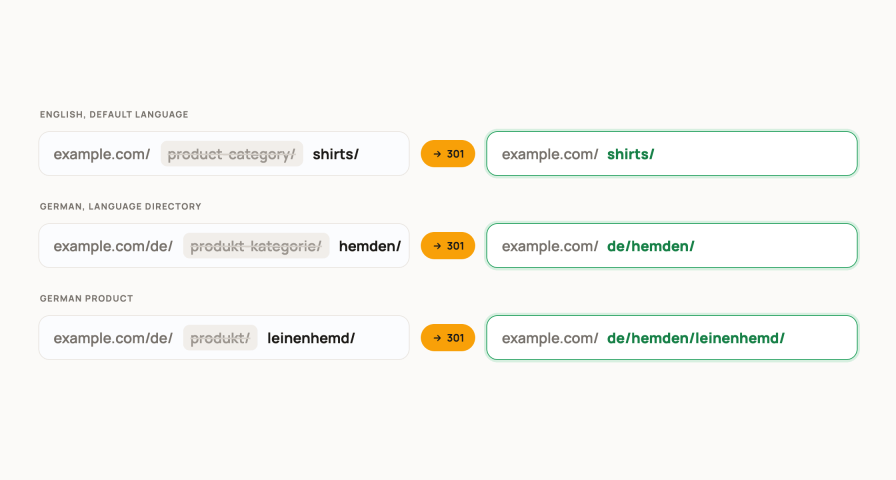
  • WPML: rules for every language, the /shop/ segment and the URL ending registered for String Translation through the bundled wpml-config.xml.
  • Polylang: one rule set per language directory, with the default language prefix hidden when Polylang hides it.

Will it work with my setup?

The plugin changes how WooCommerce builds and resolves addresses and nothing else, so it fits into an existing store without touching products, categories or orders.

  • Simple and variable products, nested categories, tags and brands.
  • WooCommerce Brands built into WooCommerce, or any custom brand taxonomy by slug.
  • Classic and block themes, pagination, feeds and embeds on the new addresses.
  • High-Performance Order Storage compatibility declared.
  • Yoast SEO, Rank Math and The SEO Framework: primary category in the URL, new addresses in the sitemap.
  • WPML and Polylang: rules per language, translatable shop segment and ending.
  • No manual flush: rules are rebuilt on save and when categories, tags or brands change.
  • Pretty permalinks are switched on automatically if the site still uses plain ones.

Perfect for: stores migrated from another platform, catalogues that sell by SKU, multilingual shops, and any store that wants short, readable product and category addresses.


Frequently asked questions

Which URL structures can I choose for products?

Four, set once for the whole store under WooCommerce, Settings, Custom permalinks. Use WooCommerce defaults keeps /product/ in the address. Product slug alone puts the product right after the domain, Product slug with category name adds its category, and Full path adds the parent categories as well. The product slugs themselves are not changed.

Can categories, tags and brands have clean URLs too?

Yes. Category permalink offers Use defaults, Category slug alone and Full path, which keeps the parent category in the path. Tag permalink offers Use defaults and Tag slug alone. For brands, pick WooCommerce Brands or enter the slug of any custom brand taxonomy, then choose Use defaults, Brand slug alone or Full path.

What happens to the old URLs?

With 301 redirects switched on, which is the default, the old product, category and tag addresses answer with a permanent redirect to the new address, so bookmarks, emails and search results keep working. Add canonicals, also on by default, prints a rel=canonical tag on product and category pages. When Yoast SEO is active the canonical tag is left to Yoast.

Can I keep the /shop/ base in the URLs?

Yes. Switch on Include /shop/ and the base is added in front of your custom product and category URLs. The /shop/ segment field lets you rename it, for example to store or catalogue. This does not change the slug of the shop page itself.

Can I add .html or another ending to the URLs?

Yes. Type the ending in the URL ending field, for example .html, .htm or .php, and switch it on for products, categories, tags and brands separately. This keeps the URL style of a platform you migrated from, and the old addresses redirect as usual.

Can I use the SKU instead of the product slug?

Yes. Set Product slug to Product SKU and the SKU replaces the title-based slug in the product URL, written in lowercase. Products without a SKU keep their normal slug. The SKU can be combined with every structure, the shop segment and a URL ending.

Can a single product use a different structure than the rest of the store?

Yes. Switch on Product specific permalinks in the Advanced section and a Custom permalinks box appears in the product editor. There you choose Use global settings or one of the four product structures for that product only. Every other product keeps the store-wide setting.

Which category is used when a product belongs to several categories?

By default the first assigned category. Set SEO plugins integration to Yoast SEO, SEO Framework or Rank Math and the primary category chosen in that plugin is used instead. The product then has one stable address no matter how many categories it is in.

Does it work with WPML and Polylang?

Yes. The rewrite rules are generated for the categories, tags and brands of every language, so the new addresses resolve inside each language directory. With WPML, the /shop/ segment and the URL ending are registered for String Translation through the bundled wpml-config.xml.

Do I have to flush permalinks or edit .htaccess myself?

No. The URLs are rebuilt when you save the settings, and the rules are refreshed automatically when categories, tags or brands are created, edited or deleted. If your site still uses plain permalinks, the plugin switches WordPress to pretty permalinks so the structures can work.

Will the new URLs appear in my XML sitemap?

Yes. Sitemaps from Yoast SEO, Rank Math, The SEO Framework and WordPress itself read the permalinks the plugin generates, so the new addresses are listed without extra steps.

Yoast SEO offers to remove the category base too. Which one should I use?

Let this plugin handle it. When the Yoast option Remove the categories prefix is on, the two tools write conflicting rules, so the settings tab shows a notice with a one-click link that switches the Yoast option off. Your Custom permalinks settings then apply as expected.

Is it compatible with High-Performance Order Storage and block themes?

Yes. The plugin declares compatibility with High-Performance Order Storage and does not touch orders. It works with classic and block themes alike, because it only changes how addresses are built and resolved, not how pages are rendered.

Extension information

  • WordPress version required: 5.0
  • WooCommerce version required: 4.0.0
  • PHP version required: 7.2
  • Tested with WordPress: 7.1
  • Tested with WooCommerce: 11.1
  • Requires at least WordPress: 5.0
  • Requires at least WooCommerce: 5.0

Compatibility

  • Cart & checkout blocks
  • High performance order storage (HPOS)

Countries

  • Worldwide

Languages

English (United States)

Customer reviews

Average rating 5

4 reviews from verified users

5 stars, 100% of reviews
4 stars, 0% of reviews
3 stars, 0% of reviews
2 stars, 0% of reviews
1 star, 0% of reviews

Click to rate

  • Rated 5 out of 5
    RRLithuaniaMar 6, 2025
  • Rated 5 out of 5
    viveroo GmbHGermanyJun 13, 2023
    Awesome Support At first we had some issues due to WPML and this plugin. Everything was resolved quickly by the awesome support team. It works like a charm now and we are very happy.
  • Rated 5 out of 5
    jarredhadecocozaSouth AfricaSep 1, 2022
    Great plugin! My links on the search console were all giving 404 errors and then I found this plugin. Fixed the issue perfectly. Highly recommended.
  • Rated 5 out of 5
    anonymized-4339094Apr 6, 2022
    PLUGING TOP SUPPORT TEAM TOP TOP TOP The plugin really does what I expected. I had some problems with my site to have a really particular configuration and the support team is really on top!!! They helped me and were able to solve my specific problem with my website without telling me to manage on my own. Congratulations to the whole meow-crew team.

Related products

Price $109 annually
Rated 4.6 out of 5 stars
Price $279 annually
Rated 3.9 out of 5 stars
Price $79 annually
Rated 3.4 out of 5 stars
Price $59 annually
Rated 3.1 out of 5 stars
Price $109 annually
Rated 2.8 out of 5 stars
Price $49 annually
Rated 4.1 out of 5 stars
Price $109 annually
Rated 2 out of 5 stars
Price $109 annually
Rated 2.5 out of 5 stars
Price $39 annually
Rated 2.8 out of 5 stars
Use of your personal data
We and our partners process your personal data (such as browsing data, IP Addresses, cookie information, and other unique identifiers) based on your consent and/or our legitimate interest to optimize our website, marketing activities, and your user experience.