

Active installs
40K+
Product comparison
Subscription includes
Support

Need guidance? Check out the comprehensive documentation to learn everything you need to know about the Min/Max Quantities extension.
If you have pre-sale questions or need help, get in touch with our friendly Happiness Engineers.
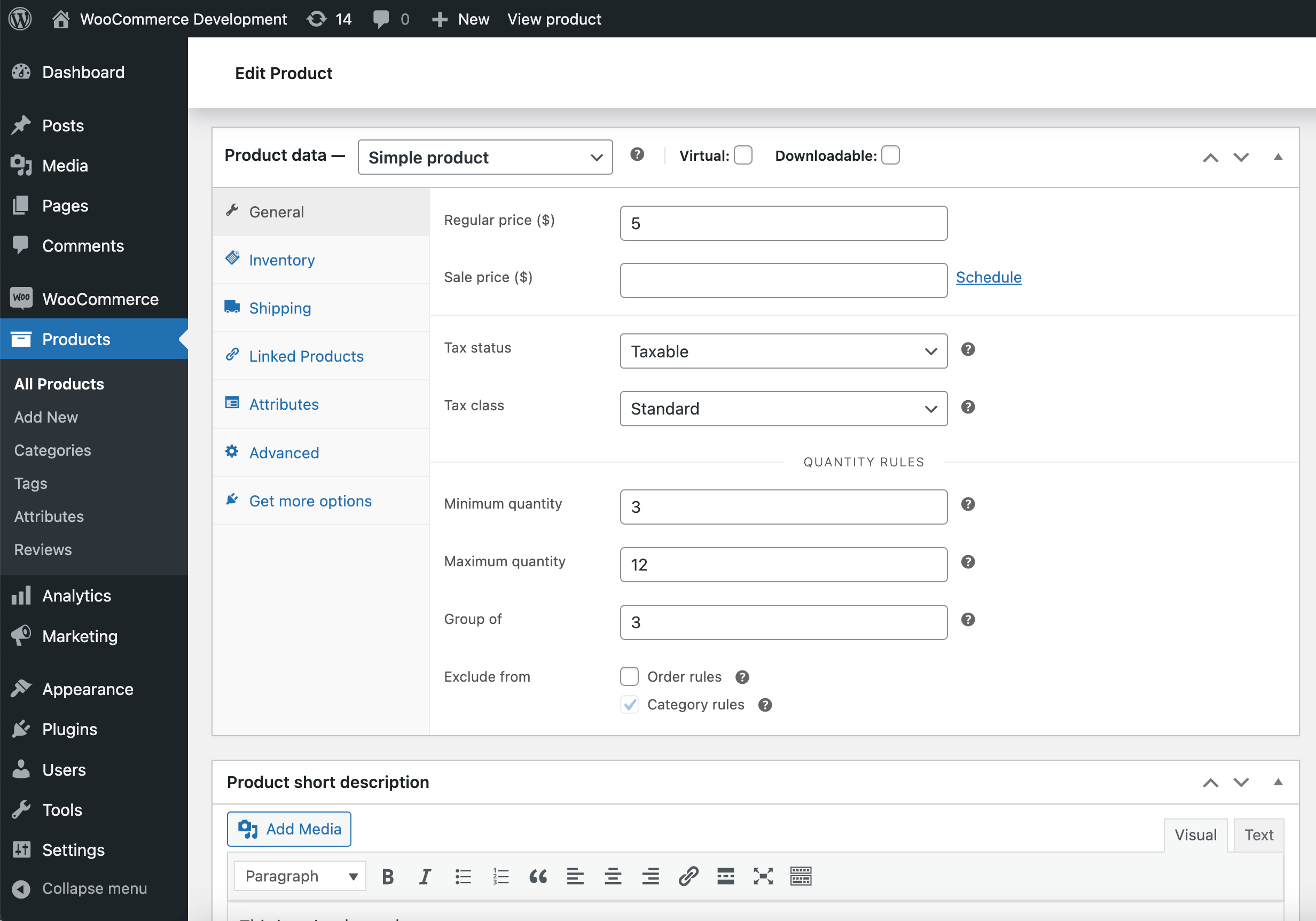
Yes. Min/Max Quantities is a WooCommerce product display and quantity control extension that lets you set a minimum required quantity and a maximum allowed quantity on individual products. WooCommerce does not enforce quantity limits on its own, so this extension gives you the controls to require a floor, cap the ceiling, or both. You can also apply these rules at the variation level for variable products.
Min/Max Quantities includes a "Group of" rule that requires a product to be purchased in predefined multiples. For example, setting a group of 6 means shoppers can add 6, 12, 18, and so on, but nothing in between. This is useful for products sold in cases, packs, or fixed bundles, and you can apply the same multiples rule to an entire product category.
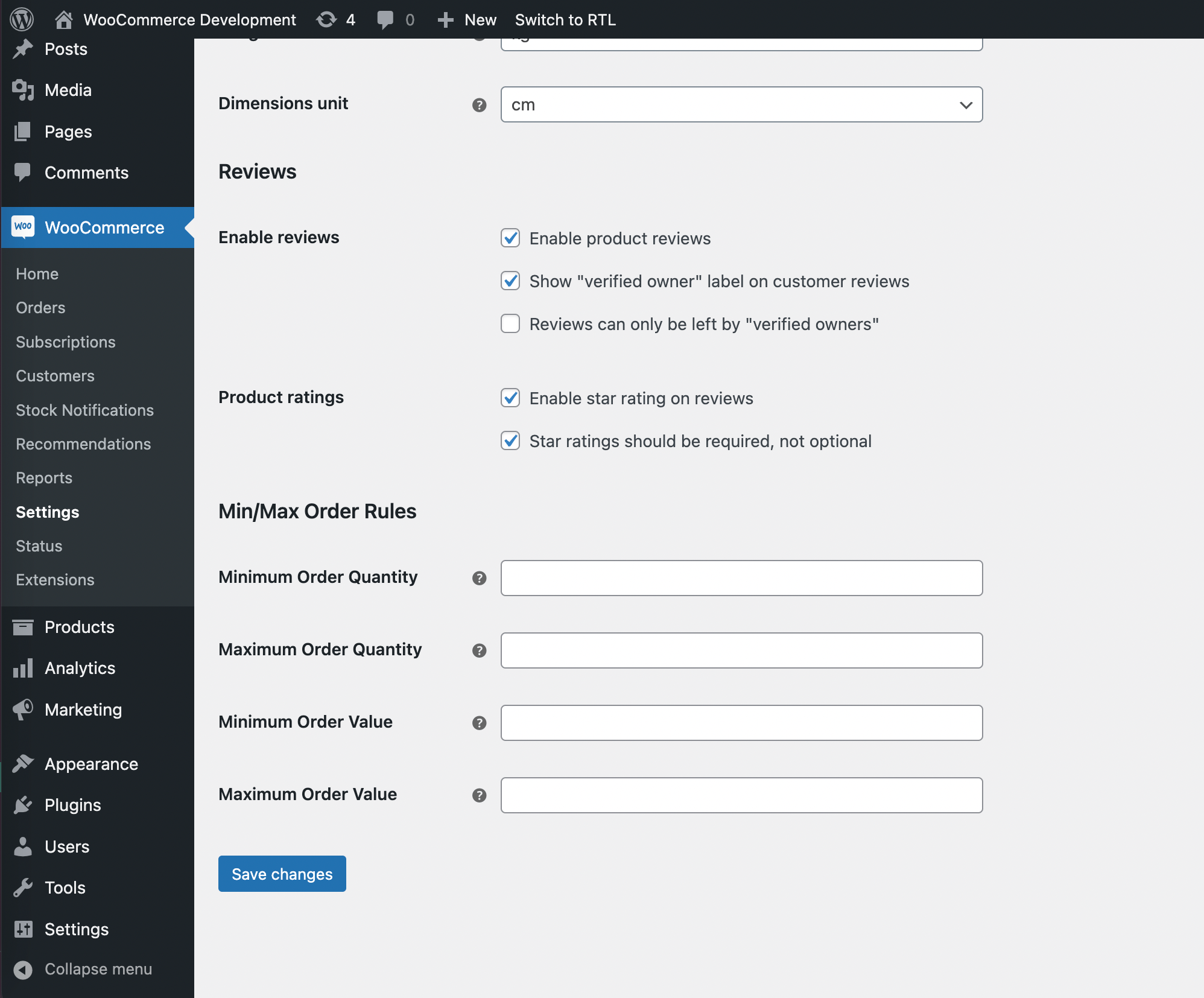
Yes. Alongside per-product rules, Min/Max Quantities lets you set order-level rules from your WooCommerce settings. You can require a minimum or maximum number of items in an order, and a minimum or maximum order total before a customer can check out. If some items should not count toward these totals, you can exclude individual products from the order rules.
Yes. Min/Max Quantities supports minimum, maximum, and "Group of" rules for entire product categories. Every product in the category inherits the category rule, so you do not have to configure each item one by one. If a product needs different handling, you can set a product-level rule or exclude it from category rules entirely.
Product-level rules take priority. When a quantity rule is set directly on a product, the matching category rule for that same rule type does not apply to it. Rules that are not defined at the product level are still inherited from the category. This gives you a clear baseline for a category while keeping the flexibility to fine-tune individual products.
Yes. You can add quantity rules at the variation level, so each variation of a variable product can carry its own minimum, maximum, and "Group of" values. There is also a Combine Variations option: when enabled, the quantities of all purchased variations are counted together when checking the rule, so a shopper can meet a requirement by mixing variations rather than buying enough of a single one.
It can help. By setting minimum and maximum quantity rules, Min/Max Quantities gives you tools to prevent overstocking and stockouts, keep inventory at more predictable levels, and reduce storage costs. For example, capping how many units a single customer can buy can help protect limited stock, while requiring minimums can help move products in efficient batches.
Yes, it is well suited to wholesale, B2B, and bulk-selling stores. Requiring minimum order quantities, minimum order values, and fixed multiples helps keep orders profitable and aligned with how you ship and stock products. Retail-friendly items can be excluded from order rules so they remain available to buy in any quantity.
Min/Max Quantities is best for merchants who need to control purchase quantities, including wholesale sellers, B2B stores, bulk suppliers, and any shop managing limited or carefully stocked inventory. It is a strong fit if you want to enforce minimums, maximums, or pack-based multiples at the product, variation, category, or order level.
If your main goal is to show customers a dropdown menu of preset quantities rather than enforce rules through a number field, Product Quantity Dropdown for WooCommerce may suit you better. If you specifically need quantity limits that change by customer or user role, look at Minimum And Maximum Quantity per Product, which uses a rule system that includes user role rules. Min/Max Quantities focuses on product, variation, category, and order rules.
WooCommerce does not enforce minimum or maximum purchase quantities out of the box, so you need an extension to add these controls. Min/Max Quantities adds quantity rules across products, variations, categories, and orders, which lets you require minimums, set maximums, and sell in multiples without custom code.
Yes. Min/Max Quantities lets you exclude individual products from order rules, so their quantity and value do not count toward minimum or maximum order requirements. You can also exclude a product from category quantity rules, which is helpful when a specific item should not follow the rule applied to the rest of its category.
Yes. When an order does not meet your minimum, maximum, or multiples requirements, shoppers are prevented from checking out until they adjust their cart to comply. This keeps your purchase rules clear and helps reduce invalid orders that would otherwise need manual correction.
You can import and export product-level quantity rules using WooCommerce's built-in product import and export tool. This is helpful if you manage a large catalog and want to set minimums, maximums, or multiples across many products at once rather than editing them individually.
Yes. Min/Max Quantities is built to work with the WooCommerce cart and checkout blocks, so you can manage those pages with the block editor while your quantity rules stay enforced. It is also compatible with high performance order storage.
Min/Max Quantities focuses on enforcing purchase rules: minimums, maximums, and multiples at the product, variation, category, and order level. A tool like Product Quantity Dropdown for WooCommerce focuses on the shopping experience by presenting quantities as a dropdown of preset options. If your priority is enforcing quantity and order limits, Min/Max Quantities is the right fit. If you mainly want to guide selection with a dropdown, the dropdown extension is worth a look.
Categories
Extension information
Quality Checks
Compatibility
Countries







