
Product Icon

SEO Product Filter for WooCommerce

AJAX product filters with clean URLs that turn the filter combinations you choose into search-friendly landing pages.
Choose a billing option
$79
Save 20%
$158 $126.40

Subscription includes

  • Product updates and improvements
  • Customer support
  • 30-day money-back guarantee

  • Let shoppers narrow products by attribute, category, tag, brand, price, stock, sale, and rating
  • Give filtered pages clean URLs such as /attribute-color-blue/ instead of long query strings
  • Set your own H1, page title, meta description, and description for any combination of attribute and brand values in a category
  • Create those landing pages in bulk for every category and attribute combination you pick
  • Update products, counts, and active filters without a page reload

Help shoppers find the right product faster

A shopper looking for a blue T-shirt in size L shouldn’t have to scroll through every top you sell. SEO Product Filter adds one filter to your shop and category pages that lists every attribute and taxonomy you choose. Checkbox, radio, and dropdown filters show how many products match each value, so shoppers can see what’s available before they click.
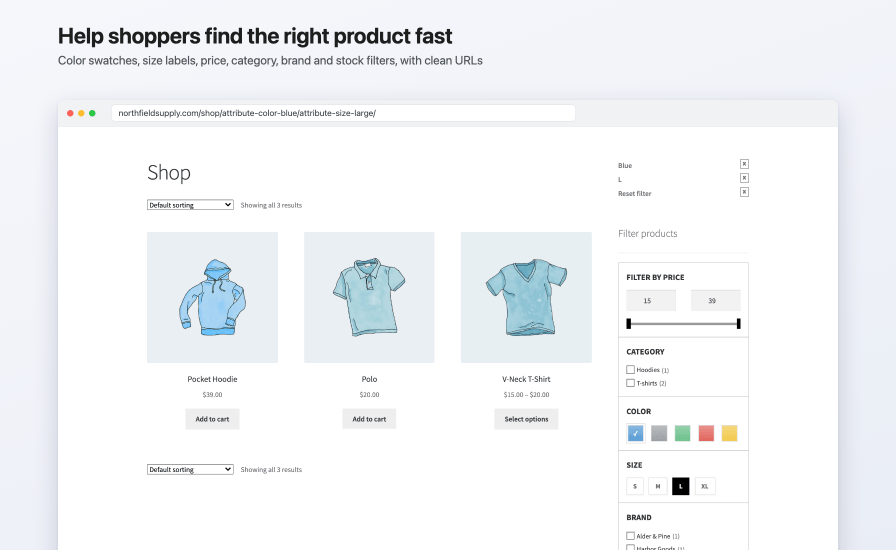
  • Show each filter as checkboxes, radio buttons, a dropdown, labels, color swatches, images, or a range slider for numeric values.
  • Add a price slider with min and max fields.
  • Keep long lists tidy with collapsible, scrolling, or hover dropdown sections.
  • List the shopper’s choices in an Active Filters widget, where each one can be removed with a click, plus an optional “Reset filter” link.
  • Turn on AJAX so products, counts, and the page heading update in place, or add a Filter button so shoppers pick several values and then apply them at once.

Shop page filtered by Blue and size L at /shop/attribute-color-blue/attribute-size-large/, with the active filters, a price slider, category checkboxes, color swatches, size labels, and a brand filter

Turn filters into search landing pages

Filtered pages usually look like /shop/?filter_color=blue&query_type_color=or, with the same heading and text as the category above them. With permalinks on, SEO Product Filter builds clean paths instead, such as /product-category/t-shirts/attribute-color-blue/, and you choose the prefix and the separator between values.

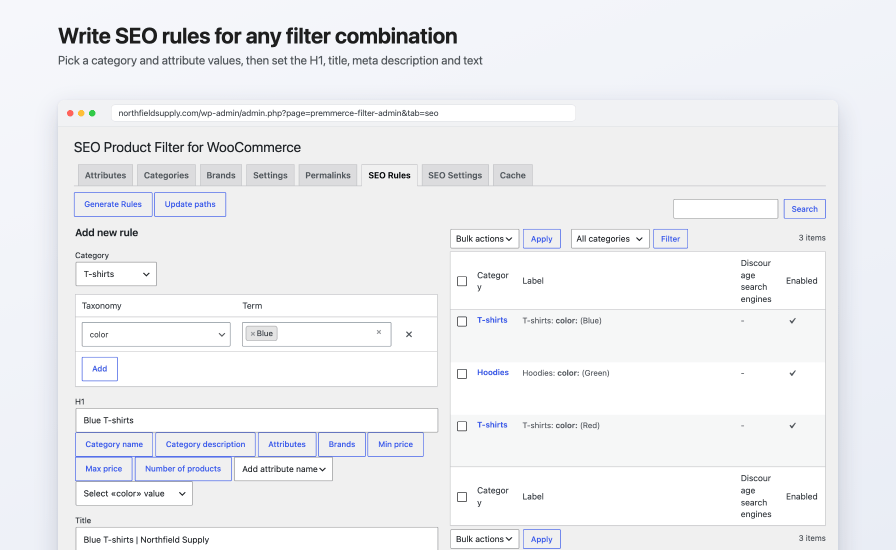
Add an SEO rule for a category and one or more attribute or brand values, and that page gets its own:

  • H1
  • Page title
  • Meta description
  • Description, written in the WordPress editor

For example, a rule for the T-shirts category and the color Blue turns /product-category/t-shirts/attribute-color-blue/ into a “Blue T-shirts” page, with the title “Blue T-shirts | Northfield Supply”, its own meta description, and a short introduction above the products.

Insert variables such as the category name, the selected attribute values, the brand, the price range, or the number of products, so one set of texts reads naturally on every page you generate from it. For filtered category pages without a rule, set default texts on the SEO Settings tab.
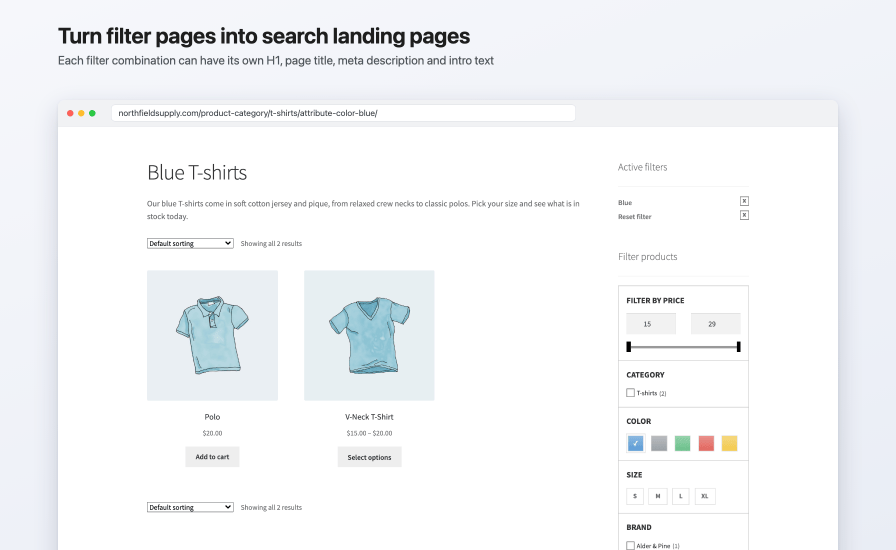
T-shirts category filtered by Blue at /product-category/t-shirts/attribute-color-blue/, with the H1 Blue T-shirts and an introduction from its SEO rule above the products

SEO Rules tab with a new rule for the T-shirts category and the color Blue, the H1 Blue T-shirts, the title Blue T-shirts | Northfield Supply, and a table of existing rules

Create landing pages in bulk

Pick categories, attributes, and terms, write the texts once with variables, and Generate Rules creates a rule for each combination that has products. Rules with no matching products are skipped, and so are rules that already exist.

Control what search engines index

  • Set every filter page without an SEO rule to noindex, nofollow with one setting.
  • Exclude a single rule page from indexing, which also adds it to robots.txt and leaves it out of sitemaps.
  • Rule pages get index, follow and a canonical URL that points to themselves, and paginated pages point to the first page.
  • With Yoast SEO, rule pages are listed in their own filter_seo_rule-sitemap.xml. Rank Math and All in One SEO sitemaps are supported too, and with any of the three, the rule’s meta description and canonical URL replace the plugin’s.

Filter by attributes, categories, brands, and more

  • Every WooCommerce product attribute, in the order you set for its terms
  • Product categories, with an optional parent and child hierarchy
  • Product tags and any other public product taxonomy
  • WooCommerce Brands and YITH WooCommerce Brands
  • Price range
  • Stock status: in stock, out of stock, and on backorder
  • Products on sale, including grouped products with a child on sale
  • Average customer rating

Choose which terms appear for each category, tag, or brand filter, drag filters into the order you want, and pick the pages the filter shows on: the shop, categories, tags, brands, attribute archives, and search results.
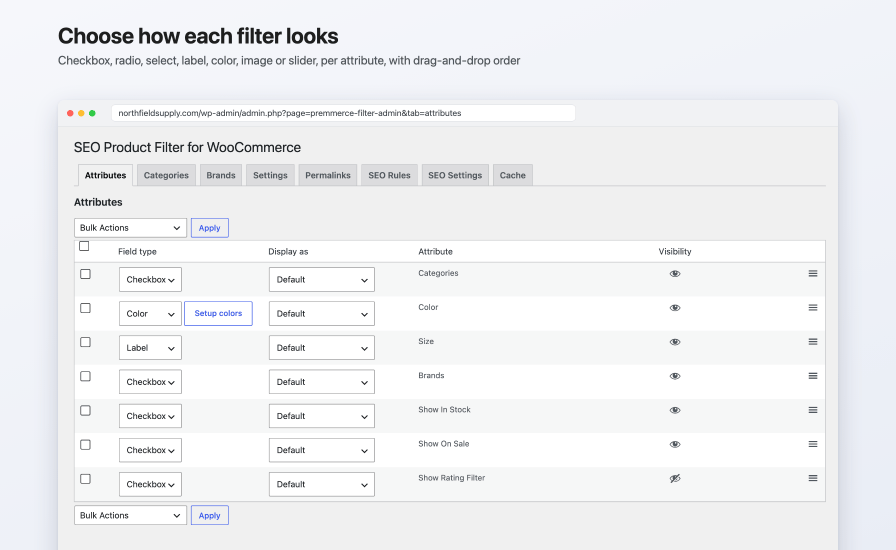
Attributes tab setting the field type, Display as option, and visibility of the Categories, Color, Size, Brands, In Stock, On Sale, and Rating filters, with a Setup colors button on the Color row

Fits your theme

  • Add the filter as a classic widget, a block, or the [premmerce_filter] shortcode, and active filters as a widget or the [premmerce_active_filters] shortcode.
  • Pick the Default style, the Premmerce style, or set your own colors, font sizes, borders, and checkbox style on the block or shortcode.
  • Add your own CSS from the Settings tab.
  • Copy the front-end templates into your theme to change the markup.
  • Choose how AJAX replaces the page content: only WooCommerce’s product area, or everything in the product archive template between the header and footer.

Keeps filter pages light

  • Product lookups and price ranges are cached to files and cleared automatically when you update a product or change the settings.
  • Scripts and styles load only on pages where the filter shows.
  • Load the filter after the page with “Load deferred”, so its counts don’t hold up the first page load.
  • A Cache tab clears the filter’s cached data in one click, along with Rank Math’s sitemap cache.

How to get started

  1. Install and activate SEO Product Filter, then go to WooCommerce > SEO Product Filter.
  2. On the Attributes tab, set the attributes you want to Display and pick a field type for each.
  3. Add the Premmerce Filter and Premmerce Active Filters widgets to your shop sidebar, or use the Premmerce Product Filter block or the shortcodes.
  4. On the Permalinks tab, turn on “Use permalinks”, then add your first rule on the SEO Rules tab.

Compared with WooCommerce’s built-in filters

WooCommerce’s built-in filters SEO Product Filter
Filter URLs Query strings, such as ?filter_color=blue Clean paths, such as /attribute-color-blue/, with your own prefixes
Own H1, title, meta description, and description for a filter combination No Yes, on category pages
Create landing pages in bulk for attribute combinations No Yes
Filter landing pages in Yoast SEO, Rank Math, and All in One SEO sitemaps No Yes

Frequently asked questions

Will filter pages create duplicate content in search results?

Only if you let them. With permalinks on, one setting marks every filter page without an SEO rule as noindex, nofollow, so search engines index only the landing pages you've written texts for.

Can I stop search engines indexing one particular filter combination?

Yes. Tick "Discourage search engines from indexing this page" on its SEO rule. The page gets noindex, nofollow, a Disallow line in WordPress's robots.txt, and stays out of sitemaps.

Which pages can have SEO rules?

Product category pages filtered by one or more attribute or brand values. Other filter pages, such as the shop page or a tag, can be filtered and noindexed but don't take rule texts.

Can filtered pages without a rule get their own texts?

Yes. On the SEO Settings tab, turn on "Use default seo settings" and write a default H1, document title, meta description, and category description with variables. They apply to filtered category pages that don't have a rule of their own.

Does it work with Yoast SEO, Rank Math, or All in One SEO?

Yes. Rule pages are added to their XML sitemaps (with Yoast SEO, as filter_seo_rule-sitemap.xml), and the rule's meta description, canonical URL, and robots settings are passed through each plugin. Without one of them, the extension prints its own meta description and canonical tag and sets WordPress's robots tag.

Does it support HPOS and the Cart and Checkout blocks?

It declares compatibility with High-Performance Order Storage. It works on shop, category, tag, brand, and search pages and doesn't change the cart or checkout.

Does it work with block themes?

The filter is a block you can add to a block theme's shop and category templates, as well as a classic widget and a shortcode. It's tested with Storefront, and its AJAX updates are built around WooCommerce's classic shop templates, so test a block theme on a staging site first.

Will it slow down my shop?

It loads its files only on pages where the filter shows, caches its product lookups and price ranges, and can load the filter after the page with "Load deferred".

Can I filter by custom taxonomies?

Yes. Any public product taxonomy can be added under Settings > Use taxonomies, and you choose which of its terms appear.

Does it work with variable products and stock status?

Attribute filters use WooCommerce's own attribute filtering, including its attribute lookup table when that's on. The stock filter shows in stock, out of stock, and on backorder products with a count for each.

Is it multilingual?

SEO rule texts can be translated with WPML String Translation, and the extension includes German, Spanish, French, Russian, and Ukrainian translations.

What happens to my filter URLs if I deactivate it?

Your settings and SEO rules stay in the database. While it's inactive, WordPress doesn't recognize the clean filter paths, so they return a not found page until you reactivate it.

Where do I get help?

See the documentation for setup and troubleshooting, and contact us through your WooCommerce.com account if you need more help.

Extension information

  • WordPress version required: 4.6
  • WooCommerce version required: 2.6.0
  • PHP version required: 5.6
  • Tested with WordPress: 7.1
  • Tested with WooCommerce: 11.2.0
  • Requires at least WordPress: 4.8
  • Requires at least WooCommerce: 3.6.0

Countries

  • Worldwide

Languages

English (UK), French (France), German, Russian, Spanish (Spain)

Customer reviews

Average rating 3.5

3 reviews from verified users

5 stars, 50% of reviews
4 stars, 0% of reviews
3 stars, 0% of reviews
2 stars, 50% of reviews
1 star, 0% of reviews

Click to rate

  • Rated 1 out of 5
    Ilja BogoliubovGermanyJun 12, 2024
    not actual version... The plugin does not work properly because it is an outdated version of the plugin. The service is terrible, I can’t provide the latest version
  • Rated 2 out of 5
    kenteush29United States (US)Feb 14, 2024
    Plenty of bugs, no support Basic functions of filtering work well as all other available today's plugins. But when It comes to SEO functions, here comes the issues: Seo descriptions edition zone is conflicted on admin side, it also replace symbols into strange code making it horrible for google search results, also the page description isn't overrided out of the box (not compatible or easily customizable), and filters link aren't readable by search engines so it makes them almost invisible (no native link to them nowhere). Bad for internal linking. The plugin support doesn't exist, they don't care if there are issues : "it's normal". Yes we are all humans after all ! They really don't want to do anything to fix or improve the plugin. Awfull team, with great projects but very bad capacity of hearing their customers and fix issues.
  • Rated 5 out of 5
    shooperSlovakiaJun 9, 2023
    Best plugin ever Very satisfying functions. I love it.

Related Products

Price $79 annually
Rated 3.4 out of 5 stars
Price $279 annually
Rated 3.9 out of 5 stars
Price $59 annually
Rated 3.1 out of 5 stars
Price $109 annually
Rated 2.8 out of 5 stars
Price $49 annually
Rated 4.1 out of 5 stars
Price $109 annually
Rated 2 out of 5 stars
Price $109 annually
Rated 2.3 out of 5 stars
Price $39 annually
Rated 2.8 out of 5 stars
Price $109 annually
Rated 2.6 out of 5 stars
Use of your personal data
We and our partners process your personal data (such as browsing data, IP Addresses, cookie information, and other unique identifiers) based on your consent and/or our legitimate interest to optimize our website, marketing activities, and your user experience.




