


Subscription includes
Support
With the Skroutz Marketplace integration for WooCommerce, you can fully manage Skroutz Marketplace orders directly from your WooCommerce backend. Accept or reject orders, configure default order statuses, enable automatic order acceptance, and keep fulfillment centralized in one system. Orders placed on Skroutz Marketplace sync instantly with WooCommerce using the Skroutz API. Stock levels update automatically, ensuring real-time inventory accuracy and preventing overselling. During the Skroutz.gr onboarding process, merchants are required to submit an XML product feed. The plugin automatically generates a fully compatible Skroutz XML feed based on your WooCommerce catalog, including support for unique product IDs, EAN fields, size and color attributes, brand taxonomy, and product availability settings.
Skroutz Marketplace & XML for WooCommerce combines both Skroutz XML feed generation and Marketplace API integration in one plugin. From onboarding and product export to real-time order syncing, instant inventory updates through the Products API, and stock control, everything is managed inside WooCommerce—making selling on Skroutz.gr simple, automated, and scalable.
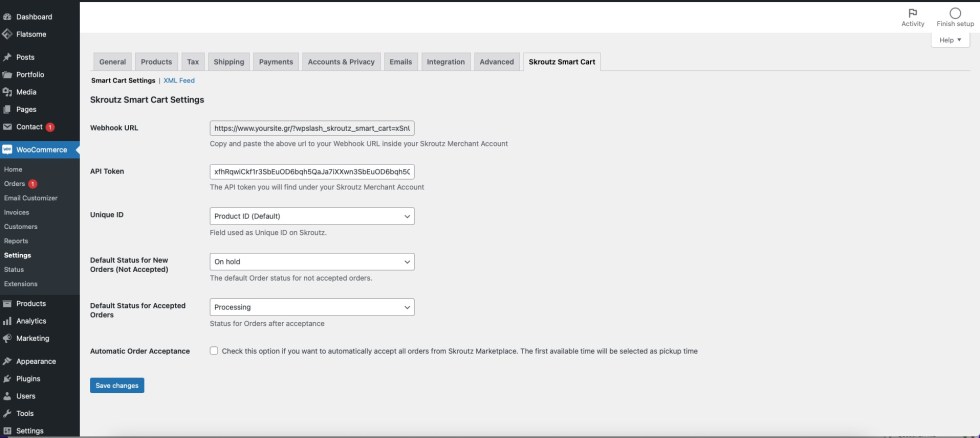
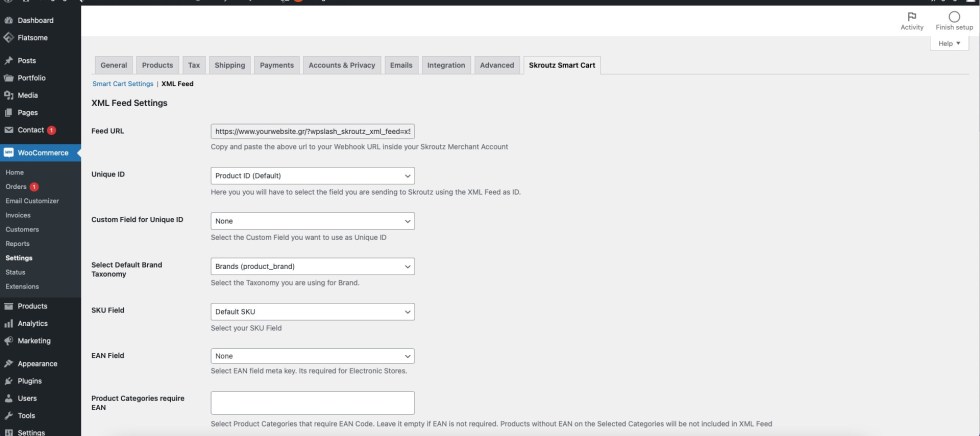
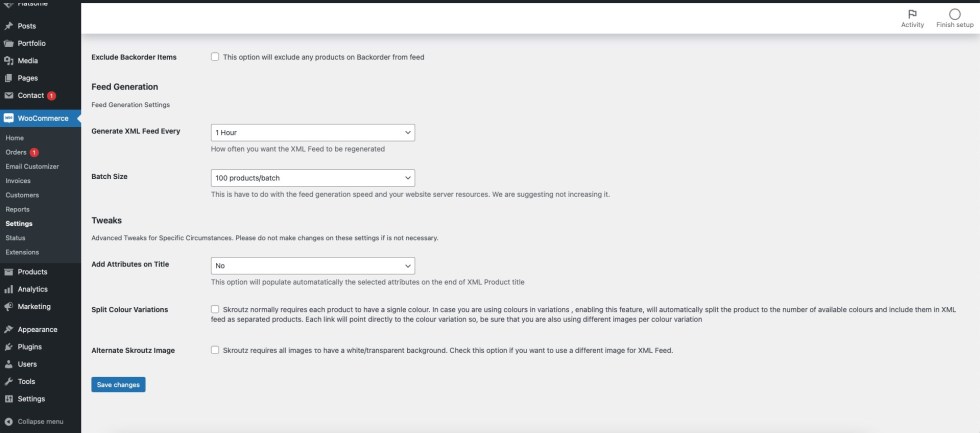
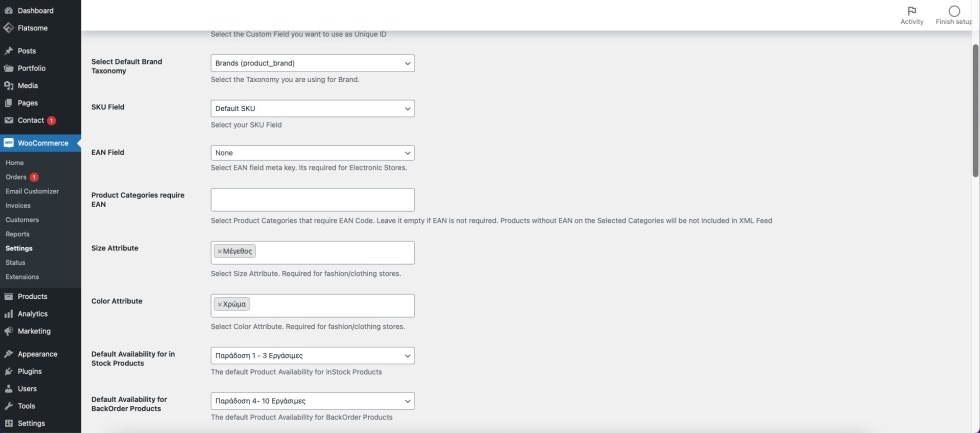
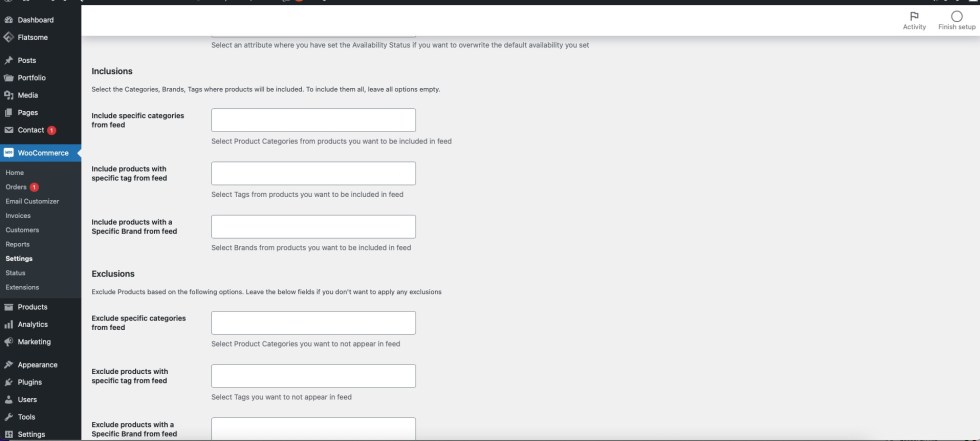
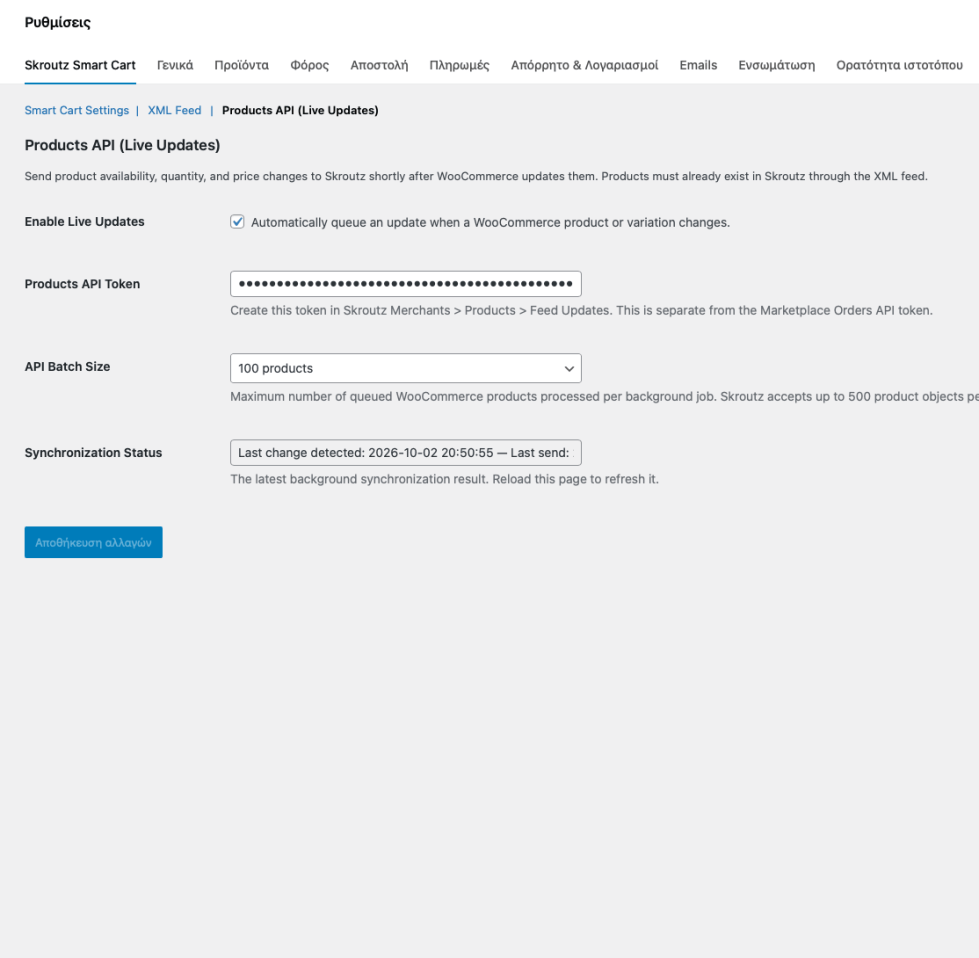
Start selling on Skroutz.gr—the largest marketplace in Greece—using a WooCommerce plugin that handles XML feed generation, API integration, order management, stock synchronization, and advanced export rules in one streamlined solution.
Take a look on the following examples and further optimize Skroutz XML Feed to match your needs
Use the wpslash_skroutz_feed_query_args filter to modify the WP_Query arguments used to retrieve products for the feed. The example below only includes products that have stock greater than zero.
add_filter( 'wpslash_skroutz_feed_query_args', function ( $args, $settings ) {
    $args['meta_query'][] = array(
        'key'     => '_stock',
        'value'   => 0,
        'compare' => '>',
        'type'    => 'NUMERIC',
    );
    return $args;
}, 10, 2 );On the following example we have a custom field with key name _hide_from_skroutz where when this has been set to yes the product is excluded from the XML feed. You can easily adjust wpslash_skroutz_feed_include_product to your needs to apply your own exclusion rules based on the rules you want.
add_filter( 'wpslash_skroutz_feed_include_product', function ( $include, $product, $settings ) {
    if ( 'yes' === get_post_meta( $product->get_id(), '_hide_from_skroutz', true ) ) {
        return false;
    }
    return $include;
}, 10, 3 );Using the wpslash_skroutz_feed_include_product filter you can also exclude products based on their price. The following example excludes all products priced below 5 euros from the Skroutz XML feed.
add_filter( 'wpslash_skroutz_feed_include_product', function ( $include, $product, $settings ) {
    if ( floatval( $product->get_price() ) < 5 ) {
        return false;
    }
    return $include;
}, 10, 3 );Using the following example to adjust prices on your Skroutz XML Feed. On the following we are multiplying the price x 1.10. You can modify it to your needs.
add_filter( 'wpslash_skroutz_feed_product_price', function ( $price, $product ) {
    return number_format( floatval( $price ) * 1.10, 2, '.', '' );
}, 10, 2 );You can also use the wpslash_skroutz_feed_product_price filter to apply custom rounding rules. The following example rounds all prices to end in .90 cents.
add_filter( 'wpslash_skroutz_feed_product_price', function ( $price, $product ) {
    return number_format( floor( floatval( $price ) ) + 0.90, 2, '.', '' );
}, 10, 2 );Use the wpslash_skroutz_feed_product_title filter to modify the product title. The following example prepends the brand name from a pa_brand taxonomy to the beginning of the product title.
add_filter( 'wpslash_skroutz_feed_product_title', function ( $title, $product ) {
    $brand = get_the_terms( $product->get_id(), 'pa_brand' );
    if ( ! empty( $brand ) && ! is_wp_error( $brand ) ) {
        $title = $brand[0]->name . ' ' . $title;
    }
    return $title;
}, 10, 2 );
Use the wpslash_skroutz_feed_product_image filter to modify product image URLs. The following example replaces your site domain with a CDN domain for faster image delivery.
add_filter( 'wpslash_skroutz_feed_product_image', function ( $image_url, $product ) {
    return str_replace( 'https://mysite.com', 'https://cdn.mysite.com', $image_url );
}, 10, 2 );Use the wpslash_skroutz_feed_product_description filter to clean up product descriptions. The following example strips all HTML tags and limits the description to 500 characters.
add_filter( 'wpslash_skroutz_feed_product_description', function ( $description, $product ) {
    $clean = wp_strip_all_tags( $description );
    if ( strlen( $clean ) > 500 ) {
        $clean = substr( $clean, 0, 497 ) . '...';
    }
    return $clean;
}, 10, 2 );Use the wpslash_skroutz_feed_product_shipping filter to modify shipping costs per product. The following example sets free shipping for all products in the free-shipping category.
add_filter( 'wpslash_skroutz_feed_product_shipping', function ( $shipping, $product, $settings ) {
    if ( has_term( 'free-shipping', 'product_cat', $product->get_id() ) ) {
        return 0;
    }
    return $shipping;
}, 10, 3 );The wpslash_skroutz_feed_product_data filter is the most powerful filter available. It allows you to modify the complete product data array right before XML rendering. You can change any field including id, mpn, ean, name, link, image, size, color, description, quantity, weight, category, price_with_vat, vat, instock, availability, shipping, and manufacturer.
add_filter( 'wpslash_skroutz_feed_product_data', function ( $data ) {
    if ( intval( $data['quantity'] ) < 1 ) {
        $data['quantity'] = 1;
    }
    return $data;
} );Using the wpslash_skroutz_feed_product_data filter you can also override the manufacturer value. The following example reads a custom field named custom_brand and uses its value as the manufacturer in the XML feed.
add_filter( 'wpslash_skroutz_feed_product_data', function ( $data ) {
    $custom_brand = get_post_meta( $data['product']->get_id(), 'custom_brand', true );
    if ( ! empty( $custom_brand ) ) {
        $data['manufacturer'] = $custom_brand;
    }
    return $data;
} );Use the wpslash_skroutz_feed_variation_data filter to modify individual variation data before it is added to the product. You can change variationid, link, availability, manufacturersku, ean, price_with_vat, size, and quantity. The following example applies a 5% markup to all variation prices.
add_filter( 'wpslash_skroutz_feed_variation_data', function ( $entry, $variation, $product ) {
    $entry['price_with_vat'] = number_format( floatval( $entry['price_with_vat'] ) * 1.05, 2, '.', '' );
    return $entry;
}, 10, 3 );Skroutz Marketplace & XML for WooCommerce is a powerful WordPress plugin that enables WooCommerce store owners to seamlessly sell on Skroutz.gr, Greece’s leading price comparison and e-commerce platform. The plugin provides two essential features:
This allows you to manage all Skroutz sales directly from your WooCommerce dashboard
To join Skroutz Marketplace, you need to provide an XML product feed during the onboarding process. This plugin automatically generates a fully compliant Skroutz XML feed of your products
Yes! The plugin fully supports variable products, making it ideal for fashion, apparel, and multi-variant stores. Each product variation (like size S, M, L) is correctly formatted and included in the XML feed with its own SKU, price, and availability
Absolutely. The plugin supports EAN, ISBN, UPC, and other GTIN codes. You can map these via product meta fields or custom fields, ensuring your products meet Skroutz’s requirements for electronics, books, and branded goods.
Yes. All marketplace orders are automatically synced to your WooCommerce backend in real time
Yes. When a product sells on Skroutz or your own store, the stock levels are automatically updated in XML Feed on both platforms. This prevents overselling and ensures accurate inventory across channels.
Yes. The plugin enables voucher printing directly from your WooCommerce backend. You can generate and print Skroutz-specific vouchers, invoices, and packing slips — streamlining your fulfillment workflow without switching platforms.
Yes. The XML feed is dynamically generated and updated based on interval your will set under settings.
When a product’s stock reaches zero, it is automatically marked as unavailable in the XML feed and on Skroutz Marketplace. Once restocked, it becomes visible again — ensuring your catalog is always up to date.
Categories
Extension information
Quality Checks
Countries
Languages







