
Ícone do produto

Rental & Transport Booking para WooCommerce

Turn your WooCommerce store into a complete rental and transport booking system. Accept daily, hourly, and point-to-point bookings with real-time availability, deposits, and automated emails.
Escolha uma opção de cobrança
$59
Economize 20%
$118 $94.40

Comparação de produtos

A assinatura inclui

  • Melhorias e atualizações de produtos
  • Suporte ao cliente
  • Garantia de 30 dias para reembolso

1. What is Rental & Transport Booking?

Rental & Transport Booking is a WooCommerce extension that turns your store into a complete booking system for vehicle rentals and transport services. Customers can check availability, pick dates and locations, see the exact price instantly, and pay — all without leaving your site.

It is built for businesses that rent out vehicles or move people from place to place: car and motorbike rentals, chauffeur services, airport shuttles, and tour transport companies. Whether you charge by the day, by the hour, or by distance, all three pricing models are covered out of the box.

The plugin removes the hardest parts of running a rental business online: it prevents double bookings with real-time availability tracking, calculates complex prices — seasonal rates, surcharges, round-trip discounts — automatically, and handles follow-up with reminder emails and remaining-balance invoices. Less admin work, more bookings.

2. Problems Solved

Rental and transport businesses face problems a standard store cannot handle:

  • Double bookings. Without live availability tracking, two customers can book the same vehicle for the same dates. The plugin keeps a booking queue per vehicle and blocks conflicting reservations at both add-to-cart and checkout.
  • Complicated pricing. Rental prices are rarely flat — they change by season, day of the week, distance, and pickup location. The plugin calculates the correct total automatically and shows it to the customer before they pay.
  • Chasing payments. Collecting a deposit upfront and the balance later usually means manual invoices. The plugin splits payments automatically and emails the remaining-balance invoice on schedule.
  • Manual follow-up. Reminder emails, cancellation notices, and cleaning up abandoned orders eat staff time. Built-in cron jobs handle all of it.
  • Quote-only customers. Some customers want to ask before they book. The Request Form lets them send an inquiry without paying, protected by reCAPTCHA.

3. Who is this plugin for?

  • Car, motorbike, scooter, and bicycle rental shops that rent by the day or by the hour.
  • Limousine, chauffeur, and private driver services that charge by distance or fixed route.
  • Airport transfer and shuttle operators offering point-to-point trips with fixed prices between locations.
  • Boat, yacht, and equipment rental businesses that need availability calendars and deposits.
  • Travel and tour companies that combine transport with scheduled pickups and drop-offs.
  • Agencies and developers building rental websites for clients on WooCommerce — the plugin ships with overridable templates, hooks, and filters.

4. Key Benefits

  • Sell three booking types in one plugin. Daily rental, hourly rental, and point-to-point transport — each with its own pricing engine, so you don’t need three separate extensions.
  • Never double-book a vehicle. Real-time availability checks per vehicle and per date range mean every booking you accept is one you can fulfill.
  • Price every trip correctly, automatically. Seasonal rates, special-day fees, location surcharges, distance-based pricing, and round-trip discounts are calculated live as the customer fills the form.
  • Get paid on your terms. Take a percentage or fixed deposit at checkout, and let the plugin invoice the remaining balance by email automatically.
  • Run on autopilot. Automatic reminder emails, cancellation notifications, and expired-order cleanup reduce day-to-day admin work.

5. How It Works

  1. Create a vehicle product. Add a new WooCommerce product using the built-in “Vehicle” product type, then choose the rental mode: daily, hourly, or point-to-point.
  2. Set your pricing rules. Define base prices, seasonal rates, special days, disabled dates, deposits, and location surcharges from the product settings panel — no code needed.
  3. Add vehicles and locations. Manage your fleet quantities and your pickup/drop-off addresses from the Rental Transport admin menu.
  4. Customers book on your site. They pick dates or locations on the booking form, see the live total (with map support via Google Maps), and pay through any WooCommerce payment gateway — or send a request through the inquiry form.
  5. The plugin handles the rest. Availability is locked, confirmation and reminder emails go out automatically, and you track everything on the visual Booking Calendar.

6. Main Features

Three booking types. Daily rental charges by date range, hourly rental charges by time slots, and point-to-point charges by distance or fixed route. This means one plugin covers a car rental shop, a chauffeur service, and an airport shuttle. Example: rent a car for 3 days, book a minibus for 4 hours, or quote a fixed $45 airport-to-hotel transfer.

This slideshow requires JavaScript.

Real-time availability and anti-double-booking. Each vehicle has a stock quantity, and the plugin checks existing bookings before accepting a new one — at add-to-cart, at checkout, and through the Store API. As a result, there are no manual calendar checks and no embarrassing cancellation calls. Example: if all 5 of your SUVs are booked for July 10–12, the calendar shows those dates as unavailable.
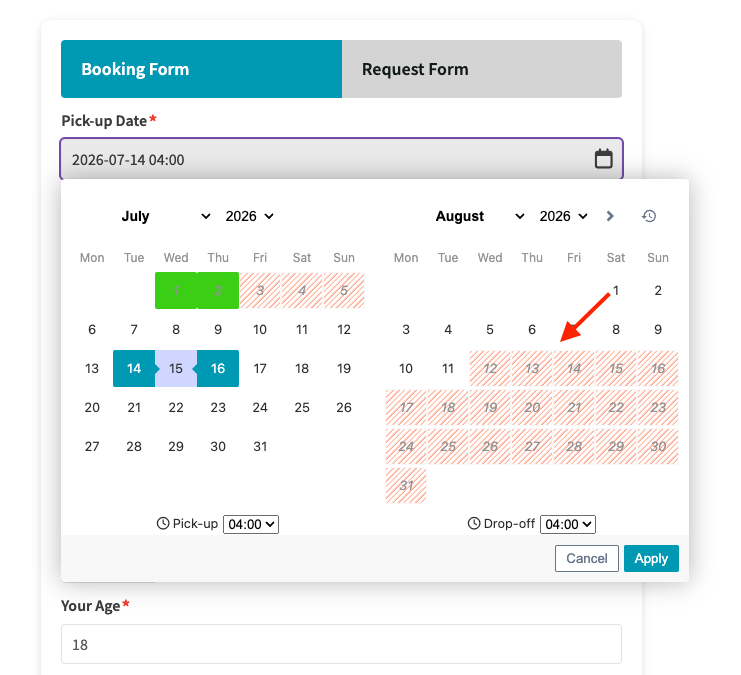
Real-time availability and anti-double-booking.

Flexible pricing engine. Seasonal pricing, special-day surcharges or discounts, duration-based discounts, setup fees, and two distance pricing models (total distance or tiered additional distance). That way, your online price always matches your real price list. Example: charge 20% more during summer season and add a $15 fee for bookings on public holidays — automatically.

This slideshow requires JavaScript.

Deposits and remaining-balance invoicing. Collect a percentage or fixed deposit at checkout; the plugin computes the balance (including tax) and emails a payment link later. This lowers the barrier to booking while still securing commitment. Example: take a 30% deposit today and automatically invoice the remaining 70% three days before pickup.
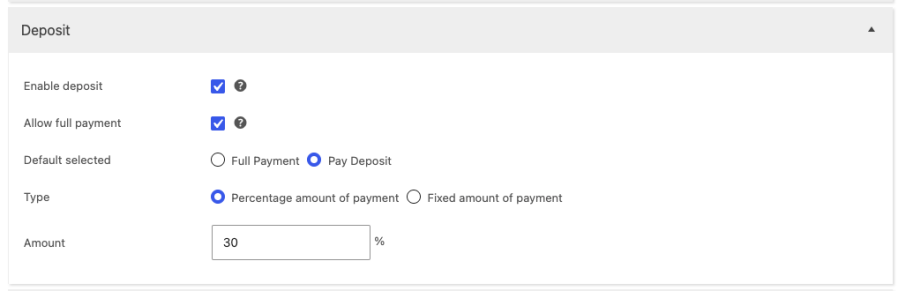
Deposits and remaining-balance invoicing

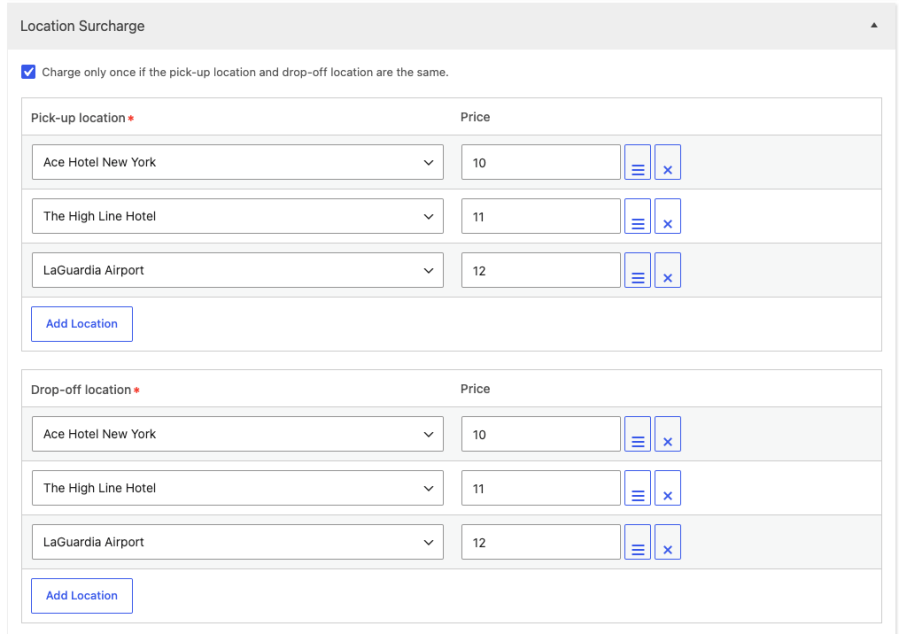
Location surcharges and Google Maps integration. Define pickup/drop-off addresses with individual surcharges, and let customers pick locations on an interactive map. So you can charge fairly for out-of-area service without manual quotes. Example: add $10 for airport pickups and $25 for pickups outside the city center.
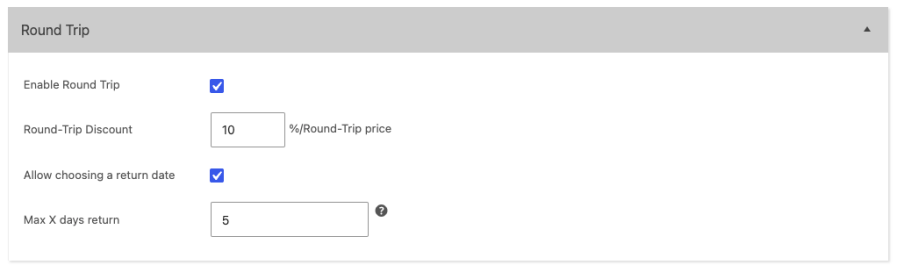
Round trips and fixed-price routes (point-to-point). Offer round-trip bookings with a configurable discount, and set fixed prices for popular routes per vehicle type. The result is predictable pricing customers trust. Example: “Airport to Downtown — Sedan $40, SUV $55, round trip 10% off.”
Booking Form and Request Form. Customers either book and pay instantly, or send a quote request (with reCAPTCHA v2/v3 protection) that emails you the full trip details. This way, you capture both ready-to-buy customers and shoppers who need a conversation first.

This slideshow requires JavaScript.

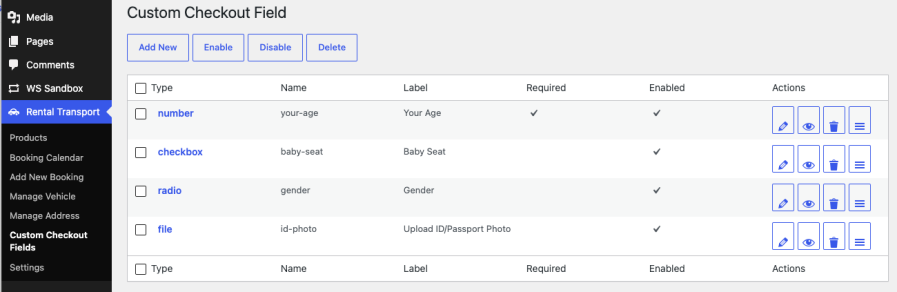
Custom checkout fields. Build extra checkout fields — text, select, radio, checkbox, date, file upload, and more — from the admin, with no coding. Example: add a “Flight number” field for airport transfers or a driver’s license upload for car rentals.
Admin Booking Calendar and manual bookings. See all bookings on a visual calendar and create bookings manually for phone or walk-in customers. This keeps online and offline reservations in one system, so availability is always accurate.

This slideshow requires JavaScript.


Automated emails and cron jobs. Reminder emails before pickup, remaining-payment invoices, cancellation notifications, and automatic cleanup of expired unpaid orders. The outcome: fewer no-shows and no stale bookings blocking your calendar.

This slideshow requires JavaScript.

7. Use Cases

  • City car rental: customers pick pickup and return dates on a color-coded calendar, pay a 30% deposit, and receive a reminder email the day before pickup.
  • Airport transfer service: a traveler selects “Airport → Hotel District,” sees the fixed price for a sedan or van, adds a flight number in a custom field, and books a round trip with a discount.
  • Hourly chauffeur or party bus: clients book a vehicle for a 4-hour block within your working hours, with a setup fee and seasonal weekend rates applied automatically.
  • Motorbike rental for tourists: daily rental with a driver’s license file upload at checkout, holiday surcharges on peak dates, and disabled dates while bikes are in maintenance.
  • Wedding and event transport: customers send a Request Form with their date and route; you review the inquiry email and confirm the booking manually from the admin.

8. Why Choose Rental & Transport Booking?

  • Native WooCommerce experience. It uses a real WooCommerce product type, your existing payment gateways, tax settings, and order management — including HPOS and Cart/Checkout Blocks compatibility.
  • Three business models, one price. Most booking plugins handle only one rental mode; this one covers daily, hourly, and distance-based transport without add-ons.
  • Built for real operations. Deposits, balance invoices, reminders, cancellations, preparation time between bookings, and a staff-facing calendar reflect how rental businesses actually work.
  • Customizable and developer-friendly. Overridable templates, extensive hooks and filters, translation-ready, and typography/color settings to match your theme.
  • From Ovatheme. Built by an established theme and plugin vendor with years of experience in booking and rental websites.

Try It Yourself — Create a Sandbox

Want to see the plugin in action before you buy? Create a free sandbox and explore the booking forms, pricing settings, and admin calendar on a live demo site.


Perguntas frequentes

Does this plugin require WooCommerce?

Yes. It requires WooCommerce 9.3 or later, WordPress 6.0 or later, and PHP 7.4 or later. It is compatible with HPOS and the new Cart/Checkout Blocks.

Can I offer both instant booking and quote requests on the same product?

Yes. Each product can show the Booking Form, the Request Form, or both in tabs. Requests are emailed to you with full trip details and protected by Google reCAPTCHA.

How does the plugin prevent double bookings?

Yes. Each vehicle has a stock quantity, and availability is checked against confirmed orders when customers add to cart and again at checkout. You choose which order statuses (processing, completed, on-hold) reserve a vehicle.

Can I charge a deposit and collect the rest later?

Yes. Set a percentage or fixed deposit globally or per product. The plugin calculates the remaining balance including tax and emails the customer an invoice automatically on a schedule you control.

Does it support distance-based pricing?

Yes. Point-to-point bookings integrate with Google Maps to calculate the route distance, and you can price by total distance, tiered distance ranges, or fixed prices per route and vehicle type. A Google Maps API key is required for map and distance features.

Can customers cancel their bookings?

Yes. Customers can cancel from their My Account page according to the cancellation rules you set, and cancellation notification emails are sent automatically.

Will it work with my theme?

The plugin works with any properly coded WooCommerce theme. Templates can be overridden in your theme, and built-in typography and color settings let you match your brand without code.

Is the plugin translation-ready?

Yes. It includes a full language template and works with translation plugins. The booking calendar also supports multiple display languages.

What happens if a customer doesn't complete payment?

A scheduled cleanup job automatically removes expired unpaid orders so the vehicle becomes available again for other customers.

Where can I get help?

Ovatheme provides documentation and dedicated support. If you have questions before or after purchase, reach out through the support channel on the product page.

Avaliações de clientes

Estamos aceitando avaliações para este produto e as exibiremos quando tivermos mais algumas.

Informações da extensão

  • Versão PHP necessária: 7.4
  • Testado com WordPress: 6.9
  • Testado com WooCommerce: 10.6.1
  • Requer pelo menos o WordPress: 6.0
  • Requer pelo menos o WooCommerce: 9.3

Países

  • Em todo o mundo

Related Products

Preço: $279 Anualmente
Classificado com 3.2 de 5 estrelas
Preço: $79 Anualmente
Classificado com 3.4 de 5 estrelas
Preço: $59 Anualmente
Classificado com 3.1 de 5 estrelas
Preço: $109 Anualmente
Classificado com 2.7 de 5 estrelas
Preço: $109 Anualmente
Classificado com 2 de 5 estrelas
Preço: $49 Anualmente
Classificado com 4.1 de 5 estrelas
Preço: $109 Anualmente
Classificado com 2.3 de 5 estrelas
Preço: $39 Anualmente
Classificado com 2.8 de 5 estrelas
Preço: $109 Anualmente
Classificado com 2.6 de 5 estrelas
Uso dos seus dados pessoais
Nós e nossos parceiros processamos seus dados pessoais (como dados de navegação, endereços IP, informações de cookies e outros identificadores únicos) com base em seu consentimento e/ou nosso interesse legítimo para otimizar nosso site, atividades de marketing e sua experiência de usuário.




