
Ícone do produto

Tip Pro para WooCommerce

Offer customers the option to add tips to their orders with Tip Pro for WooCommerce.
Escolha uma opção de cobrança
$49
Economize 20%
$98 $78.40

Comparação de produtos

A assinatura inclui

  • Melhorias e atualizações de produtos
  • Suporte ao cliente
  • Garantia de 30 dias para reembolso

Offer Customers the Option to Tip

Tip Pro for WooCommerce allows your customers to add tips to their orders.

Features

  • Works for members and guests
  • Tips can be added from the cart and checkout pages
  • Tip Types
    • Predefined Tip
    • Custom Tip
    • Predefined with Custom Tip
  • Tip Amount Charging Types
    • Percentage [Order Total or Subtotal]
    • Fixed
    • Either Percentage or Fixed by User’s Choice
  • Includes an option to pay the Tip Offline
  • Includes an option to charge taxes on tip amount
  • Includes an option to remember the last tip and:
    • Automatically add the tip to the cart
    • Display the tip as a recommended tip
  • An Option to restrict tipping based on Order Total[Minimum and Maximum]
  • An option to restrict tipping based on User and User role filter
  • Separate reports section to present the following information about Tip
    • Tip Overview [Displays Total Tip Amount Received, Total Number of Online and Offline Tip Orders]
    • Order Details [Orders which contains Tip]
  • Tip messages can be customized[Cart and Checkout page]

Benefits

Insights into customer satisfaction

Tip amount give you insights into your customer’s experience.

Increased revenue potential

Potentially earn more revenue when customers add tips to their orders.
How does it work?

Predefined tips

Predefined Tip Amount On Cart
Predefined Tip Amount – Button Type On Cart

The customer needs to select a value from already configured Tip values.

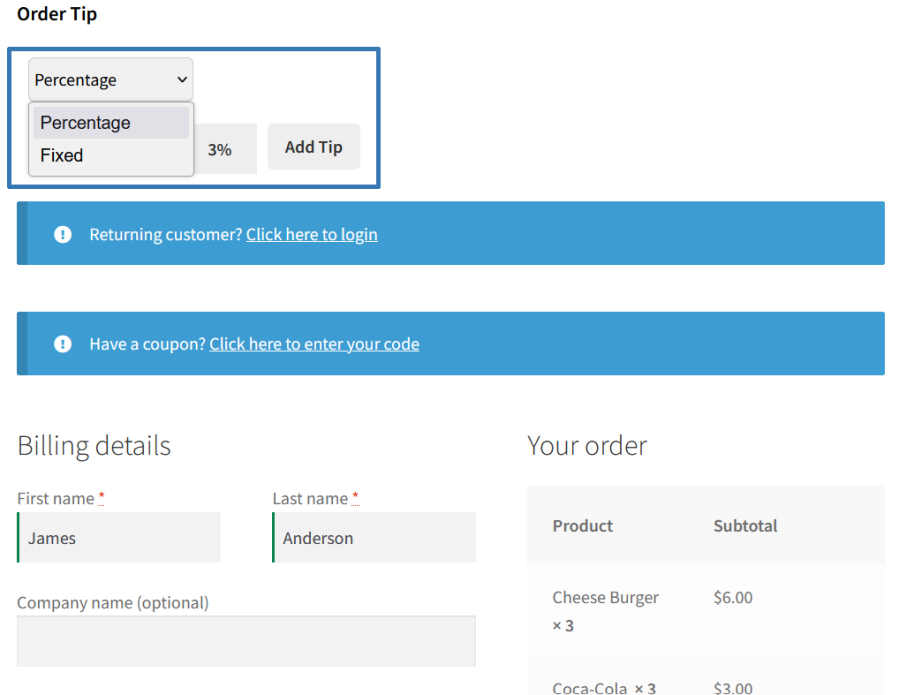
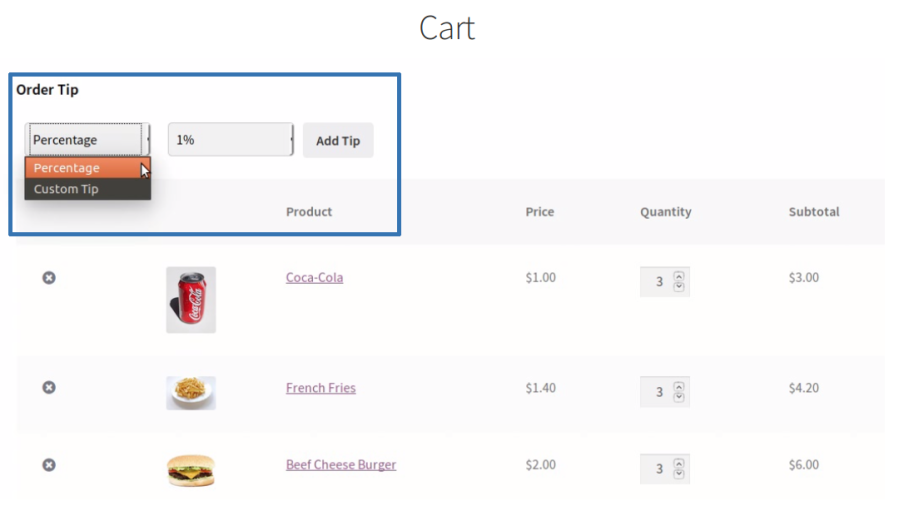
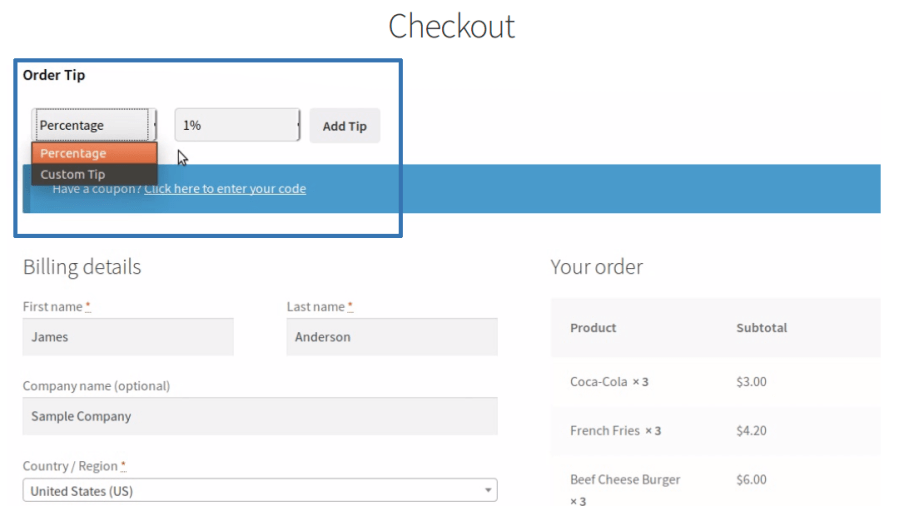
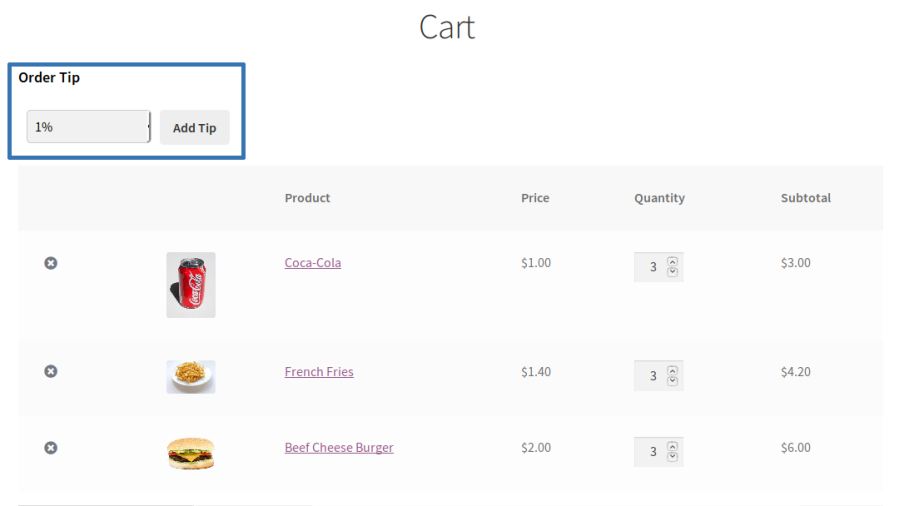
Add an order tip by percentage or fixed value

Tip Type Section on Cart
Tip Type Selection on Checkout
  • Your users can select a tip amount by percentages or fixed values based on configuration on the cart/checkout page.
  • Once the percentage or the fixed value amount is selected, your users can add the tip to their carts by clicking the Add Tip button.

Custom Amount

The customer can enter their own tip amount.
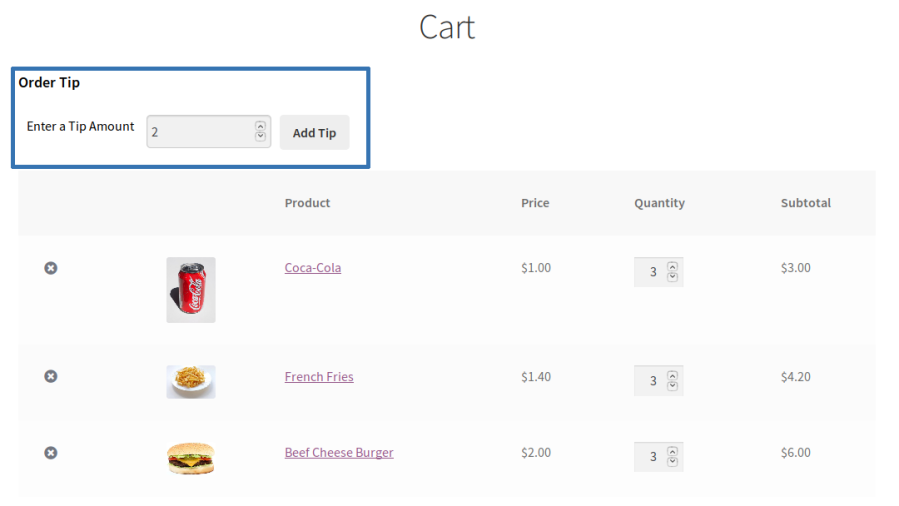
Add a custom order tip

  • Once the plugin settings are configured, users will be able to add custom tip amounts on the cart/checkout pages.
  • The custom Tip can be restricted with the Minimum and Maximum value.


Custom Tip Amount on Cart
Custom Tip Amount on Checkout
  • On the cart/checkout page, your users can add custom tips to their carts.

Predefined with Custom Tip

Add a predefined custom tip

  • Once the plugin settings are configured, the user will be able to add a tip on the cart/checkout pages.
Predefined & Custom Tip on Cart
Predefined & Custom Tip on Checkout
  • Your users can select a tip amount from the list of available options. Your users can enter a tip amount of their choice and add the tip to their cart.
  • Once the tip amount is selected/inputted, your users can add the tip to their carts by clicking the Add Tip button.
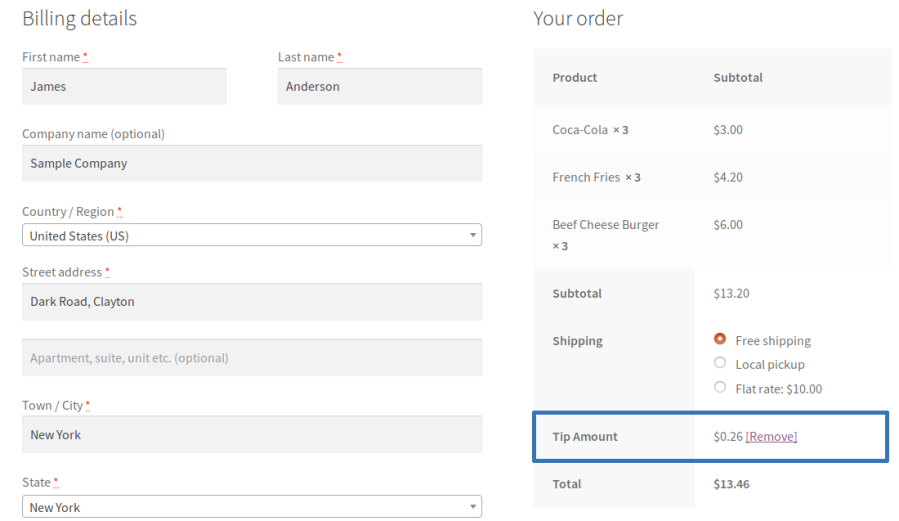
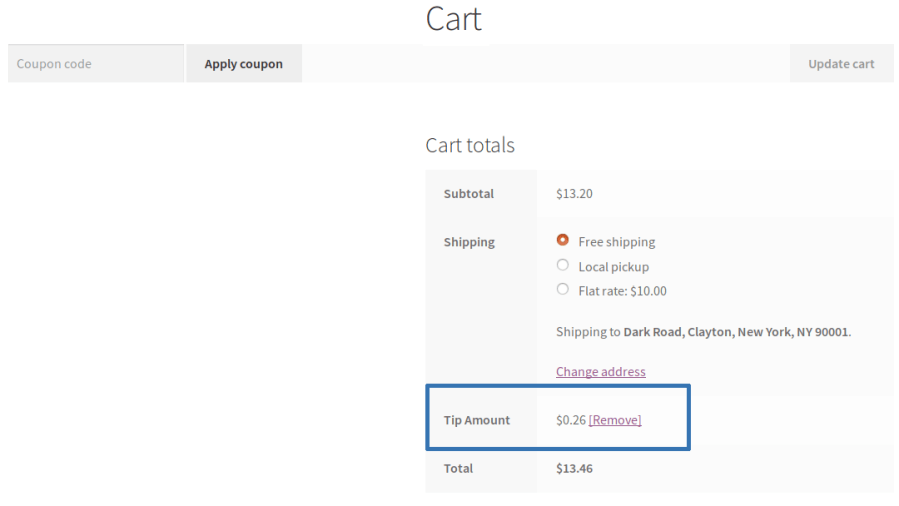
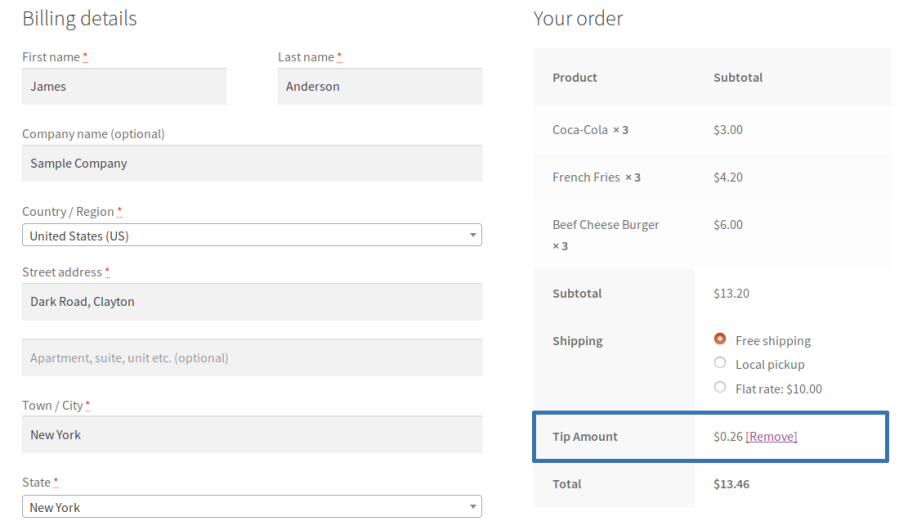
Tip Amount Added to Cart
Tip Amount Added to Checkout

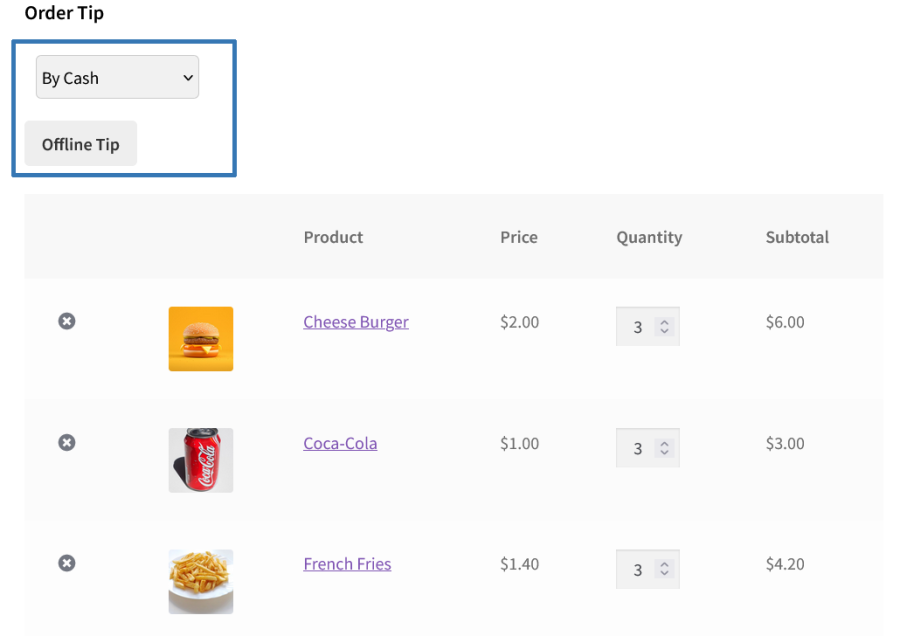
Offline Tip

Offline Tip
  • Once the plugin settings are configured, the user will able to pay the tip offline.
  • This will be helpful for the customers to pay the tip after receiving the product/fulfillment.

Recommend or Automatically Add the Last Tip Amount

  • For every new transaction, the user will have to select the tip amount.
  • Alternatively, the last tip amount contributed by the user will be selected/prefilled in the tip amount field.

Reports

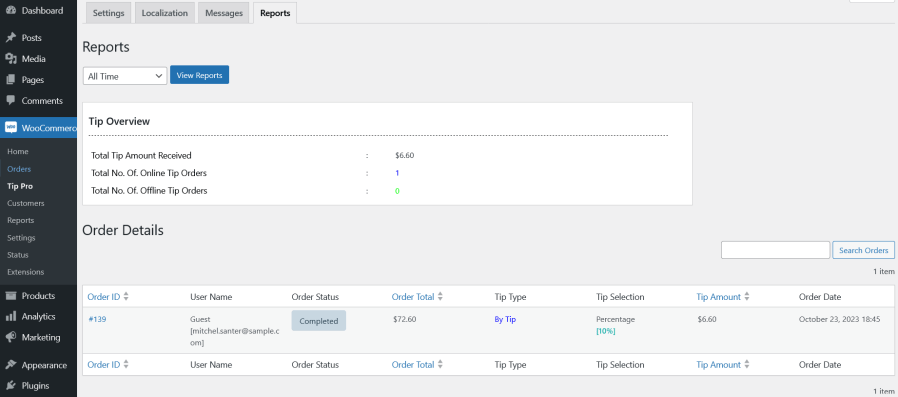
Reports

The reports section will display the following information about Tip,

  • Tip Overview [Displays Total Tip Amount Received, Total Number of Online and Offline Tip Orders].
  • Order Details [Orders which contains Tip].

Extensive Features List

Tip Collection on Cart & Checkout

  • Enable tip collection independently on the Cart page, the Checkout page, or both simultaneously.
  • Tip is added as a fee line item to the order, fully integrated with WooCommerce order totals.
  • Customers can add, update, or remove a tip directly from the cart or checkout without leaving the page.
  • Compatible with both shortcode-based and block-based WooCommerce cart and checkout experiences.

Tip Types & Input Methods

  • Choose from three top-level tip modes:
    • Predefined: customers select a tip from a preconfigured list of values.
    • Custom Tip: customers type in any tip amount they choose.
    • Predefined with Custom Tip: customers can either select from preset options or enter their own amount.
  • Configure the Predefined Tip Type as:
    • Percentage: all preset values are percentage-based.
    • Fixed: all preset values are fixed monetary amounts.
    • Let the User’s Choice: customers can toggle between percentage and fixed modes themselves when selecting from predefined options.
  • Configure predefined tip values as a comma-separated list, supporting any number of options.
  • Display predefined options as a drop-down selector or as interactive Buttons for a more visual experience.
  • When a predefined tip type is set to percentage, the equivalent price value is displayed alongside each percentage button so customers can see exactly what they’ll pay.
  • Configure whether percentage-based tips are calculated against the Order Total (including shipping and fees) or against the Sub-Total (product items only), giving full control over what the tip percentage applies to.
  • Define minimum and maximum custom tip amounts to keep the tip within acceptable limits.

Offline (Cash) Tip

  • Enable an Offline Tip option that allows customers to indicate they will pay the tip in person at delivery instead of online.
  • The offline tip selection is recorded against the order without adding a monetary fee to the online transaction.
  • Offline tip orders are tracked and reported separately from other tip orders in the reports section.

Tax on Tips

  • Optionally enable tax calculation on the tip amount, treating the tip as a taxable fee.
  • When tax is enabled, select the Tax Class to apply to the tip (Standard or any custom tax class configured in WooCommerce), allowing accurate tax handling for different store setups.

Customer Last Tip Recommendation

  • Enable a Remember Customer Last Tip Amount feature to personalize the tipping experience on return visits.
  • Configure one of two workflows for returning customers:
    • Display Recommended Tip Amount: The previously selected tip is highlighted as the suggested amount, giving the customer the choice to accept or change it.
    • Automatically Add to Cart: The previously selected tip amount is directly pre-added to the cart on the customer’s next visit, streamlining the checkout experience.

Tip Form Display Positioning

  • For shortcode-based cart pages with various positioning options.
  • For shortcode-based checkout pages with various positioning options.
  • For block-based cart and checkout pages, the Order Tip block can be freely repositioned by dragging it within the WordPress block editor.
  • A dedicated Order Tip Form widget is available for placement in any widget area.

User Eligibility & Access Restriction

  • Display the tip form only to selected customers through Eligible Users/User Role filters.
  • Use the Guest User role filter to restrict tipping for non-registered users

Order Amount Restriction for Tipping

  • Restrict tip form visibility based on the cart/order amount using a configurable minimum and/or maximum order amount threshold, so tipping is only offered when the order value falls within an appropriate range.

Tip Details in WooCommerce Orders

  • Tip amounts are stored with the order and visible within the WooCommerce order details.
  • A dedicated Tip Amount column is added to the WooCommerce Orders list table in the admin, allowing at-a-glance review of tip values across all orders.
  • Tip fee line items display the tip type (online or offline) alongside the fee name in the order view for both admin as well as customer
  • Tip data is saved when orders are placed via both the standard checkout and the WooCommerce Store API (block checkout).

Reports & Analytics

  • A dedicated Reports screen provides a centralized overview of all tip activity.
  • The Order Details table within Reports shows per-order tip data.
  • Filter and search reports using a variety of criteria.
  • All filters apply to both the overview summary metrics and the order details table simultaneously.

CSV Export

  • Export the full tip report to CSV directly from the Reports screen, with the active filters applied to export only the relevant data.
  • Export uses a progress-based batch processing flow, suitable for stores with large order volumes.

Customizable Messages

  • Configure the notification message displayed to customers when a tip is successfully added to the cart or checkout.
  • Configure the notification message displayed to customers when a tip is successfully removed from the cart or checkout.

Custom CSS

  • A Custom CSS field is available in the settings for applying additional styles to the tip form and related elements, enabling precise visual customization beyond the default appearance.

Requirements

Minimum PHP version: 5.6


Avaliações de clientes

Estamos aceitando avaliações para este produto e as exibiremos quando tivermos mais algumas.

Informações da extensão

  • Versão PHP necessária: 7.4.0
  • Testado com WordPress: 7.0
  • Testado com WooCommerce: 10.7.0
  • Requer pelo menos o WordPress: 6.2
  • Requer pelo menos o WooCommerce: 8.2.0

Compatibilidade

  • High performance order storage (HPOS)

Países

  • Em todo o mundo

Idiomas

English (United States)

Related Products

Preço: $79 Anualmente
Classificado com 3.4 de 5 estrelas
Preço: $279 Anualmente
Classificado com 3.2 de 5 estrelas
Preço: $59 Anualmente
Classificado com 3.1 de 5 estrelas
Preço: $109 Anualmente
Classificado com 2.8 de 5 estrelas
Preço: $49 Anualmente
Classificado com 4.1 de 5 estrelas
Preço: $109 Anualmente
Classificado com 2 de 5 estrelas
Preço: $109 Anualmente
Classificado com 2.3 de 5 estrelas
Preço: $109 Anualmente
Classificado com 2.6 de 5 estrelas
Preço: $109 Anualmente
Classificado com 2.3 de 5 estrelas
Uso dos seus dados pessoais
Nós e nossos parceiros processamos seus dados pessoais (como dados de navegação, endereços IP, informações de cookies e outros identificadores únicos) com base em seu consentimento e/ou nosso interesse legítimo para otimizar nosso site, atividades de marketing e sua experiência de usuário.