Instalações ativas
4K+
A assinatura inclui
Suporte
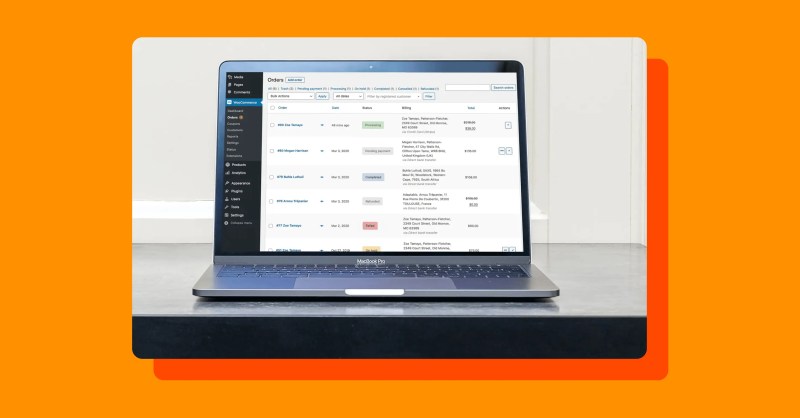
Anti-Fraud for WooCommerce helps you identify suspicious orders, reduce card testing activity, and decide how your store responds to potential fraud.
Combine configurable WooCommerce fraud rules, checkout protection, customer controls, and optional risk intelligence in a workflow that fits your business.
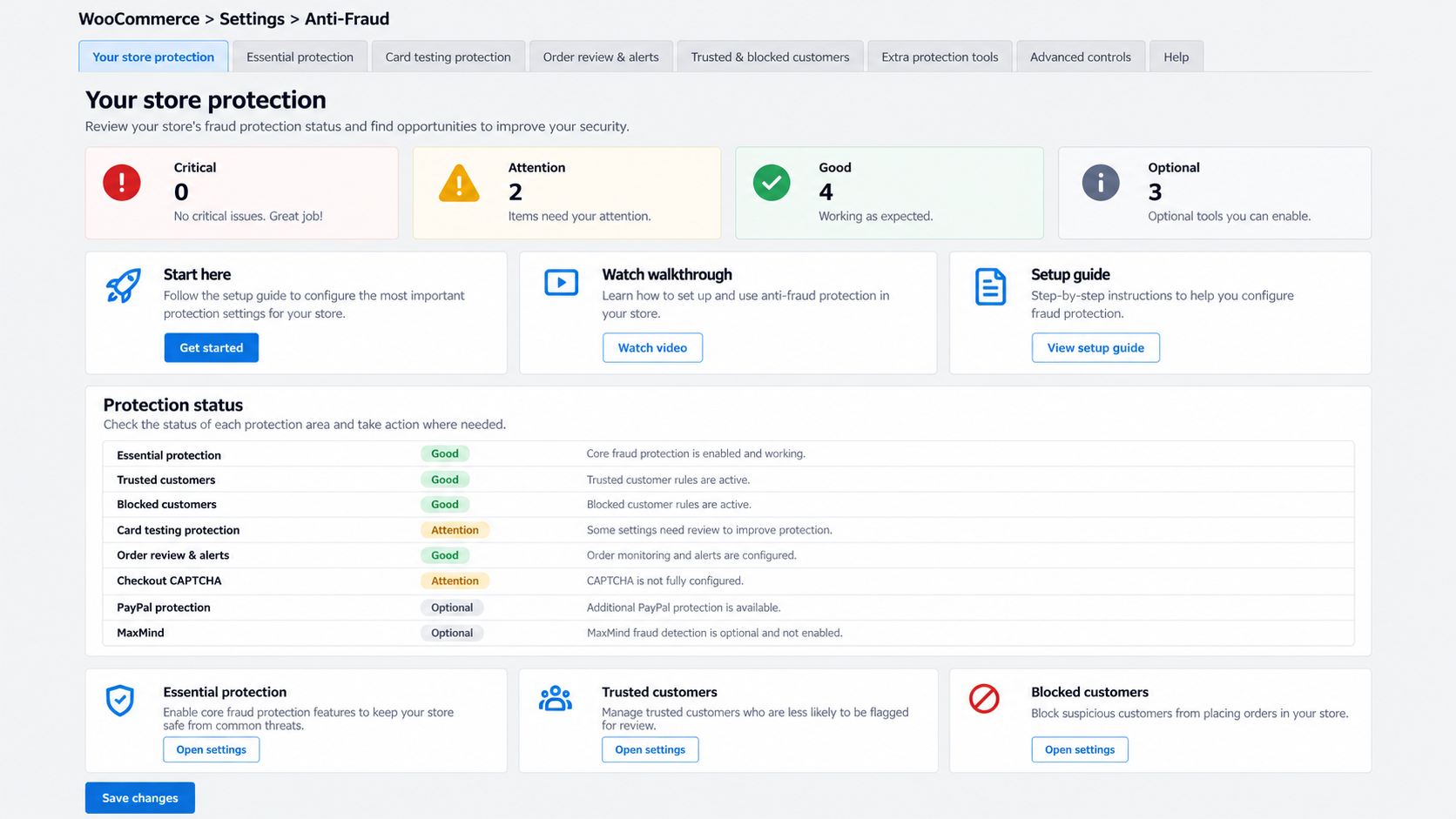
Whether you are dealing with card attacks, suspicious checkout activity, or orders that need a closer look, choose the protection and review process that suits your customers, products, and payment methods.
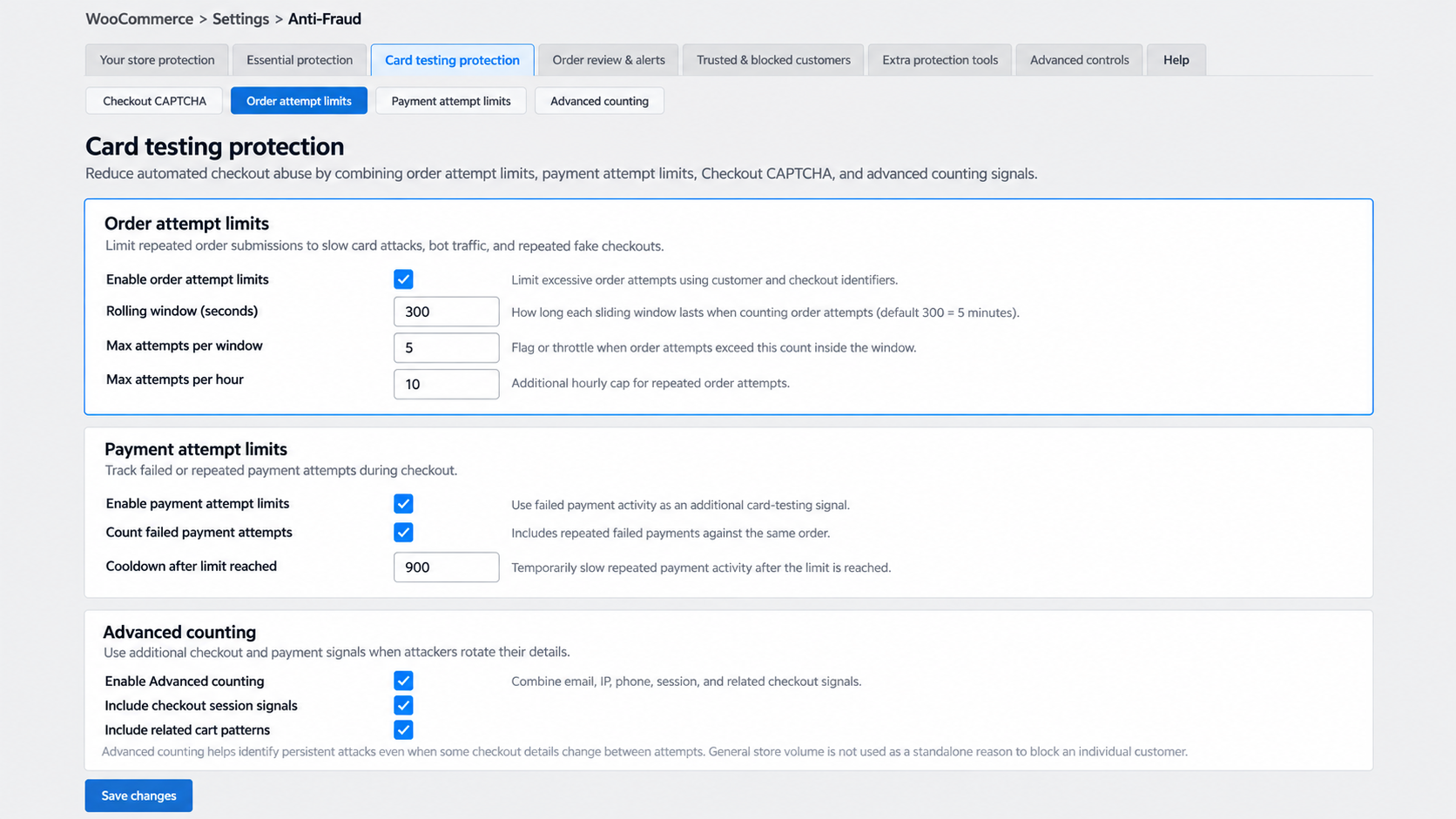
Card testing uses repeated checkout attempts to test payment credentials. It can leave your store handling failed payments and suspicious orders while you try to keep checkout available for genuine customers.
Anti-Fraud combines order and payment attempt controls with fraud rules and Checkout CAPTCHA to help you respond to this activity.
Attackers may change email addresses, IP addresses, or other checkout details between attempts. When Advanced counting is enabled, Anti-Fraud can combine customer identifiers with failed payment activity, checkout sessions, and related cart patterns.
This provides additional ways to identify persistent attack behavior beyond a single IP address or email address. In Advanced counting, overall store volume is not used as a standalone reason to block a customer.
A suspicious order and an automated card attack do not necessarily look the same. Anti-Fraud brings together controls for both, with configurable WooCommerce rules at the center of the workflow.
Use built-in scoring, checkout attempt limits, allow and block lists, and automated order actions. Add Checkout CAPTCHA, PayPal protection, MaxMind, identity verification, or AI-assisted review where they fit your store.
Different fraud controls solve different problems. This comparison shows what each control contributes on its own and how Anti-Fraud lets you combine it with additional protection.
| Protection layer | What it contributes on its own | How Anti-Fraud for WooCommerce adds to it |
|---|---|---|
| External fraud scoring | Transaction intelligence from a separate scoring service | Built-in WooCommerce rules and scoring, with MaxMind available as an optional additional signal |
| IP attempt limits | Detection of repeated activity from the same IP address | Additional customer identifiers, with payment, session, and related checkout signals available through Advanced counting |
| Checkout CAPTCHA | Human verification to help reduce automated checkout activity | Cloudflare Turnstile or Google reCAPTCHA v2 alongside order attempt limits, payment attempt limits, and fraud scoring |
| Customer exception lists | Rules for customer details that are already trusted or known to be risky | Allow and block lists across multiple customer attributes, plus optional automatic blocking of high-risk email addresses and IP addresses |
| Pre-payment checks | A decision about whether a checkout should proceed to payment | Configurable pre-payment checks alongside order review, administrator alerts, and automatic hold or cancellation actions |
| PayPal payment protection | Controls focused on activity through a PayPal payment flow | Dedicated attempt limits and optional PayPal email verification alongside the store’s broader fraud rules |
Individual products and services may combine these controls differently. Anti-Fraud gives you the flexibility to build a layered workflow inside WooCommerce without requiring MaxMind for its built-in fraud scoring.
Different stores have different risk tolerances. Choose the rules that matter to your business, adjust their weights, and decide how much risk warrants a closer review.
You can leave order statuses unchanged while your team reviews risk information, place suspicious orders on hold, or apply more restrictive actions when appropriate.
Protection presets provide a starting point. Settings are organized around essential protection, card testing, order review and alerts, trusted and blocked customers, extra protection tools, and advanced controls.
Use settings search to find the controls you need. Then adjust your configuration using real order results rather than enabling every restriction at once.
Performance depends on your hosting, order volume, enabled checks, and connected services. Choose the controls relevant to your store and test your normal checkout and payment flows after making changes.
Use several relevant fraud indicators together, review higher-risk orders before fulfillment, and combine Anti-Fraud with your payment gateway’s security controls.
Start conservatively. Review which rules contribute to genuine and suspicious orders, then tune those rules rather than making broad changes that could affect every customer.
No fraud prevention system can identify every fraudulent transaction. Anti-Fraud does not replace your payment gateway’s security controls, manage chargeback disputes for you, or replace general WordPress security.
For website access and WordPress security controls, see Security for WooCommerce. Anti-Fraud focuses on checkout activity, fraud risk, and suspicious orders.
OPMC has been developing WooCommerce extensions since 2014 and supports merchants around the world.
We maintain our extensions and provide support from the team that builds the software. Contact support when you need help understanding your configuration or investigating a reproducible issue.
See recent fraud activity and order risk in one place, so your team can focus on the transactions that need attention.
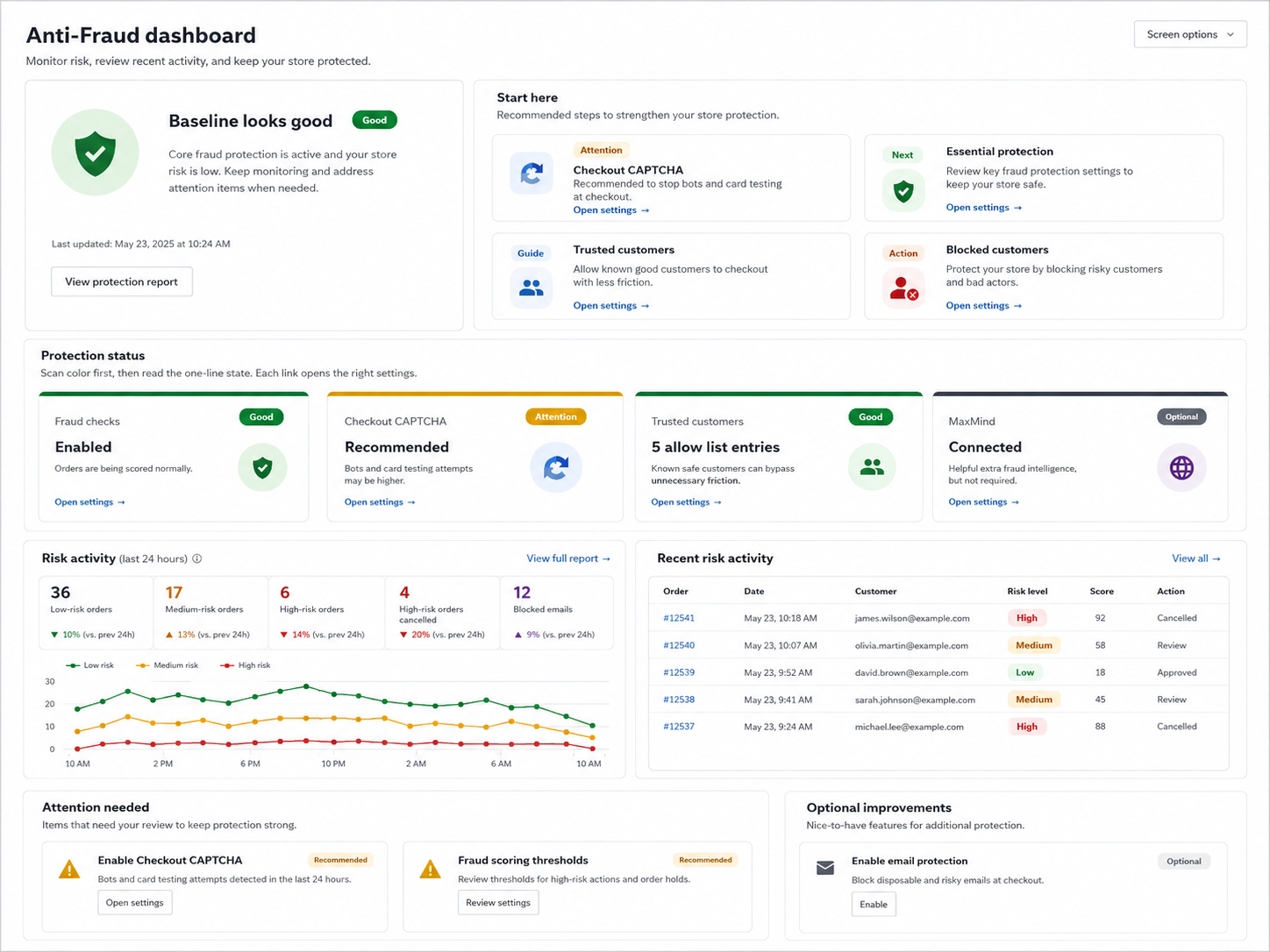
Reduce repetitive review work without treating every suspicious order the same way. Decide what should happen when an order reaches your chosen risk level.
Manual review remains useful for orders that need additional context. You can increase automation as you become familiar with your store’s fraud patterns.
Anti-Fraud combines enabled order and customer checks into an overall risk score. Assign each rule a weight according to how useful that signal is for your store.
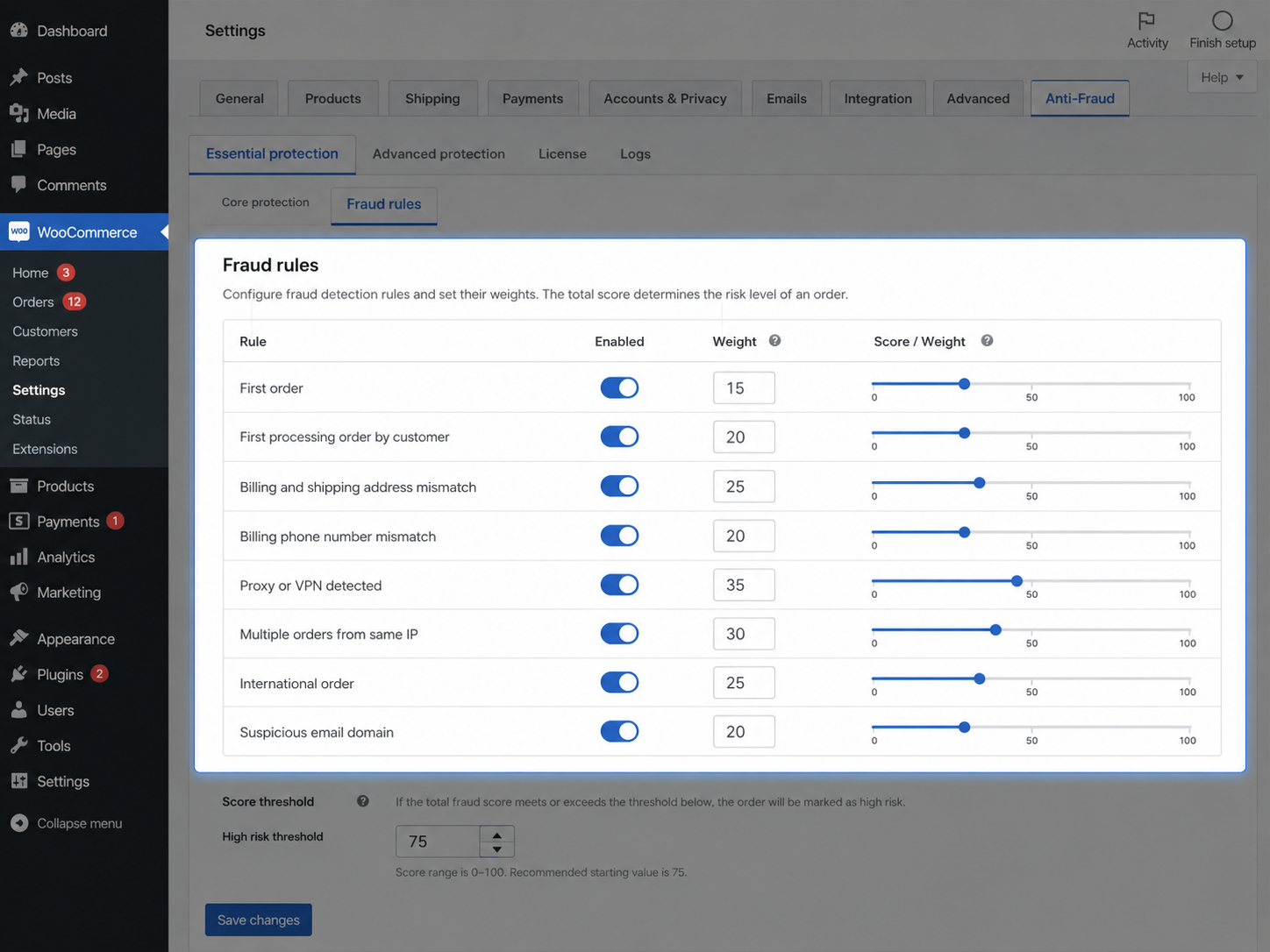
Increase the weight of useful signals, reduce the influence of weaker ones, or disable rules that do not apply to your customers. Some checks need a connected external service.
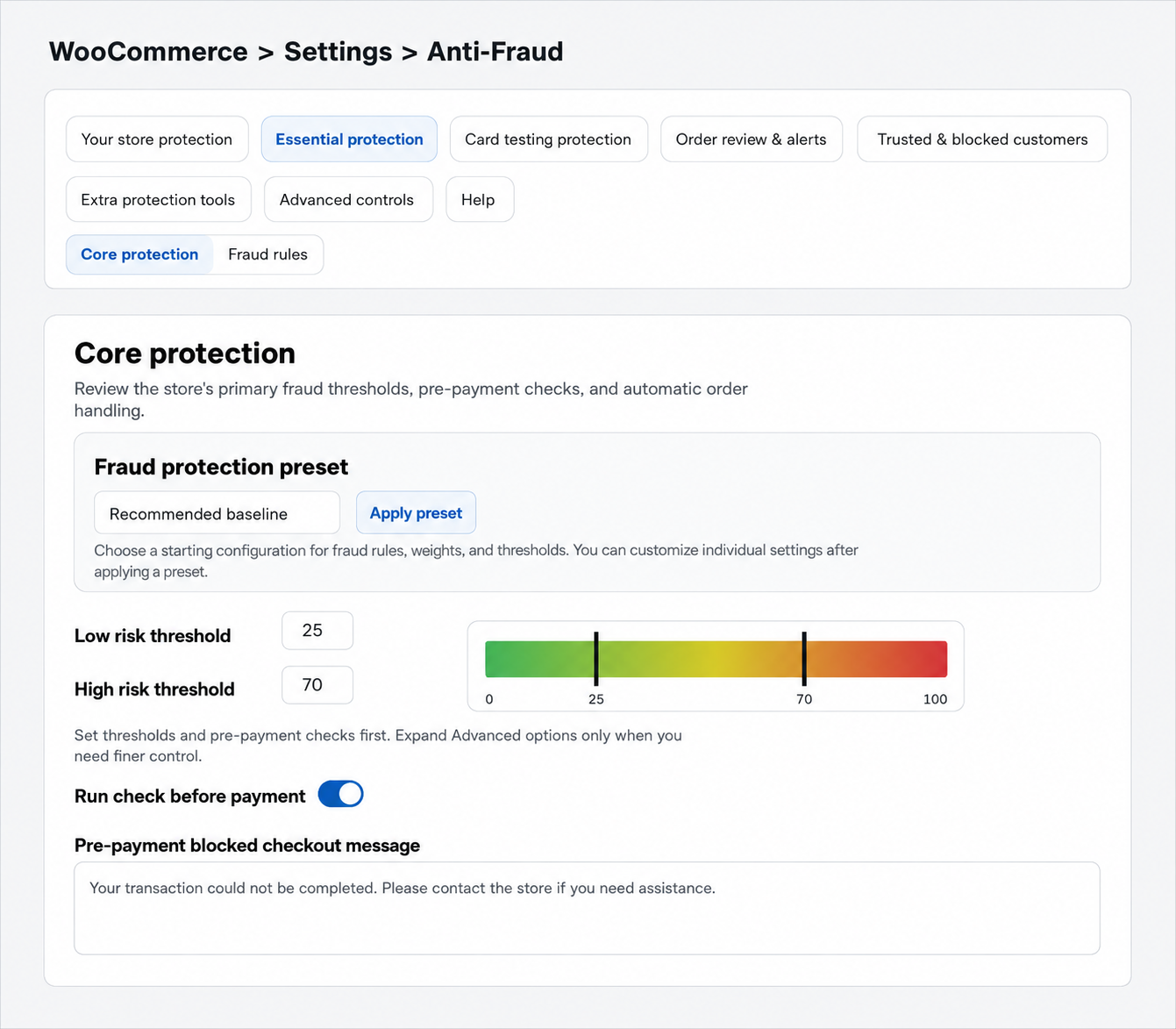
Enable the pre-payment fraud check to assess applicable checkouts before the payment transaction proceeds. When the calculated risk reaches your configured high-risk threshold, Anti-Fraud can stop checkout and display your chosen message.
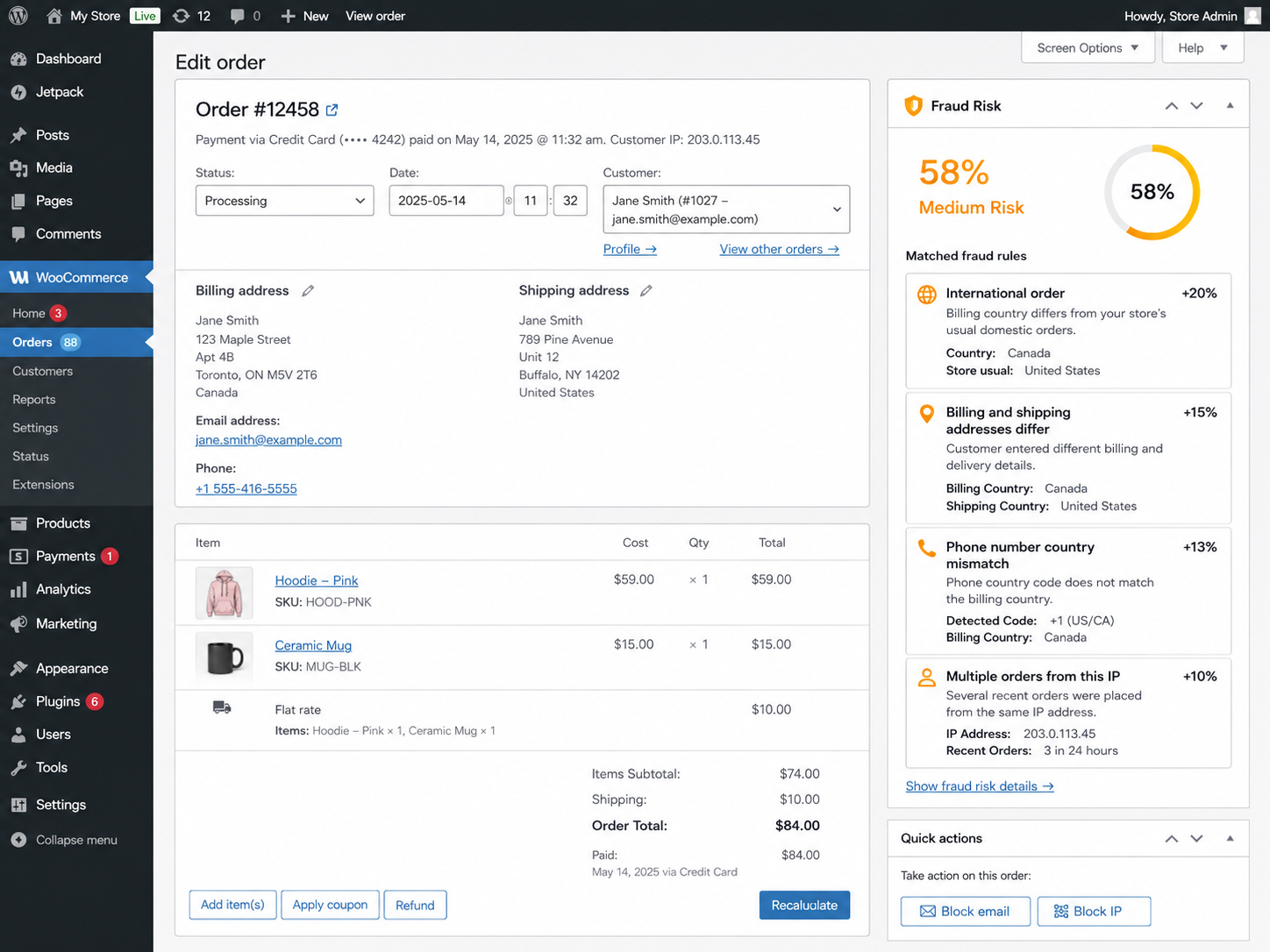
A risk score is more useful when you can see what contributed to it. Review Anti-Fraud information directly on the WooCommerce order screen.
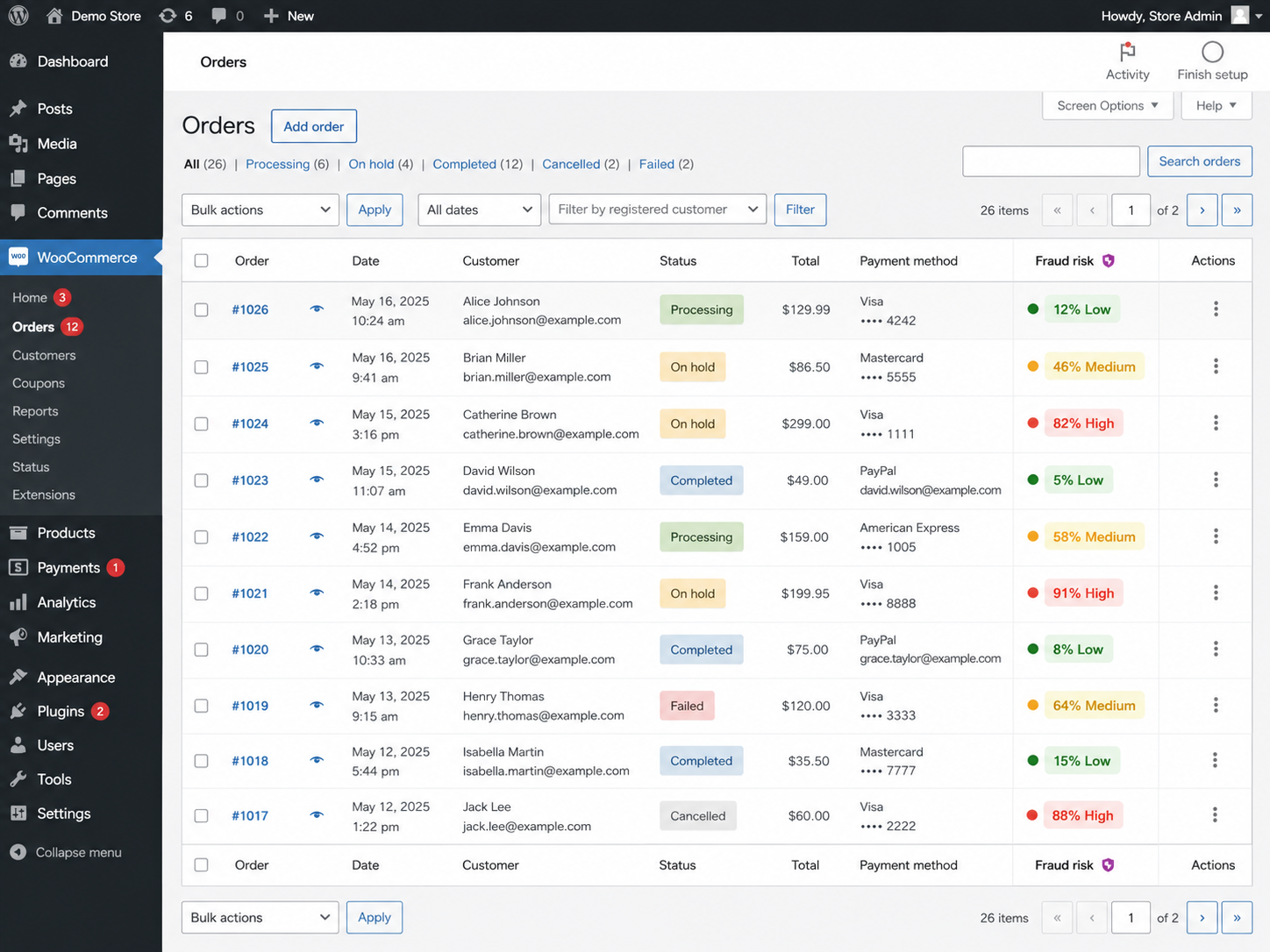
Spot low, medium, and high-risk orders while reviewing daily transactions, without opening every order individually.
Create targeted exceptions for customers and order sources you already trust. Allow-list entries can exclude supported identifiers from applicable fraud checks or automated actions.
Use information such as email addresses, IP addresses, phone numbers, user roles, payment methods, names, locations, and selected REST API keys.
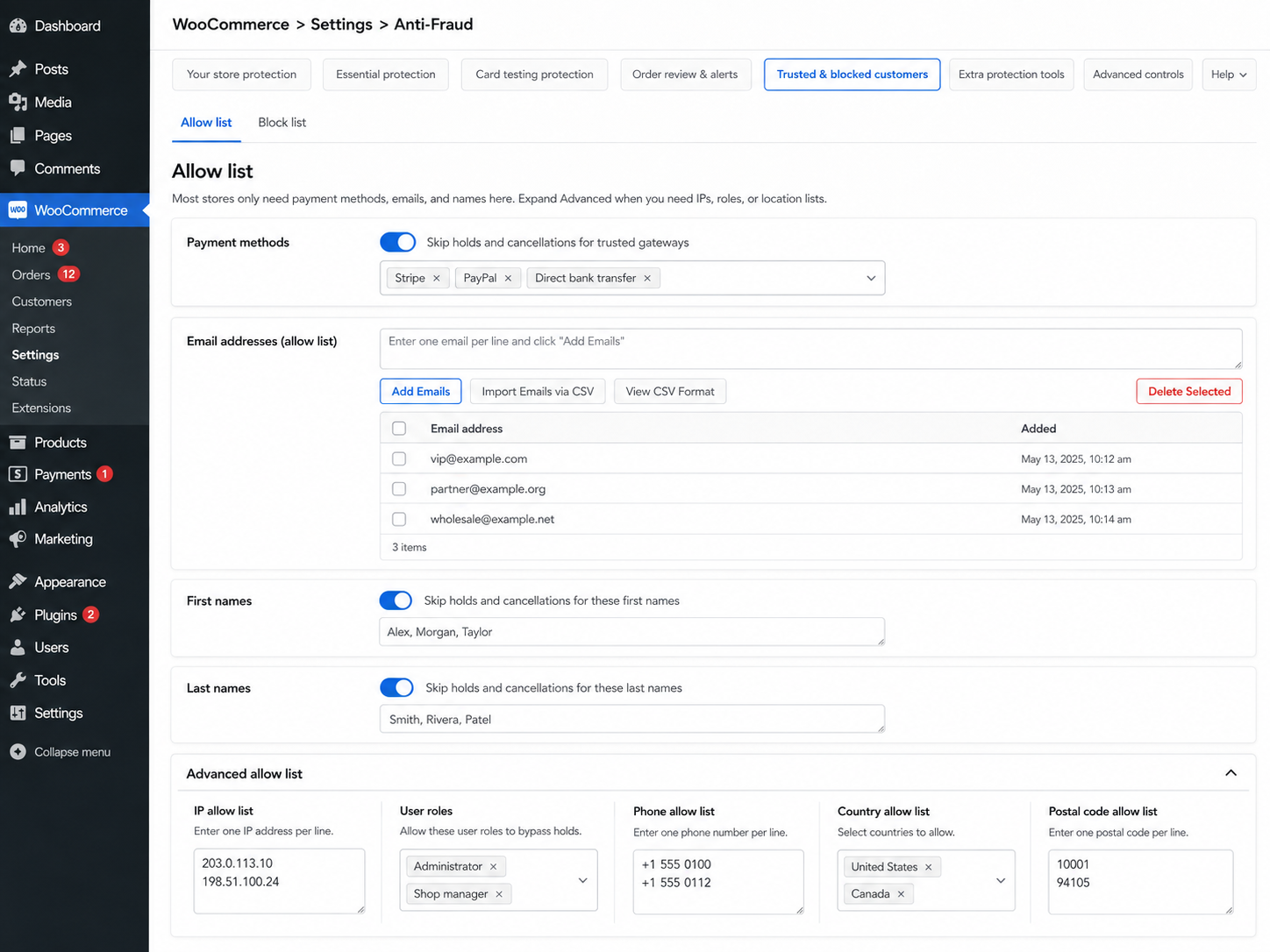
Keep exceptions narrow. Allowing an entire payment method, role, or location can bypass useful checks for more customers than intended.
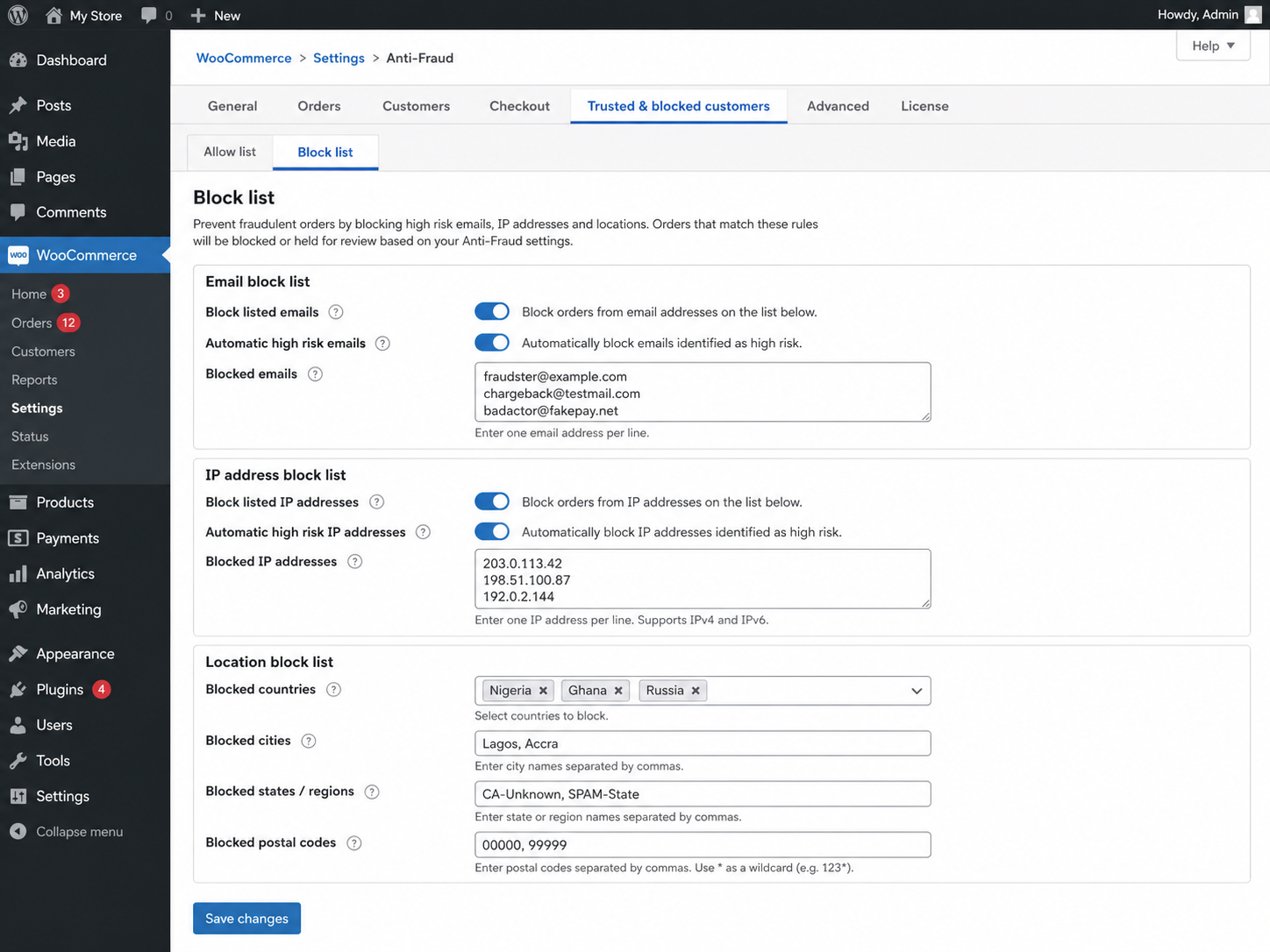
Use information from previous suspicious activity to help prevent repeat abuse. The block list supports customer and checkout identifiers including:
You can also enable automatic additions of email addresses and IP addresses associated with high-risk orders.
MaxMind is optional. Anti-Fraud includes built-in WooCommerce rules and risk scoring. Connect MaxMind minFraud when you want additional transaction intelligence.
Choose a supported service level and configure its risk threshold and rule weight. The result can contribute to your overall Anti-Fraud assessment alongside the other rules you enable.
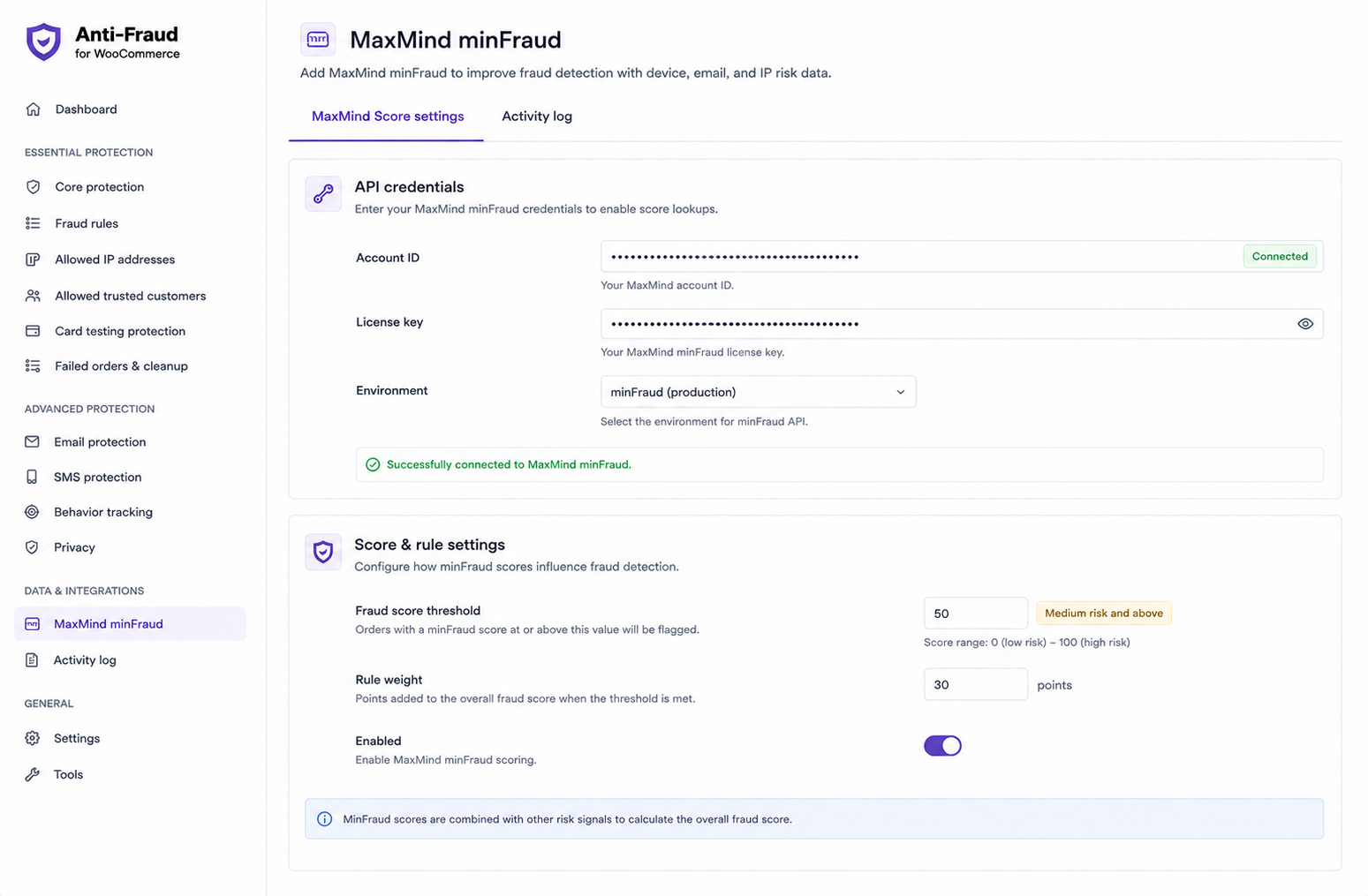
Supported Insights or Factors services can provide additional information to help you review suspicious transactions.
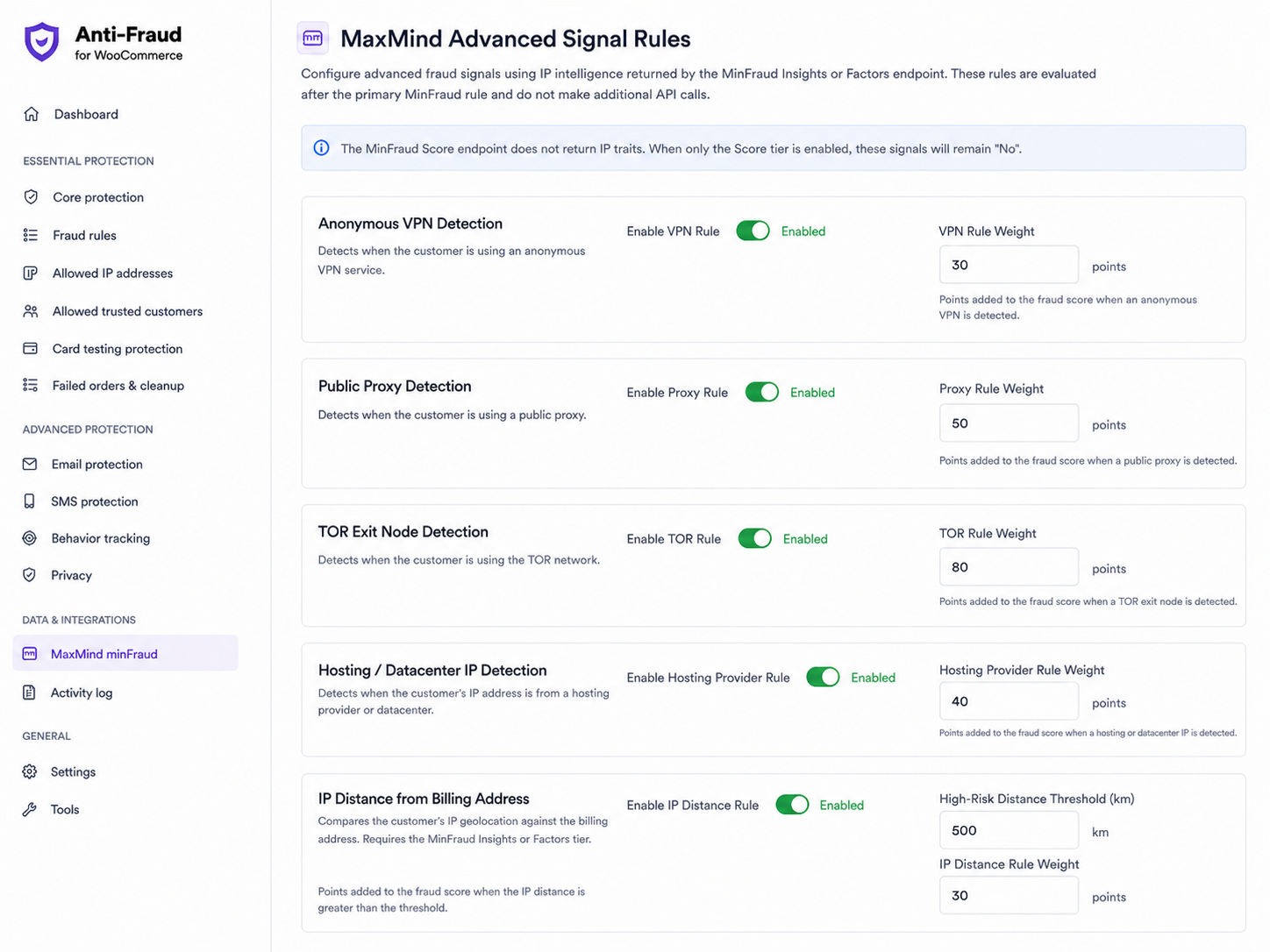
Available signals depend on the MaxMind service level connected to your store. A separate account and service charges may apply.
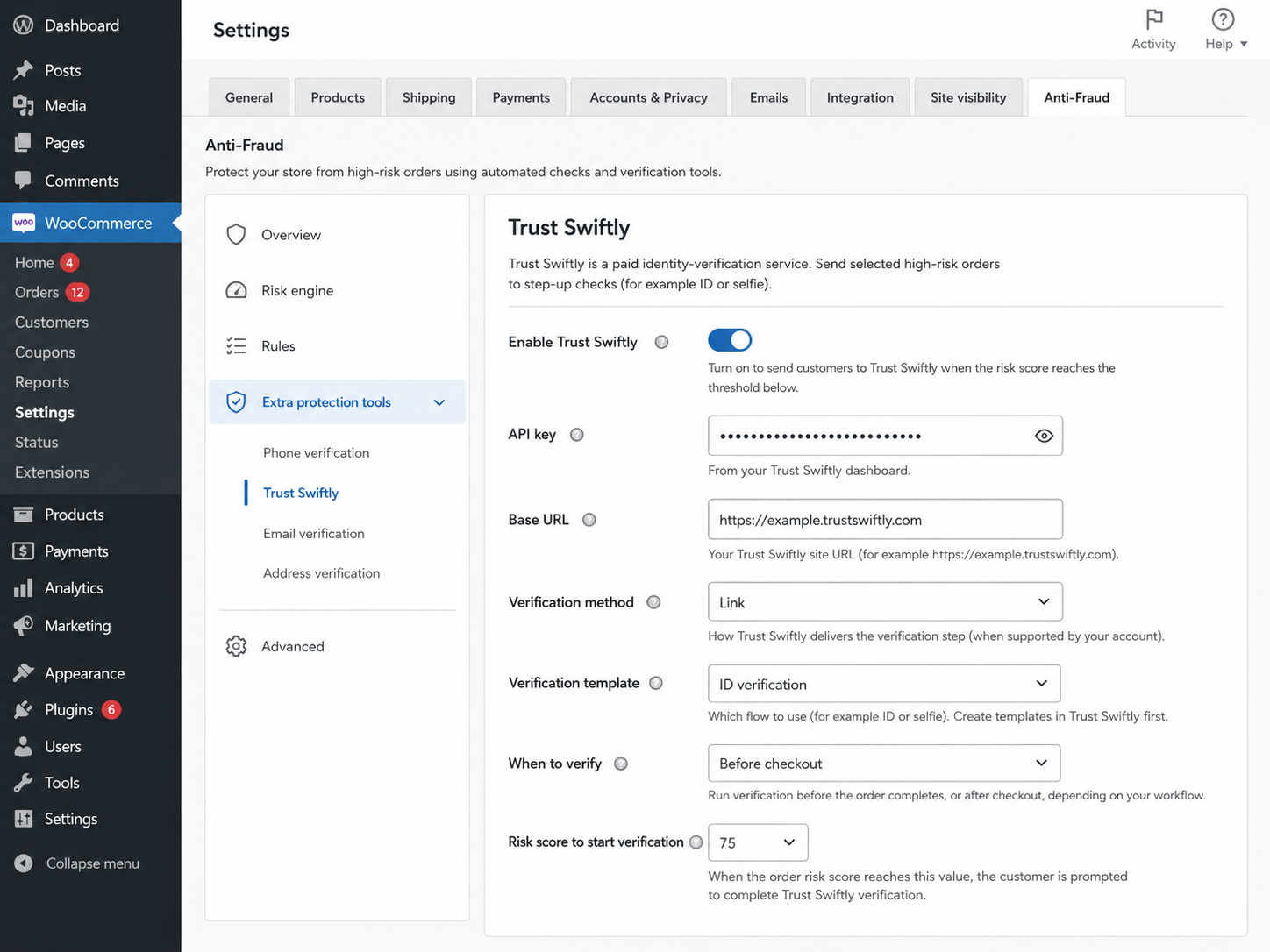
Some orders need an additional check rather than an immediate rejection. The optional Trust Swiftly integration lets you request identity verification when a customer reaches your chosen risk threshold.
Anti-Fraud can optionally send supported order information to OpenAI and display an AI-generated risk note for administrators reviewing an order.
Connect your own API credentials and choose a supported model. Treat the result as additional context alongside your fraud rules and manual review, not as a guarantee or the sole reason to accept or reject an order.
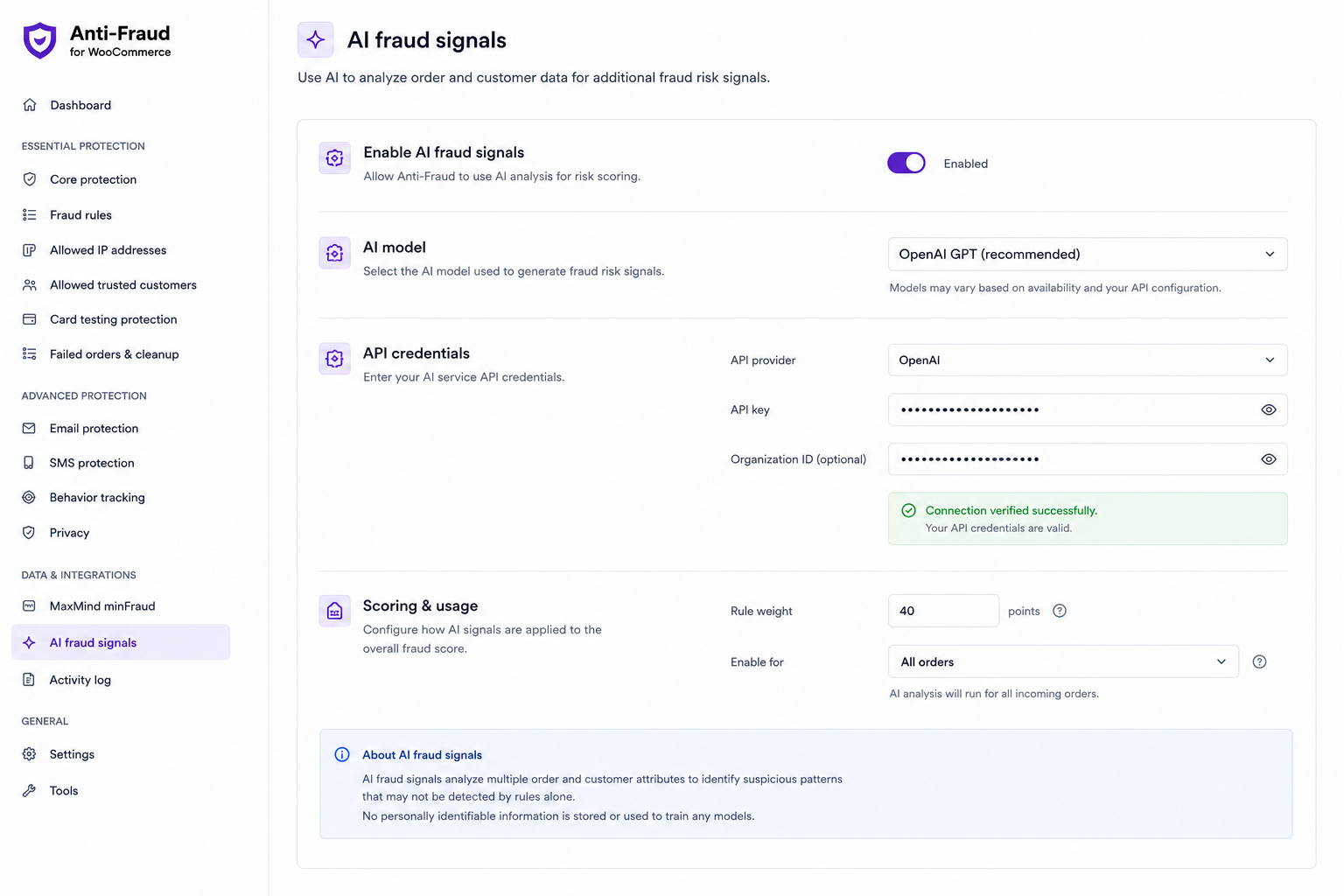
API usage, provider terms, and data handling are separate from your extension subscription. Review them before enabling the integration.
Use dedicated PayPal controls alongside your broader fraud rules when supported PayPal payment flows are being targeted by repeated attempts.
PayPal account verification and card testing protection serve different purposes. Account email verification applies to customers paying with a PayPal account, not guest card payments.
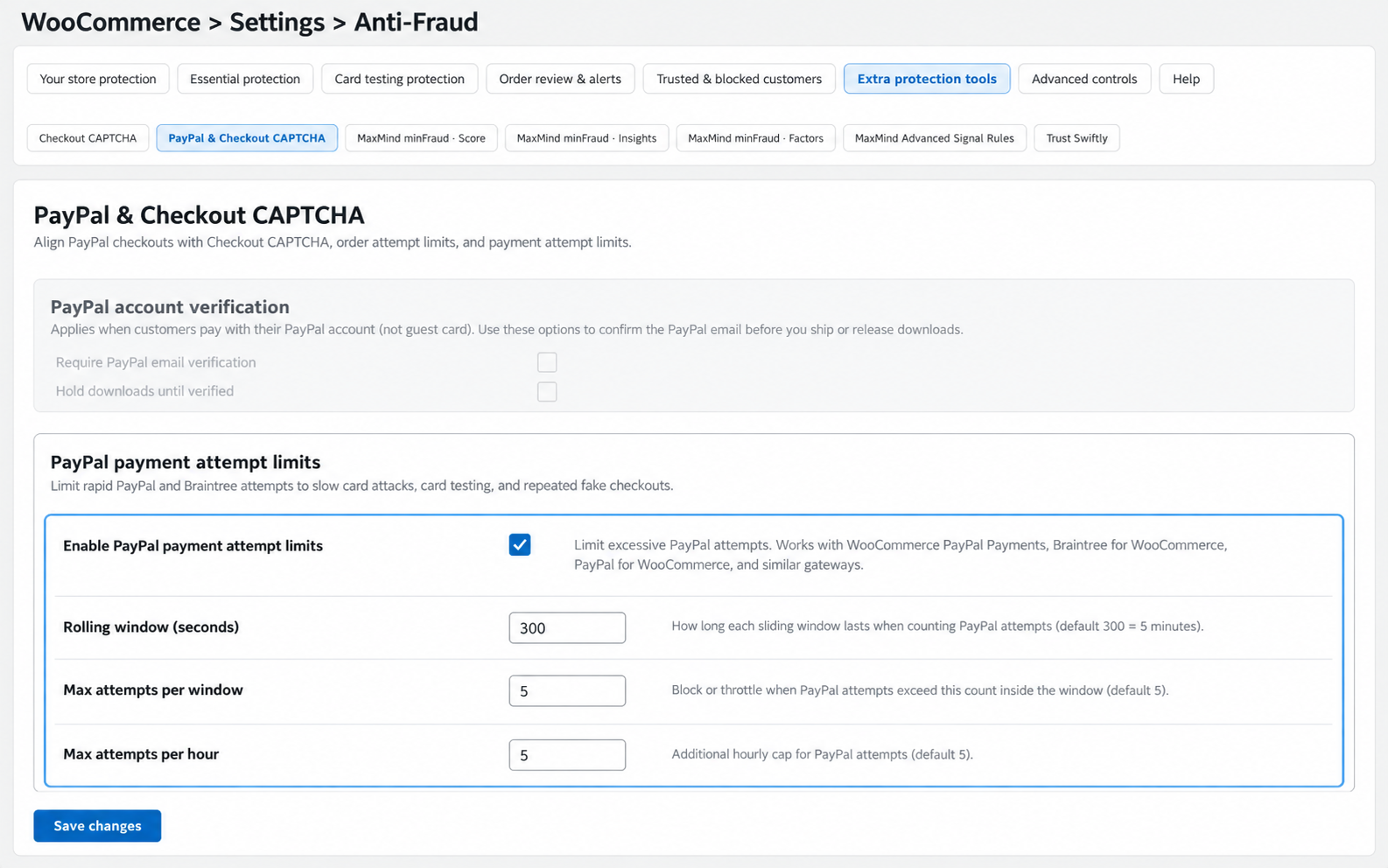
Choose Cloudflare Turnstile or Google reCAPTCHA v2 Checkbox for supported checkout protection. Use human verification alongside attempt limits and fraud rules rather than relying on CAPTCHA alone.
The available protection depends on your checkout and payment configuration. Test your chosen payment methods and avoid adding duplicate CAPTCHA challenges through multiple extensions.
Alongside Checkout CAPTCHA, PayPal protection, MaxMind, Trust Swiftly, and optional AI-assisted review, additional integrations can support specific fraud checks:
For setup guidance, supported configurations, and troubleshooting, visit the Anti-Fraud for WooCommerce documentation.
Fraud scoring is based on available risk indicators and no automated system can identify every fraudulent transaction. We recommend combining scoring with custom rules, MaxMind and manual review for high-value orders.
While Anti-Fraud is compatible with most WooCommerce extensions, some security, checkout or CAPTCHA plugins may require additional configuration. Our support team can help identify and resolve conflicts.
Fraud rules that are configured too aggressively can increase false positives. Anti-Fraud provides configurable risk thresholds, allow lists, and manual review workflows to help you balance fraud protection with a smooth checkout experience.
Yes. OPMC Anti-Fraud gives you complete control over how your store responds to potential fraud. Create custom rules based on customer details, IP address, country, order value, products, payment method, and more. Depending on the risk, you can automatically approve, hold for review, cancel, or block orders to match your business's risk tolerance.
Absolutely. OPMC Anti-Fraud is designed to complement—not replace—the fraud detection provided by payment gateways such as PayPal Payments and Stripe. By combining gateway protections with customizable WooCommerce fraud rules, AI-assisted analysis, and MaxMind integration, you create multiple layers of defence against evolving fraud tactics.
Most merchants can have Anti-Fraud protecting their store in just a few minutes. The plugin includes sensible default settings, allowing you to start with basic protection immediately. As your business grows, you can fine-tune advanced rules, integrations, and automation to match your specific fraud prevention strategy.
Anti-Fraud is designed to minimize checkout overhead and support stores of different sizes. Recent releases also reduce memory usage in scheduled Anti-Fraud processing on larger stores. Performance can vary depending on order volume, enabled integrations and hosting resources.
Our support team works directly with the developers who build the plugin, ensuring complex technical questions and bug reports are resolved as quickly as possible.
No. OPMC Anti-Fraud is designed to protect your checkout and payment process by identifying suspicious orders, preventing card testing attacks, detecting high-risk transactions, and helping reduce fraudulent purchases.
If you're looking to protect your WordPress website and WooCommerce store from unauthorized access, malware, VPN and proxy users, country-based threats, or to secure downloadable products and sensitive areas of your site, we recommend Security for WooCommerce.
Many merchants use both plugins together—Anti-Fraud to protect against payment fraud and Security for WooCommerce to strengthen the overall security of their website. Together, they provide comprehensive protection for both your store and your customers.
Informações da extensão
Verificações de qualidade
Países