


Aktive Installationen
200+
Das Abonnement beinhaltet
Support
Additional Terms helps WooCommerce stores add custom agreement checkboxes, notices, waivers, policies, and acknowledgements to the checkout experience. Create required or optional checkboxes, control how terms are displayed, and keep a record of customer acceptance with each order.
Whether you need product-specific policies, warranty acknowledgements, subscription terms, age confirmations, or region-based notices, Additional Terms gives you more control over when checkout agreements appear and how customers interact with them.
Create checkout terms that match your store’s policies, show them where customers need them, and maintain clear acceptance records after purchase.

Create multiple checkout checkboxes for policies, notices, waivers, and acknowledgements.

Choose ready-made Terms Text and Error Message templates, then customize them for your store.

Link checkboxes to dedicated terms pages for more detailed information.

Add a fixed or percentage fee to an Additional Terms checkbox, and choose whether the fee is taxable.

Place custom agreement checkboxes inside the Cart and Checkout Blocks.

Show accepted terms and their acceptance dates directly within WooCommerce order emails.

Show customers the terms they accepted on the Thank You page after checkout.
Show customers the terms they accepted on the Thank You page after checkout.

Set each checkbox as optional or required based on your store’s needs.

Show terms in a modal, new tab, or directly above the checkout checkbox.

Display important terms upfront so customers can review details before purchase.

Insert dynamic details, including the linked terms page, fee amount, site details, and customer information.

Translate using .po files, and integrate with WPML and Polylang.

Attach a PDF receipt containing accepted terms, order details, and acceptance dates to order emails.

Let customers review the accepted terms and exact terms versions from their account.

Migrate plugin settings and export detailed acceptance records in CSV format.
Choose where each agreement appears in your store. Display terms checkboxes on the Checkout page, Cart page, or both. Additional Terms Pro supports classic WooCommerce shortcode pages and WooCommerce Block pages, including Checkout Block and Cart Block. When an agreement is accepted on the cart, the customer’s choice is carried over to checkout during the same session.
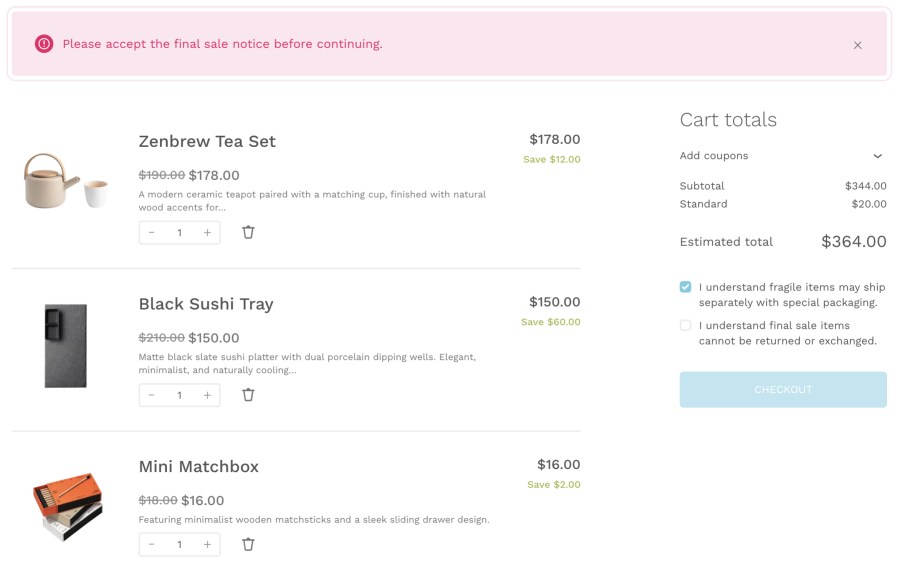
Checkboxes also respond to live updates. For example, conditions based on cart totals, discounts, shipping amounts, or cart weight can update automatically as the customer changes their cart or checkout details. Placement details are also included in the order acceptance summary, so you can see where each agreement was accepted.
Create advanced terms and conditions checkboxes for your WooCommerce checkout with Additional Terms Pro. Its advanced settings, such as customizable link actions and conditional logic, allow you to enhance the user experience and tailor the terms checkboxes to meet your specific business needs. Here are some examples of using Additional Terms:
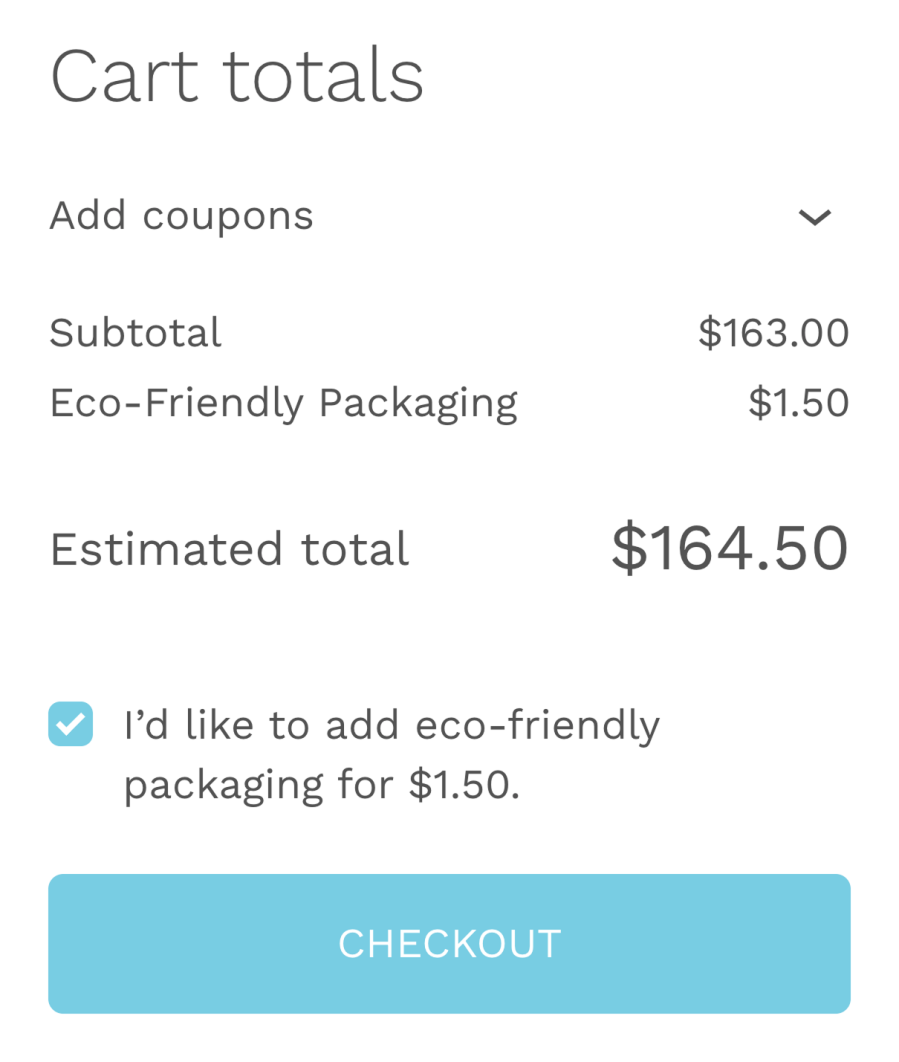
Add a fixed or percentage fee when a customer accepts an Additional Terms checkbox. Use it for paid add-ons or required charges, choose whether the fee is taxable, and show the cost clearly before checkout. Choose whether each fee is taxable and use the Fee Amount Smart Tag to display the price directly in the checkbox text. Customers can see the amount before they accept the related terms, helping you keep checkout pricing clear.
When a fee is selected, its charged details are stored with the acceptance record and can appear in order notes, customer emails, PDF receipts, and CSV exports.
Show checkout agreements only when they are relevant. With conditional logic, you can display WooCommerce terms and conditions checkboxes based on products, categories, payment gateways, billing and shipping locations, cart amount, cart weight, coupon discounts, customer roles, weekdays, product types, URL parameters, and more. You can also choose whether all conditions must match or if any single matching condition is enough.

Show checkout terms when selected products are included in the customer’s cart.

Show checkout terms for subscriptions, bookings, or other product types.

Show checkout terms when selected payment methods are chosen at checkout.

Show checkout terms based on the cart subtotal, total, or shipping total.

Show checkout terms based on the live total weight of cart contents.

Show checkout terms based on the customer’s selected shipping location.

Show checkout terms based on your store’s current Store Vacation status.

Show checkout terms for selected roles, members, vendors, or subscribers.

Show checkout terms for products included in selected product categories or tags.

Show checkout terms for products assigned to selected WooCommerce Brands.

Apply checkout terms to products assigned to selected shipping classes.

Show checkout terms when selected coupon codes are applied to the customer’s cart.

Show checkout terms when coupon discounts match your selected amount rules.

Display checkout terms only on selected weekdays or specific store days.

Show checkout terms based on the customer’s selected billing location.

Show checkout terms based on campaign, affiliate, or custom checkout URL parameters.
Record the date and time each Additional Term is accepted and include these details in WooCommerce order emails and PDF terms receipts.
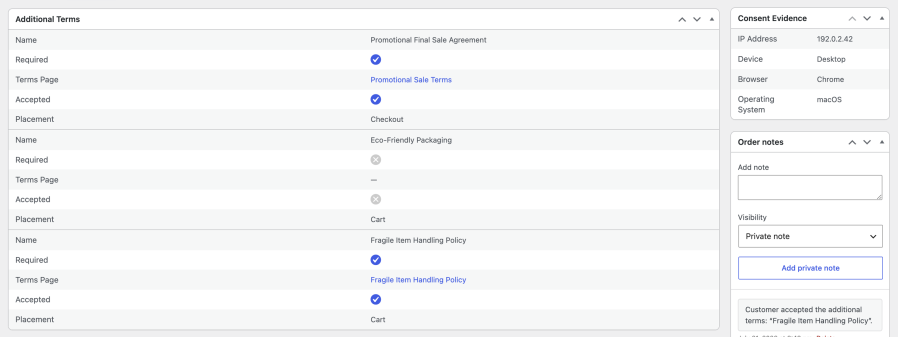
Store managers can review recorded customer choices directly from the WooCommerce order screen. For additional consent evidence, enable the optional Consent IP & Device Log to record the customer’s IP address and device details when Additional Terms are accepted.
Export detailed Additional Terms acceptance records in CSV format from Tools > Export. Choose a date range and include order, customer, accepted terms, acceptance status, placement, terms snapshots, and linked page details.
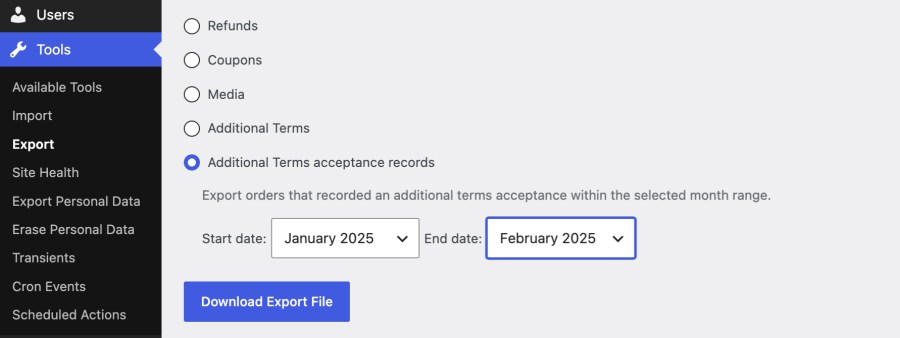
When Consent IP & Device Log is enabled, exports can also include the customer’s IP address, device, browser, operating system, and user agent. Exports support both HPOS and legacy order records.
Generate professional terms and conditions faster with Additional Terms Pro’s guided Terms Generator for modern online businesses. Instead of writing legal content from scratch, the guided questionnaire helps you create structured, customizable terms pages based on your business type, platform, products, services, customer interactions, payment setup, refund policies, user accounts, subscriptions, digital downloads, reviews, third-party links, and other important store details.
Built for WooCommerce stores, ecommerce brands, SaaS platforms, marketplaces, mobile apps, subscription businesses, digital product sellers, and service-based websites, the Terms Generator helps you create clearer and more complete terms and conditions in minutes. You can preview, edit, refine, regenerate, and save the generated content directly, making it helpful to keep your legal page updated as your business grows or your policies change.
Clear terms and conditions can improve customer transparency, reduce confusion, and help communicate important policies before purchase. Additional Terms Pro helps store owners, startups, and growing online businesses to create professional looking legal pages, while keeping full control over the final content.
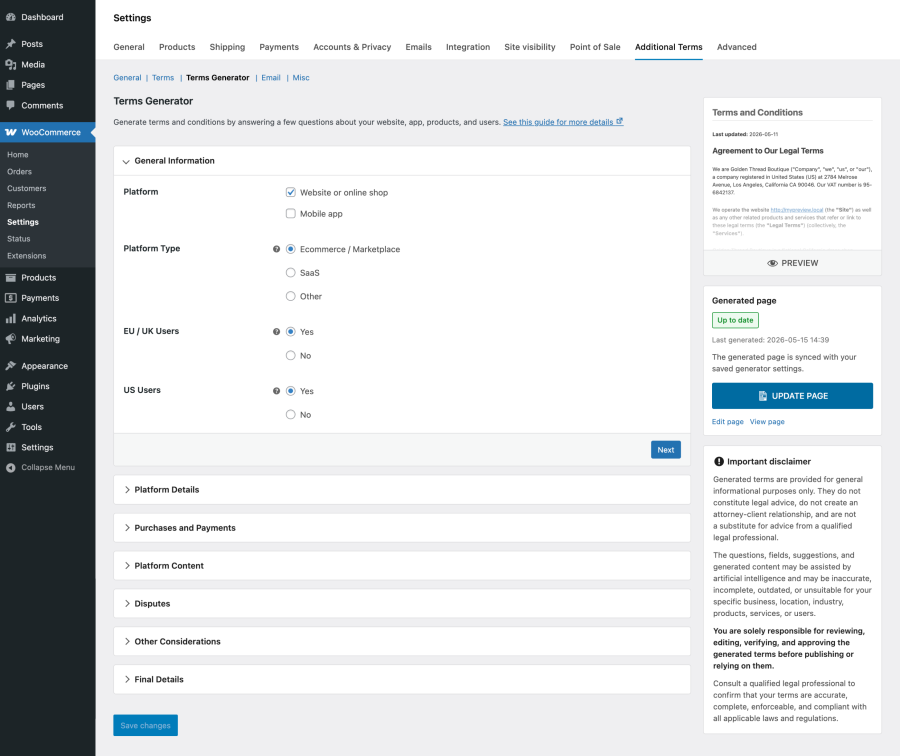
The Terms Generator is designed to help you create a strong starting point for your terms and conditions. Since every business is different, review and adjust the generated content before publishing, and consider getting legal guidance when needed.
Additional Terms helps WooCommerce stores present important checkout agreements clearly, collect customer acknowledgements, and keep acceptance records connected to each order. Whether you need product-specific policies, warranty notices, subscription terms, age confirmations, or regional checkout notices, the extension gives you flexible control over how and when those terms appear.
A terms and conditions checkbox lets you present an agreement, policy, notice, or acknowledgement on the WooCommerce Cart or Checkout page and ask customers to accept it before placing an order.
You can use additional checkboxes for:
Yes. Additional Terms Pro lets you control when each checkbox appears so customers only see agreements relevant to their cart, order, or account.
You can create conditions based on:
You can also choose whether all conditions must match or whether any single matching condition is enough.
Yes. Additional Terms stores the date and time for each accepted term with the WooCommerce order.
When the related email options are enabled, the acceptance date and time can also appear in WooCommerce order emails and PDF terms receipts. Dates use the store’s configured date format, time format, and timezone.
No. Consent IP & Device Log is optional and disabled by default.
When enabled, it stores the customer’s IP address and user agent when an Additional Terms acceptance is recorded. Store managers can review the available IP address, device, browser, operating system, and user agent details on the WooCommerce order screen and include them in acceptance CSV exports.
Admin Acceptance Summary must also be enabled to use Consent IP & Device Log.
A terms checkbox can help demonstrate that a customer was presented with specific terms and actively acknowledged them during the Cart or Checkout process. Additional Terms stores the recorded choice and related acceptance details with the WooCommerce order for later review.
Whether an agreement is legally binding depends on factors such as its wording, presentation, checkout process, customer location, and applicable laws. Consult a qualified legal professional for requirements specific to your business.
Additional Terms Pro gives WooCommerce stores flexible control over how checkout agreements are created, displayed, targeted, and recorded.
You can:
Kategorien
Extension information
Quality Checks
Kompatibilität
Länder
Sprachen
Anforderungen








