Product Icon

Automatic Order Printing for WooCommerce

Automatic Order Printing for WooCommerce allows you to print your order invoices, packing slips automatically using PrintNode.
Choose a billing option
$119
Save 20%
$238 $190.40

Das Abonnement beinhaltet

  • Product updates and improvements
  • Kundensupport
  • 30-tage geld-zurück-garantie

Automatic Order Printing for WooCommerce

Automatic Order Printing for WooCommerce connects your store to any printer in the world via PrintNode and prints the right document the moment an order is placed or its status changes – with no manual effort from your team.

Whether you’re printing invoices in your back office, packing slips in the warehouse, or thermal receipts at the counter, this plugin handles every scenario automatically. Set it up once, and every new order triggers the printer instantly.
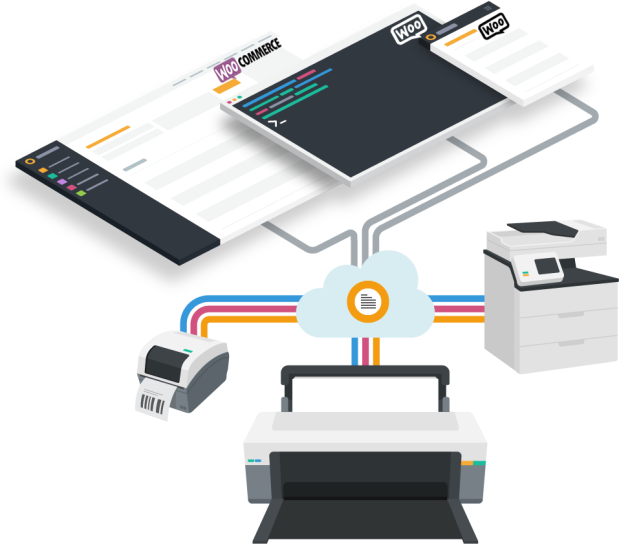
How it works

  1. Install PrintNode on any computer connected to your printer and link it to your PrintNode account.
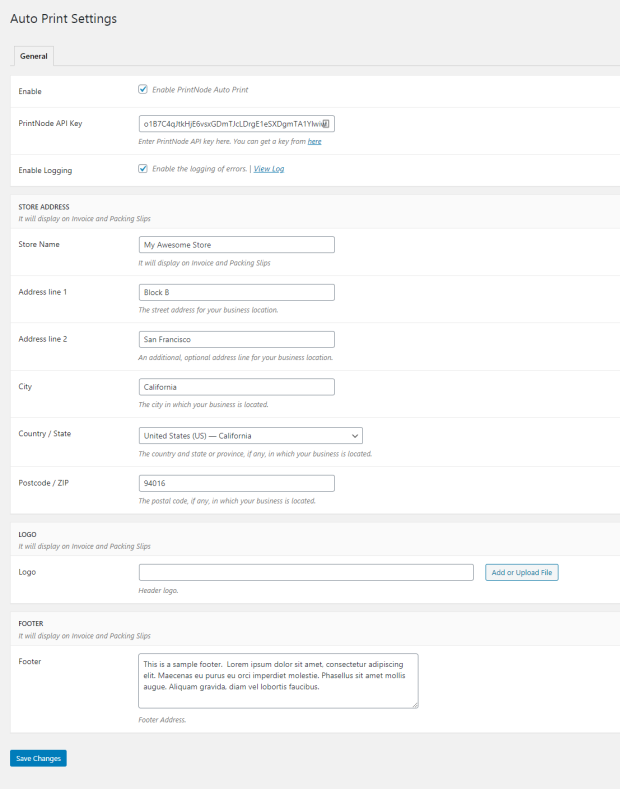
  2. Enter your PrintNode API key in the plugin settings.
  3. Create a print template, choose a layout, pick your printer, set the trigger condition.
  4. Done. Every qualifying order now prints automatically, without anyone touching a button.

Automatic Printing Triggers

Each template can be configured to print based on any combination of:

  • Order placed at checkout – print immediately when an order is created, filtered by payment method (e.g. only for Cash on Delivery or Bank Transfer orders)
  • Payment complete – print the moment a payment is confirmed, filtered by gateway (e.g. only for Stripe or PayPal)
  • Order status change – print when an order moves from any status to any other (e.g. Pending → Processing, Processing → Shipped). Supports all standard WooCommerce statuses and any custom statuses added by other plugins.

Four Ready-Made Templates

Choose from four professionally designed templates or build your own with custom HTML and CSS:
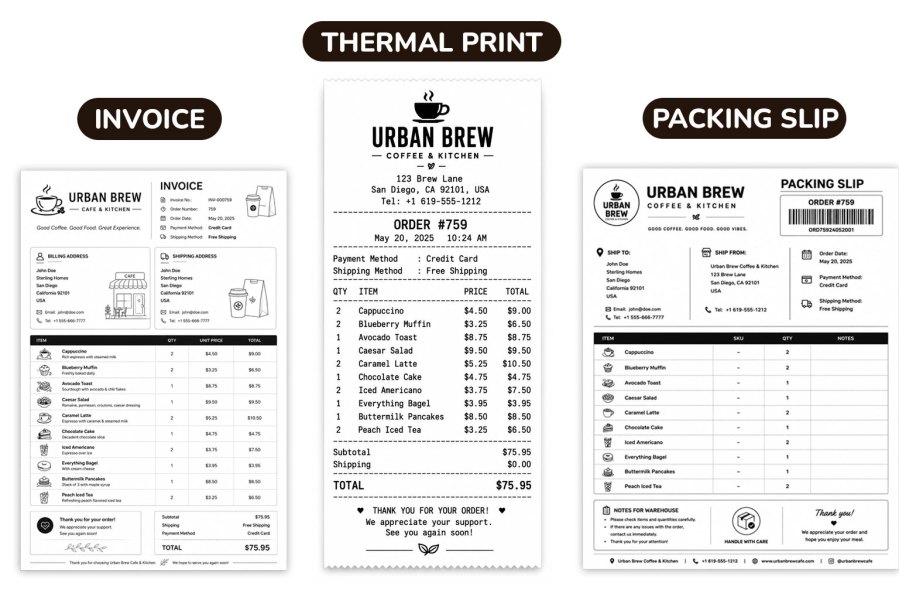
  • Default Template – clean, minimal layout suitable for invoices and packing slips
  • Advanced Template – two-column layout with full address blocks, order details, and product table
  • Modern Template — contemporary design optimised for A4 and letter paper
  • Thermal Receipt Template — compact layout specifically designed for 80mm thermal receipt printers

Every template supports custom CSS via a built-in code editor, and you can preview the output against a real order before saving.

Full Control Over What Prints

Each template gives you granular control over every section:

  • Store logo and document name
  • Store address (from global settings or overridden per template)
  • Billing address, email, and phone
  • Shipping address
  • Order number, order date, payment method, shipping method
  • Product table with configurable columns: image, name, SKU, quantity, unit price, line total
  • Order totals, subtotals, taxes, discounts, and shipping costs
  • Customer notes
  • Footer text

Each section can be toggled on or off independently per template.

Any Printer. Any Location. Any Size.

PrintNode acts as the bridge between WooCommerce and your physical printers. As long as a printer is connected to a computer running the PrintNode client, this plugin can print to it — regardless of whether the printer is in the same building or on the other side of the world.

Supported paper sizes:

  • Standard: A1, A2, A3, A4, A5, A6, A7, A8, US Letter
  • Thermal: 80mm continuous (receipt rolls)
  • Custom: define exact width and height in millimetres for labels or non-standard formats

Compatible with any PrintNode-supported printer brand including Epson, Zebra, Dymo, Brother, HP, Canon, and Star Micronics.
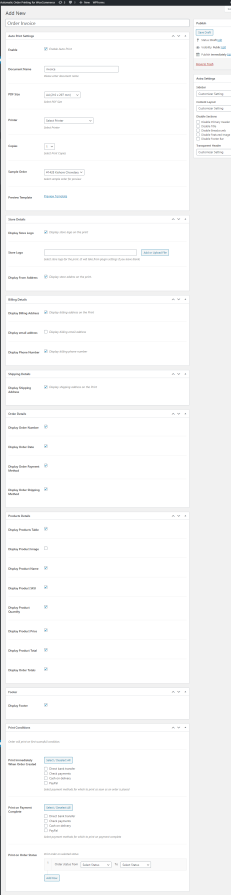
Multiple Copies & Paper Bin Selection

Each template supports printing 1–10 copies per order. You can also select the specific paper tray or bin on printers that support it — useful when one printer holds both standard paper and labels.

Manual Printing When You Need It

Automatic printing is the default, but manual control is always available:
  • Order page — a dedicated “Order Auto Print” panel on every order shows Print, Preview, and Download buttons for each template
  • Bulk actions — select multiple orders from the WooCommerce orders list and print them all in one click
  • HTML preview — view the rendered HTML of any template against any order directly in your browser
  • PDF download — download the generated PDF without sending it to the printer

Duplicate Print Protection

The plugin tracks whether each template has already been printed for each order. Once a document has been automatically printed, it will not print again on subsequent status changes — preventing unwanted duplicates. Manual reprints from the order page are always available when needed.

Delivery Date Plugin Integrations

If your store uses a supported delivery date plugin, the scheduled delivery information is automatically included on the printed document:

  • PI WooCommerce Order Date Time and Type (free & pro)
  • Order Delivery Date for WooCommerce by Tyche Softwares (lite & pro)
  • WooCommerce Order Delivery (official extension)
  • YITH WooCommerce Delivery Date Premium

Developer Friendly

The plugin is built with extensibility in mind. Every major output — the printer list, print job object, document title, order totals, item display, footer content, and more — is filterable. Custom template layouts can be loaded from your theme directory, following the same override pattern as WooCommerce templates.

Key filter hooks: woo_order_auto_print_hooks_print_this, woo_order_auto_print_printnode_printjob, woo_order_auto_print_order_totals, woo_order_auto_print_document_footer_format, and many more.

HPOS Compatible

Fully declared compatible with WooCommerce High-Performance Order Storage (HPOS / Custom Order Tables), ensuring continued compatibility as WooCommerce evolves.

Conflict-Free PDF Generation

The bundled Dompdf PDF library is isolated under a private PHP namespace (AutoOrderPrint\Dompdf), so it cannot conflict with other plugins that also bundle Dompdf. No site-level fatal errors from library version collisions.


Requirements

  • WordPress 4.6 or higher
  • WooCommerce 5.0 or higher
  • PHP 7.4 or higher
  • A PrintNode account (free tier available) with the PrintNode client installed on a computer connected to your printer

Häufig gestellte Fragen

Do I need a PrintNode account?

Yes. PrintNode is a third-party cloud printing service. They offer a free tier that covers most small-to-medium stores. You install the PrintNode desktop client on any computer connected to your printer, then paste your API key into the plugin settings. Printing then works from anywhere - including cloud-hosted WordPress sites.

Which printers are supported?

Any printer compatible with PrintNode — which includes virtually all printers supported by Windows, macOS, or Linux. Common brands include Epson, Zebra, Dymo, Brother, HP, Canon, and Star Micronics. If your OS can print to it, PrintNode can too.

Can I connect more than one printer?

Yes. You can connect unlimited printers through PrintNode. Create separate print templates and assign each to a different printer. All can fire automatically on the same order - for example, a packing slip to the warehouse printer and a receipt to the front-desk printer.

Can I control which orders get printed automatically?

Yes. Each template has its own trigger conditions. You can restrict automatic printing to specific payment methods (for checkout and payment triggers) and to specific order status transitions. Orders that don't match the conditions are simply skipped.

What paper sizes are supported?

A1 through A8, US Letter, 80mm thermal roll (continuous), and fully custom dimensions in millimetres. You can also configure per-printer paper tray selection for printers with multiple trays.

Can I manually print an order?

Yes. Every order has a "Order Auto Print" panel in the WooCommerce admin with Print, Preview, Download, and HTML Preview buttons for each template. You can also bulk-print multiple orders at once from the orders list using bulk actions.

Will an order print twice if its status changes multiple times?

No. The plugin records a flag on each order once a template has been automatically printed. Subsequent status changes will not trigger a duplicate print. You can always reprint manually from the order page when needed.

Can I customise the template design?

Yes. Every template has a built-in CSS editor and supports full HTML customisation. You can also override any template file by copying it into your theme directory (following the standard WooCommerce template override pattern).

Does it work with HPOS (High-Performance Order Storage)?

Yes. The plugin is fully declared compatible with WooCommerce HPOS / Custom Order Tables.

Does it work with subscription renewal orders?

Yes. Any order that passes through a WooCommerce status change - including automatic subscription renewals — will trigger the print conditions you've configured.

Do you support delivery date plugins?

Yes. The plugin natively integrates with four delivery date plugins: PI WooCommerce Order Date Time and Type, Order Delivery Date for WooCommerce (Tyche Softwares), WooCommerce Order Delivery, and YITH WooCommerce Delivery Date Premium. When detected, their delivery information is automatically included on the printed document.

Is my bundled PDF library safe from conflicts with other plugins?

Yes. The bundled Dompdf PDF library is namespaced under AutoOrderPrintDompdf using PHP-Scoper, so it is completely isolated from any other copy of Dompdf bundled by other plugins. This prevents the class-collision fatal errors that can occur when multiple plugins bundle the same library.

Kundenbewertungen

Average rating 4.3
33 reviews
5 stars, 76% of reviews
4 stars, 6% of reviews
3 stars, 3% of reviews
2 stars, 0% of reviews
1 star, 15% of reviews
33 reviews
  • elrebostdelnordcf69d7b5bd
    Bewertet mit 5 von 5
    Support
    Jun 23, 2026
    Support
    I had a coding and configuration problem and the plugin development department solved it for me in less than 24 hours.
    • ProcomLtd
      Jun 24, 2026
      Thank you for your feedback! We’re glad we could help resolve the issue quickly and appreciate your support.
  • blauebohneroesterei
    Bewertet mit 5 von 5
    Support
    Apr 6, 2026
    Support
    While I would love an easier Template editor, The support was amazing and they managed to get everything set up for our specific usecase. Thank you!!
    • ProcomLtd
      Apr 16, 2026
      Thank you so much for your kind feedback! 😊 We truly appreciate your suggestion regarding the template editor and will definitely take it into consideration for future improvements. Glad we could help set everything up for your use case!
  • Alina
    Bewertet mit 5 von 5
    Support
    Feb 12, 2026
    Support
    We had an incredible experience with the support for our website comparability. We had few jock ups and those were fixed with lightning speed and competence. Irreplaceable plugin for reliable printing your weborders. Highly recommend.
    • ProcomLtd
      Feb 18, 2026
      Thank you so much for your kind words and for your recommendation! 😊 We’re really happy to hear that you had a great experience with our support and that everything was resolved quickly. Your feedback means a lot to us and motivates us to keep improving.
  • KONSTANTINOS LYKOGEORGOS
    Bewertet mit 5 von 5
    Support
    Dec 18, 2025
    Support
    Plugin itself is very straightforward and does what says on the box. It was what we were looking for, almost from day one. But what really made a difference in our case, was the support we got from the dev team. They trully went the extra mile to help us set up the plugin to accomodate our specific needs and to get the full value out of their product. If we could add a sixth star for the suppor we got, we would definetely do it.
    • ProcomLtd
      Dec 19, 2025
      Thank you so much for the wonderful review and kind words! We’re really happy to hear that the plugin met your expectations and did exactly what you were looking for. It’s especially rewarding for our team to know that our support made a meaningful difference and helped you get the most value out of the plugin for your specific needs. Your feedback truly motivates us to keep improving both the product and our support. Thanks again for choosing our plugin and for taking the time to share your experience!
  • countdavid
    Bewertet mit 3 von 5
    Functionality
    Nov 18, 2025
    Functionality
    When it works, it's great. However, whenever Chrome or Automatic Order Printing updates, you have to reload PrintNode to get it working with your printer. Randomly, it will skip printing an order. It could be a great product if they made a few changes to make it totally dependable.

Extension information

  • WordPress version required: 4.6
  • WooCommerce version required: 2.6.0
  • PHP version required: 7.4
  • Tested with WordPress: 6.9.4
  • Tested with WooCommerce: 10.6.1
  • Requires at least WordPress: 4.6
  • Requires at least WooCommerce: 5.0.0

Länder

  • Worldwide

Sprachen

English (United States)

Related Products

Price $79 Jährlich
Rated 3.4 out of 5 stars
Price $279 Jährlich
Rated 3.2 out of 5 stars
Price $59 Jährlich
Rated 3.1 out of 5 stars
Price $109 Jährlich
Rated 2.7 out of 5 stars
Price $49 Jährlich
Rated 4.1 out of 5 stars
Price $109 Jährlich
Rated 2 out of 5 stars
Price $109 Jährlich
Rated 2.3 out of 5 stars
Price $39 Jährlich
Rated 2.8 out of 5 stars
Price $109 Jährlich
Rated 2.6 out of 5 stars
Use of your personal data
We and our partners process your personal data (such as browsing data, IP Addresses, cookie information, and other unique identifiers) based on your consent and/or our legitimate interest to optimize our website, marketing activities, and your user experience.




