Product Icon

Cost & Reports for WooCommerce

Manage costs, update prices with smart suggestions, and track profit with detailed WooCommerce reports and insights.
Choose a billing option
$89
Save 20%
$178 $142.40

Product comparison

Das Abonnement beinhaltet

  • Product updates and improvements
  • Kundensupport
  • 30-tage geld-zurück-garantie

Gain financial control with Cost & Reports for WooCommerce

Cost & Reports for WooCommerce helps you manage product costs, pricing, profit, and reporting directly inside WooCommerce. Update costs and prices in bulk, track margins across orders and products, export reports, and use the new Insights tab to better understand your store’s financial performance.

Use your product costs, purchase prices, shipping costs, markups, stock values, order data, and refunds to make clearer pricing and profitability decisions.

Key benefits

  • Financial insights — Monitor costs, revenue, profit, stock value, refunds, and key store metrics.
  • Profit-First Insights — See KPI cards, trends, and ranked product/customer lists for faster decision-making.
  • Bulk cost and price management — Update costs, prices, stock, markups, and related values across your catalog.
  • Detailed reports — Analyze orders, products, customers, refunds, profit, and sales data with filters and exports.
  • Inventory Valuation — See full-store purchase, COGS, retail, and stock totals in one dialog.
  • WooCommerce COGS support — Use the native WooCommerce Cost of Goods field when enabled.
  • CSV and XLSX export — Export full reports or filtered on-screen tables for further analysis.
  • Dark mode — Work comfortably with a clean, low-glare admin interface.

Cost & Reports for WooCommerce has been recognized as one of the best accounting software solutions for WooCommerce in 2024 by TechReport.
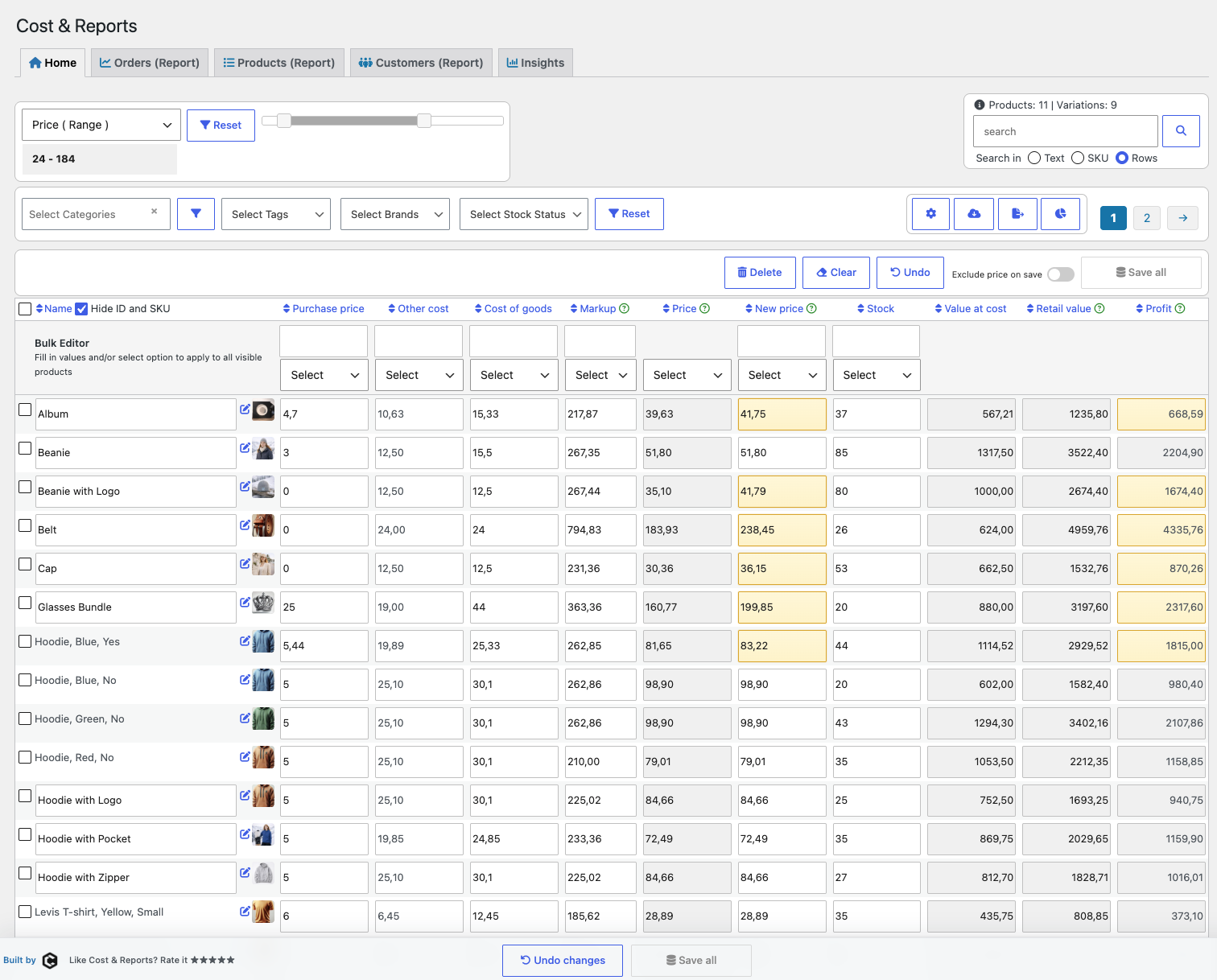
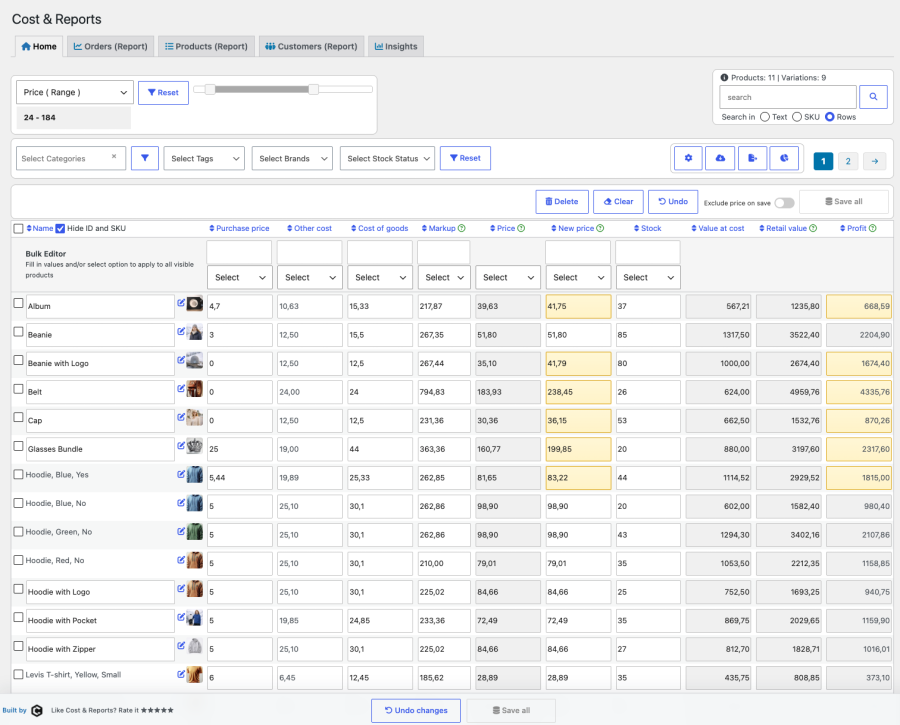
Powerful table editor for product costing

Cost & Reports - home tab

The Cost & Reports table editor is built for efficient bulk updates and inventory management. Quickly modify purchase prices, cost of goods, shipping fees, markups, regular prices, sale prices, and stock values.

Automated calculations help you understand retail value, cost value, profit, and markup while you work.

  • Detailed financial overview — Display total and individual cost values, retail values, and profit.
  • Search and filtering — Use range filters and customizable views to isolate specific data points.
  • Customizable views — Hide or show product IDs, SKUs, cost fields, price fields, stock, and more.
  • Sorting and export — Sort data by column and export filtered results in CSV or XLSX format.

Bulk editing made simple

Cost & Reports - bulk functions

Bulk editing functions let you update multiple rows with a few clicks. Adjust costs, markups, prices, and stock values, apply rounding for cleaner pricing, and save changes from one table view.

For example, you can increase an “other cost” field for all selected products, apply a rounding rule, or update prices while Cost & Reports recalculates markup and profit automatically.
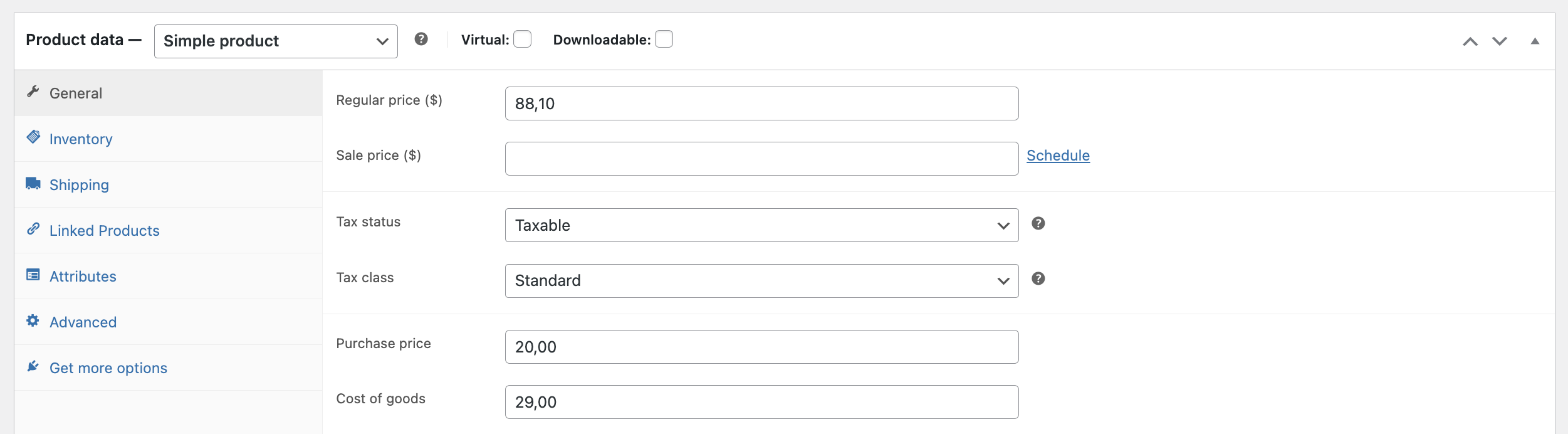
Product-specific cost tracking

Cost & Reports product page cost fields

Add purchase prices and cost of goods on each product or variation. Cost & Reports stores cost information so reports can show historically accurate profit when orders are placed.

Support for the native WooCommerce Cost of Goods field is available and can be enabled in the plugin settings.

VAT and profit calculations

Cost & Reports - prices

Work with prices including or excluding VAT and let the plugin calculate cost, retail value, markup, and profit. This makes it easier to maintain accurate pricing while keeping profitability visible.

Advanced range filtering

Cost & Reports - range filter

Filter products and reports by values such as purchase price, cost, markup, profit, stock, and more. Range filters help you quickly find products that need attention, such as low-margin products or items with missing cost data.
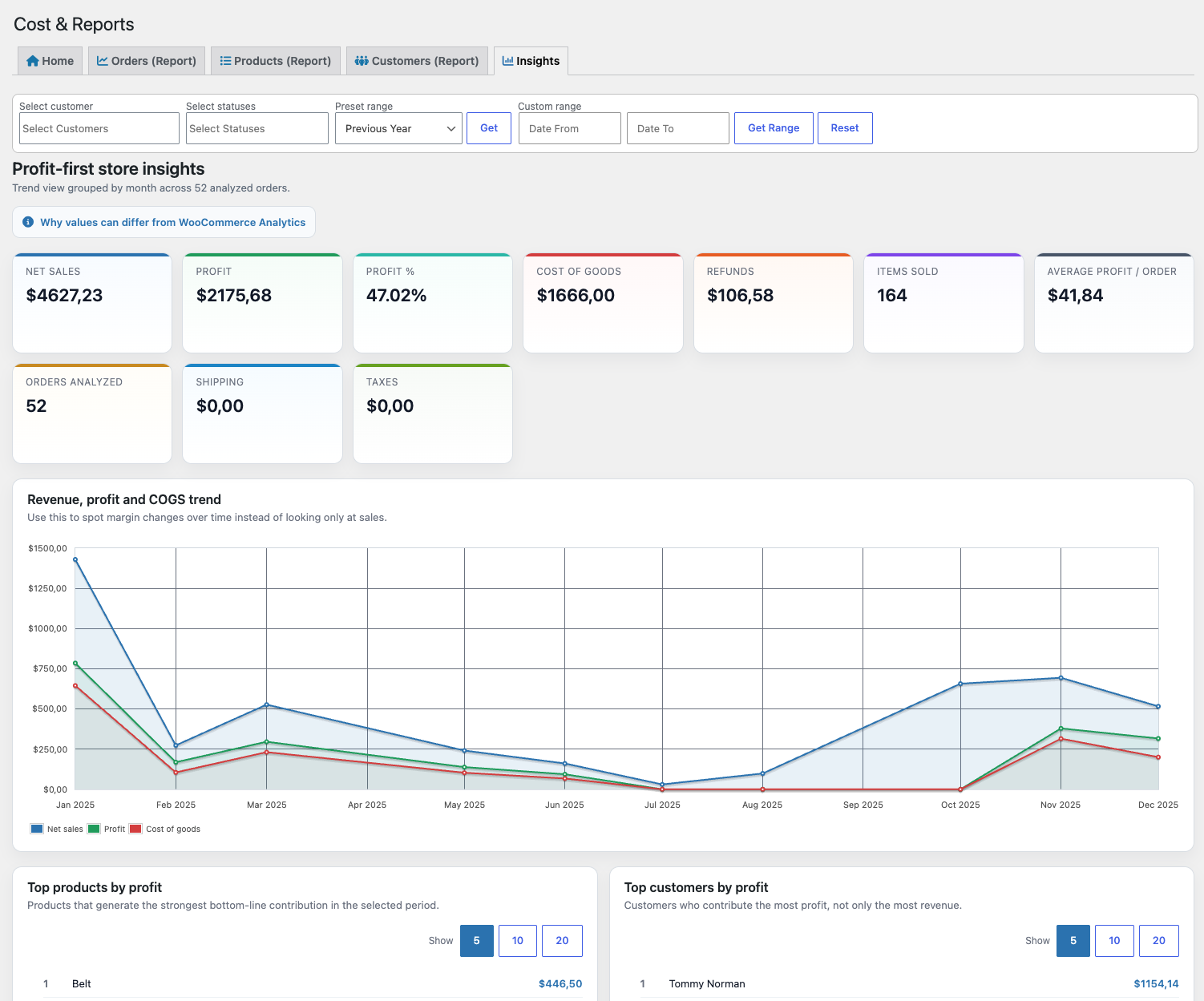
Profit-First Insights Dashboard

Cost & Reports - insights tab
Turn store data into clearer decisions with the new Insights tab. See profit-first KPI cards, sales and margin trends, and ranked lists for top products and customers without exporting data.

  • Track net sales, profit, refunds, cost of goods, shipping, taxes, and order volume in one place
  • Compare net sales, profit, and cost of goods over time with visual trend charts
  • Identify top products by profit and quantity sold
  • Identify top customers by profit and revenue
  • Understand profit performance faster without digging through raw order rows

The Insights tab complements the detailed Orders, Products, and Customers reports by giving store owners a faster way to understand what is driving real profitability.
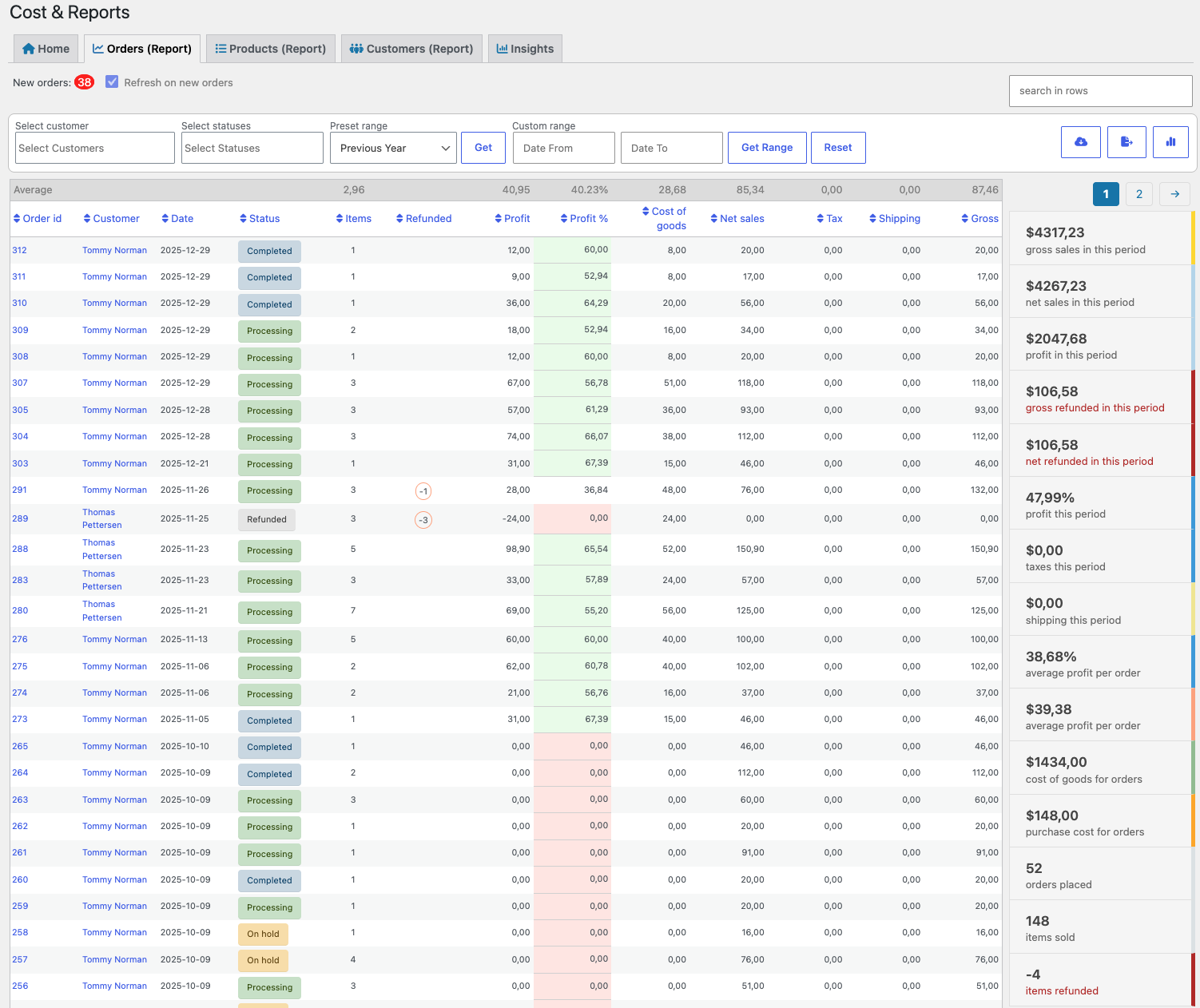
Reports for orders, products, and customers

Cost & Reports - orders report

Analyze store performance with detailed reports for orders, products, and customers. Choose date ranges, filter results, search rows, view totals and averages, and export data when needed.

  • Orders report — View order totals, costs, profit, net sales, taxes, refunds, customer, role, status, and more.
  • Products report — Analyze products and variations sold, quantities, prices, costs, profit margins, categories, SKUs, and refunded data.
  • Customers report — Review customer totals, contact details, shipping, order totals, tax, payment method, and purchase activity.

Customer filter for targeted reporting

Customer filter

Use the customer filter to analyze reports by specific customers, companies, or roles. Combine customer filtering with date ranges to understand revenue, profit, refunds, and purchasing behavior for selected segments.

  • Customer-specific reporting — Filter reports by customer name, company, or role.
  • Date range analysis — Track revenue and profit over custom periods.
  • Consistent filters — Apply reporting filters across orders, products, and customers.
  • Export filtered data — Export filtered reports to CSV or XLSX for analysis or sharing.

Product and variation reports

Products report

The products report gives you a product-level view of sales, cost, and profit. Review order IDs, product names, variations, categories, SKUs, quantities, prices at purchase, net sales, profit, and margins.

Use sorting and row search to quickly find the products, variations, or categories you want to analyze.

Reports by customer

Customers report

The customer report helps you understand customer activity and totals. View customer name, company, email, phone, shipping, order total, tax, items purchased, currency, country, and payment method.

Customer totals

Cost & Reports customer totals popup

Click the info icon to see customer totals and summary values for a selected customer.

Row search and automatic calculations

Cost & Reports row filter

Use row search to filter report tables by order ID, category, product name, SKU, customer, or other visible values. Totals, averages, best sellers, and profit calculations update automatically for the filtered selection.

Live reports

Cost & Reports live report filters

Reports can show an automatic counter for new orders and can be refreshed automatically when enabled in settings. This makes the report view useful for live monitoring throughout the day.
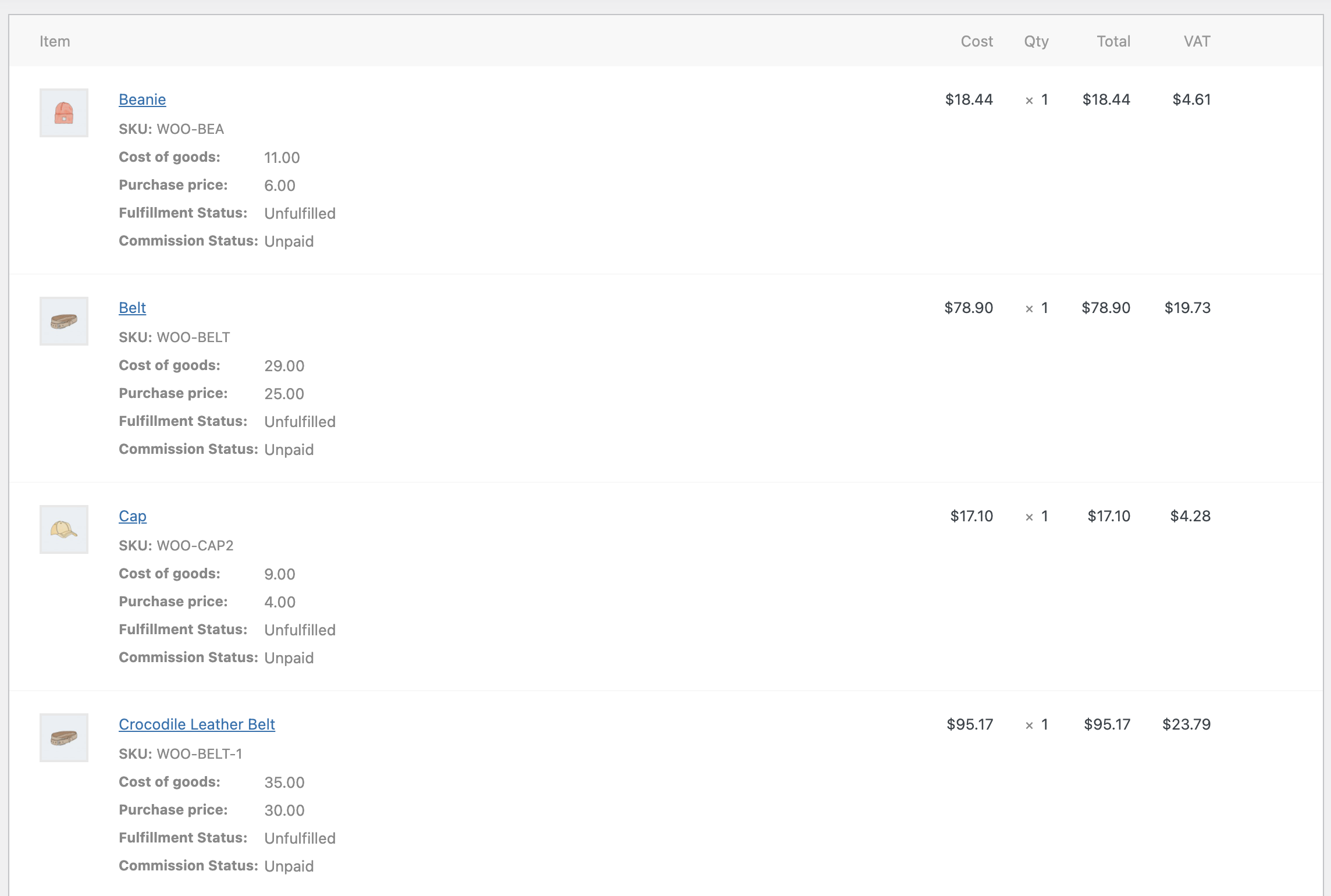
Cost history on order items

Cost & Reports order item history

When customers purchase products, Cost & Reports can add cost of goods and purchase price to each order line. This helps preserve historical cost data so profit reports remain accurate even if product costs change later.
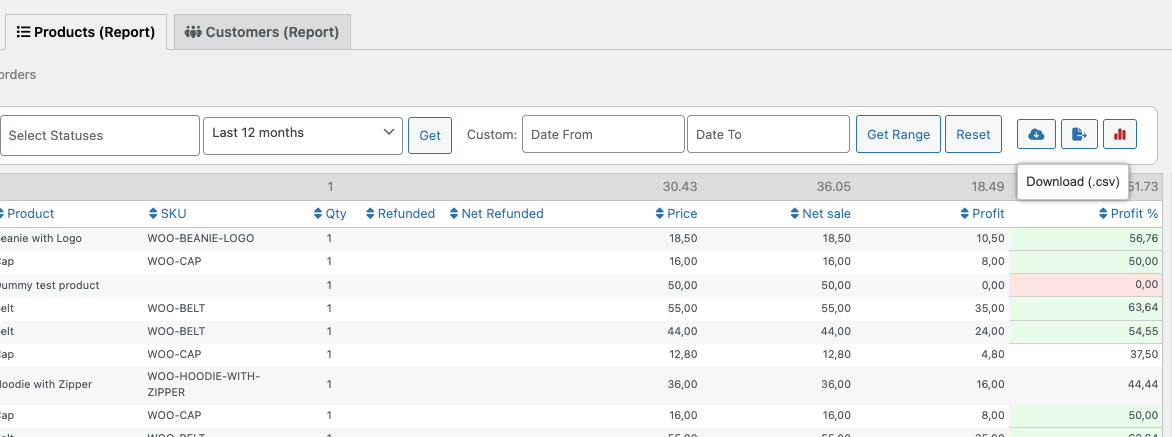
Export detailed reports

Cost & Reports export buttons

Cost & Reports provides two export options for your store data.

Download CSV — full data export

The CSV export includes complete report data with relevant fields that may not be visible in the on-screen table. Use it for accounting, custom reporting, or importing into other systems.


  • Orders exports include totals, profit, shipping, tax, customer details, refunds, and more.
  • Products exports include line-item data, quantities, costs, profit margins, categories, SKUs, product types, and refunded data.

Cost & Reports export orders CSV file
Cost & Reports export products CSV file

Export table XLSX — filtered on-screen export

The XLSX export includes the currently visible report table, including filters, search terms, date ranges, and sorted columns. It is useful for quick insights or sharing filtered reports in spreadsheet tools.

Cost & Reports export table

Already using cost of goods for your products?

If you already use a cost of goods field for your products, you can connect it in the plugin settings. Cost & Reports can also create its own cost of goods field by default and use it in product, order, and report calculations.

Native WooCommerce Cost of Goods support is also available and can be enabled in the settings.

Built for better WooCommerce decisions

Cost & Reports helps you manage costs, understand margins, export financial data, and make better pricing decisions from inside WooCommerce.


Kundenbewertungen

Average rating 4.1
7 reviews
5 stars, 71% of reviews
4 stars, 0% of reviews
3 stars, 14% of reviews
2 stars, 0% of reviews
1 star, 14% of reviews
7 reviews
  • ronald capodagli
    Bewertet mit 5 von 5
    Functionality
    Feb 24, 2026
    Functionality
    There is one last concern I have as I add products to my orders via ADMIN Order entry, that being that for some products, COGS creates a meta entry for 0 price, forcing me to delete the meta entry - I have yet to figure out what is triggering this as it does not happen to all my products.
    • Tommy Hansen ( Support Manager - Consortia )
      Feb 16, 2026
      Thank you for the thoughtful review and for highlighting this concern. You’re absolutely correct that historical COGS accuracy is critical, especially for year-end reporting. Cost & Reports is designed to preserve order-level COGS snapshots to ensure that historical reports are not affected by later product cost changes. We’ve recently released version 3.6.2, which further refines how stored order item COGS values are prioritized in the reports to prevent recalculation from current product table values. If you haven’t updated yet, please make sure you’re running the latest version. And as always, feel free to reach out directly if anything still looks off — we’re happy to review it together....
  • airstreamtrailerparts
    Bewertet mit 3 von 5
    Feb 12, 2024
    Needing TOTALS - doesn't do that
    The boss wants a report showing total of 'Value at Cost' and 'Retail Value' for the entire store inventory on a regular basis. The plugin only shows 'per page' totals at the bottom. Setting the page to show all inventory on one page is way too server intensive. I have to total all pages manually?
    • Tommy Hansen ( Support Manager - Consortia )
      Feb 22, 2024
      Thanks for the idea, as this is a feature request, we had appreciated if it was sent to us as that. That said, we will look into the idea and see what's possible.
  • harrypaywoo
    Bewertet mit 5 von 5
    Nov 18, 2022
    Great tool, great support!
    This is a good tool to have. Support is also very good: quick respons & solution.
    • Tommy Hansen ( Support Manager - Consortia )
      Nov 19, 2022
      Thanks, happy that you enjoy Cost & Reports and our support.
  • markkinointiukkonen
    Bewertet mit 5 von 5
    Mar 7, 2022
    Works as intended! :)
    Everything works like advertised, we are happy with the add-on. We had a small inquiry and were extremely satisfied with the speed and quality of the customer service.
    • Tommy Hansen ( Support Manager - Consortia )
      Mar 10, 2022

      Thanks, always happy to help and thanks for great input.

  • taitldigitalnowat
    Bewertet mit 1 von 5
    Feb 28, 2022
    no trust in calculation
    the only thing this plugin has to do is to calculate correct but thats not the case. after a few weeks with back and force with the support we have given up. the support is supportive, but not successful, so no more trust that they get it done.
    • Tommy Hansen ( Support Manager - Consortia )
      Mar 18, 2022

      We are deeply sorry that you are feeling this way and have had this experience. Your suggestion to remove products from an order and re-add them with the current purchase price and cost of goods was a nice one. We agreed to work on it despite the fact that our developer had Covid19, resulting in a version that was not perfect. So, once again, my apologies, but the subsequent ones worked perfectly. There were no errors in the calculations.


Extension information

  • WordPress version required: 4.9
  • WooCommerce version required: 3.4.0
  • PHP version required: 5.6
  • Tested with WordPress: 7.0
  • Tested with WooCommerce: 10.8.1
  • Requires at least WordPress: 5.0
  • Requires at least WooCommerce: 3.3

Kompatibilität

  • High performance order storage (HPOS)

Länder

  • Worldwide

Sprachen

English (United States), German, Norwegian (Bokmål)

Related products

Price $79 Jährlich
Rated 3.4 out of 5 stars
Price $279 Jährlich
Rated 3.2 out of 5 stars
Price $59 Jährlich
Rated 3.1 out of 5 stars
Price $109 Jährlich
Rated 2.8 out of 5 stars
Price $49 Jährlich
Rated 4.1 out of 5 stars
Price $109 Jährlich
Rated 2 out of 5 stars
Price $109 Jährlich
Rated 2.3 out of 5 stars
Price $109 Jährlich
Rated 2.6 out of 5 stars
Price $109 Jährlich
Rated 2.3 out of 5 stars
Use of your personal data
We and our partners process your personal data (such as browsing data, IP Addresses, cookie information, and other unique identifiers) based on your consent and/or our legitimate interest to optimize our website, marketing activities, and your user experience.




