
Product Icon

Order Status Manager for WooCommerce

Create, edit, and delete completely custom order statuses and integrate them seamlessly into your order management flow.
Choose a billing option
$49
Save 20%
$98 $78.40

Subscription includes

  • Product updates and improvements
  • Customer support
  • 30-day money-back guarantee

  • Create new order statuses and add icons or action buttons
  • Display order status descriptions to customers on the “View Order” page to explain order status
  • Edit WooCommerce core statuses to set a “next status” for new action buttons
  • Use “Next Statuses” to create a seamless fulfillment workflow and add order action buttons
  • Add bulk actions for new statuses in the orders list
  • Drag and drop order statuses to re-order the way they’re shown in your admin
  • Use status icons instead of text badges in the “Orders” list NEW
  • Include orders with custom statuses in shop reports
  • Mark order statuses as “Paid” to include download links, purchase notes, or other features when customers view these orders
  • Mark order statuses as “requires payment” to show “Pay” and “Cancel” links to customers NEW
  • Add new order emails, which can be triggered based on status changes
  • Edit new email content via new templates
  • Import existing custom statuses from custom code or other plugins
  • Safely delete custom statuses without losing orders

Custom WooCommerce Order Statuses Completely Integrated into your Workflow

The WooCommerce Order Status Manager allows you to create, edit, and delete custom order statuses and integrate them seamlessly into your WooCommerce order management flow. You can also edit core order statuses and trigger new order emails based on status changes.

Custom order statuses will be used in your orders list, and can even be integrated into the order actions or bulk actions for a completely seamless fulfillment workflow.
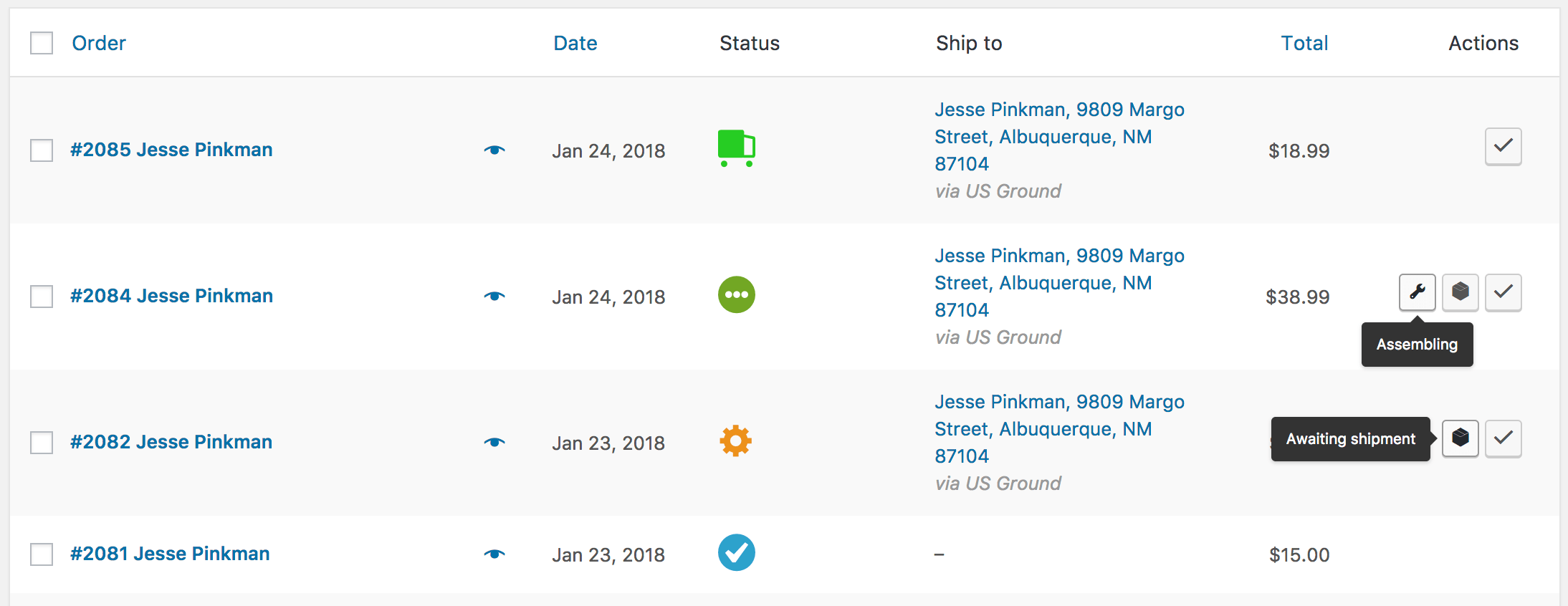
WooCommerce Order Status Manager: Statuses in action
Statuses in action

New order emails can also be triggered as an order status change notifier. You can trigger emails based on changes between custom statuses or core statuses so that customers and/or shop admins are always informed of order updates and changes.

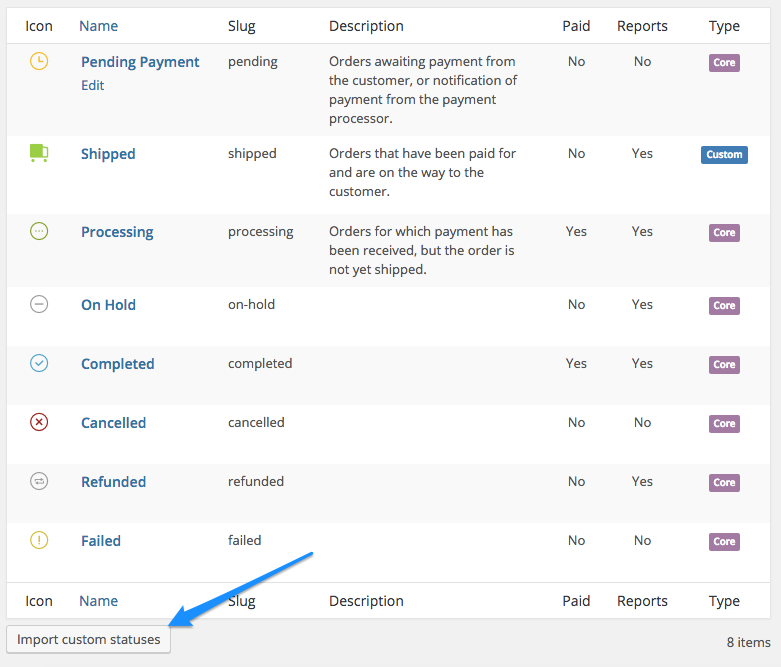
WooCommerce Order Status Manager email list
View Emails
WooCommerce Order Status Manager import statuses
Import Statuses

Add New Order Statuses

You can add a new order status and select an icon to display in the orders list (which replaces the text badge for a status name). Action buttons can also be added if this will be used as “next status” by another status in your order flow. You can also add next statuses to determine which actions buttons should be displayed for this status.

WooCommerce Order Status Manager: Create a Status
Create a Status

Edit Core Statuses

You can edit a core WooCommerce order status to add “next statuses”. For example, you can add a custom status as a next status for “processing” orders, which will display your custom status action button for any processing order.

This makes order management simple, fast, and easy to use, as custom statuses are completely integrated into the orders workflow.

Add New Order Emails

New order emails can be added based on order status changes, including changes with custom order statuses. When these emails are added, they can be edited and enabled in your WooCommerce email lists, or the template can be overridden in your theme for greater control over the content.
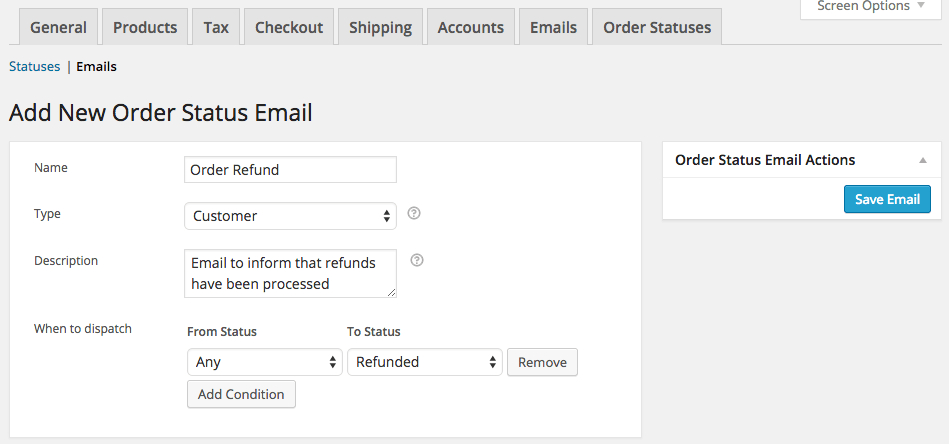
WooCommerce Order Status Manager new email
Create an email

Display Status Information to Customers

Customers can be frustrated by order management when they don’t know where their orders are. While your statuses are meant to help in your fulfillment workflow, displaying a status like “Manufactured” or “Assembling” doesn’t tell customers anything.

You can now set a description for any status (including core statuses!) that will be shown to customers when they mouse over the order status.

WooCommerce Order Status Manager Orders List
Customer View

Complete Order Status Management

Rather than adding one-off statuses that don’t integrate with the rest of your emails, statuses, or fulfillment process, you can now completely embed custom statuses into your order management scheme. Use custom icons, action buttons, and new emails to tailor orders to your store and helpt to automate your order management.

How to Get Started

  1. Purchase and download the extension 🙂
  2. Upload and install it into your WooCommerce store.
  3. Go to WooCommerce > Settings > Order Statuses, and set up new statuses or email triggers.
  4. Edit your email content if needed.
  5. That’s it! Sit back and enjoy custom WooCommerce order statuses and automatic emails!

Need any more reason to buy? When you purchase a SkyVerge-developed extension, you’re getting the highest quality extensions for your WooCommerce store. Gain peace of mind by knowing that when you purchase our products, your store’s performance is as important to us as it is to you.


Customer reviews

Average rating 3.8
26 reviews
5 stars, 58% of reviews
4 stars, 12% of reviews
3 stars, 8% of reviews
2 stars, 0% of reviews
1 star, 23% of reviews
26 reviews
  • Jeffrey Hapeman
    Rated 3 out of 5
    Functionality
    Dec 26, 2025
    Functionality
    UPDATE: Support fixed this error within a few days. Updating to 3 stars as a result--not more as this should have been caught in regression testing. Do not install the latest version--there's a bug that causes it to create a totally new order number whenever you update the order status to a custom status you've created. If you change it back to a standard status and then change it again to new one, it will once again create a new order number.
    • SkyVerge
      Dec 26, 2025
      Thanks for bringing this to our attention, we understand how concerning that behavior would be. Creating new order numbers unexpectedly isn’t intended and may be related to a specific configuration or compatibility issue.

      We’d strongly recommend reaching out to support so we can review your setup and logs and help get this resolved properly. - S.M.
  • arabfono
    Rated 1 out of 5
    Support
    Sep 19, 2025
    Support
    bad plugin i have many problems with it and support not fix it
    • SkyVerge
      Oct 3, 2025
      Thank you for letting us know about your difficulties. It’s disappointing to hear you’ve faced multiple problems and haven’t gotten the help you need. We take these concerns seriously and want to make things right. Please contact our support team with details about your environment and the issues you’ve encountered so we can assist you promptly. Your feedback is invaluable in helping us improve. - S.M.
  • heliosgallery
    Rated 1 out of 5
    Functionality
    Aug 31, 2025
    Functionality
    I have the same issue as the other reviewers on here, changing status randomly, we have had a massive issue chasing this down and have shipped out several items thinking they have been paid when they have not! you cannot trust this, it is unstable to say the least
    • SkyVerge
      Oct 3, 2025
      We’re very sorry for the order status issues you’re experiencing. It’s certainly alarming if statuses change unexpectedly and cause confusion about whether an order has been paid. Please rest assured we take such matters seriously. Our development and support teams are investigating this behavior to ensure stability. In the meantime, please open a support ticket if you haven’t already so we can diagnose your specific setup. We appreciate your feedback and thank you for bringing it to our attention. - S.M.
  • Paul Banks
    Rated 1 out of 5
    Functionality
    Mar 26, 2025
    Functionality
    I just wanted to echo what customer "psio94" has also left a review about. A clients website has experieced a considerable amount of orders being changed after failed payments when using the Stripe plugin when no actual payment was taken. I would highly advise everyone to check their orders and report problems to this developer. This is a very serious breach! Our investigations found this plugin to be the sole cause.
    • SkyVerge
      Apr 29, 2025
      Thank you for bringing this to our attention, and for echoing the concerns raised by "psio94." We take reports like this extremely seriously, especially when it comes to order integrity and payment processing.

      We're very sorry to hear that your client experienced issues with orders being changed after failed payments when using the Stripe plugin. We understand how critical this is for both merchants and their customers, and we appreciate you taking the time to investigate and share your findings.

      We’d be grateful if you could reach out to our support team directly with any logs or further technical details from your investigation. - S.M.
  • manollod
    Rated 5 out of 5
    Functionality
    Mar 15, 2025
    Functionality
    • SkyVerge
      Apr 29, 2025
      Hey there, thanks so much for the positive rating! We really appreciate it. - S.M.

Extension information

  • PHP version required: 7.4
  • Tested with WordPress: 6.9
  • Tested with WooCommerce: 10.3.6
  • Requires at least WordPress: 5.6
  • Requires at least WooCommerce: 3.9.4

Countries

  • Worldwide

Languages

English (United States), Italian, Russian

Requirements

  • WooCommerce 3.0+
  • PHP 5.6+

Related Products

Price $109 annually
Rated 4.6 out of 5 stars
Price $119 annually
Rated 3.5 out of 5 stars
Price $49 annually
Rated 2.7 out of 5 stars
Price $29 annually
Rated 3.5 out of 5 stars
Price $279 annually
Rated 3.2 out of 5 stars
Price $79 annually
Rated 4.2 out of 5 stars
Price $149 annually
Rated 4.8 out of 5 stars
Price $79 annually
Rated 4 out of 5 stars
Price $99 annually
Rated 4.7 out of 5 stars
