

Product comparison
Das Abonnement beinhaltet
Support
Discount On Cart is a powerful WooCommerce discount plugin that automatically applies bulk discounts, tiered pricing, and quantity-based cart offers — without a single coupon code. Whether you run a wholesale store, a B2B shop, or a retail WooCommerce store, this plugin increases your average order value by rewarding customers the more they buy.
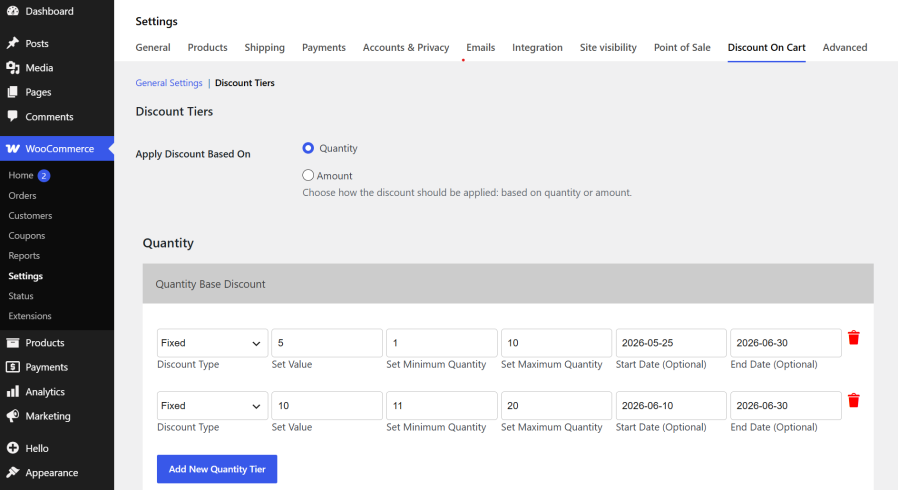
Set up unlimited WooCommerce bulk discount tiers based on cart quantity or cart subtotal. Offer fixed or percentage discounts, restrict by user role, and schedule promotions with start and end dates — all from a clean, intuitive settings panel inside WooCommerce → Settings.
Easily set up quantity-based discounts, bulk order discounts, and tiered pricing rules to reward loyal customers, attract new buyers, and increase your average order value. Whether you’re offering percentage discounts, fixed prices, or dynamic cart offers, Discount On Cart makes it simple, fast, and fully compatible with all major WooCommerce themes.
Take control of your store promotions with the best WooCommerce discount by quantity solution — no coupon codes required. Discounts apply automatically the moment cart conditions are met. Schedule promotions with start and end dates, restrict discounts by user role, and enjoy full compatibility with the WooCommerce Cart Block and High-Performance Order Storage (HPOS).
Discount On Cart makes creating and applying automatic WooCommerce cart discounts effortless — no coupon codes, no manual work. Here’s exactly how it works:
Automatic WooCommerce Bulk Discount — Quantity & Subtotal Tiered Pricing
Automatically apply cart discounts in WooCommerce based on either total cart quantity or cart subtotal. Create unlimited discount tiers with fixed or percentage values — no coupon code needed. Discounts are applied instantly as a negative fee in the cart the moment the threshold is met.
WooCommerce Discount by User Role — Wholesale & B2B Ready
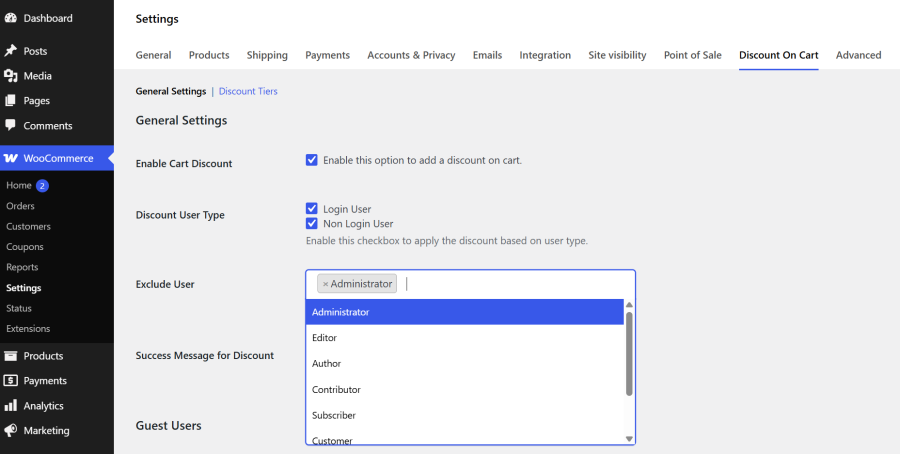
Control exactly who receives cart discounts. Apply discounts to logged-in users, guest shoppers, or both. Exclude specific WordPress user roles (e.g., Administrator, Shop Manager) or individual users by username — perfect for wholesale stores and B2B shops where staff should never receive promotional pricing.
Live Tiered Pricing Table on Cart Page — Increases Average Order Value
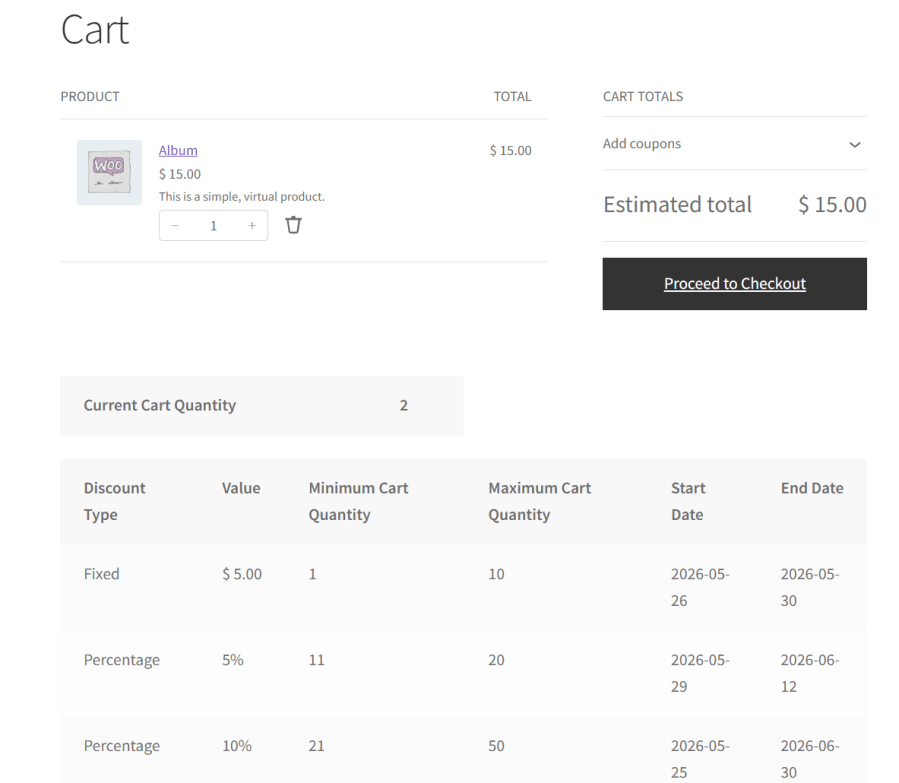
A fully formatted discount tier schedule is automatically displayed on the WooCommerce cart page — showing customers the current cart value, all available discount tiers, ranges, and savings. This transparency motivates customers to add more items to unlock a bigger discount, directly increasing average order value.
Schedule WooCommerce Promotions — Automatic Start & End Dates
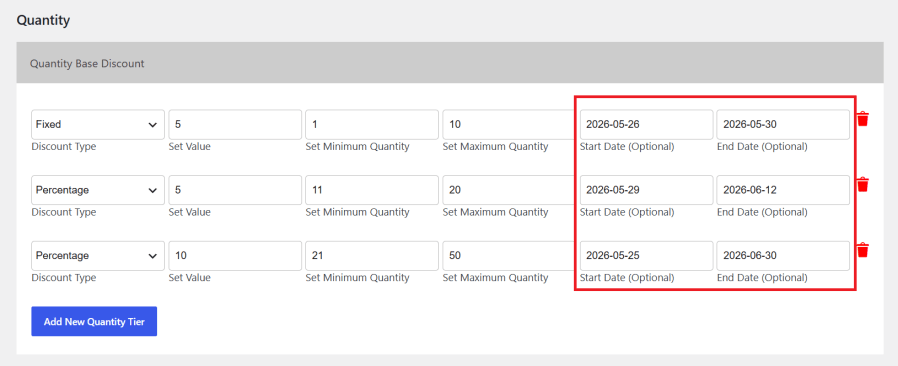
Every discount tier supports optional start and end dates — allowing you to plan and automate promotional campaigns in advance. Black Friday sales, seasonal discounts, and flash promotions activate and deactivate automatically. No manual switching needed — just set it and forget it.
Custom Discount Notification — Reduce Cart Abandonment
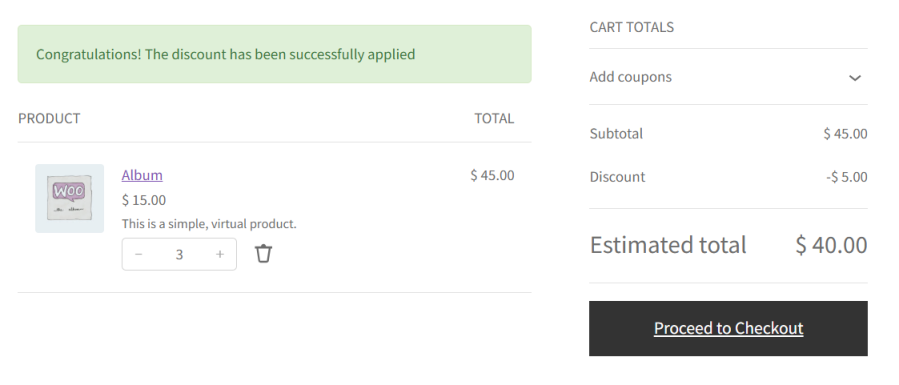
Display a personalized success notice to customers the moment their cart qualifies for a discount. Fully customizable message text from the admin panel. Works on both the classic WooCommerce cart page (as a WooCommerce notice) and the modern Cart Block (as an injected banner) — giving every customer instant confirmation of their savings.
WooCommerce Block Cart & HPOS Compatible — Future-Proof Plugin
Fully compatible with the modern WooCommerce Cart Block (Gutenberg). The plugin extends the WooCommerce Store API to deliver real-time discount data — displaying the tier table and success message inside the Cart Block without page reloads. Also officially compatible with WooCommerce High-Performance Order Storage (HPOS).
Hide Prices for Guests — WooCommerce Membership & B2B Price Control
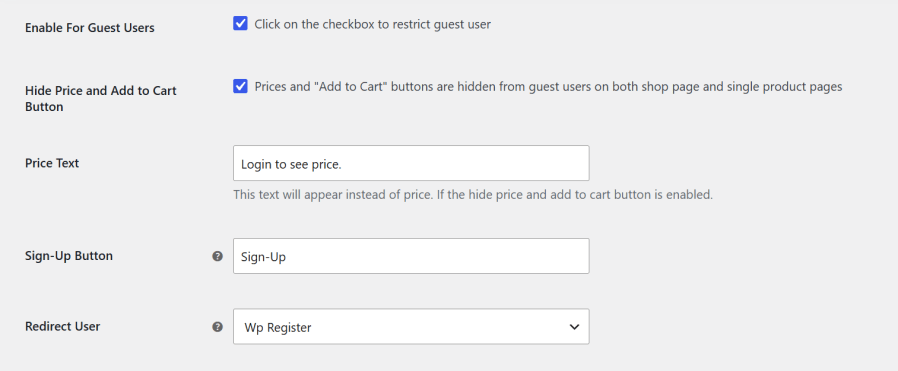
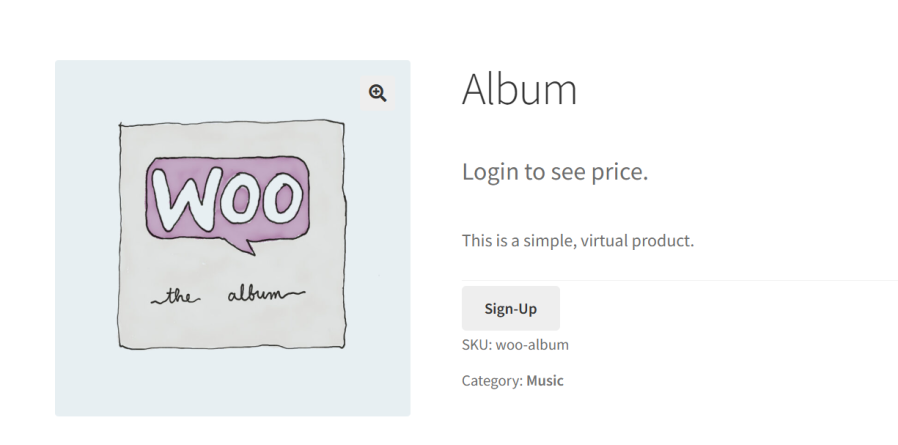
Running a membership or B2B store? Hide product prices and the “Add to Cart” button for non-logged-in visitors. Replace them with a fully customizable Sign-Up button that redirects guests to your WP login or My Account page. Custom price text (“Login to see price”) is shown instead of the actual price across shop and single product pages.
Discount On Cart is one of the top-rated WooCommerce bulk discount plugins on the official WooCommerce Marketplace. It lets store owners create unlimited automatic bulk discount tiers based on cart quantity or subtotal — with no coupon codes required. It supports both fixed and percentage discounts, works with the WooCommerce Cart Block, and is HPOS compatible.
With Discount On Cart, you can add tiered pricing to any WooCommerce store in minutes. Go to WooCommerce → Settings → Discount On Cart, choose quantity or subtotal mode, and create your tiers with minimum/maximum ranges and discount values. The tiered pricing table is automatically displayed on the cart page — no coding or theme changes required.
Yes. Discount On Cart automatically applies cart discounts in WooCommerce without requiring any coupon code. Once you configure your discount tiers in the plugin settings, the discount is applied instantly as a negative cart fee the moment a customer's cart meets the qualifying quantity or subtotal threshold. Customers do not need to search for, copy, or enter any coupon code — the discount simply appears in the cart totals automatically. This friction-free experience helps reduce cart abandonment and encourages customers to complete their purchase.
Yes. Discount On Cart lets you create unlimited quantity-based discount tiers in WooCommerce where customers automatically get a bigger discount the more items they add to their cart. For example, you can set 1–4 items for no discount, 5–10 items for 10% off, and 11+ items for 20% off. Each tier supports both fixed amount and percentage discount types. A live discount tier table is also displayed on the cart page showing customers exactly how many more items they need to unlock the next discount level — a proven technique to increase average order value.
Yes. Discount On Cart supports amount-based discount tiers that automatically apply a WooCommerce cart discount when the customer's cart subtotal reaches a defined threshold. You can set multiple subtotal ranges — for example, $50–$99 for a $10 fixed discount, $100–$199 for 15% off, and $200+ for 20% off. The discount is calculated against the actual item totals in the cart, keeping it independent of shipping and taxes. Both fixed amount and percentage discount types are supported for each subtotal range.
Yes. Discount On Cart gives you full control over who receives cart discounts in WooCommerce. You can choose to apply discounts only to logged-in users, only to guest users, or to both. Additionally, you can exclude specific WordPress user roles — such as Administrator, Editor, or Shop Manager — and even exclude individual users by their username. This is essential for wholesale stores, B2B shops, and any store where staff accounts or certain customer segments should not receive promotional pricing.
Yes. Discount On Cart is fully compatible with the WooCommerce Cart Block. The plugin extends the WooCommerce Store API to include real-time discount data in the cart response, and uses the WordPress block data layer (wp.data) to reactively display the discount tier table and the success message directly inside the Cart Block — without any page reload. It also declares official compatibility with WooCommerce Blocks and HPOS (High-Performance Order Storage), making it future-proof for modern WooCommerce stores running the latest block-based cart and checkout experience.
Extension information
Quality Checks
Länder
Anforderungen






