

Product comparison
Das Abonnement beinhaltet
Support
Your customers want your product information in their hands — as a PDF for a presentation, a DOCX to edit into a proposal, a CSV to drop into a spreadsheet. Right now, getting it there means copy-pasting content, formatting it manually, and hoping nothing gets missed. Print Products for WooCommerce puts an export button directly on your product and shop pages. One click generates a professionally formatted document — with images, pricing, descriptions, attributes, variations, reviews, and your branding — and downloads it instantly. No extra steps. No formatting work. No manual anything.
A trade buyer visits your store and wants a product sheet to take back to their manager. They email you. You find the product, copy the description, grab the image, paste it into a Word document, add the price, format it roughly, and send it — fifteen minutes later, for one product.
A sales rep needs a catalog page for a client meeting tomorrow. Same process, multiplied by ten products.
A customer wants to compare two products offline before buying. They screenshot your page, which looks nothing like a professional document, and your store’s credibility takes a hit.
Print Products for WooCommerce turns all of this into one button click — for your customers on the frontend and for your team in the admin Products table. The document is generated, formatted, and downloaded immediately. Your branding is already in it. The data is already accurate. Nothing is manual.
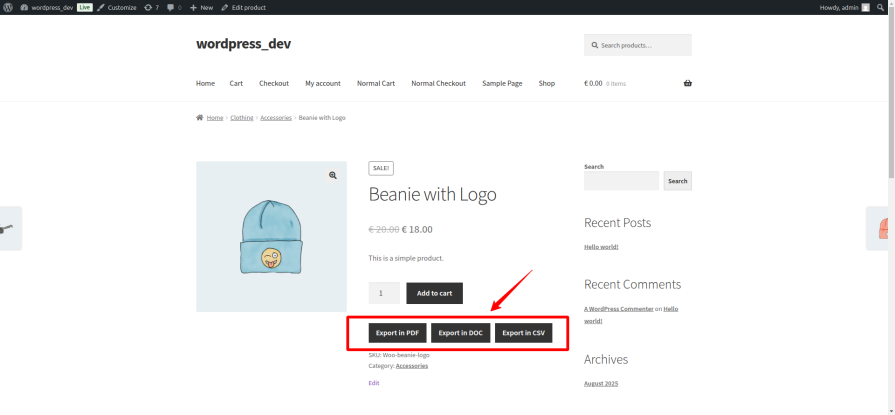
Export buttons appear on product pages and shop listing pages. Click PDF — a branded, formatted PDF downloads instantly. Click DOCX — an editable Word document with full product data is ready in seconds. Click CSV — a structured spreadsheet for integrations or internal use. Every format serves a different workflow, and all three are available without switching screens or changing settings per export.
Three formats, one plugin, every workflow covered. PDF for client-facing documents and presentations — polished, branded, and print-ready. DOCX for proposals and datasheets that need to be edited before sending. CSV for product data that feeds into spreadsheets, CRMs, or other systems. Each format is generated and downloaded immediately on button click with no extra steps.
Choose the layout that fits your products and your audience.
Classic places the featured image in the top-left with product name, price, SKU, stock status, and other quick-reference fields beside it. Full descriptions, attributes, variations, and reviews follow in clearly separated sections below. It is the most information-dense layout and works well for technical products.
Minimal opens with a full-width title bar and arranges all meta fields in a two-column grid — no large image at the top, clean structure, fast to scan. Best for simple products where the data is the story.
Catalog places a large featured image in the top-right with the product name, a colored accent stripe, and a price badge in the top-left. Meta fields run below in full-width rows. It is the most visually prominent layout and works well for consumer-facing product sheets and trade catalogs.
All three layouts share the same section structure below the header block: descriptions, attributes, variations, gallery, reviews, and QR code — each appearing only when the corresponding field is enabled in settings.
Every field in the export is individually controlled. Enable or disable each one from the Fields and Labels settings tab, and set a custom label for any field in any language. The full list of available fields covers the complete product record:
All field settings apply to PDF, DOCX, and CSV exports. Disable a field once and it disappears from all three formats.
Every visual element of the PDF is configurable. Upload your store logo from the WordPress media library — it appears in the top-left corner of every page. Set custom text for the header left and right, footer left and right. Choose background and text colors for the header, footer, section headings, and body text. Add a diagonal watermark to every page — useful for sample documents, confidential pricing sheets, or draft exports. Select your page size (A4, Letter, Legal, A3) and orientation (Portrait or Landscape). The document looks like it came from your store, not a generic plugin.
The Word document export goes beyond plain text. Tables use styled header rows in your brand color with alternating row backgrounds. Headings are formatted and hierarchical. Customer reviews appear in structured review blocks with author, star rating, and date. The document header carries your store name and the footer shows the export date. Every field enabled in settings appears in the DOCX — the same selection that controls the PDF controls the Word export.
Export one product or many without leaving the Products list in wp-admin. Select any number of products using the standard WordPress checkboxes and an export bar appears — choose PDF, DOCX, or CSV, and click export. A single product downloads directly. Multiple products are packaged into a ZIP archive, one file per product, and downloaded in a single click. Each product row in the list also has individual PDF, DOCX, and CSV quick-export links for one-off exports without selecting checkboxes.
Optionally include a scannable QR code in every PDF that links directly back to the live product page. A customer or buyer who receives your product sheet offline can scan it to go straight to the live listing — closing the loop between printed material and your live store.
Define exactly who sees export buttons. Restrict to administrators only, open to specific user roles, allow all logged-in users, or include guest visitors. If your export feature is part of a trade buyer workflow, limit it to wholesale roles. If it is a customer-facing feature, open it to everyone. Full control, configured once in settings.
Export buttons appear on each product listing in your shop and category archive pages — so customers can download product summaries without navigating to each individual product page. For buyers comparing multiple products, this significantly speeds up their research process.
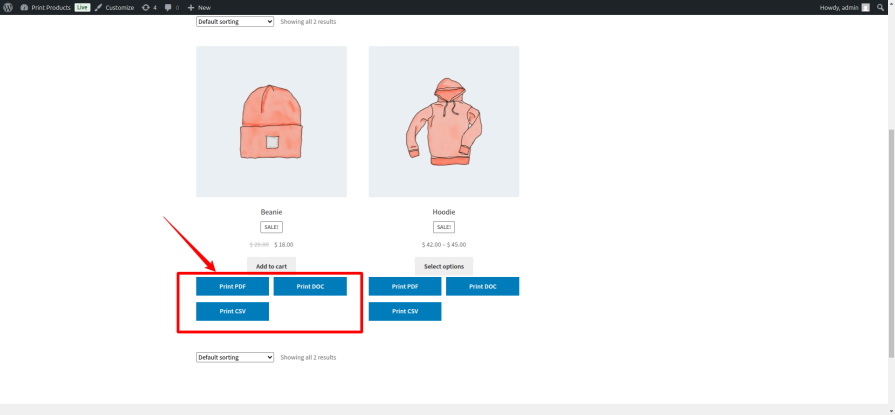
On individual product pages, exports include the full product dataset — complete descriptions, all images, every attribute, the full variations table, and customer reviews when enabled. The export reflects the complete product record, not a truncated version.
Quick-export links on every product row and a bulk export bar for multi-product selection mean your team can generate product documents directly from wp-admin — no frontend visit required, no switching between screens.
Business buyers routinely need product sheets, spec documents, and data exports for internal approval processes. Print Products for WooCommerce puts those documents one click away — reducing the back-and-forth between buyers and your team, and removing a friction point that delays purchase decisions. The admin bulk export means your sales team can prepare a full range of product sheets for a trade show or client meeting without touching a design tool.
Products with detailed specifications, multiple attributes, size and weight data, and extensive descriptions benefit most from a formatted PDF export. Variable products export with a complete variations table — every combination, its price, SKU, and stock status — so a buyer has the full picture without guesswork.
Generate product sheets for proposals, create printable catalogs for trade shows, or produce branded datasheets for client presentations — directly from your WooCommerce product data, without rebuilding anything in a separate tool. Choose the Catalog layout for visually prominent single-product sheets, or the Minimal layout for clean data-forward documents.
Customers who browse online but decide offline — at a desk, in a meeting, with a colleague — need something to take with them. A downloadable PDF bridges that gap and keeps your product information in the conversation after they leave your site. The optional QR code on every PDF brings them back to the live listing when they are ready to buy.
After installation, configure the plugin under WooCommerce → Settings → Print Products. The settings panel is organized into three tabs.
Configuration covers button visibility (product pages, shop pages, or both), which products or categories show export buttons, user role and guest access, which export formats are enabled, and button label and color customization.
PDF Settings controls the PDF layout (Classic, Minimal, or Catalog), page size and orientation, logo upload, watermark text and color, header and footer content and colors, and section heading and body text colors.
Fields and Labels contains the full 23-field checklist. Enable or disable each field with a checkbox and set a custom label — the same settings apply to PDF, DOCX, and CSV exports.
WordPress 6.0 or higher, WooCommerce 8.0 or higher, PHP 7.4 or higher, and the PHP zip extension enabled for DOCX export.
No, you can show print/export buttons directly on the shop/category page if enabled.
Yes, you can allow only specific user roles (like Administrators or Customers). You can also leave it open to all logged-in users.
Yes, if you enable the "Allow guest user" option. This is great for public catalogs.
Users can export products as PDF, DOCX (Word), or CSV files.
Yes, DOCX export requires the PHP zip extension. PDF and CSV work without extra requirements.
Yes, you can change the button label, background color, and text color to match your site’s style.
You can choose to include product price, categories, tags, reviews, attributes, short/long descriptions, and even a QR code linking back to the product.
Yes, you can add your own text to the header/footer and choose background and text colors.
Yes, you can customize heading and text colors separately for a consistent look.
Kategorien
Extension information
Quality Checks
Länder







