Product Icon

User roles editor - Add, Assign and Switch user roles for WooCommerce

Manage WooCommerce User Roles and Permissions. Create, edit, or delete user roles, and manage permissions and capabilities of user roles. Assign and switch between user roles based on conditions.
Choose a billing option
$49
Save 20%
$98 $78.40

Das Abonnement beinhaltet

  • Product updates and improvements
  • Kundensupport
  • 30-tage geld-zurück-garantie

Simplify user role management in your WooCommerce store with the WooCommerce Role Editor plugin. Whether you’re a store owner, admin, or developer, this plugin helps you easily assign, switch, and customize user roles without the need for manual effort or complex workflows. Create and manage custom roles, adjust user capabilities, and automate role switching based on product purchases, total orders, or spending behavior—all with a few simple settings.

WooCommerce Role Editor is designed to streamline your admin tasks by letting you set up multiple rules, schedule role changes, and even return users to previous roles if needed. It also supports email notifications, role switch history tracking, and menu visibility controls, making it a complete solution for role-based user management. With its user-friendly interface and seamless integration into your WooCommerce dashboard, you can confidently manage user access and permissions with ease.

Need to enable role based pricing for user roles? Try our User Defined pricing – Name your price based on user roles plugin.

WooCommerce User Roles Editor Plugin Features

    • Add, edit, or delete custom and default user roles
    • Automatically switch user roles based on defined conditions
    • Assign user roles to new users upon registration or purchase
    • Customize capabilities for both default and custom roles
    • Create and manage multiple role-switching rules
    • Set conditions like specific product purchase, total spend, or order count
    • Schedule role changes with start and end dates
    • Set temporary roles for a limited duration
    • Revert users to their previous roles when needed
    • Show or hide frontend menu items based on user roles
    • Send email notifications on role changes to users and admins
    • Exclude specific user roles from automation rules
    • View detailed role-switch history for users and admins
This Plugin is fully compatible with HPOS(High-Performance Order Storage) and Multisite.

Add, Edit, or Delete User Roles

With WooCommerce Role Editor, you can easily create new user roles or edit existing ones, whether default or custom. If a custom role is no longer needed, you can remove it with just a click.

Add new user roles

Automatically Switch User Roles

Save time and reduce admin effort by setting rules to automatically switch user roles. Based on your conditions, a subscriber can become a customer, a contributor can become an author, or any user can be promoted or demoted as needed.

Automatically Switch User Roles

Change Capabilities of User Roles

Create custom roles and define exactly what each role can and cannot do. You can modify capabilities for both default and custom roles across various areas, including:
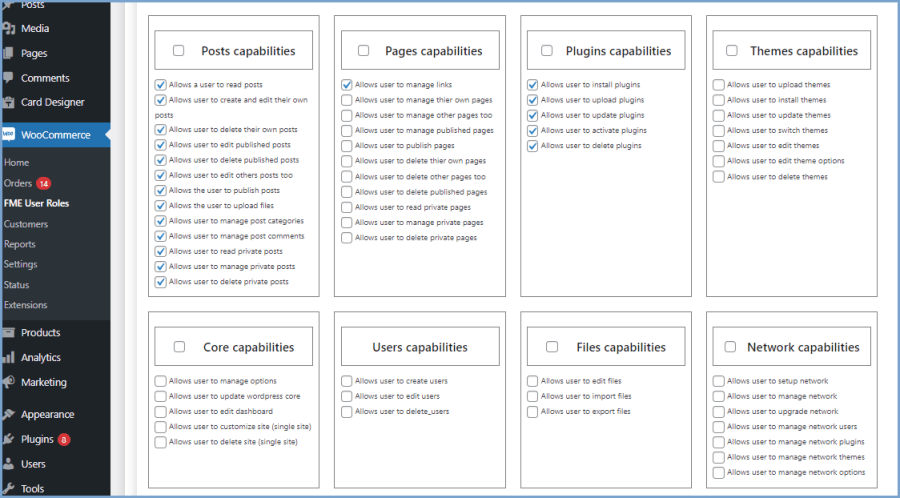
  • Posts
  • Pages
  • Plugins
  • Themes
  • Core
  • Users
  • Files
  • Network
  • Sites

Change Capabilities of User Roles

Assign Roles to New Users

Assign appropriate user roles automatically when someone registers or makes a purchase. You can place them in a relevant group like customer, subscriber, or any custom role to improve onboarding and engagement.

Assign User Roles to New Users

Set Multiple Rules for Role Switching

Create and manage multiple rules for different user groups to handle role changes more effectively. Define the conditions for each group to streamline role management in your store.

Multiple Rules for User Roles

Define Conditions for Automatic Role Switching

Automate role switching by setting specific triggers. WooCommerce Role Editor supports multiple conditions, such as:

  • Purchase of a specific product
  • Purchase from a certain category
  • Order value within a specific price range
  • Total number of orders placed
  • Total amount spent by the user
  • Amount spent during the last month

Set conditions to Switch User Roles Automatically

Schedule Role Switching

Apply rules within a specific date range by setting a start and end date. This is perfect for running time-based promotions or testing temporary role assignments.

Apply Rules for a Specific Period

Set Temporary Roles

Assign or switch user roles for a limited period. Temporary promotions let you evaluate user behavior and performance before making permanent changes.

Set the Duration of the Role

Revert to Previous User Roles

If a role change no longer suits the user, you can switch them back to their previous role and restore the associated permissions. You can also include a note explaining the reason for the switch.

Return Users to Previous Roles as Needed

Control Frontend Menu Visibility

Easily manage who sees what on your site by showing or hiding menu items based on user roles. Choose from visibility options like:

  • Everyone
  • Logged-in users
  • Logged-out users
  • Specific user roles

Show and Hide Menu to specific user roles

Email Notifications on Role Changes

Automatically send email notifications to both the user and the admin whenever a role is changed. This keeps everyone informed in real time.

Email Notifications for a Role Switch

Exclude Roles from Rules

Prevent certain user roles from being affected by automatic switching rules by excluding them from your conditions.

Exclude Specific User Role

View Role Switch History

Track all user role changes using the role-switch history feature. Both admins and users can access past changes for better visibility and accountability.

Admin view

User role-switch history - Admin View

Customer view

User role-switch history - Customer View


Compatibility

Our plugins are designed to be highly versatile and also compatible with the most commonly used themes, browsers, builders, and mobile views. We understand the importance of flexibility and integration when it comes to enhancing your website’s functionality. Our plugins can effortlessly integrate with the following:

Themes Compatibility

  • Store Front
  • Avada
  • Flatsome
  • Porto
  • Woodmart
  • WooCommerce default theme
  • Divi

Builders

  • Elementor
  • Bakery
  • Divi

Compatible with

  • PHP 8
  • Mobile Layout

Requirements

Minimum PHP version: 5.2


Häufig gestellte Fragen

Can I create completely new user roles in WooCommerce using this plugin?

Yes, the plugin allows you to create custom user roles from scratch. You can also assign specific capabilities to each role based on your store's requirements.

Is it possible to edit or delete default WooCommerce roles like ‘Customer’ or ‘Shop Manager’?

You can edit the capabilities of default roles, but deleting core default roles is not recommended. However, custom roles can be edited or removed easily.

How does automatic user role switching work?

You can define conditions such as product purchases, total spending, or order count. When those conditions are met, the plugin will automatically switch the user's role based on the rules you've set.

Can I assign a role to new users automatically at registration or after their first purchase?

Yes, the plugin allows you to automatically assign roles to new users upon registration or based on their first purchase, helping you categorize users from the start.

What happens if I assign a temporary role to a user?

If you assign a role for a limited time, the plugin can automatically revert the user to their previous role once the duration ends.

Can I schedule when a role-switching rule should start and end?

Yes, you can set start and end dates for any rule. This is useful for limited-time offers, promotions, or testing temporary access.

Can I exclude specific user roles from automatic switching rules?

Absolutely. You can mark certain roles as excluded so the automation rules don’t apply to users with those roles.

Will users and admins get notified when a role is changed?

Yes, both the user and the admin receive email notifications whenever a role is changed through the plugin.

Can I view a history of user role changes?

Yes, the plugin maintains a role-switch history log, allowing you and your team to track role changes over time.

Is it possible to control what menu items are visible based on user roles?

Yes, you can configure the visibility of frontend menu items and decide whether to show them to everyone, logged-in users, logged-out users, or users with specific roles.

Does this plugin support multisite or network-wide role management?

Yes, you can manage capabilities that extend to network and site-level roles within a multisite WooCommerce setup.

Kundenbewertungen

Average rating 3.6
8 reviews
5 stars, 57% of reviews
4 stars, 0% of reviews
3 stars, 14% of reviews
2 stars, 0% of reviews
1 star, 29% of reviews
8 reviews
  • fufy675835225
    Bewertet mit 3 von 5
    Support
    Nov 23, 2025
    Support
    The extension had problem that it didn't assign the roles automatically after each purchase so I contacted their support team but never got response hence forced me to inevitably manually assigned the roles to each purchase one by one for over a hundred. Nine days past and woo customer service stepped in, that's how I got response from the support team, otherwise I would never. The support team took one full day to investigate and fixed the problem. That's the only good thing I found. After the fix there was no problem for a month until it happened again a month later. This time I investigated by myself, looked into the code they changed, the database, cron jobs, etc., which took me a few ho...
  • FmeAddons
    Sep 29, 2025
    Dear User, We’re truly sorry to hear about the experience you’ve had and sincerely apologize for the inconvenience caused. Please rest assured, we are committed to supporting our clients and addressing any issues related to our plugins with the highest priority. If our plugin is not working as expected, we are more than willing to offer a refund at any time. That said, we would very much appreciate the opportunity to work with you directly to resolve this matter. Our team can provide dedicated support via WhatsApp, Teams or any communication channel you prefer, to ensure the issue is fixed promptly. We also tried to locate your email or support thread in our system but couldn’t find it due t...
  • ammerseemedia
    Bewertet mit 5 von 5
    Support
    Aug 20, 2024
    Support
    Great support! Solved my issue over night! thx alot guys
    • FmeAddons
      Aug 20, 2024
      Thank you for your feedback !!
  • Szabó Csaba
    Bewertet mit 5 von 5
    Apr 23, 2024
    Amazing support
    The support helped us resolve our issue very quickly and effectively.
    • FmeAddons
      Apr 23, 2024
      Thank you for your feedback !!
  • Francisco Cabrera
    Bewertet mit 5 von 5
    Dec 8, 2023
    Very good functional plugin and excellent support
    This plugin allow us to offer exclusive memberships to our customers. We had a small issue and the support was amazing. It solve the issue in no time. Highly recommended.
    • FmeAddons
      Dec 8, 2023
      Thank you for your feedback !!

Extension information

  • WordPress version required: 4.6
  • WooCommerce version required: 2.6.0
  • Tested with WordPress: 6.9.1
  • Tested with WooCommerce: 10.*.*
  • Requires at least WooCommerce: 4.0

Länder

  • Worldwide

Sprachen

English (United States)

Related Products

Price $279 Jährlich
Rated 3.2 out of 5 stars
Price $199 Jährlich
Rated 4 out of 5 stars
Price $109 Jährlich
Rated 4.6 out of 5 stars
Price $79 Jährlich
Rated 4.9 out of 5 stars
Price $79 Jährlich
Rated 3.4 out of 5 stars
Price $59 Jährlich
Rated 3.1 out of 5 stars
Price $109 Jährlich
Rated 2.8 out of 5 stars
Price $49 Jährlich
Rated 4.1 out of 5 stars
Price $109 Jährlich
Rated 2 out of 5 stars


