
Instalaciones activas
100+
Product comparison
La suscripción incluye
Ayuda y soporte
The stock management function that comes with WooCommerce tracks sold variations, rather than the number of physical units for each variation, that the store currently has in stock. As an example, if a customer buys one variation of a product that has six items in it (a «6-pack»), WooCommerce records one unit sold. However, six physical items have left your warehouse.
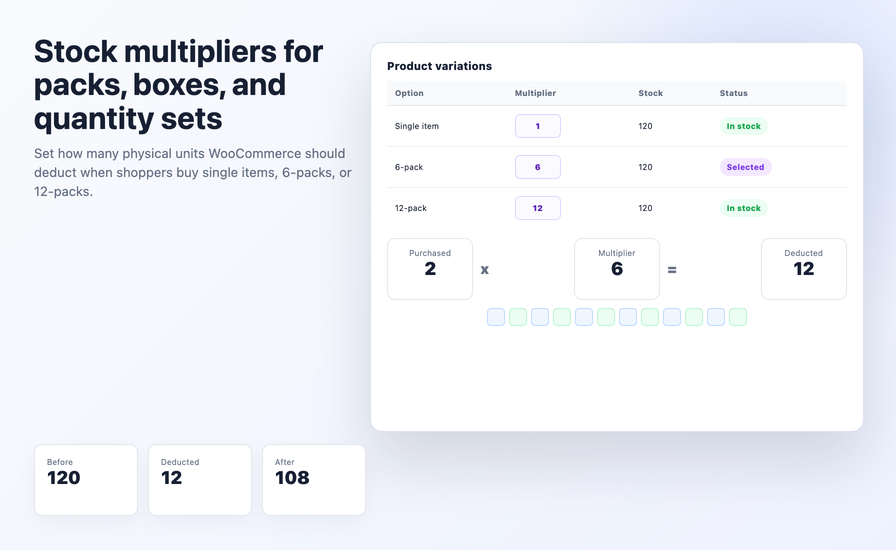
To properly keep track of the number of physical units you have in stock, and to provide low inventory notification at the right threshold, and to ensure that you do not oversell any of your products, the AICOSO Custom Stock Quantity Multiplier will accomplish this for you. For example, if you set the stock multiplier for a 6-pack product to be 6, then every time one of those 6-pack products is sold, the AICOSO Custom Stock Quantity Multiplier will deduct six physical units from the store’s inventory record for that product variation.
This is the most targeted inventory management plugin available for WooCommerce, specifically for stores that sell products in packs, bundles, or multiple variations. As of February 15, 2023, AICOSO has over 100 active installs. The plugin is priced at $29.00 yearly, and there is a 30-day money-back guarantee.
The way that WooCommerce tracks inventory is going to work just fine for stores that only sell variations representing a single physical unit. Many stores do not sell products this way.
Consider these common scenarios:
The Custom Stock Quantity Multiplier addresses all of these problems at the variation level, allowing you to input the multiplier, and the plugin will take care of the rest.
Stock quantity multipliers can be assigned to all variations of WooCommerce variable products. For instance, the «pack of 6» variation would have a multiplier of 6, «twin pack» would have a multiplier of 2, and «box of 50» would have a multiplier of 50. Each time an item is purchased in a certain quantity, the plugin will multiply the number of units purchased by the multiplier assigned to that particular variation and deduct the correct number of physical units from stock.
Multipliers for the various product variations can differ from each other; however, the single unit variation will always have a set multiplier of 1, while the pack variations will use their appropriate multiplier. All variations use the same stock pools, so inventory counts remain consistent and accurate.
The multipliers also can work in the reverse order; therefore, you may utilize them either as a means to increase your stock deductions due to bundled sales (e.g., when you sell more than one each of the same variation) or as a way to handle situations where a single purchase represents only a fraction of a larger, pooled stock quantity. At the variation level, this plugin provides directional control for adjusting stock quantities by determining whether to apply the multiplier in increasing or decreasing the stock balance.
The plugin is designed to follow the existing low-stock threshold settings established in WooCommerce. Now that stock deductions are tallied at the physical-unit level, low-stock notifications activate at the proper time — that is, when actual warehouse stock is truly low, as opposed to being triggered by a variation count that does not represent reality. As a result, customers will see accurate out-of-stock indicators at the time of purchase and store managers will receive low-stock notifications without delay.
There are no limits on how many variations you can maintain or how many multipliers you can establish. For example, a single product may have ten variations (reflecting ten different pack sizes) but have 10 associated multipliers. Each multiplier can be as low as one or as high as the size of your pack sizes permits. The plugin allows stores to create bundles the same way they currently do, for all the various types of products they sell.
This plugin does not replace WooCommerce’s built-in stock control. Instead, it serves as an enhancement to WooCommerce’s existing inventory management capabilities. All product inventory-related data remains in WooCommerce, so you continue to manage inventory in the same location you’ve always used. All inventory reporting, stock status, out-of-stock actions and back order rules operate as usual, but the only difference is in how the deduction quantity is calculated for a multi-units variation sold.
This plugin solves a specific inventory-related issue, which will benefit those types of stores.
Stores that sell food & drinks will have individual items for sale as well as items grouped together in packs. A SKU example would be a single item with three variants sold as a single pack, double pack, and twelve-pack.
Supplements & health stores will often sell bundles of products that come from the same stock that single-unit purchases do not come from; therefore, WooCommerce cannot deduct from the inventory used in a bundled order.
Stationery and office supplies and wholesale will sell varying sizes of products for their customers; they will also sell for their wholesalers.
Gift and bundle store owners will sell items as individual items and sell bundles with multiple items in one location.
All stores using WooCommerce to sell product variations as variable products with different pack sizes or quantities. The number of total stock used will need to accurately represent the number of individual items shipped and not just the number of variations sold.
WooCommerce stores where one product variation represents more than one physical unit — packs, bundles, or multi-quantity variations — and inventory counts need to reflect actual units leaving the warehouse, not just variations sold.
Stores that need a full inventory management dashboard with supplier management, purchase orders, and stock reporting across their entire product catalog.
Setup takes under 10 minutes:
From that point, every sale of a pack or bundle variation deducts the correct number of units from your stock count without any manual adjustment.
Fix Your WooCommerce Pack and Bundle Inventory Today with AICOSO!
If your stock counts do not match your warehouse because customers are buying multi-unit variations. AICOSO Custom Stock Multiplier solves the problem at the source with accurate per-variation stock deduction and no manual reconciliation required. For only $29/yr. 100+ active installs. comes with a 30-day money-back guarantee.
It is a value you set per product variation that tells WooCommerce how many physical units that variation represents. When a customer buys one unit of a "6-pack" variation with a multiplier of 6, WooCommerce deducts 6 units from stock instead of 1. This keeps inventory counts accurate for stores selling products in packs, bundles, or multiple-unit quantities.
WooCommerce's native stock management deducts one unit from stock per variation sold, regardless of how many physical items that variation contains. For stores selling variable products where different variations represent different pack sizes, this causes stock counts to diverge from actual warehouse stock. The Custom Stock Quantity Multiplier corrects this at the variation level.
Yes. The plugin extends native WooCommerce stock management — it does not replace it. All stock data, low-stock notifications, out-of-stock behaviour, and backorder settings remain in WooCommerce as normal.
Product Bundles creates a grouped product where component items have their own independent stock pools. This plugin works with variable products where different pack sizes are variations of the same product, all drawing from one shared stock count. If you sell the same item in single, 6-pack, and 12-pack variations from one product listing, this plugin is the right tool. If you want a curated bundle of different products each with their own stock, Product Bundles is the right tool.
Yes. Because the plugin deducts the correct number of physical units per sale, WooCommerce's native low-stock threshold alerts fire at the right point — when actual physical stock is running low, not based on an inaccurate variation count.
The plugin requires WordPress 4.9 or higher, WooCommerce 3.3 or higher, and PHP 5.6 or higher. It has been tested with WooCommerce 10.3.5 and is compatible with standard WooCommerce flows and extensions. Current version: 1.2.1.
Información de la extensión
Comprobaciones de calidad
Países
Idioma:







