Instalaciones activas
600+
La suscripción incluye
Ayuda y soporte
Disability & Charity Tax Exemption for WooCommerce helps stores collect tax-exemption declarations, apply a configured zero-rate tax class, and keep the supporting information with each order.
Use the extension for disability and charity VAT relief or adapt its labels, instructions, and form fields for other VAT, GST, and zero-rate tax workflows. Customers can complete the declaration during checkout, while your team receives a consistent record for review, reporting, and administration. A dedicated settings hub now brings together claim activity, country controls, notifications, PDF designs, and order-management tools.
Disability & Charity Tax Exemption for WooCommerce is designed for merchants that need to collect a customer declaration before applying a zero-rate or tax-exempt treatment to eligible products.
It is particularly well suited to UK stores managing disability and charity VAT relief, while its customizable terminology, form fields, eligibility settings, and tax-class handling also make it perfectly suitable for exemption workflows in other countries.
Built for UK disability and charity VAT exemption workflows, with the flexibility to support configurable VAT, GST, zero-rating, and tax-exemption processes in other markets.
The extension includes two configurable declaration pathways. They are set up for disability and charity VAT exemption by default, but you can customize the customer-facing labels, messages, field names, terms, and instructions to reflect your store’s tax-exemption process.
This flexibility can support stores working with VAT, GST, sales tax relief, or another tax system that uses a WooCommerce zero-rate tax class. The extension does not determine whether a customer or transaction is legally eligible. It applies the workflow and tax treatment you configure.
Create and configure the required zero-rate tax class in WooCommerce before accepting exemption claims. Shipping tax treatment continues to follow your WooCommerce tax settings.
Find the extension under WooCommerce > Settings > Tax > Disability VAT / Tax Exemption by OPMC. Its seven tabs bring together Dashboard, General Settings, Emails & Notifications, Signatures, Drop down & field namings, Page & PDF Designs, and VAT Exemption Fields.
Show the exemption workflow only where it is relevant to the order and your store’s policies.
Leave the country allow-list empty if you do not need an allow-list restriction. The separate country-hiding and user-role settings can still restrict visibility. When a country allow-list is set, customers outside those countries cannot use the exemption workflow.
Customize the information displayed and collected at checkout without editing template files. You can keep the form concise or enable additional fields when your process requires more detailed records.
Custom eligibility questions, form headings, and disability reason dropdown choices apply to the classic checkout experience; Checkout Blocks use their supported form controls and wording.
Customers can complete the exemption declaration through the classic WooCommerce checkout or Cart and Checkout Blocks. The extension uses the same core exemption data across both checkout experiences, although some wording and field controls differ.
Recent development has focused on the accessibility and usability of exemption selection, conditional sections, required fields, validation messages, buttons, and signature controls.
Declaration details are stored with the WooCommerce order, giving administrators a central record of the information supplied by the customer.
Adjust the appearance of checkout declarations, the order-screen information box, and downloadable PDF records to suit your store’s workflow.
Keep administrators and customers informed throughout the exemption process with optional, customizable emails.
Use the built-in Dashboard and reports to understand exemption activity and prepare records for accounting, administration, or internal review.
The extension can be configured for WooCommerce stores that need a customer declaration before applying zero-rate tax treatment, including:
Replace manual tax adjustments with a structured checkout declaration, consistent order records, configurable notifications and PDFs, claim management tools, and exportable reports.
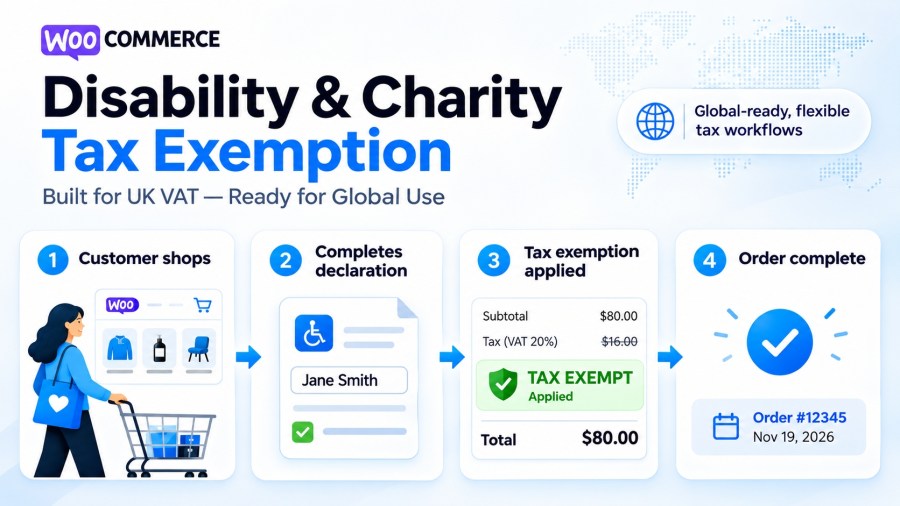
When a customer completes an eligible exemption declaration, the Disability & Charity Tax Exemption plugin applies your configured WooCommerce zero-rate tax class to qualifying products and recalculates the checkout total. Products that are not eligible retain their normal tax treatment, while shipping tax follows your WooCommerce tax configuration. Before using the plugin, you must ensure the Zero rate tax class is properly configured in WooCommerce.
Yes. The plugin supports both classic WooCommerce checkout and Checkout Blocks. You can customize declaration fields, required information, tax terminology, and supported form styling. Classic checkout also supports additional customization of the eligibility question, form heading, and disability reason dropdown options. Checkout Blocks use their supported field controls and wording, so some presentation options differ between the two checkout types.
Not necessarily. Signature collection is configurable. You can enable digital signatures, allow customers to enter a text-based signature, or disable signature fields entirely. You can also control which declaration fields are required. This allows you to collect the information your business needs without unnecessarily complicating checkout.
Yes. Customer declarations, exemption details, and applicable signatures are stored with the WooCommerce order. Administrators can review claim information, manage claim statuses, and generate downloadable PDF declarations. Choose from five PDF designs and customize the documents with your business logo, header information, and footer. These records can support your accounting and internal review processes, subject to your applicable legal recordkeeping requirements.
Yes. You can configure claim notifications for one or more administrators and optionally send customers an email confirming receipt of their declaration. The plugin also supports notifications when claim statuses change and customizable reminders for expiring charity exemptions. Email subjects and messages can be personalized using supported placeholders, and you can optionally use your existing WooCommerce email template for consistent branding.
The built-in Dashboard provides an overview of disability and charity claims, estimated tax exempted, recent orders, and claim statuses. You can filter activity by time period and review exemption information by country or product. Reports can be exported to CSV or printed for accounting and internal review. The WooCommerce Orders list also includes exemption information and filtering tools, helping your team find and manage relevant orders more efficiently.
Información de la extensión
Comprobaciones de calidad
Países