The Exit Intent Coupons for WooCommerce extension allows you to offer coupons to your users(logged-in users & guest users) when they try to exit the site with products in their cart.
Coupons options
Copy and paste text coupon
Users(logged-in users & guest users) can can manually copy and paste the coupon to receive the discount.
Apply by click-text coupon
Users(logged-in users & guest users) receive the discount by clicking the Apply Now button.
Image coupon
The coupon code is displayed in an image. Users can manually enter the coupon to receive the discount.
Benefits
Prevent cart abandonment
Offering coupons to logged-in users(members) when they try to abandon their purchases can convince your logged-in users(members) to complete their purchases and increase your conversion rates.
Additional revenue to the site
When logged-in users(members) complete their purchases instead of abandoning them, your site earns additional revenue.
Increase trust and loyalty
Offering coupons to logged-in users(members) who may abandon their purchases increases trust and loyalty.
How does it work?
Copy and paste text coupon
The Logged-in users(members) adds products to their carts, and they proceed to the cart page.
On the cart page, they try to exit the site by hovering over the address bar.
A popup will display Coupon Value, Coupon, and Copy to Clipboard button.
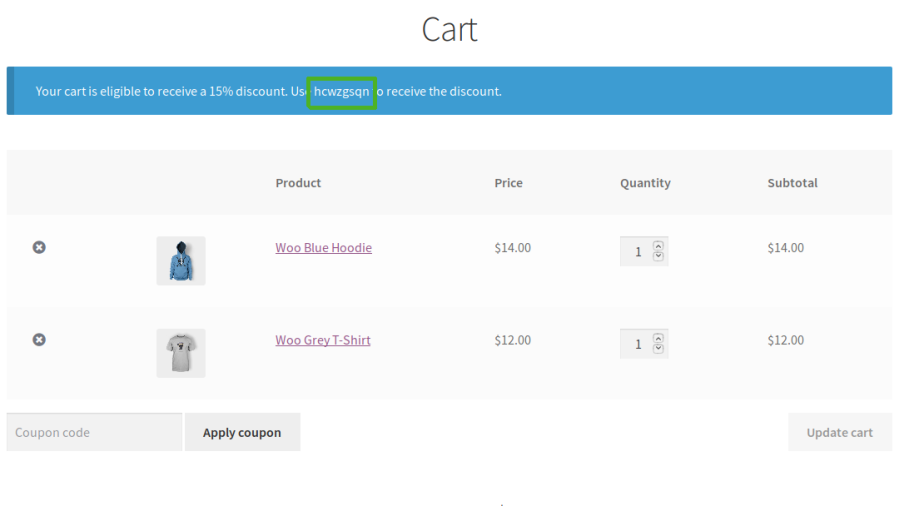
Coupon displayed on cart page
Apply by click-text coupon
The Logged-in users(members) adds products to the cart, and they proceed to the cart page.
On the cart page, they try to exit the site by hovering over the address bar.
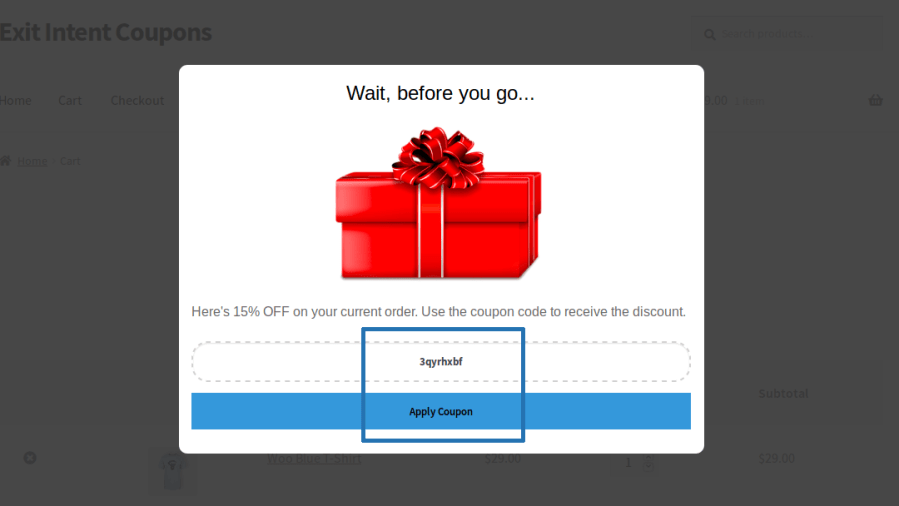
A popup will display Coupon Value, Coupon, and Copy to Apply Coupon Button.
Coupon displayed in a popup on cart page
Your logged-in users(members) can apply the coupon to the cart by clicking the “Apply Coupon” button. Once the button is clicked, the coupon will be added to the cart. If your logged-in users(members) choose not to accept the offer and close the popup, the popup will be hidden, and a notice with the coupon code will be displayed on the cart and checkout page. The coupon will be available for usage till the user completes the purchase or clears the cart.
Image coupons
The Logged-in users(members) adds products to the cart, and they proceed to the cart page.
On the cart page, they try to exit the site by hovering over the address bar.
A popup with the image will be displayed.
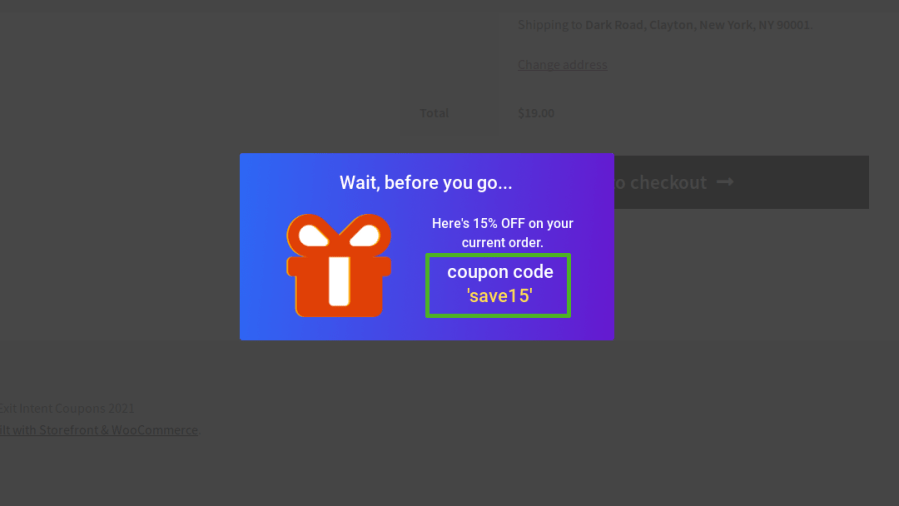
Image coupon displayed on checkout page
Your logged-in users(members) can make use of the coupon name displayed in the image to receive a discount. Once the user closes the popup, the popup will hide and a notice with the coupon code will be displayed on the cart and checkout page. The coupon will be available for usage till the user completes the purchase or clears the cart.
Popular Features
1. Exit Intent Coupon Popups
Display targeted coupon popups when customers attempt to leave your site with items in their cart, helping recover abandoned carts and increase sales conversions.
2. Flexible Coupon Discounts
Create percentage-based or fixed-amount discounts with unlimited exit intent coupon campaigns.
3. Multiple Coupon Display Types
Offer coupons as copy-and-paste coupons, one-click apply coupons, or image-based coupons, providing a seamless redemption experience.
4. Advanced Display Controls
Display exit intent coupon popups on the Product, Cart, and Checkout pages with flexible display conditions and restriction options.
5. Customizable Popup Templates
Choose from multiple popup templates and customize images, colors, messages, and coupon details to match your store’s branding.
6. Guest & Registered Customer Support
Display exit intent coupon popups to both guest users and registered customers, maximizing engagement and conversion opportunities.
7. Smart Coupon Generation (Recommended addition)
Automatically generate unique coupon codes with customizable prefixes, suffixes, coupon code length, and random or static coupon names.
8. Activity Log Tracking
Track exit intent coupon activity through a dedicated admin activity log for better campaign monitoring and analysis.
Extensive Features List
Display Exit intent coupon popup to the user when they try to exit the site with products in their cart.
Works for Guest users.
Option to manually copy and paste the coupon to receive the discount.
Option available to display the coupon code in an image.
Option available to display Exit Intent Coupon popup on the product page, cart page and checkout page.
Option to set a percentage or fixed Coupon discount.
Create unlimited rules for exit intent coupon.
Option to customize the coupon name as per your need.
Various restriction options available to display the exit intent coupon popup.
Various exit intent coupon popup templates are available. You can choose the template which you want to display on the frontend.
Options available to customize Exit Intent Coupon Popup image, messages and coupon details.
Options available to customize the Exit Intent Coupon Popup color.
Display the Coupon details on Exit Intent Coupon Popup
Activity Log available for site admin to track the exit intent coupons.
Localization and Messages settings.
Supports PO translation files for translating and customizing plugin text.
Compatible given with Cart and Checkout Blocks.
Exit Intent Coupons for WooCommerce allows you to offer coupons to your logged-in users(members) when they try to exit your site with products in their cart.
Requirements
Minimum PHP version: 5.6
Opiniones de clientes
Estamos aceptando reseñas para este producto, y las mostraremos cuando tengamos unas cuantas más.
Tanto nosotros como nuestros socios procesamos tus datos personales (como los datos de navegación, las direcciones IP, la información sobre las cookies y otros identificadores únicos) en función de tu consentimiento o en nuestro interés legítimo para optimizar nuestra web, las actividades de marketing y tu experiencia como usuario.