

La suscripción incluye
Ayuda y soporte
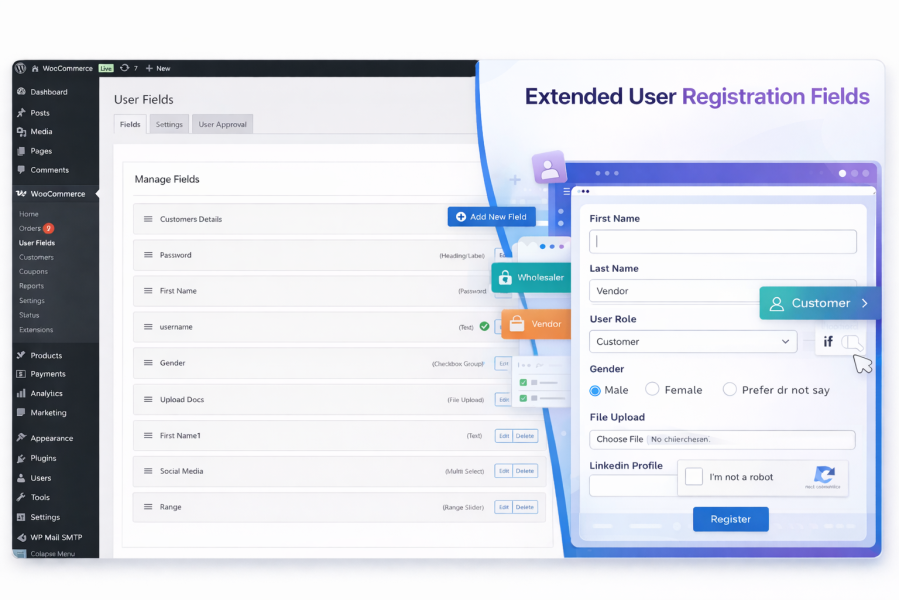
Extended User Registration Fields for WooCommerce is an advanced WooCommerce registration form plugin that lets you add unlimited custom user registration fields, manage user roles, apply conditional logic, and control user approval workflows—all fully integrated with WooCommerce.
Perfect for B2B stores, wholesale shops, membership websites, and multi-role WooCommerce stores.
WooCommerce’s default registration form is limited. This plugin transforms it into a fully customizable registration system designed for businesses that need extra customer data, role-based access, and approval control.
With a powerful drag & drop field builder, you can create complex WooCommerce registration forms without writing a single line of code.
Create and manage unlimited WooCommerce registration fields and collect exactly the customer data your store needs.
Supported field types include:
Each field supports required validation, placeholders, and custom validation rules.
Create dynamic WooCommerce registration forms using advanced conditional logic.
Show or hide fields based on:
This ensures a cleaner, faster, and more user-friendly registration experience.
Allow customers to select a user role during WooCommerce registration.
Control customer access with an advanced WooCommerce user approval system.
Perfect for B2B, wholesale, and restricted WooCommerce stores.
Display and manage custom registration fields inside the WooCommerce My Account area.
Make registration data useful across your entire WooCommerce store.
Ideal for order verification, compliance checks, and B2B workflows.
Protect your WooCommerce registration forms from spam and automated bots.
Easily manage WooCommerce registration fields using an intuitive drag & drop interface.
Go beyond WooCommerce’s default registration form and capture custom customer information that matters to your business. Unlimited custom fields let you collect documents, business details, tax IDs, preferences, and more—directly at registration.
With conditional logic, users only see fields that are relevant to them. This reduces form clutter, shortens registration time, and increases successful signups across B2C, B2B, and wholesale stores.
The built-in user approval system allows you to approve, reject, or automatically activate users based on their selected role. This is ideal for wholesale stores, members-only pricing, and restricted products.
Let customers select a role during registration and upload required documents. Admins can review submissions, approve users, and assign roles without manual follow-ups or email back-and-forth.
Protect your WooCommerce registration forms with Google reCAPTCHA v2 or v3. This helps block bots, fake accounts, and abusive signups while keeping the experience smooth for real users.
All registration data is stored securely and displayed in My Account, user profiles, WooCommerce orders, and order emails. This makes customer verification, order processing, and support faster.
Automated approvals, role assignment, and email notifications reduce manual admin work. The plugin runs seamlessly in the background, helping you manage registrations at scale.
The drag & drop field builder allows you to create and manage advanced WooCommerce registration forms without writing any code. Everything is designed specifically for WooCommerce compatibility and performance.
Yes. You can create unlimited custom WooCommerce registration fields with no restrictions. This includes text fields, dropdowns, checkboxes, file uploads, and more.
Yes. You can use conditional logic to show or hide registration fields based on user role or previous field values, creating dynamic WooCommerce registration forms.
es. The plugin allows customers to select a user role during WooCommerce registration. You can restrict which roles are available and control approval rules for each role.
Admins can configure automatic or manual approval based on user roles. Users requiring approval are placed in a pending state until approved by an administrator.
Yes. If enabled, users can view and edit their custom registration fields from the WooCommerce My Account area.
Yes. Registration field data can be displayed in WooCommerce order details and included in order emails if enabled.
Yes. The plugin supports Google reCAPTCHA v2 and v3 to protect WooCommerce registration forms from spam and fake registrations.
Yes. The plugin is ideal for B2B, wholesale, membership, and restricted WooCommerce stores that require role-based registration and user approval.
Categorías
Información de la extensión
Comprobaciones de calidad
Países






