
Icono del producto

Order Restrictions para WooCommerce

Place purchase restrictions based on current order total, product & order quantity, payment gateways, previous purchase history & more.
Elige una opciĂłn de facturaciĂłn
$49
Ahorra un 20 %
$98 $78.40

La suscripciĂłn incluye

  • Actualizaciones y mejoras del producto
  • AtenciĂłn al cliente
  • GarantĂ­a de devoluciĂłn de 30 dĂ­as

Increase Your Control Over Orders

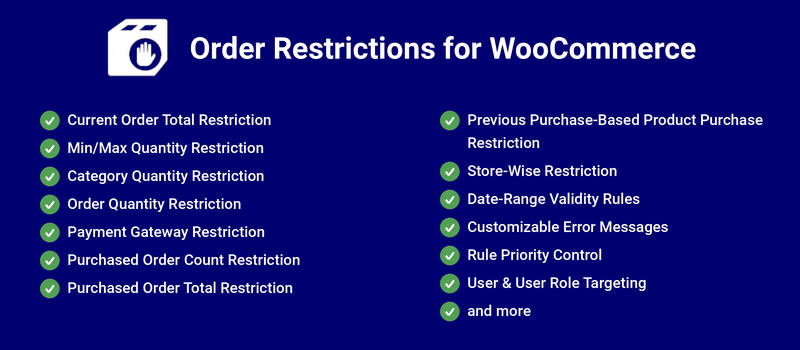
Order Restrictions for WooCommerce allows you to place the following restrictions on orders placed in your shop.

Current Order Totals

You can configure the restriction based on the minimum and maximum order amount during the order placement on your site.

Previously Purchased Order Total

You can configure the restriction based on previously purchased minimum and maximum order amount during the order placement on your site.

Previously Purchase Order Count

You can configure the restriction based on previously purchased minimum and maximum number of order count during the order placement on your site.

Minimum and Maximum Quantity

You can configure the minimum product quantity and the maximum product quantity purchased from your site.

Payment Gateway

You can configure the minimum and maximum order total amount to make payment through each payment gateway on your site.

Product Purchase Restriction

You can configure the minimum and maximum number of purchases of a Product on your site.

Store-wise Restriction

You can restrict the purchase in the store based on the minimum and maximum order amount received as well as minimum and maximum number of orders placed on your store.

Benefits

1. Increase the average order value

By placing restrictions such as minimum order value and minimum quantity to be purchased, you can increase the average order value of all the orders placed on your site.

2. Reduce unwanted fees

By setting a minimum order value for specific payment gateways, you can prevent your users from using specific payment gateways if their order value is below the specified threshold. You can help reduce fees paid to payment processors.

How does it work?

Current Order Total Restriction

You can configure the restriction based on the minimum and maximum order amount during order placement on your site.

Example:

If you only want to accept orders above $50 on your site, using order total restriction it is possible.
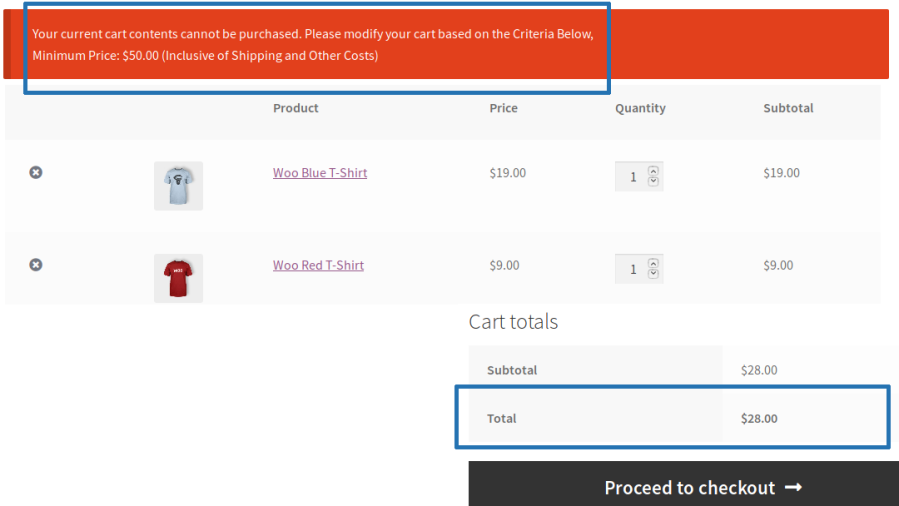
Minimum order total not met error on cart page

Previously Purchase Order Total

You can configure the restriction based on previously purchased minimum and maximum order amount during the order placement on your site.

Example:

If you only want to accept orders from the customer whose purchased order total is less than $1000 on your site, using Purchased Total restriction it is possible.
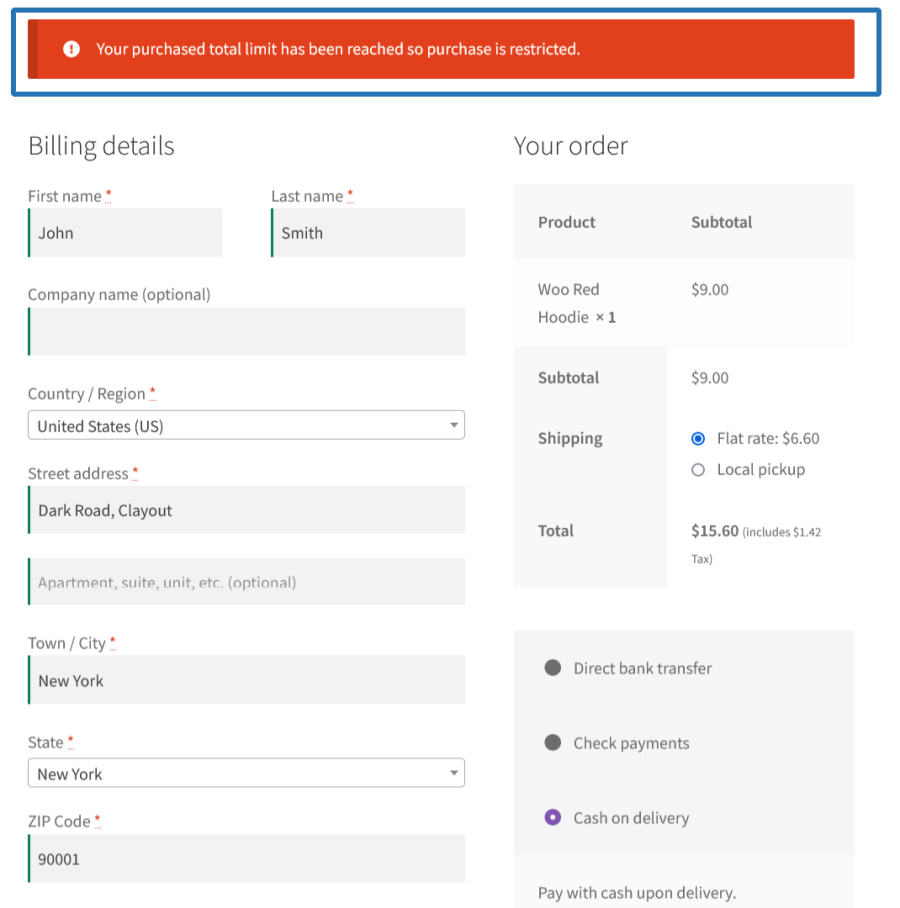
Order total limit reached error message on cart page

Previously Purchase Order Count

You can configure the restriction based on previously purchased minimum and maximum number of order count during the order placement on your site.

Example:

If you only want to accept orders from the customer whose purchased order count is less than 10 on your site, using Order Count restriction makes it possible.
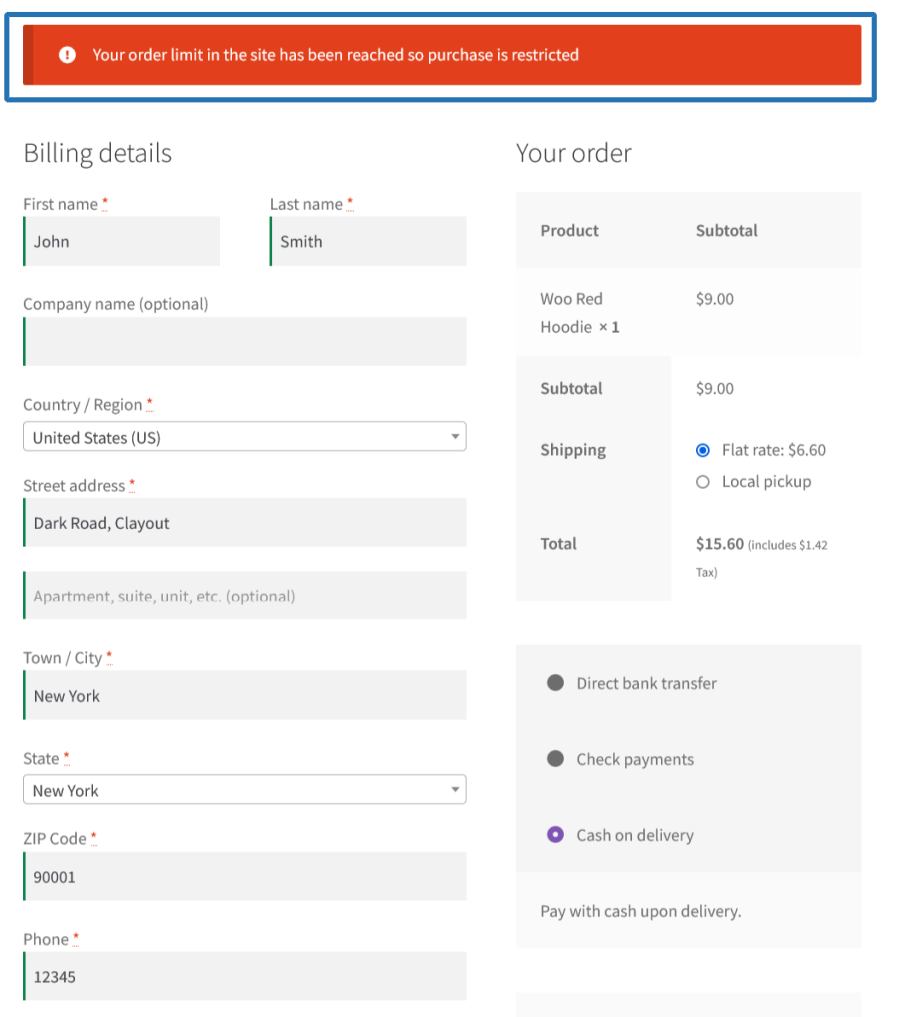
Order count limit reached error message on cart page

Minimum and Maximum Quantity Restriction

You can configure the minimum product quantity and the maximum product quantity purchased from your site.

You can configure the quantity restrictions for the following options,

  • For all products using Global Level configuration
  • For respective product using product level configuration
  • For respective category using each category level configuration
    • You can apply this restriction for each product’s quantity/total quantity of the products from the respective category based on your needs.
  • For entire order using order quantity restrictions.

Example:

i) If you want your users to purchase a minimum of five (5) quantities of each product on your site, using Min/Max quantity restriction makes it possible.
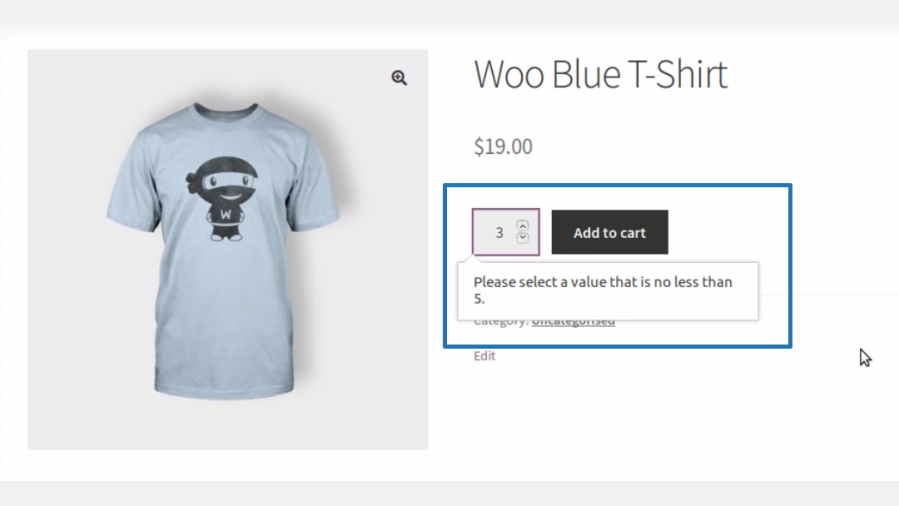
Min quantity limit error message on product page

ii) If you want your users to purchase only a total of two (2) quantities from a specific category on your site, using Min/Max quantity restriction under category level it is possible.
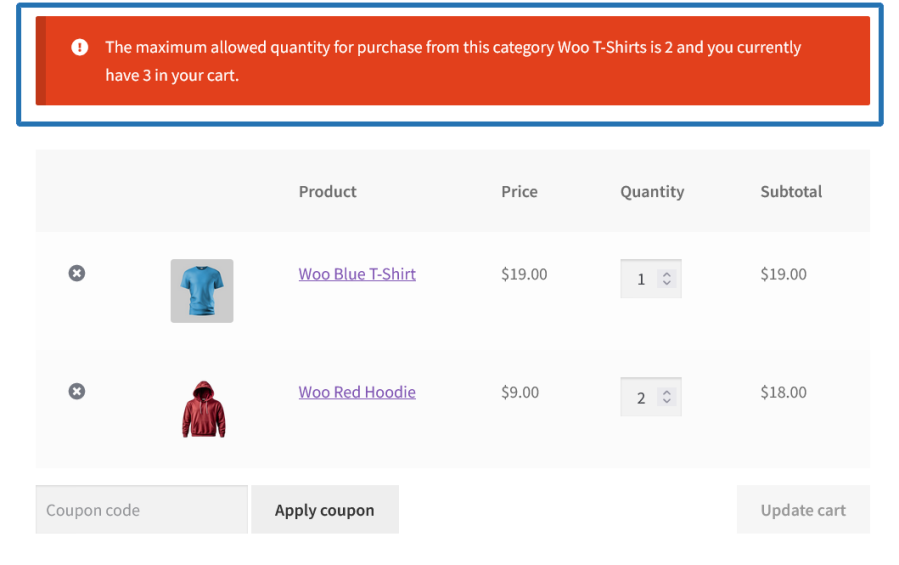
Max quantity limit error message on cart page

iii) If you want your users to purchase only a total of two (2) quantities in the current order on your site, using Order Quantity Restriction it is possible.
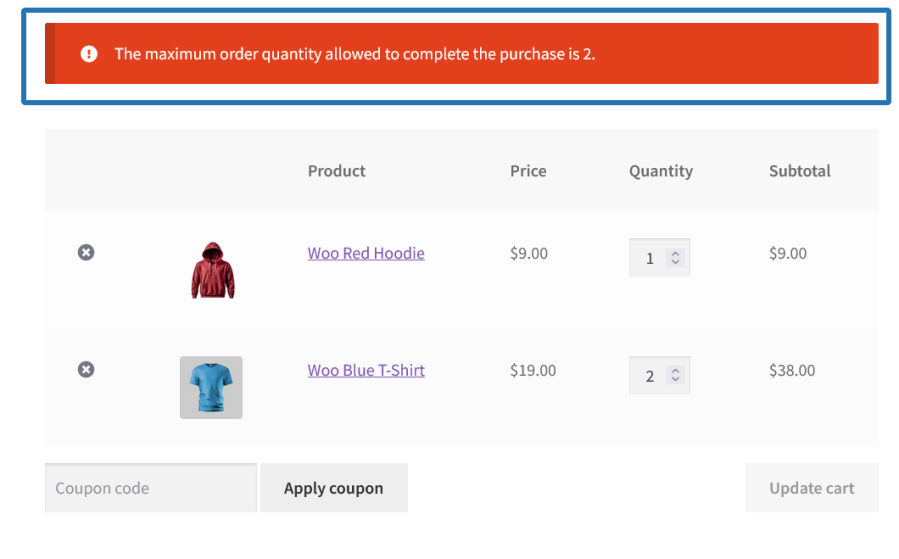
Max order quantity limit error message on cart page

Min/Max Quantity Restriction

You can also customize the quantity increment value for the products sold on your site.

For example:

If you want your users to increase quantities in increments of five (5), it’s possible.

Payment Gateway Restriction

You can configure the minimum order amount and the maximum order amount that can be made through each payment gateway on your site.

Example: If you want to disable Cash on Delivery for orders above $500, using payment gateway restriction makes it possible.
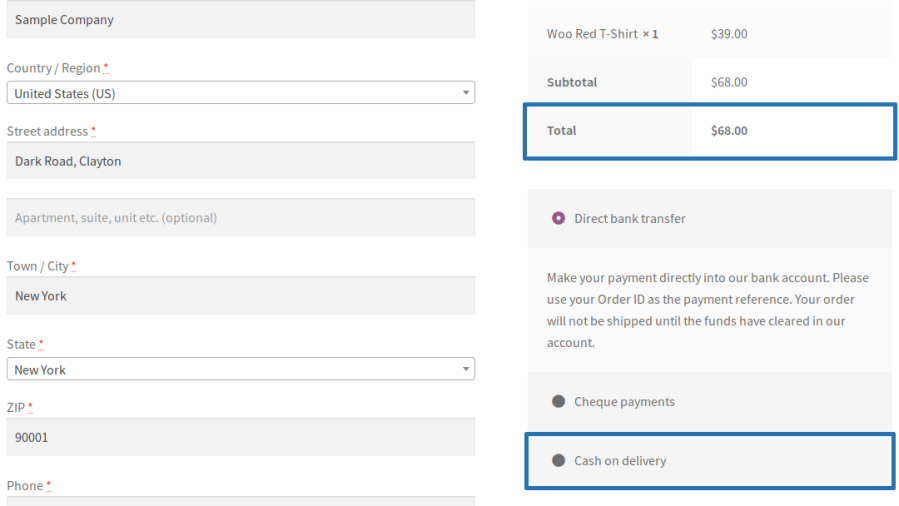
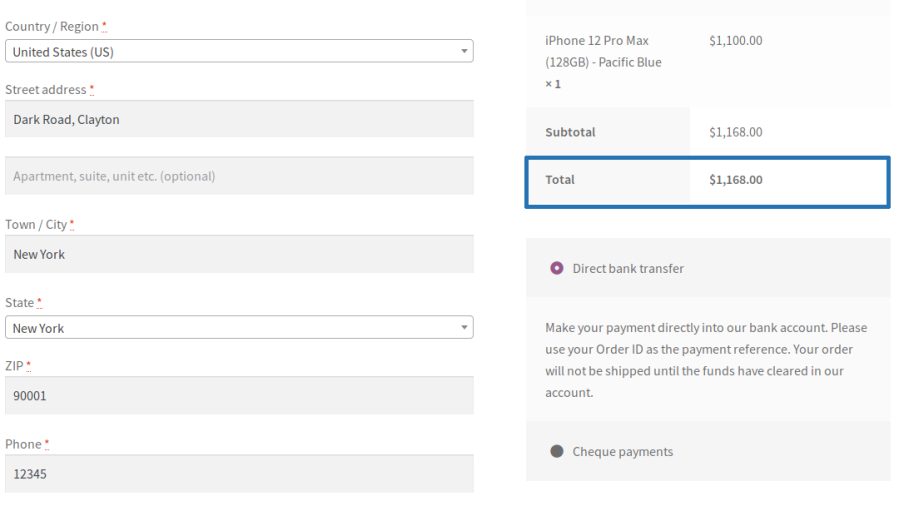
Payment Gateway Visible
Payment Gateway Hidden

Product Purchase Restriction

Using this module, you can prevent your users from purchasing a specific product more than the specified number of time(s). By default, the restriction is permanent you can optionally set the validity of the restriction to specific time period.

Example:

If you want to prevent your users from purchasing a product more than 10 times, using product purchase restriction, it is possible.
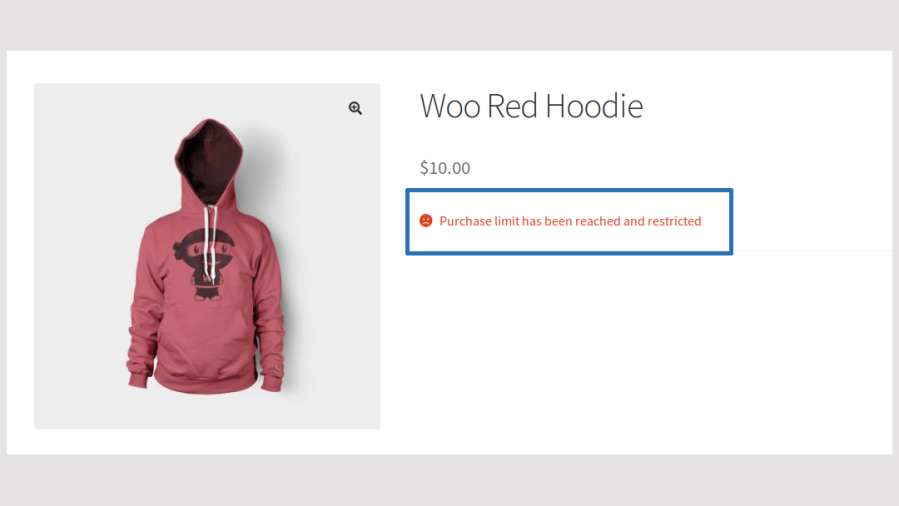
 

Purchase restricted message on product page

Store-wise Restriction

Using this module, you can restrict the order placement on your site when more than the specified number of order(s) or Total value is reached. By default, the restriction is permanent you can optionally set the validity of the restriction to specific time period.

Example:

If you want to prevent the New Order placement when the Order Total has crossed $1000/Order Count then it is possible using Store-wise restriction.
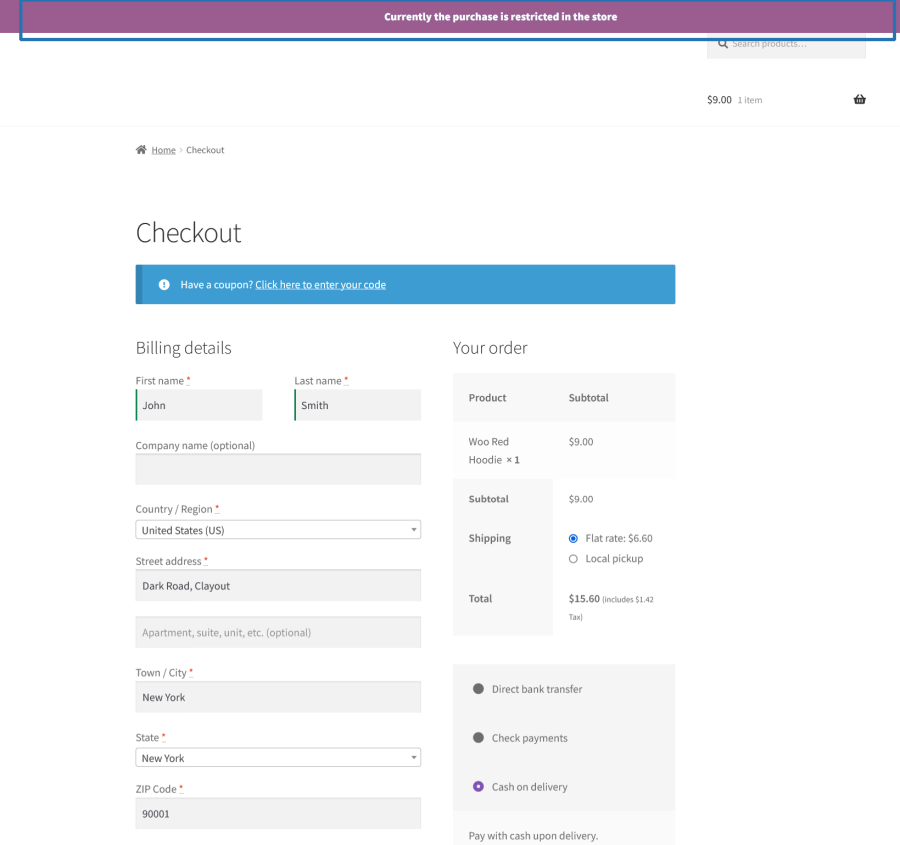
Store-wise purchase restricted message

Extensive Features List

Order Total Restriction

  • Restrict customers from placing orders unless the cart total falls within a defined minimum and/or maximum order value.
  • Create rule-based order total restrictions for specific products, categories, user roles, or individual users.
  • Define rule evaluation priority using First Match or Last Match logic when multiple rules apply.
  • Optionally disable the Proceed to Checkout button on the cart page and the Place Order button on the checkout page until the configured criteria are met.
    Apply restrictions based on billing or shipping zip codes.
  • Configure custom validation messages for:
    • Minimum order value violations
    • Maximum order value violations
    • Minimum product quantity violations
    • Maximum product quantity violations
  • Support dynamic placeholders including:
    • [rts_min_price]
    • [rts_max_price]
    • [rts_min_product_count]
    • [rts_max_product_count]
  • Simultaneously restrict both total cart value and number of products in the purchase.

Order Count Restriction

  • Limit the number of orders a customer can place within a specified period.
  • Configure a custom order count threshold that triggers the restriction.
  • Apply restrictions to all users or target/exclude specific users and user roles.
    Set restriction validity
  • Configure custom week, month, and year starting points for accurate period calculations.

Previously Purchased Total Restriction

  • Restrict customers from placing additional orders once their cumulative purchase value reaches a defined threshold.
  • Create rule-based configurations with different spending limits for different customer segments.
  • Set restriction validity.

Min/Max Quantity Restriction [Global and Product Level]

  • Configure global minimum and maximum purchase quantities per product globally.
  • Override global quantity restriction settings for individual products.
  • Define quantity step values to enforce quantity increments (e.g., multiples of 5).
  • Apply restrictions to all users or specific users and user roles.
  • Include or exclude specific users and roles from restrictions.
  • Configure restriction validity.
  • Optionally display or hide stock availability information alongside quantity restrictions.
  • Apply minimum and maximum quantity rules at the category level.

Category-Level Min/Max Quantity Restriction

  • Configure minimum and maximum purchase quantities at the product category level.
  • Override global quantity restriction settings for selected product categories.
  • Apply quantity limits in one of two ways:
    • Per Product in the Category: each product must meet the configured quantity requirements individually.
    • Across All Products in the Category: the combined quantity of all products within the category must meet the configured requirements.
  • Define a Minimum Quantity Requirement to ensure customers purchase a specified number of products from a category.
  • Define a Maximum Quantity Limit to prevent customers from purchasing more than the allowed quantity from a category.
  • Configure Quantity Increment Steps to require purchases in predefined multiples (e.g., quantities of 2, 5, or 10).
  • Apply category restrictions for an unlimited duration or configure date-based validity periods.
  • Schedule restrictions using start and end dates for seasonal promotions, wholesale ordering, or limited-time purchasing rules.
  • Restrict category-level rules to:
    • All Customers
    • Specific Users
    • Selected User Roles
  • Automatically validate category quantity requirements during the checkout process.
  • Prevent checkout when category quantity rules are not met.
  • Display customizable validation messages to clearly inform customers of category purchase requirements.

Order Quantity Restriction (Cart Level)

  • Restrict the total number of items that can be added across the entire cart.
  • Configure minimum and/or maximum cart quantity requirements.
  • Enforce order-level quantity restrictions independently from product-level quantity limits.

Product Purchase Restriction

  • Prevent customers from purchasing specific products after reaching a defined purchase limit.
  • Create rule-based restrictions for products, categories, user roles, or individual customers.
  • Choose whether restricted products should:
    • Be hidden from the storefront, or
    • Remain visible with a restriction message
  • Include or exclude specific users and user roles.
  • Configure First Match or Last Match rule priority handling.
  • Display custom restriction messages when purchase limits are reached.
  • Supports:
    • Simple products
    • Variable products
    • Product-level restriction settings

Payment Gateway Restriction

  • Show or hide payment gateways at checkout using configurable restriction rules.
  • Create rule-based gateway availability conditions based on:
    • Products
    • Product categories
    • Product tags
    • Product types
    • Product brands
    • Users
    • User roles
    • Countries
    • Billing zip codes
    • Shipping zip codes
  • Determine customer location using:
    • Billing country
    • IP-based country detection
  • Configure rule evaluation using First Match or Last Match priority.
  • Support include and exclude conditions for all supported filter types.

Store-Wide Purchase Restriction

  • Restrict all purchases once a global order value threshold is reached.
  • Restrict all purchases once a global order count threshold is reached.
  • Apply restrictions store-wide or target specific users and user roles.
  • Configure restriction validity.
  • Configure custom week start days and month/year start dates.

Rule-Based Filtering & Conditions

  • Create multiple named rules across applicable restriction modules.
  • Configure each rule using the following filters:
    • Products (include/exclude)
    • Categories (include/exclude)
    • Product types (include/exclude)
    • Product tags (include/exclude)
    • Product brands (include/exclude)
    • Users (include/exclude)
    • User roles (include/exclude)
    • Countries (include/exclude)
    • Billing zip codes (with wildcard * support)
    • Shipping zip codes (with wildcard * support)
  • Enable or disable rules without deleting them.
  • Configure rule-specific validity periods with optional date and time restrictions.

User Targeting & Segmentation

  • Apply restrictions to:
    • All users
    • Guest users
    • Specific users
    • Specific user roles
  • Independently include or exclude users and roles within each rule.
  • Supports all default WordPress roles and custom WooCommerce roles.
  • Fully supports guest customer restrictions.

Custom Restriction Messages

  • Configure custom messages for all restriction types.
  • Supported restriction messages include:
    • Order total restrictions
    • Product quantity restrictions
    • Product purchase limits
    • User and role restrictions
  • Supports HTML formatting within messages.
  • Supports dynamic placeholders for automatically displaying configured values.
  • Messages are displayed contextually on product, cart, and checkout pages.

Validity & Time Span Management

  • Configure restrictions as permanent or date-based.
  • Supported scheduling options include:
    • Daily
    • Weekly
    • Monthly
    • Yearly
    • Custom Date Range
  • Configure custom start points for weekly, monthly, and yearly calculations to support accurate rolling-period enforcement.

WooCommerce Compatibility

  • Fully compatible with WooCommerce Cart and Checkout Blocks.

Administration & Management

  • Centralized management through a dedicated Order Restrictions menu in WooCommerce.
  • Organized settings panels for:
    • Order Restrictions (Order Total, Order Count, Purchased Total)
    • Min/Max Quantity Restrictions
    • Product Purchase Restrictions
    • Payment Gateway Restrictions
    • Store-Wide Purchase Restrictions
  • Create, edit, activate, deactivate, and delete rules independently.


Opiniones de clientes

Estamos aceptando reseñas para este producto, y las mostraremos cuando tengamos unas cuantas más.

InformaciĂłn de la extensiĂłn

  • Se requiere una versiĂłn de PHP: 7.4.0
  • Se ha probado con WordPress: 6.9
  • Se ha probado con WooCommerce: 10.4.3
  • Se necesita al menos WordPress: 6.2
  • Se necesita al menos WooCommerce: 8.2.0

Compatibilidad

  • High performance order storage (HPOS)

PaĂ­ses

  • Todo el mundo

Idioma:

English (United States)

Related Products

Precio: $279/anualmente
ValoraciĂłn: 3.2 sobre 5 estrellas
Precio: $79/anualmente
ValoraciĂłn: 3.4 sobre 5 estrellas
Precio: $59/anualmente
ValoraciĂłn: 3.1 sobre 5 estrellas
Precio: $109/anualmente
ValoraciĂłn: 2.8 sobre 5 estrellas
Precio: $49/anualmente
ValoraciĂłn: 4.1 sobre 5 estrellas
Precio: $109/anualmente
ValoraciĂłn: 2 sobre 5 estrellas
Precio: $109/anualmente
ValoraciĂłn: 2.3 sobre 5 estrellas
Precio: $109/anualmente
ValoraciĂłn: 2.6 sobre 5 estrellas
Precio: $109/anualmente
ValoraciĂłn: 2.3 sobre 5 estrellas
Usar sus datos personales
Tanto nosotros como nuestros socios procesamos tus datos personales (como los datos de navegación, las direcciones IP, la información sobre las cookies y otros identificadores únicos) en función de tu consentimiento o en nuestro interés legítimo para optimizar nuestra web, las actividades de marketing y tu experiencia como usuario.




