Instalaciones activas
10K+
La suscripción incluye
Ayuda y soporte
Product CSV Import Suite te permite importar miles de productos y admite productos complejos y datos personalizados de Product Vendors, Brands, Google Product Feed y mucho más.
El objetivo principal de WooCommerce es que puedas vender lo que quieras. Actualizar los productos (por ejemplo, ajustar los precios) puede llevar mucho tiempo, sobre todo si tienes muchos productos o cambios que aplicar.
Ahórrate las molestias de tener que hacer los cambios uno a uno gracias a Product CSV Import Suite.
Crea, sube o actualiza miles de productos a la vez, incluidos productos complejos. Actualiza de forma masiva elementos estándar, como el precio y la descripción, además de datos personalizados, como la disponibilidad de las citas, los recursos y mucho más.
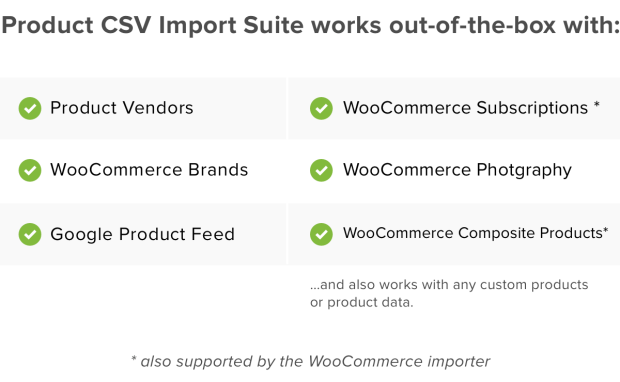
Product CSV Import Suite va más allá de la herramienta de importación/exportación básica disponible en WooCommerce y admite más extensiones, como Product Vendors, WooCommerce Photography y Google Product Feed.
Aparte de los tipos de productos especiales, puede que dispongas de información especial que importar y actualizar, como la siguiente:
Product CSV Import Suite recopila información de campos personalizados sin requerir código personalizado, de manera que puedes incluir información adicional en las importaciones y exportaciones. Aparte de eso, puedes importar información en cualquier taxonomía personalizada y añadir o actualizar todos los datos sobre tus productos.
Puedes usar Product CSV Import para volver a exportar datos a un archivo CSV.
Además de los productos en modo publicado o privado, también puedes exportar productos configurados como borrador.
Si tu tienda cuenta con muchos productos, puedes tener dificultades al exportar todos a la vez. Con Product CSV Import Suite, puedes definir el límite de productos exportados que quieras u omitir la exportación de las X primeras filas de productos para que las exportaciones sean más fáciles de gestionar.
Si combinas productos y variaciones en tu tienda, también puedes volver a exportar esos cambios en un archivo CSV.
Además, si quieres exportar datos de clientes o pedidos, prueba WooCommerce Customer / Order CSV Export.
Yes. Product CSV Import Suite is a WooCommerce import and export extension built for bulk work, so you can create and upload hundreds or thousands of products from a single CSV file. It is a strong fit for stores that are migrating a catalog, launching with a large inventory, or adding many products at once, rather than entering each item by hand.
Yes. Product CSV Import Suite lets you merge changes into products you already have, so you can mass update standard details like price and description across your catalog in one go. It matches rows to existing products using a product ID or SKU column, which is helpful when you need to adjust pricing, prepare a sale, or refresh product data without opening each product individually.
Yes. Product CSV Import Suite supports variable products and their variations. Variations are handled through a separate variations CSV, which gives you clear control over parent products and the individual variations attached to them. This is useful for stores selling items in multiple options such as size or color.
Yes. Product CSV Import Suite goes beyond the basic import and export tool built into WooCommerce to support more extensions and custom product data. It has been tested to work with extensions including Product Vendors, WooCommerce Brands, WooCommerce Photography, and Google Product Feed. That means you can do things like assign products to the vendor that sells them or add the brand that makes them, all as part of your import.
Yes. Product CSV Import Suite captures custom field information without requiring custom code, so you can include extra details in your imports and exports. You can also import information into any custom taxonomies, which lets you add or update the full set of data about your products from one file. This is helpful for stores that rely on custom product information beyond the standard WooCommerce fields.
Yes. Product CSV Import Suite can export your product data back to a CSV file. Alongside published and private products, it can also export products set to draft, and if you have merged products and variations, you can export those changes too. This makes it useful for backups, bulk edits in a spreadsheet, and moving product data between stores.
Yes. If your store has many products, exporting them all at once can be a challenge, so Product CSV Import Suite lets you set a limit on how many products to export or skip a set number of rows using an offset. This gives you more manageable, targeted exports instead of one large file.
Yes. Because you can export your product data to a CSV and then import or merge it elsewhere, Product CSV Import Suite can help you move and sync catalog data between stores. Rows are matched to existing products by ID or SKU during a merge, so you can keep product details aligned across sites.
WooCommerce includes a built-in product import and export tool that works well for simple, variable, and subscription products, as well as Product Bundles and Composite Products. Product CSV Import Suite is the premium option for stores that need more, including support for additional extensions like Product Vendors, WooCommerce Photography, and Google Product Feed, plus custom fields and custom taxonomy data. If your needs go beyond standard product types, the Suite is designed to cover them.
Product CSV Import Suite is best for stores with large catalogs, complex products, or custom product data from supported extensions such as Product Vendors and WooCommerce Brands. It is a good fit if you regularly create or update many products at once, or if you need to include custom fields and custom taxonomy data that the basic importer does not cover.
If you are only working with simple, variable, or subscription products, or with Product Bundles or Composite Products, the import and export tool built into WooCommerce may be all you need. Product CSV Import Suite is aimed at stores that need to go further, such as importing custom data or data tied to supported extensions. Start with the built-in tool for straightforward catalogs, and move to the Suite when your product data becomes more complex.
Not for that job. Product CSV Import Suite is focused on products and variations. If you need to export customer or order data, WooCommerce Customer / Order CSV Export is the extension designed for that purpose.
Yes. When the extension is active, it adds Delete ALL Products and Delete ALL Variations tools under WooCommerce > Status > Tools. These are useful for clearing out a catalog before a fresh import, but they are irreversible, so it is worth backing up your store or testing on a staging site before using them.
Categorías
Información de la extensión
Comprobaciones de calidad
Países