
Icono del producto

QR Code by QodeVault para WooCommerce

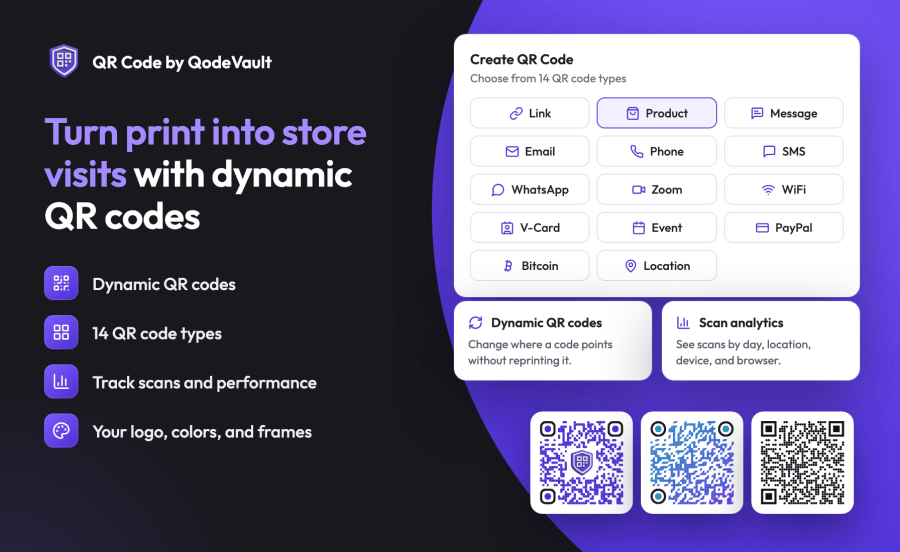
Create branded QR codes for your products, change where they point after printing, and track scans, all from your WooCommerce admin.

La suscripción incluye

  • Actualizaciones y mejoras del producto
  • Atención al cliente
  • Garantía de devolución de 30 días

QR Code by QodeVault for WooCommerce turns what you print (packaging, flyers, and in-store signs) into a direct path to your store. Pick a product from your catalog, style the code to match your brand, and download it ready to print. If a link changes later, update the code instead of reprinting it.

  • Send shoppers from printed materials straight to a product page in your store.
  • Change where a QR code points after it’s printed, with no reprint needed.
  • See how often each QR code is scanned, where people scan it, and on what devices.
  • Make QR codes that match your brand with your colors, logo, and frame.
  • Manage everything from your WooCommerce admin, with no separate account to set up.

Turn QR codes into store visits

Choose the product type, search your catalog by product name or SKU, and select the product. The QR code points to that product page, so a shopper who scans the QR code on a box, shelf tag, or flyer lands right where they can buy.

  • Search your published products by name or SKU.
  • View each product’s image, SKU, and price as you choose.
  • Use the link type to point a QR code at any page, such as a sale, a category, or a reviews page.

Update codes without reprinting

Dynamic QR codes point to a short link that QodeVault manages for you. When a promotion ends or a page moves, edit the QR code, change the destination, and save. The QR code you already printed keeps working and now opens the new page.

  • Dynamic codes are available for every QR type except Wi-Fi.
  • Static QR codes store their content in the code itself, for anything that never changes.
  • Delete a dynamic code to stop it from redirecting.

See which codes are working

Every scan of a dynamic code is recorded. Pick a date range to see how many times a code was scanned, how many people scanned it each day, and where they were.

  • Total scans, scans in a date range, and your busiest day.
  • Daily scans and daily unique visitors.
  • Top countries, cities, devices, and browsers.

Make it look like your brand

Style each code with a live preview, so you see the result before you save.

  • 19 dot patterns, 19 corner marker styles, and 26 corner center styles.
  • Your own colors, including gradients and separate colors for the corner markers.
  • Your logo in the middle of the code.
  • 11 frames with your own call to action, such as «Scan me.»
  • Downloads in PNG, JPEG, or SVG, up to 4000 pixels wide.

14 types of QR code

Beyond product pages and links, you can create QR codes for a message, email, phone call, SMS, WhatsApp chat, Zoom meeting, Wi-Fi network, contact card (vCard), calendar event, PayPal payment, Bitcoin payment, or map location.

Ideas for your store

  • Product packaging and inserts: link to care instructions, a reorder page, or matching products.
  • Shelf tags and in-store signs: let shoppers read reviews or buy online.
  • Flyers, catalogs, and mailers: send readers to the exact product they saw.
  • Events and trade shows: share your contact card or add your event to visitors’ calendars.
  • Your shop or café: let customers join your Wi-Fi without typing a password.

Built into WooCommerce

  • Works inside your WooCommerce admin, under WooCommerce > QR Codes Generator.
  • No separate QodeVault account or API key to set up.

Preguntas frecuentes

Do I need a QodeVault account?

No. Your WooCommerce.com subscription is all you need. After you install and activate the extension, you create and manage QR codes in your WordPress admin.

What's the difference between dynamic and static QR codes?

A dynamic code points to a short link, so you can change where it goes after printing and see scan analytics. A static code stores its content directly in the code, so it can't be changed after printing and has no analytics. Wi-Fi codes are always static.

Can I link a QR code to a product in my store?

Yes. Choose the Product type and pick from your published products by name or SKU.

Which file formats can I download?

PNG, JPEG, and SVG. PNG and JPEG files can be 100 to 4,000 pixels wide. SVG is a vector file that scales to any size, which suits large prints and professional printers.

Will it slow down my store or affect checkout?

No. The extension runs only in your WordPress admin and adds nothing to your storefront or checkout. It's compatible with HPOS and the Cart and Checkout blocks.

Where are my QR codes stored?

Your QR codes, their design settings, and scan data are stored by the QodeVault service, not in your WordPress database. The documentation explains exactly what's shared.

How do I get help?

Información de la extensión

  • Se requiere una versión de PHP: 7.4
  • Se ha probado con WordPress: 7.1
  • Se ha probado con WooCommerce: 11.2.1
  • Se necesita al menos WordPress: 6.4
  • Se necesita al menos WooCommerce: 8.0

Países

  • Todo el mundo

Related products

Precio: $279/anualmente
Valoración: 3.9 sobre 5 estrellas
Precio: $79/anualmente
Valoración: 3.4 sobre 5 estrellas
Precio: $59/anualmente
Valoración: 3.1 sobre 5 estrellas
Precio: $109/anualmente
Valoración: 2.7 sobre 5 estrellas
Precio: $49/anualmente
Valoración: 4.1 sobre 5 estrellas
Precio: $109/anualmente
Valoración: 2 sobre 5 estrellas
Precio: $109/anualmente
Valoración: 2.3 sobre 5 estrellas
Precio: $39/anualmente
Valoración: 2.8 sobre 5 estrellas
Precio: $59/anualmente
Valoración: 4.1 sobre 5 estrellas
Usar sus datos personales
Tanto nosotros como nuestros socios procesamos tus datos personales (como los datos de navegación, las direcciones IP, la información sobre las cookies y otros identificadores únicos) en función de tu consentimiento o en nuestro interés legítimo para optimizar nuestra web, las actividades de marketing y tu experiencia como usuario.



