

La suscripción incluye
Ayuda y soporte
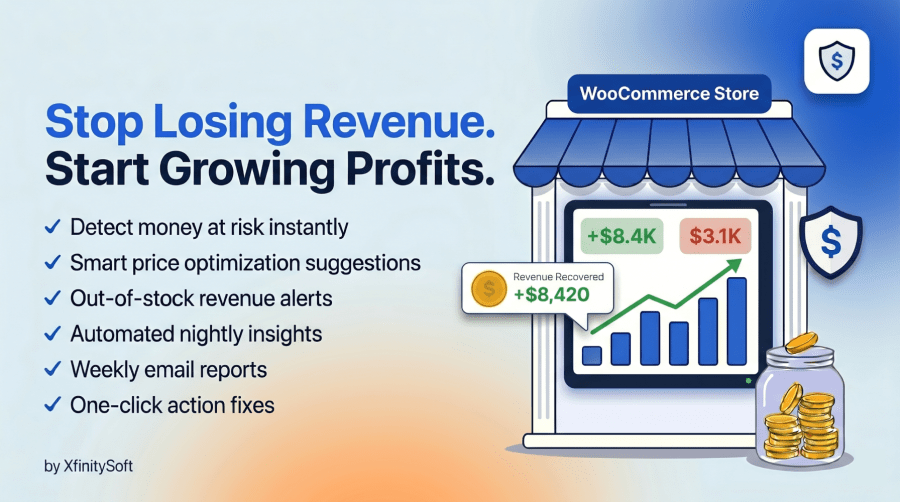
Stop Losing Revenue. Start Growing Profits. Automatically.
Revenue Guard for WooCommerce is your intelligent revenue optimization assistant that works 24/7 to protect your income and uncover hidden profit opportunities. Unlike traditional analytics plugins that just show you data, Revenue Guard for WooCommerce takes action to identify exactly where you’re losing money and what to do about it.
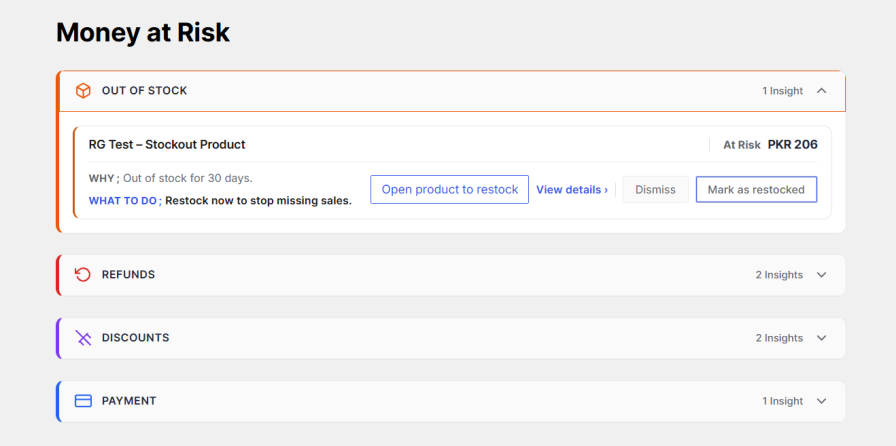
Revenue Guard features two intelligent modules:
Stop the revenue leaks draining your profits:
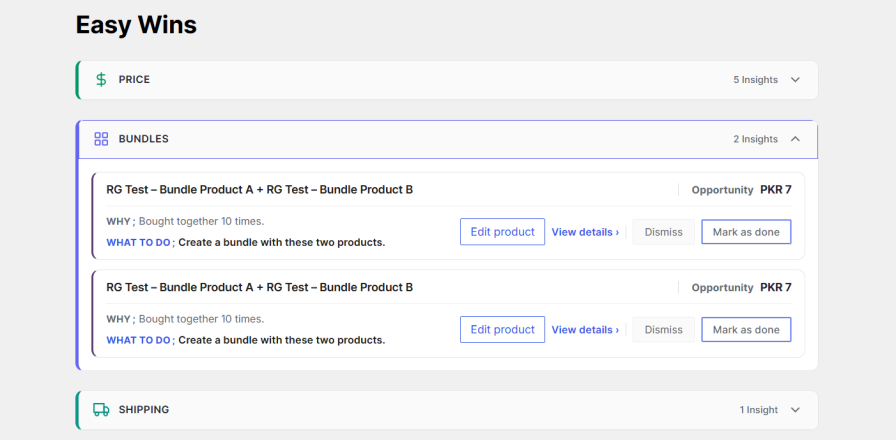
Discover low-effort, high-impact opportunities to grow revenue:
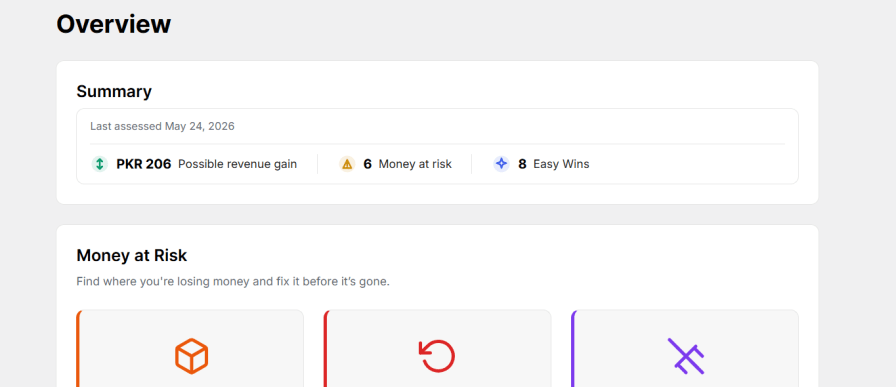
The Overview dashboard gives you a real-time store health check:
Each alert explains:
Why it matters
What to do next
You can click directly to restock products or edit pricing.
Get summarized insights delivered automatically.
This email report is useful for:
Stay informed without logging in daily.
Running a successful WooCommerce store means constantly balancing inventory, pricing, discounts, and customer satisfaction. But what if you had an automated system watching your back?
Revenue Guard analyzes your store data every night and delivers actionable insights that help you:
Every store is different. Revenue Guard for WooCommerce lets you fine-tune when alerts trigger:
Default settings work great for most stores, but advanced users can optimize for their specific business model.
The beautiful dashboard shows at a glance:
Color-coded cards make it impossible to miss critical issues. One-click actions let you fix problems without leaving the dashboard.
Physical product retailers
While other plugins just show you charts and graphs, Revenue Guard for WooCommerce tells you what to do. No data science degree required. No hours spent analyzing spreadsheets. Just clear, actionable insights that protect and grow your revenue.
Join successful store owners who never miss an opportunity or lose revenue to preventable problems.
No credit card required. No complex setup. Just better revenue decisions.
XfinitySoft actively maintains Revenue Guard for WooCommerce with regular updates, security patches, and feature improvements.
Feel free to contact us 24/7 Contact support. Our support team is ready to help you maximize your store’s revenue potential.
Ready to stop leaving money on the table? Install Revenue Guard for WooCommerce today and start making data-driven decisions that boost your bottom line.
Revenue Guard for WooCommerce analyzes your WooCommerce order data, product performance, refund rates, stock levels, and payment gateway performance. It compares metrics against your store averages and industry thresholds to identify products or processes that are costing you revenue. Each insight includes the specific amount at risk and clear action steps.
No. Revenue Guard for WooCommerce runs automated analysis nightly at 2:00 AM (your store time) during off-peak hours. The dashboard loads instantly because all calculations are pre-computed. Your customers won't notice any performance impact.
Revenue Guard for WooCommerce only suggests price increases for products with strong sales velocity, low refund rates (below 3% by default), and minimal coupon dependency. These are products with proven demand that can likely support a 3-5% price increase without losing customers. However, you should always test price changes gradually.
Yes! The Settings page lets you adjust all thresholds. For example, you can set minimum days out of stock before alerting, minimum refund rates to flag, or minimum orders before suggesting price increases. Default settings work for most stores, but you can fine-tune them for your specific business.
Yes, Revenue Guard for WooCommerce analyzes simple products, variable products, virtual products, and downloadable products. It works with any product type that generates WooCommerce orders.
You can choose to keep or remove all Revenue Guard for WooCommerce data on uninstall. Go to Settings > Data and check "Remove data on uninstall" if you want a clean removal. Your WooCommerce data remains untouched either way.
Insights are computed nightly at 2:00 AM store time. You can also manually trigger an analysis anytime by clicking "Run insights now" at the top of the dashboard.
Yes! Enable weekly email reports in Settings > Weekly email. Reports are sent every Monday at 9:00 AM with a summary of Money at Risk and Easy Wins. You can add multiple recipients (comma-separated email addresses).
Absolutely. All analysis happens on your server. Revenue Guard for WooCommerce doesn't send data to external servers or third parties. Your customer data, order information, and product details stay 100% private on your WooCommerce installation.
Results vary by store size and current optimization level. Typical stores find:
The Overview dashboard shows your specific potential revenue gain based on current data.
Yes, the Revenue Guard for WooCommerce displays all amounts in your WooCommerce store's base currency. If you use a multi-currency plugin, insights are calculated using the base currency for consistency.
Yes! Revenue Guard for WooCommerce is a backend analytics tool that works independently of your frontend theme or page builder. It integrates directly with WooCommerce data.
Revenue Guard for WooCommerce includes contextual help icons throughout the settings to explain each option. For additional support, visit our support forum or contact XfinitySoft directly through the plugin page.
Categorías
Comprobaciones de calidad
Países







