

La suscripción incluye
Ayuda y soporte
Simple, powerful customer impersonation for WooCommerce admins.
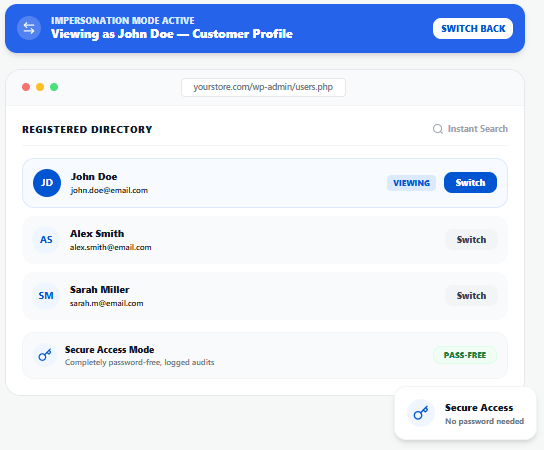
Switch to any customer account directly from the WordPress admin bar — no need to log out, find credentials, or open a new browser.
Quickly find any registered customer by searching their name or email address in the admin bar dropdown.
The dropdown shows recently viewed customers for quick access — no need to search every time for repeat troubleshooting.
Browse your entire storefront, product pages, cart, checkout, and account area exactly as the customer sees it.
View the customer’s My Account page including orders, downloads, saved addresses, payment methods, and subscription details.
Place orders, apply coupons, update addresses, add items to cart, and complete purchases on behalf of any customer.
Switch to any customer account without knowing or resetting their password — completely seamless and secure.
Customers are not notified when an admin views their account. No emails, no alerts — zero disruption.
Log out from the customer’s My Account page to instantly return to your admin session. No re-login needed.
Multiple store admins or support agents can use View as Customer simultaneously without conflicts.
Works with Dokan, WCFM, and other multi-vendor marketplace plugins — admins can assist vendors and their customers.
No settings page, no setup steps. Install and the Switch User menu appears in the admin bar automatically.
Whoever needs to see the store through a customer’s eyes — View as Customer makes it instant.
Reproduce and fix customer-reported issues in seconds — no screenshots, no password resets.
Place orders, apply discounts, and complete checkout on behalf of high-touch customers.
Test account-specific pricing, role-based content, and personalization across different customer accounts.
Assist vendors and their customers with full account context on Dokan, WCFM, and more.
Modify carts, update addresses, and complete purchases for customers who need help ordering.
Verify what members see — gated content, course access, and membership-specific views.
Faster troubleshooting, white-glove support, and zero password headaches.
See exactly what the customer sees — no more guessing or asking customers to send screenshots. Diagnose and fix issues in seconds.
Place orders, apply discounts, and complete purchases on behalf of customers who need help — deliver a premium, hands-on support experience.
Some issues only appear for specific accounts (pricing rules, role-based visibility, geo-restrictions). View as Customer lets you reproduce and fix them instantly.
Stop asking customers to share passwords or reset credentials. Switch to their account securely and silently — no disruption to the customer.
Walk through account setup, first order, or subscription management from the customer’s perspective to create better documentation and onboarding flows.
Verify that dynamic pricing, role-based content, membership access, and personalized product visibility work correctly for different customer accounts.
Multiple admins can use View as Customer at the same time — scale your support capacity without additional tools or licenses per agent.
No settings to configure, no performance impact. Install and it works. The simplest plugin in your stack.
Regular updates ensure compatibility with the latest WooCommerce versions. Dedicated support available whenever you need help.
View as Customer allows WooCommerce store admins to log in as any customer, providing the ability to see the store exactly as the customer experiences it. This helps with troubleshooting, order placement, and customer support.
To log in as a customer:
When logged in as a customer, you can:
Yes! To return to your admin account, simply log out from the My Account page. You will be automatically switched back to your admin session.
No, customers do not receive any notification when an admin logs in as them.
Yes, the plugin allows admins to log in as a customer without needing their password.
By default, the plugin works for WooCommerce customers. However, if your store has additional user roles (e.g., wholesale customers), you may be able to view as them as well.
Yes, multiple store admins can use the View as Customer functionality simultaneously.
Yes, the plugin works with Dokan, WCFM, and other multi-vendor plugins, allowing admins to assist vendors if needed.
No, the plugin is lightweight and does not slow down your WooCommerce store.
Categorías
Información de la extensión
Países







