

Instalaciones activas
2K+
Product comparison
La suscripción incluye
Ayuda y soporte
WooCommerce Box Office te permite crear y vender entradas directamente a los clientes sin pasar por un servicio o una página de terceros. Pon en marcha la venta de entradas para tu próximo evento o conferencia en cuestión de minutos y empieza a obtener ingresos adicionales.
Utilizamos Box Office para gestionar todas las ventas de entradas, cupones, tickets de streaming en vivo y registros para la WooConf, nuestra conferencia de usuarios presencial.
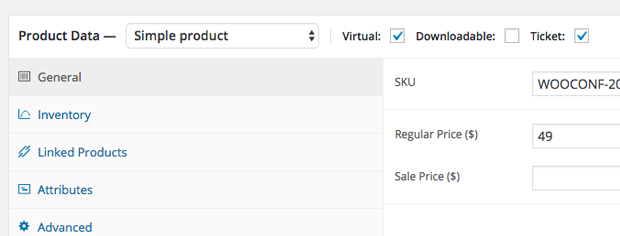
Con Box Office puedes crear un producto de tipo «evento» y venderlo directamente en tu tienda para que los clientes no tengan que abandonar tu sitio.
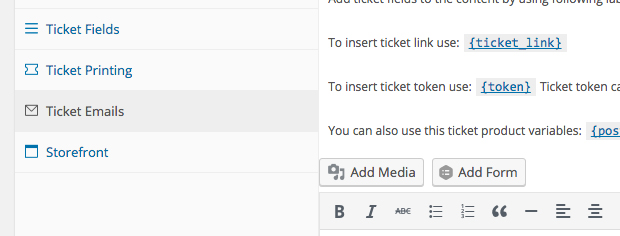
Añade campos personalizados con formularios de registro para conocer mejor a las personas que van a asistir y personalizar su experiencia. Personaliza los correos electrónicos que envías a las personas que compran una entrada y envía mensajes en masa a todos los asistentes.
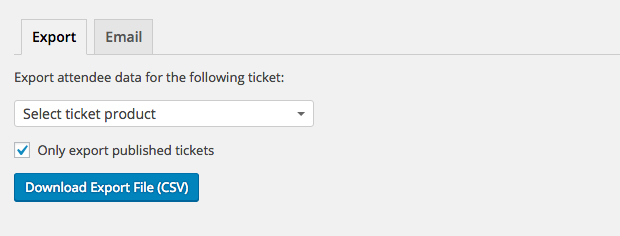
Descarga un fichero en formato CSV con todas las personas que compraron una entrada y por tipo de entrada.
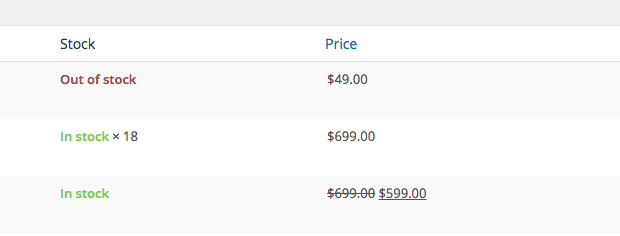
Define límites para la venta de entradas y asegúrate de no vender entradas de más para un evento o para una categoría de entradas.
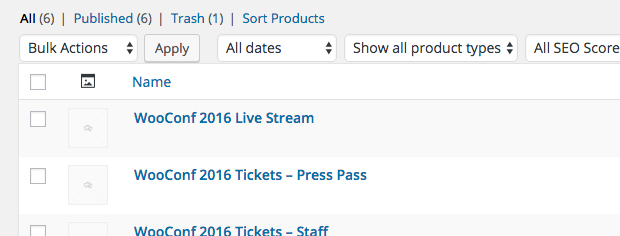
Crea tantos tipos de entrada como quieras, con descuentos, precios diferentes o contenido privado, y gestiona por separado los niveles de stock de cada categoría.
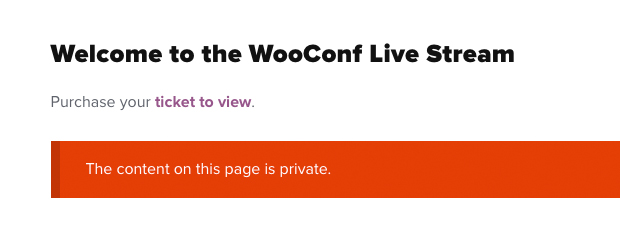
¿Quieres ofrecer un webinar privado, un streaming en vivo o dar a tus asistentes acceso a contenido de descarga después del evento? Todo esto es lo que permiten Box Office y Groups.

Busca asistentes por nombre, ID de entrada, correo electrónico o compañía, por ejemplo.
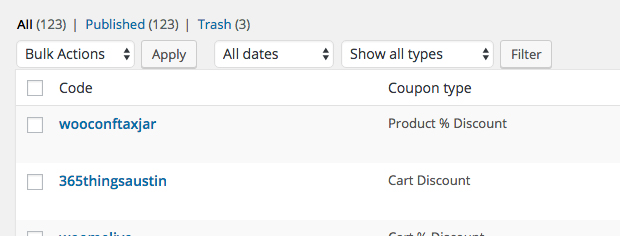
Ofrece códigos de descuento a colaboradores o patrocinadores del evento para que te ayuden con las ventas y gestiona fácilmente el uso de los cupones desde el escritorio de administración de WooCommerce.
 |
Documentación¿Necesitas ayuda? Echa un vistazo a la completa documentación para descubrir todo lo que necesitas sobre WooCommerce Box Office. Ver documentación |
 |
Preguntas y soporteSi tienes alguna pregunta de preventa o si necesitas ayuda, ponte en contacto con nuestros amables Happiness Engineers. Obtener ayuda
|
WooCommerce Box Office is a ticketing extension that turns WooCommerce products into tickets, so you can sell tickets for events, concerts, functions, fundraisers, and conferences directly on your own site. Standard WooCommerce lets you set up a virtual product to act as a ticket, but it does not give you tools to manage those tickets. Box Office fills that gap by adding ticket creation, attendee information, ticket emails, and reporting inside your familiar WooCommerce dashboard.
Yes. Box Office is designed to keep the entire ticket purchase on your store, so buyers do not need to visit a separate ticketing site or service. Customers register, pay, and receive their tickets through your standard WooCommerce checkout, which keeps you in control of the buying experience and your customer relationships. This on-site approach is the same one WooCommerce used to run ticketing, coupons, and onsite check-in for its own WooConf event. You can read more in the WooConf ticketing case study.
Yes. Box Office lets you add custom fields to your ticket signup forms so you can gather details about each ticket-holder, not only the person who made the purchase. You can mark fields as required or optional, use dropdowns, radio buttons, or checkboxes, and auto-fill certain fields from billing information to streamline checkout. Ticket-holders can also manage their own information, which is helpful when one person buys multiple tickets for a group.
Yes. You can create multiple ticket types, each with its own pricing, benefits, and private content, and manage stock levels for each type independently. This supports common event setups such as general admission, VIP passes, early-bird pricing, and live-stream tickets. Setting individual ticket limits also helps you avoid overselling a specific event or ticket type.
Yes. Box Office includes ticket inventory management, so you can set individual limits for each ticket you create and help prevent selling more tickets than you have capacity for. Because ticket stock is managed per ticket type, you can control availability for general admission and premium tickets separately for the same event.
Yes. Box Office lets you customize the emails sent after a ticket purchase and send bulk emails to ticket-holders for a selected ticket product. This gives you a straightforward way to share event updates, reminders, and follow-up information with everyone holding a particular ticket type, all from your WooCommerce admin.
Yes. Box Office can export ticket-holder information to a CSV file, filtered by ticket type. The export includes the ticket fields you defined along with details such as ticket ID, ticket status, and purchase date, which is useful for check-in lists, record-keeping, reporting, or importing attendee data into another system such as a newsletter tool.
You can, with an additional extension. Box Office supports scannable barcodes through WooCommerce Order Barcodes, which is a separate purchase. Once it is installed and active, you can generate a unique, scannable barcode for each ticket and use a scan form to look up ticket-holders and mark them as attended. Without WooCommerce Order Barcodes, tickets will not include a barcode.
Yes. Box Office lets you send custom printable tickets and gives you control over the ticket design by adding, removing, and reordering ticket fields and labels. You can choose whether tickets are printable by the ticket-holder, which is helpful for events where attendees want a physical copy to bring with them.
Yes. Box Office can restrict access to private content so it is only available to ticket-holders, which is useful for a private webinar, a live-stream of your event, or downloadable materials after the event. For membership-style access control across your site, this works together with Groups.
Yes. Box Office works with WooCommerce coupons, so you can offer discount codes to event partners and sponsors to help drive ticket sales. You can track and manage coupon usage from your WooCommerce admin dashboard, which gives you visibility into how each code is performing.
Box Office is a good fit for merchants and organizers who want to sell stand-alone tickets for a one-off or occasional event, such as a concert, conference, function, fundraiser, or workshop, directly on a WooCommerce store. It suits store owners who want to keep ticket sales, attendee data, and check-in on their own site rather than relying on an external ticketing service. It also works well for service businesses that occasionally sell tickets alongside their other products.
Box Office is built for selling tickets to events, not for time-based reservations. If you need customers to book appointments, reserve rooms, rent equipment, or choose specific time slots, WooCommerce Bookings is designed for that and turns products into bookable time. Box Office also is not built to manage recurring events on a schedule, so a bookings-focused tool is a better fit when time and availability are central to what you sell.
Box Office and Bookings solve different problems. Box Office transforms products into tickets and helps you sell and manage tickets for events, making it a good choice for one-off or occasional events and stand-alone ticket sales. WooCommerce Bookings transforms products into bookable time, so customers can book appointments, reserve items, or schedule time-based services. Both are developed and supported by WooCommerce, so the right choice depends on whether you are selling event tickets or bookable time.
Box Office runs on any store with WooCommerce installed, and WooCommerce is free. For core ticketing, including ticket creation, attendee fields, ticket emails, CSV export, and reporting, Box Office works on its own. Some capabilities rely on additional extensions: scannable barcodes for check-in require WooCommerce Order Barcodes, and membership-style content restriction pairs with Groups.
Yes. Box Office includes a Create Ticket option that lets you generate a ticket for a customer from your dashboard. You can connect the ticket to an order for payment, assign it to an existing order, or create it without an order at all. This is useful for comps, onsite registrations, or handling special cases outside the standard checkout.
Yes. Box Office adds a Tickets tab to the WooCommerce Reports screen, giving you a top-level view of the total number of tickets sold to date per event or product. You can also search for attendees by name, ticket ID, email, or company, which helps you find and manage individual ticket-holders quickly.
Box Office includes privacy controls for personally identifiable information. Ticket lists shown publicly through the tickets shortcode only include ticket-holders who have consented to share their information, and admins can update these privacy settings in bulk for all ticket-holders. Ticket details tied to a specific user are visible only to that purchaser and to store managers or administrators.
With Box Office, you add the event date and time as part of the product description rather than as a dedicated date field. If a built-in date and time field is important for your workflow, keep this in mind when planning your event pages. If date and time selection is central to what you sell, WooCommerce Bookings may be a better fit.
Categorías
Información de la extensión
Comprobaciones de calidad
Compatibilidad
Países
Requisitos