

Comparaison de produits
L’abonnement comprend
Assistance
Some customers are ready to buy the moment they hit your cart. Others need a conversation first — a custom price, a bulk discount, a question answered. Right now, those customers have no option but to abandon their cart and email you separately. Cart to Quote and Social Share for WooCommerce gives them a better option: request a quote directly from their cart, get a professional PDF in their inbox, and share their wishlist across nine social platforms — all without leaving your store.
A B2B buyer fills their cart with $2,000 of products. They need a formal quote before their finance team will approve the purchase. There is no quote button. They abandon the cart, send you an email, wait for a reply, and maybe come back — or maybe don’t.
A retail customer builds a cart they love and wants to share it with a friend before buying. There is no share option. They screenshot it, paste a list into a message, and half the context is lost.
A procurement manager wants a PDF they can attach to an internal approval request. There is no download. They give up.
Each of these is a sale you almost had. Cart to Quote and Social Share for WooCommerce closes all three gaps at once.
Quote requests, PDF downloads, and social sharing — built directly into your WooCommerce cart page, working together to convert the customers your store is currently losing.
A « Request a Quote » option appears directly in the cart — no extra pages, no separate contact forms. Customers submit their cart contents as a quote request in one click, triggering an automatic notification to both you and them. The moment a customer wants to negotiate price or request a formal document, the path is right there waiting.

The moment a customer submits a quote request, an automatic email goes out — to the customer confirming their request, and to you with the full details. Every notification includes a professionally formatted PDF of the quote, ready to forward, file, or attach to an approval process. No manual PDF generation, no copy-pasting order details.
Every quote request lands in a dedicated management panel where you can review the cart contents, update pricing, add custom line items, and send the revised quote back to the customer — all from one place. No switching between email threads and WooCommerce screens. Quote management that actually keeps up with your response time.
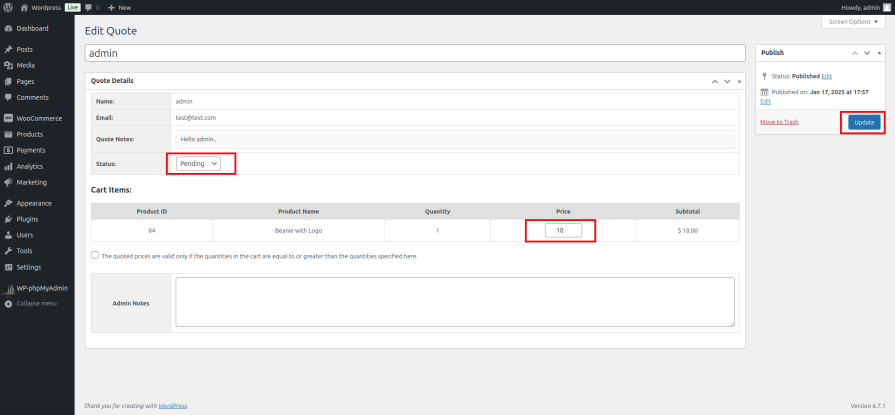
Customers can download their cart or approved quote as a PDF at any time. For B2B buyers, procurement teams, and anyone who needs to get internal approval before purchasing, this is the difference between a completed sale and an abandoned cart. Professional, clean, and instant — no account portal needed.
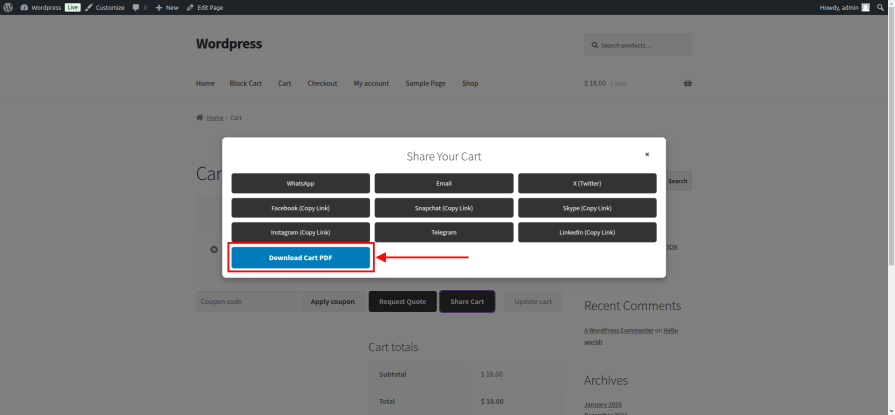
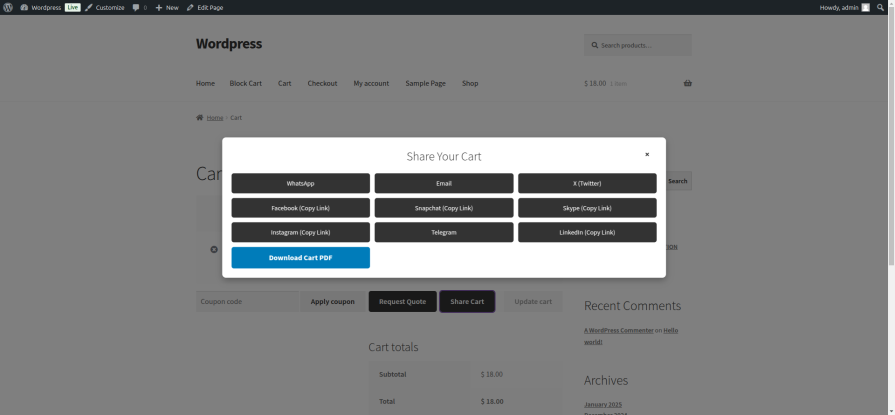
A share button in the cart lets customers send their product selection to WhatsApp, Facebook, X (Twitter), LinkedIn, Telegram, Pinterest, Email, and more — in one tap. When a customer shares their cart, your products travel with it. Every share is free exposure to an audience you did not have to advertise to.
Tailor the quote request and response emails to match your brand’s tone and include the information your customers need. Custom subject lines, body text, and branding — so every touchpoint in the quote process feels like it came from your store, not a plugin.
Everything works inside your existing WooCommerce cart and admin — no separate portals, no third-party platforms, no workflow disruption. Cart to Quote and Social Share for WooCommerce layers onto what you already have and immediately starts working.
Business buyers routinely need a formal quote before any purchase can be approved internally. Without a quote request option, they cannot buy from you even if they want to. Cart to Quote and Social Share for WooCommerce gives them the document they need and gives you the sale you were about to lose.
If you offer custom pricing based on quantity, customer type, or project scope, the quote request workflow is where that conversation starts. Customers submit their cart, you review and reprice, they get a formal quote back — clean, professional, and entirely inside WooCommerce.
Furniture, equipment, custom orders, bulk supplies — any product where the customer needs to consult with a partner, manager, or finance team before buying benefits from the PDF download and quote workflow. Give them the document they need to get the purchase approved.
When a customer loves what they have found, social sharing turns their enthusiasm into a referral. Nine platforms, one tap, zero cost to you — and your products reach people who trust the person sharing them.
Yes. The email notifications are fully customizable — subject line, body text, and branding — so every quote touchpoint matches your store’s voice.
No. Both registered users and guests can submit quote requests directly from the cart without creating an account.
Yes. The admin management panel lets you review the submitted cart, adjust any line item prices, add custom pricing, and send the revised quote back to the customer — all from one screen.
Cart sharing works across nine platforms, including WhatsApp, Facebook, X (Twitter), LinkedIn, Telegram, Pinterest, and Email — covering the platforms where your customers are most likely to be.
No. The plugin adds functionality to your existing cart page without affecting checkout flow or page load performance for customers who are not using the quote or share features.
You are covered by a full 30-day money-back guarantee. If it does not work for your business, request a refund — no questions asked.
Catégories
Informations sur l'extension
Vérifications qualité
Pays






