Installazioni attive
10K+
L'abbonamento include
Supporto
1 persona su 10 che abbandonano il carrello lo fa perché il processo di pagamento è troppo lungo*. Riduci l’abbandono del carrello gestendo l’intero processo di acquisto su una singola pagina con WooCommerce One Page Checkout.
* Dato basato su un’indagine condotta da Webcredible su 1.200 acquirenti online.
One Page Checkout permette di trasformare qualsiasi pagina in una pagina di pagamento. Rende anche più facile per i clienti acquistare da queste pagine personalizzate perché visualizzano sia la selezione dei prodotti che i moduli di pagamento su una singola schermata.
I clienti possono aggiungere o rimuovere i prodotti dal carrello e completare il pagamento senza lasciare la pagina e attendere il caricamento di una nuova.
I campi di pagamento possono anche essere visualizzati sulla pagina di un singolo prodotto oppure puoi aggiungere il campo alle pagine di destinazione personalizzate per promozioni uniche. È facile creare una singola pagina di pagamento e, una volta che lo fai, è ancora più facile per i clienti acquistare i prodotti su quella pagina.
 One Page Checkout mostra la selezione dei prodotti e i moduli di pagamento su una singola pagina. I clienti possono aggiungere i prodotti a un ordine (o rimuoverli) e completare il pagamento senza lasciare la pagina.
 Crea pagine di destinazione uniche per eventi speciali, promozioni o clienti selezionati. Aggiungi prima lo shortcode a qualsiasi pagina (o articolo), quindi il contenuto sopra lo shortcode in modo da visualizzare il testo della vendita esclusiva prima del processo di acquisto.
 One Page Checkout è integrato con più di una decina di estensioni in modo da consentirti di vendere abbonamenti, prenotazioni, pacchetti e molti altri tipi di prodotti unici.
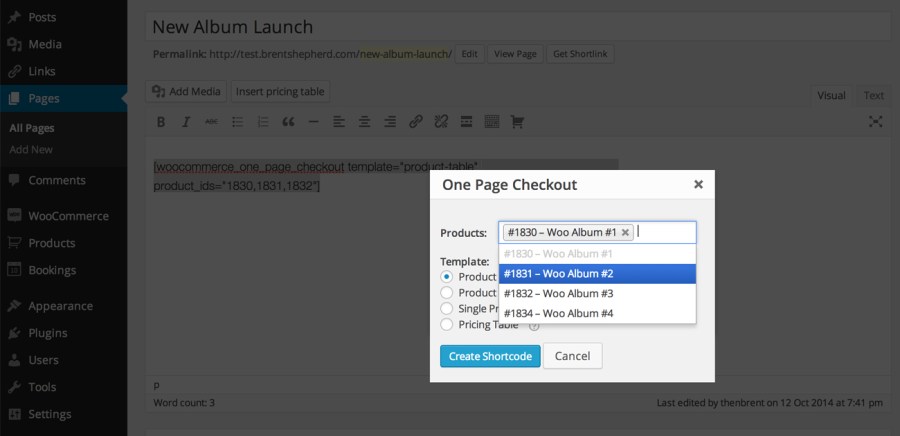
 Le pagine di pagamento possono essere create utilizzando l’interfaccia grafica aggiunta all’editor classico di WordPress. Ogni pagina di prodotto può anche diventare una pagina di pagamento facendo clic su una singola casella di controllo.
 Puoi scegliere i prodotti da visualizzare su ogni pagina di pagamento. Crea una pagina per un singolo prodotto in evidenza, alcuni prodotti correlati per una promozione o l’intero catalogo se il tuo negozio ha pochi prodotti.
 One Page Checkout include svariati template integrati, tra cui una semplice tabella dei prezzi e l’elenco dei prodotti. Scegli il template più adatto alla tua pagina o, se i template integrati non soddisfano le tue esigenze, creane personalizzato.
Non importa se stai vendendo servizi come il personal training o beni fisici come una scatola di caramelle in abbonamento mensile: se stai vendendo con WooCommerce, One Page Checkout può aiutarti a concludere più vendite.
Consentire ai clienti di acquistare su una singola pagina dà loro un’esperienza di pagamento più veloce, con meno interruzioni. Questo significa più vendite e clienti più felici per il tuo business.
WooCommerce One Page Checkout is a cart and checkout extension that displays product selection and checkout forms together on a single product, post, or page. Customers can add products to their order, remove them, and complete payment without leaving the page or waiting for a new page to load. It turns any page into a checkout page, so you can build focused buying experiences around the products you want to feature.
Yes, that is one of the main reasons stores use it. A long or multi step checkout is a common reason shoppers drop off before paying. By presenting product selection and the checkout form on one page, One Page Checkout shortens the purchase path and gives customers a faster, less interrupted way to buy, which can help recover sales that a longer flow might lose.
Yes. You can add the One Page Checkout shortcode to any page or post, then place your own sales copy, event details, or promotional content above it. This makes it well suited to campaign and landing pages where you want customers to read a pitch and then buy in the same place, without being sent off to a separate cart and checkout flow.
No. You can turn any product page into a checkout page by ticking a single checkbox in the product data panel. For pages and posts, there is a graphical interface in the classic WordPress editor that helps you pick products and a template and then generates the shortcode for you. If you prefer, you can also add the shortcode manually and set its attributes yourself.
Yes. You decide which products display on each One Page Checkout page. You can feature a single product, group a few related products together for a promotion, display products from selected categories, or show your whole catalog if your store carries only a few items. You also control the order in which products appear.
One Page Checkout includes several built-in templates so you can match the layout to the products you are selling. The Product table template suits a small set of products where images help the choice. The Product list template shows products with radio buttons when descriptions or photos are not needed. The Single product template mirrors your standard product page, including the description, images, and gallery. There is also a pricing table template. If none of these fit, you can create a custom template.
Yes. One Page Checkout integrates with more than a dozen WooCommerce extensions, so you can sell subscriptions, bookings, product bundles, and other product types on a single page checkout. If you want to sell recurring products this way, see WooCommerce Subscriptions. For appointment or reservation based products, see WooCommerce Bookings, and for grouped offers, see Product Bundles.
Yes. The Single product template is the option that displays the selection boxes shoppers use to choose a variation of a variable product, so they can pick their options and check out in one place. Other templates display each variation as a separate item rather than through variation dropdowns.
It is designed to work with any WooCommerce payment gateway extension that uses the standard WooCommerce payment section. That means your existing checkout payment options can carry over to your One Page Checkout pages without a separate setup.
No. Your store still needs the standard WooCommerce Cart and Checkout pages in place. The checkout page continues to handle order confirmation and the receipt after purchase. One Page Checkout adds a streamlined buying experience on the pages you choose, and you can point menu links or promotions to those pages, but it works alongside your existing checkout rather than removing it.
It is built to support that goal. Whether you sell services like personal training or physical goods like a monthly subscription box, letting customers buy on a single page gives them a faster experience with less interruption, which can lead to more completed purchases. It gives you tools to build focused, distraction light buying pages around the products you most want to move.
It is a strong fit for stores that want to sell a focused set of products quickly: single product sales, curated promotions, event or campaign landing pages, and stores with a small catalog. It works across product types, including subscriptions, bookings, and bundles, so service businesses and product sellers alike can use it to create a shorter path to purchase.
It is designed around curated, focused buying pages rather than large scale catalog browsing. If your main goal is to give shoppers a big catalog to browse, filter, and search across many categories before deciding, a full storefront flow will serve that better. One Page Checkout shines when you already know which products you want to feature and want customers to select and pay in one place.
Categorie
Informazioni sull'estensione
Controlli di qualità
Paesi